

Day 23 的 gateway 解決的是這個請求要去哪個模型,依據是 request body 裡的 model。選到模型之後,請求交給那個模型的 Service,由 Service 決定落在哪個 Pod 上。
今天要換掉的是後半段。同一個模型跑三個副本,這三個副本在任何一個時刻的狀態都不一樣,有的 KV cache 快滿了,有的佇列裡排著十個請求。Service 看不到這些,它分配請求的時候不看後端的狀態。
Gateway API Inference Extension 把挑哪一個副本這件事從 Service 手上拿走,交給一個看得到後端狀態的元件。今天看它怎麼接進叢集,以及挑選這件事最後是誰在做。
一般的 HTTP 負載平衡建立在一個假設上:後端是可以互換的。三個副本跑同一份程式、連同一個資料庫,請求給誰都一樣,所以輪流發就好。
推理請求不符合這個假設。
| 一般 HTTP 請求 | 推理請求 | |
|---|---|---|
| 持續時間 | 毫秒到數百毫秒 | 數秒到數十秒 |
| 佔用資源 | 輕 | 一張卡的大部分 |
| 狀態 | 無 | 引擎裡留著這個對話的 KV cache |
差別來自最後一列。一個模型伺服器同時服務多個對話,每個對話的 KV cache 都留在那張卡的記憶體裡。所以三個副本雖然跑同一個模型,手上的負擔卻完全不同:記憶體剩多少、佇列排多長、前綴快取裡有沒有這段對話的開頭。
這些差異決定了請求落在哪一個副本上會比較快。而一般的負載平衡看不到它們,只看得到請求的 path 和標頭。
HTTPRoute 的 spec.rules[].backendRefs 說明這條規則的後端是什麼。裡面有一個 kind 欄位,不寫的時候預設是 Service,因為一般 HTTP 流量只需要知道送到哪一組 Pod。
Day 23 我們用的不是 HTTPRoute 而是 AIGatewayRoute,它有一個同名的 backendRefs,但預設的 kind 是 AIServiceBackend,因為那天要在選路之前讀 request body 裡的 model,而只有 AIGatewayRoute 做得到。
今天回到標準的 HTTPRoute,kind 填 InferencePool。這個 kind 來自 Gateway API Inference Extension。
Gateway API Inference Extension 是 kubernetes-sigs 底下的 Kubernetes 官方專案。它針對的是在 Kubernetes 上自行託管的生成式 AI 和 LLM 推理工作負載,要在整個生態裡把這類流量的路由方式標準化,並且讓負載平衡依據後端的實際狀態來決定。
做法不是另外寫一個 gateway,而是接在現有的那個上面。
我們這個叢集裡實際處理流量的是 Envoy。Day 23 建 Gateway 的時候,Envoy Gateway 就開了一個跑 Envoy 的 Pod。而 Envoy 本來就有 external processing 這個機制:處理請求的中途,把請求送給一個外部服務,等它回答再繼續。Day 23 的 ai-gateway-extproc 就是這樣接上去的。
Gateway API Inference Extension 定義的是那個外部服務會被問什麼、要怎麼回答。所以一個 gateway 只要本來就支援 ext_proc 和 Gateway API,不用改寫就能挑副本。Day 23 的 Envoy Gateway 兩個都有,所以今天不換 gateway,接著用那一套。
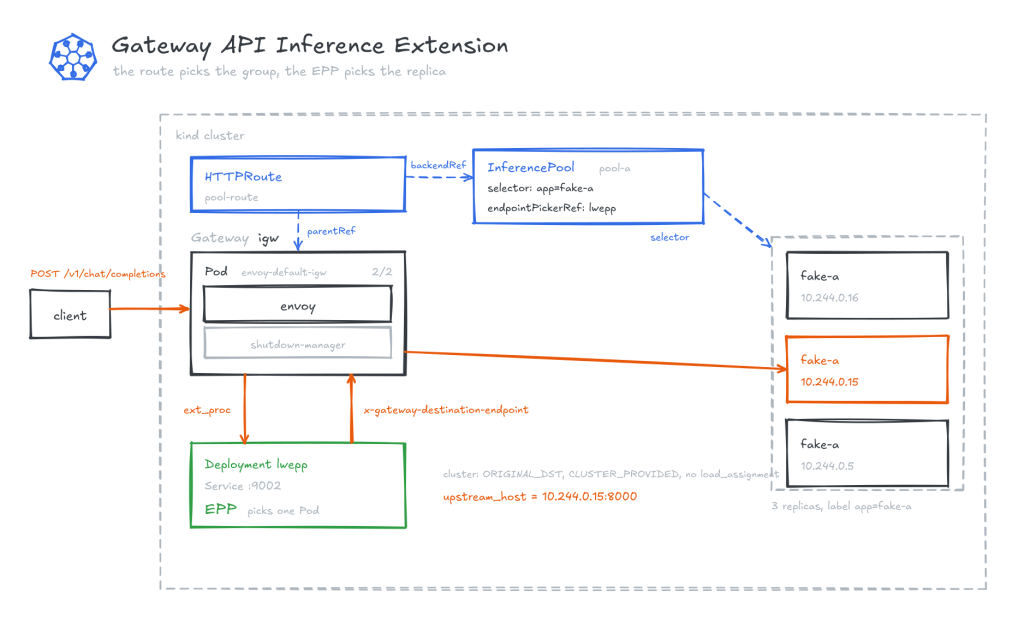
InferencePool 屬於 inference.networking.k8s.io/v1,spec 有三個欄位。
| 欄位 | 內容 |
|---|---|
selector |
哪些 Pod 屬於這一組,用 label 選 |
targetPorts |
要打這些 Pod 的哪個 port |
endpointPickerRef |
挑選的時候問誰 |
前兩個欄位做的事情看起來跟 Service 重疊,但 InferencePool 不是 Service 的另一種寫法,有了它就不需要旁邊再放一個 Service 物件。第三個欄位才是 InferencePool 真正加的東西:把挑選這個動作指派給一個具名的元件。
EPP 的全名是 Endpoint Picker,endpointPickerRef 指向的就是它的 Service。
EPP 的工作是回答一個問題:這個請求應該打到這一組裡的哪一個 Pod。
ai-gateway-extproc 和 EPP 都是 ext_proc 服務,都是 Envoy 暫停之後去問的那一方,差別在怎麼部署。Day 23 那個是 Envoy 自己 Pod 裡的 sidecar,跟 Envoy 同一個生命週期。EPP 是叢集裡另一個 Deployment,會單獨掛掉。
EPP 透過 Envoy 的 external processing 協定跟 gateway 說話。它的回答要同時寫在兩個地方:
| 管道 | 內容 |
|---|---|
x-gateway-destination-endpoint request header |
選中的那個 endpoint |
ext-proc 回應的 dynamic_metadata 欄位 |
同一個值 |
兩個地方的值必須一致。另外可以在同一個 metadata namespace 下用 x-gateway-destination-endpoint-fallback 指定一個備援 endpoint,供重試使用。
兩個管道都沒有成功帶回 endpoint 的時候,行為分兩種:沒有可用的 endpoint 回 503,而請求應該被丟掉的時候回 429。
叢集沿用 Day 23 那一套,kind 單節點,零 GPU。Gateway API Inference Extension 用 v1.6.2,Envoy Gateway 用 v1.9.1。後端沿用 Day 23 的 fake-a,它會回 OpenAI 格式。
要加的東西有三樣:Gateway API Inference Extension 的 CRD、讓 Envoy Gateway 認得 InferencePool 的一份 values、LWEPP。
kubectl apply -f https://github.com/kubernetes-sigs/gateway-api-inference-extension/releases/download/v1.6.2/manifests.yaml
customresourcedefinition.apiextensions.k8s.io/inferencepoolimports.inference.networking.x-k8s.io created
customresourcedefinition.apiextensions.k8s.io/inferencepools.inference.networking.k8s.io created
這份 manifests.yaml 只有 CRD,EPP 要自己部署。
# envoy-gateway-values-inferencepool.yaml
config:
  envoyGateway:
    extensionManager:
      backendResources:
        - group: inference.networking.k8s.io
          kind: InferencePool
          version: v1
這份是疊加在 Day 23 原本的 values 上面,所以 helm upgrade 要把三份一起給。
helm upgrade -i eg oci://docker.io/envoyproxy/gateway-helm --version v1.9.1 \
  -n envoy-gateway-system \
  -f envoy-gateway-values.yaml \
  -f envoy-gateway-values-ratelimit.yaml \
  -f envoy-gateway-values-inferencepool.yaml
NAME: eg STATUS: deployed REVISION: 2
extensionManager 是 Day 23 就設好的,那時候指向的是 Agent Router 的 controller。這次只是在它的 backendResources 底下多登記一個 GVK。
InferencePool 的 selector 用 Deployment 原本的 label,所以只要擴副本,不需要新的 Service。
kubectl scale deploy/fake-a --replicas=3 && kubectl rollout status deploy/fake-a --timeout=180s
deployment "fake-a" successfully rolled out
LWEPP 是 Gateway API Inference Extension 自己附的輕量 EPP。
# 02-lwepp.yaml
apiVersion: v1
kind: ServiceAccount
metadata: { name: lwepp, namespace: default }
---
apiVersion: rbac.authorization.k8s.io/v1
kind: ClusterRole
metadata: { name: lwepp }
rules:
  - apiGroups: [""]
    resources: ["pods"]
    verbs: ["get", "list", "watch"]
  - apiGroups: ["inference.networking.k8s.io"]
    resources: ["inferencepools"]
    verbs: ["get", "list", "watch"]
  - apiGroups: ["inference.networking.k8s.io"]
    resources: ["inferencepools/status"]
    verbs: ["get", "update", "patch"]
---
apiVersion: rbac.authorization.k8s.io/v1
kind: ClusterRoleBinding
metadata: { name: lwepp }
roleRef: { apiGroup: rbac.authorization.k8s.io, kind: ClusterRole, name: lwepp }
subjects:
  - { kind: ServiceAccount, name: lwepp, namespace: default }
---
apiVersion: apps/v1
kind: Deployment
metadata: { name: lwepp, namespace: default }
spec:
  replicas: 1
  selector: { matchLabels: { app: lwepp } }
  template:
    metadata: { labels: { app: lwepp } }
    spec:
      serviceAccountName: lwepp
      containers:
        - name: lwepp
          image: registry.k8s.io/gateway-api-inference-extension/lwepp:v1.6.2
          args:
            - --pool-name=pool-a
            - --pool-namespace=default
            - --endpoint-target-ports=8000
            - --health-checking
          ports:
            - { containerPort: 9002, name: grpc }
            - { containerPort: 9003, name: grpc-health }
            - { containerPort: 9090, name: metrics }
---
apiVersion: v1
kind: Service
metadata: { name: lwepp, namespace: default }
spec:
  selector: { app: lwepp }
  ports:
    - { name: grpc, port: 9002, targetPort: 9002, appProtocol: kubernetes.io/h2c }
--pool-name 要寫進 args,而 InferencePool 的 endpointPickerRef 也要指回 LWEPP。這個綁定兩邊都要宣告一次。
另外 LWEPP 的 --secure-serving 預設是 true,ext_proc 的 gRPC 伺服器預設就開 TLS。
kubectl apply -f 02-lwepp.yaml && kubectl rollout status deploy/lwepp --timeout=180s
serviceaccount/lwepp created
clusterrole.rbac.authorization.k8s.io/lwepp created
clusterrolebinding.rbac.authorization.k8s.io/lwepp created
deployment.apps/lwepp created
service/lwepp created
deployment "lwepp" successfully rolled out
啟動的時候它會說自己在看什麼、提供什麼服務。日誌裡有十幾行 controller-runtime 的樣板,只留關鍵的三行:
kubectl logs deploy/lwepp | grep -E 'Starting EventSource|ExternalProcessor' \
  | grep -oE '"controllerKind": "[A-Za-z]+"|"serviceName": "[^"]+"'
"controllerKind": "Pod"
"controllerKind": "InferencePool"
"serviceName": "envoy.service.ext_proc.v3.ExternalProcessor"
前兩行是它 watch 的東西:Pod 用來算出組裡有哪些端點,InferencePool 用來知道組的定義。第三行是它提供的 gRPC 服務名,跟 Day 23 的 ai-gateway-extproc 是同一個 Envoy 擴充點。
寫之前先看完整的欄位結構。
kubectl explain inferencepool.spec --recursive
GROUP:      inference.networking.k8s.io
KIND:       InferencePool
VERSION:    v1

FIELD: spec <Object>


DESCRIPTION:
    Spec defines the desired state of the InferencePool.

FIELDS:
  appProtocol <string>
  enum: http, kubernetes.io/h2c
  endpointPickerRef   <Object>
    failureMode       <string>
    enum: FailOpen, FailClose
    group     <string>
    kind      <string>
    name      <string> -required-
    port      <Object>
      number  <integer> -required-
  selector    <Object> -required-
    matchLabels       <map[string]string> -required-
  targetPorts <[]Object> -required-
    number    <integer> -required-
必填的只有四個:selector.matchLabels、targetPorts[].number、endpointPickerRef.name、endpointPickerRef.port.number。endpointPickerRef 有 group 和 kind,不填的話指的就是同一個 namespace 裡的 Service。
# 03-pool-route.yaml
apiVersion: inference.networking.k8s.io/v1
kind: InferencePool
metadata: { name: pool-a, namespace: default }
spec:
  selector:
    matchLabels: { app: fake-a }
  targetPorts: [{ number: 8000 }]
  endpointPickerRef:
    name: lwepp
    port: { number: 9002 }
    failureMode: FailOpen
---
apiVersion: gateway.networking.k8s.io/v1
kind: Gateway
metadata: { name: igw, namespace: default }
spec:
  gatewayClassName: aigw
  listeners: [{ name: http, protocol: HTTP, port: 80 }]
  infrastructure:
    parametersRef: { group: gateway.envoyproxy.io, kind: EnvoyProxy, name: aigw }
---
apiVersion: gateway.networking.k8s.io/v1
kind: HTTPRoute
metadata: { name: pool-route, namespace: default }
spec:
  parentRefs: [{ name: igw, kind: Gateway, group: gateway.networking.k8s.io }]
  rules:
    - matches: [{ path: { type: PathPrefix, value: / } }]
      backendRefs:
        - group: inference.networking.k8s.io
          kind: InferencePool
          name: pool-a
路由用的是標準的 HTTPRoute,沒有用到 AIGatewayRoute。failureMode 設 FailOpen,意思是 EPP 連不上的時候請求照樣往下送。
今天的路由掛在自己的 Gateway igw 上,跟 Day 23 的 aigw 分開,所以兩條路可以並排比較。
kubectl apply -f 03-pool-route.yaml
inferencepool.inference.networking.k8s.io/pool-a created
gateway.gateway.networking.k8s.io/igw created
httproute.gateway.networking.k8s.io/pool-route created
kubectl get crd | grep inference
inferencepoolimports.inference.networking.x-k8s.io    2026-10-08T10:16:15Z
inferencepools.inference.networking.k8s.io            2026-10-08T10:16:15Z
今天用的是 inferencepools。另一個 inferencepoolimports 代表的是從別的叢集匯入的 InferencePool,由 controller 產生,不是自己寫的。
kubectl get inferencepool
NAME     AGE
pool-a   47s
kubectl get pods -o wide
fake-a-f7c68f445-k24hx    1/1   Running   10.244.0.16
fake-a-f7c68f445-mx2gf    1/1   Running   10.244.0.15
fake-a-f7c68f445-ql5md    1/1   Running   10.244.0.5
fake-b-5857b7d5c5-9b7rw   1/1   Running   10.244.0.6
lwepp-747bdd58ff-hxj8n    1/1   Running   10.244.0.19
EPP 是自己一個 Pod。fake-b 是 Day 23 留下來的,今天沒有用到。
kubectl get pods -n envoy-gateway-system -l gateway.envoyproxy.io/owning-gateway-name
envoy-default-aigw-7b45c098-5d965d6f5d-qnh6t   3/3   Running
envoy-default-igw-1cad2424-5644dc66d9-v5xwp    2/2   Running
兩個 Gateway 並排在同一個叢集裡,容器數不一樣。
| 容器 | 擴充的東西住在哪 | |
|---|---|---|
aigw,Day 23 的 Agent Router |
3/3,envoy 加 shutdown-manager 加 ai-gateway-extproc |
塞在 Envoy 自己的 Pod 裡 |
igw,今天這條 |
2/2,envoy 加 shutdown-manager | 叢集裡另一個 Deployment |
同一個 ext_proc 擴充點,兩種部署方式。獨立的那個可以自己擴縮,也可以被多個 Gateway 共用。
kubectl get httproute pool-route -o yaml
spec:
  rules:
  - backendRefs:
    - group: inference.networking.k8s.io
      kind: InferencePool
      name: pool-a
      weight: 1
status:
  parents:
  - parentRef: { name: igw }
    conditions:
    - type: Accepted      status: "True"   reason: Accepted
    - type: ResolvedRefs  status: "True"   reason: ResolvedRefs
ResolvedRefs 是 True,kind 是 InferencePool,group 是 inference.networking.k8s.io。
kubectl get pods -l app=fake-a -o custom-columns='NAME:.metadata.name,IP:.status.podIP'
fake-a-f7c68f445-k24hx   10.244.0.16
fake-a-f7c68f445-mx2gf   10.244.0.15
fake-a-f7c68f445-ql5md   10.244.0.5
SVC=$(kubectl -n envoy-gateway-system get svc -o name | grep envoy-default-igw)
kubectl -n envoy-gateway-system port-forward "$SVC" 8081:80 >/tmp/pf-igw.log 2>&1 &
echo $! > /tmp/pf-igw.pid
sleep 8
六發完全相同的請求。
for i in $(seq 1 6); do
  curl -s -X POST localhost:8081/v1/chat/completions \
    -H 'Content-Type: application/json' \
    -d '{"model":"model-a","messages":[{"role":"user","content":"hi"}]}'
  echo
  sleep 1
done
{"id":"chatcmpl-fake-fake-a","object":"chat.completion","model":"model-a",
 "choices":[{"index":0,"finish_reason":"stop",
   "message":{"role":"assistant","content":"served_by=fake-a ..."}}]}
六發都是正常回應。不過把標頭也印出來的話,上面有一個寫著 fail 的欄位。
curl -si -X POST localhost:8081/v1/chat/completions \
  -H 'Content-Type: application/json' \
  -d '{"model":"model-a","messages":[{"role":"user","content":"hi"}]}' | head -4
HTTP/1.1 200 OK
x-conformance-test-served-endpoint: fail: missing envoy lb metadata
x-went-into-resp-headers: true
server: BaseHTTP/0.6 Python/3.12.15
這個標頭是 LWEPP 加的。它想在回應階段確認剛才那一發實際上是哪一台服務的,依據是 Envoy 在回應裡帶回來的 lb metadata,而那份 metadata 是空的,所以它回報 fail。
這跟路由無關,六發都是 200。LWEPP 拿不到的是回報用的資料,不是請求送錯了地方。
落點要從 access log 看。
P=$(kubectl -n envoy-gateway-system get pods \
     -l gateway.envoyproxy.io/owning-gateway-name=igw -o jsonpath='{.items[0].metadata.name}')

kubectl -n envoy-gateway-system logs "$P" -c envoy | python3 -c "
import json,sys
rows=[json.loads(l) for l in sys.stdin if l.strip().startswith('{')]
ok=[d for d in rows if d.get('response_code')==200][-6:]
print('%-5s %-22s %-40s %s' % ('code','upstream_host','upstream_cluster','details'))
for d in ok:
    print('%-5s %-22s %-40s %s' % (d.get('response_code'), d.get('upstream_host'),
          d.get('upstream_cluster'), d.get('response_code_details')))
from collections import Counter
print()
print('落點分佈:')
for k,v in sorted(Counter(d.get('upstream_host') for d in ok).items()):
    print('  %-22s %d 次' % (k,v))
"
code  upstream_host          upstream_cluster                       details
200   10.244.0.16:8000       httproute/default/pool-route/rule/0    via_upstream
200   10.244.0.15:8000       httproute/default/pool-route/rule/0    via_upstream
200   10.244.0.5:8000        httproute/default/pool-route/rule/0    via_upstream
200   10.244.0.16:8000       httproute/default/pool-route/rule/0    via_upstream
200   10.244.0.15:8000       httproute/default/pool-route/rule/0    via_upstream
200   10.244.0.5:8000        httproute/default/pool-route/rule/0    via_upstream

落點分佈:
  10.244.0.15:8000       2 次
  10.244.0.16:8000       2 次
  10.244.0.5:8000        2 次
kill $(cat /tmp/pf-igw.pid)
順序是 .16、.15、.5、.16、.15、.5。兩輪一模一樣,所以不是隨機。
但光看落點還不能說是誰在輪。Envoy cluster 的預設負載平衡政策就是輪詢,所以「EPP 在輪」和「Envoy 拿著三個端點自己在輪」會產生一樣的觀察。要分開這兩種解釋,得看 Envoy 實際的 cluster 設定。
kubectl -n envoy-gateway-system port-forward "$P" 19000:19000 >/tmp/pf-admin.log 2>&1 &
echo $! > /tmp/pf-admin.pid
sleep 5
curl -s 'localhost:19000/config_dump?resource=dynamic_active_clusters' | python3 -c "
import json,sys
for c in json.load(sys.stdin)['configs']:
    cl=c['cluster']
    if 'pool-route' not in cl['name']: continue
    print(cl['name'])
    for k in ('type','lb_policy','original_dst_lb_config'):
        if k in cl: print('  %-22s %s' % (k, json.dumps(cl[k])))
"
httproute/default/pool-route/rule/0
  type                   "ORIGINAL_DST"
  lb_policy              "CLUSTER_PROVIDED"
  original_dst_lb_config {"use_http_header": true, "http_header_name": "x-gateway-destination-endpoint"}
ORIGINAL_DST 加 CLUSTER_PROVIDED 的意思是這個 cluster 沒有端點清單。目的地從 original_dst_lb_config 指定的那個標頭讀,而那就是前面提過的 x-gateway-destination-endpoint,由 EPP 寫上去的那一個。這個 cluster 的設定裡也沒有 load_assignment。
所以 Envoy 不可能在輪,它手上沒有端點清單。剛才那個順序是 LWEPP 決定的。
輪詢是 LWEPP 的策略,不是這個環境的巧合。它的定位是給 conformance 測試用的參考實作,不是給生產環境用的,生產環境要自己實作一個 EPP 或者用現成的。會去抓每個成員 Pod 的指標,依記憶體使用率、佇列長度、載入了哪些 LoRA adapter 來評分的那個完整 EPP,在 llm-d/llm-d-router。
aigw 還在同一個叢集裡,所以同一份設定可以對照著看。
kill $(cat /tmp/pf-admin.pid)
A=$(kubectl -n envoy-gateway-system get pods \
     -l gateway.envoyproxy.io/owning-gateway-name=aigw -o jsonpath='{.items[0].metadata.name}')
kubectl -n envoy-gateway-system port-forward "$A" 19000:19000 >/tmp/pf-admin2.log 2>&1 &
echo $! > /tmp/pf-admin2.pid
sleep 5
curl -s 'localhost:19000/config_dump?resource=dynamic_active_clusters' | python3 -c "
import json,sys
for c in json.load(sys.stdin)['configs']:
    cl=c['cluster']
    if 'demo' not in cl['name']: continue
    print(cl['name'])
    for ep in cl.get('load_assignment',{}).get('endpoints',[]):
        for lb in ep.get('lb_endpoints',[]):
            sa=lb['endpoint']['address']['socket_address']
            print('  address:    %s' % sa['address'])
            print('  port_value: %s' % sa['port_value'])
"
httproute/default/demo/rule/0
  address:    fake-a.default.svc.cluster.local
  port_value: 8000
httproute/default/demo/rule/1
  address:    fake-b.default.svc.cluster.local
  port_value: 8000
httproute/default/demo/rule/2
  address:    fake-a.default.svc.cluster.local
  port_value: 8000
kill $(cat /tmp/pf-admin2.pid)
每一條 rule 的清單裡都只有一筆,而且那一筆是個主機名。
所以 Day 23 那條路上,挑哪一個這個問題不存在。清單裡只有一個選項,而那個選項是 fake-a 這個 Service 的 FQDN,名稱後面有幾個 Pod,Envoy 不知道也不管。這就是為什麼那條路的 upstream_host 是 10.96.97.74:8000,Service 的 ClusterIP,而今天這條是 Pod IP。
| 有沒有端點清單 | 目的地從哪裡來 | |
|---|---|---|
aigw |
有,一筆,而且是個主機名 | 清單裡那一筆 |
igw |
沒有 load_assignment |
x-gateway-destination-endpoint 這個標頭 |
三層分工到這裡就齊了。
| 決定什麼 | |
|---|---|
HTTPRoute |
請求進到哪一組 |
InferencePool |
這一組是哪些 Pod |
| LWEPP | 這一發給組裡的哪一個 |
kubectl delete -f 03-pool-route.yaml
inferencepool.inference.networking.k8s.io "pool-a" deleted
gateway.gateway.networking.k8s.io "igw" deleted
httproute.gateway.networking.k8s.io "pool-route" deleted
kubectl delete -f 02-lwepp.yaml && kubectl scale deploy/fake-a --replicas=1
serviceaccount "lwepp" deleted
clusterrole.rbac.authorization.k8s.io "lwepp" deleted
clusterrolebinding.rbac.authorization.k8s.io "lwepp" deleted
deployment.apps "lwepp" deleted
service "lwepp" deleted
deployment.apps/fake-a scaled
Gateway API Inference Extension 沒有做一個新的 gateway,也沒有改路由規則。它加的是 backendRefs 可以填的一種 kind,加上一份協定,規定 EPP 會被問什麼、要怎麼回答。所以接得上它的條件只有兩個,支援 ext_proc 和 Gateway API。
差別落在 Envoy 的 cluster 設定上。走 Service 的時候 Envoy 拿到一個主機名,之後打到哪個 Pod 不是它的事;走 InferencePool 的時候它手上什麼都沒有,每一發都得問一次要打哪個 Pod。前者沒有挑選可談,後者才有。
至於挑得好不好,Gateway API Inference Extension 不管。完整的 EPP 在 llm-d,它自己留的是一個輪詢的參考實作,文件說那是給 conformance 用的。所以今天看到的是分工,不是品質。
Kubernetes Gateway API Inference Extension
kubernetes-sigs/gateway-api-inference-extension
Getting started for implementers
InferencePool
InferencePoolImport
Gateways
Envoy Gateway Extension Server
Release v1.6.2
Introducing Gateway API Inference Extension


 iThome鐵人賽
 看影片追技術