
靈魂抽取器
useWeather
自訂 Hook 是以 use 加大寫字母開頭的函式,內部可以呼叫其他 Hook。
| 片段 | 工作 |
|---|---|
WeatherPanel 元件 |
顯示按鈕、等待、成功與失敗畫面 |
useWeather 自訂 Hook |
管理查詢狀態、重查與清理 |
buildWeatherUrl 一般函式 |
依城市與單位建立網址 |
今天會建立 useWeather 使用 useState 保存查詢資料,並使用 useEffect 開始與清理請求,接著來看看。
首先把查詢相關的流程 weather、reloadVersion、Effect、cleanup,以及結果身分比對,一起搬進 use-weather.ts。
// 示意片段
export function useWeather(cityId: CityId, temperatureUnit: TemperatureUnit) {
  const [weather, setWeather] = useState<WeatherState>({
    status: "loading",
    requestKey: "",
  });
  const [reloadVersion, setReloadVersion] = useState(0);

  function reload() {
    setReloadVersion((version) => version + 1);
  }

  useEffect(() => {
    const controller = new AbortController();
    const requestKey = `${cityId}:${temperatureUnit}:${reloadVersion}`;
    setWeather({ status: "loading", requestKey });

    async function loadWeather() {
      // 原本的 fetch、成功與錯誤處理放在這裡。
    }

    void loadWeather();

    return () => controller.abort();
  }, [cityId, temperatureUnit, reloadVersion]);

  const currentKey = `${cityId}:${temperatureUnit}:${reloadVersion}`;
  const visibleWeather: WeatherState = weather.requestKey === currentKey
    ? weather
    : { status: "loading", requestKey: currentKey };

  return { weather: visibleWeather, reload };
}
呼叫端可以寫成以下片段:
const { weather, reload } = useWeather(cityId, temperatureUnit);

// 加入重新查詢按鈕
<button
  type="button"
  onClick={reload}
  disabled={weather.status === "loading"}
>
  重新查詢
</button>
城市與單位是輸入,weather 是目前可顯示的查詢狀態,reload 則讓按鈕要求重新查詢。
Hook 接收這次渲染的參數,Effect 依賴一樣是 [cityId, temperatureUnit, reloadVersion]。
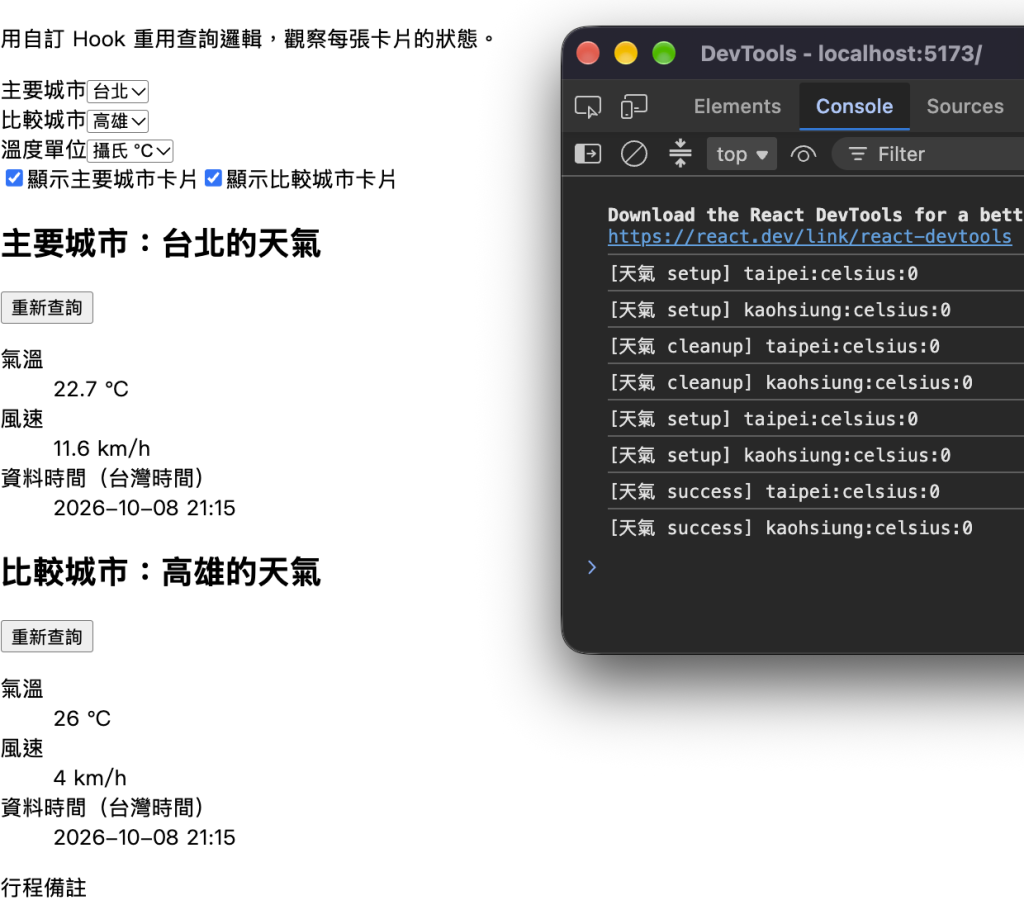
接著建立台北與比較高雄兩張卡片,各自在元件最上層呼叫 useWeather,我們來觀察看狀態。
將 WeatherPanel 的參數與型別改成:
function WeatherPanel({
  panelId,
  title,
  cityId,
  temperatureUnit,
}: {
  panelId: string;
  title: string;
  cityId: CityId;
  temperatureUnit: TemperatureUnit;
}) {
原本的 h2 改成:
<h2 id={headingId}>{title}:{city.name}的天氣</h2>
兩張卡片不能都使用固定的 id="weather-heading",這次由外層傳入固定且不同的 panelId:
const headingId = `${panelId}-heading`;
在 WeatherDashboard 的 state 區新增:
const [comparisonCityId, setComparisonCityId] = useState<CityId>("kaohsiung");
const [showComparison, setShowComparison] = useState(true);
原本城市選單的 label 改成「主要城市」,id="city" 和 htmlFor="city" 都改成 primary-city,在城市選單的 div 後新增:
<div>
  <label htmlFor="comparison-city">比較城市</label>
  <select
    id="comparison-city"
    value={comparisonCityId}
    onChange={(event) => setComparisonCityId(event.target.value as CityId)}
  >
    {CITIES.map((city) => (
      <option key={city.id} value={city.id}>{city.name}</option>
    ))}
  </select>
</div>
原本開關的文字改成「顯示主要城市卡片」,並在它後面新增:
<label>
  <input
    type="checkbox"
    checked={showComparison}
    onChange={(event) => setShowComparison(event.target.checked)}
  />
  顯示比較城市卡片
</label>
把原本 {showWeather ? (...) : ...} 的整個卡片區塊替換為:
{showWeather ? (
  <WeatherPanel
    panelId="primary"
    title="主要城市"
    cityId={cityId}
    temperatureUnit={temperatureUnit}
  />
) : <p>主要城市卡片已關閉。</p>}

{showComparison ? (
  <WeatherPanel
    panelId="comparison"
    title="比較城市"
    cityId={comparisonCityId}
    temperatureUnit={temperatureUnit}
  />
) : <p>比較城市卡片已關閉。</p>}
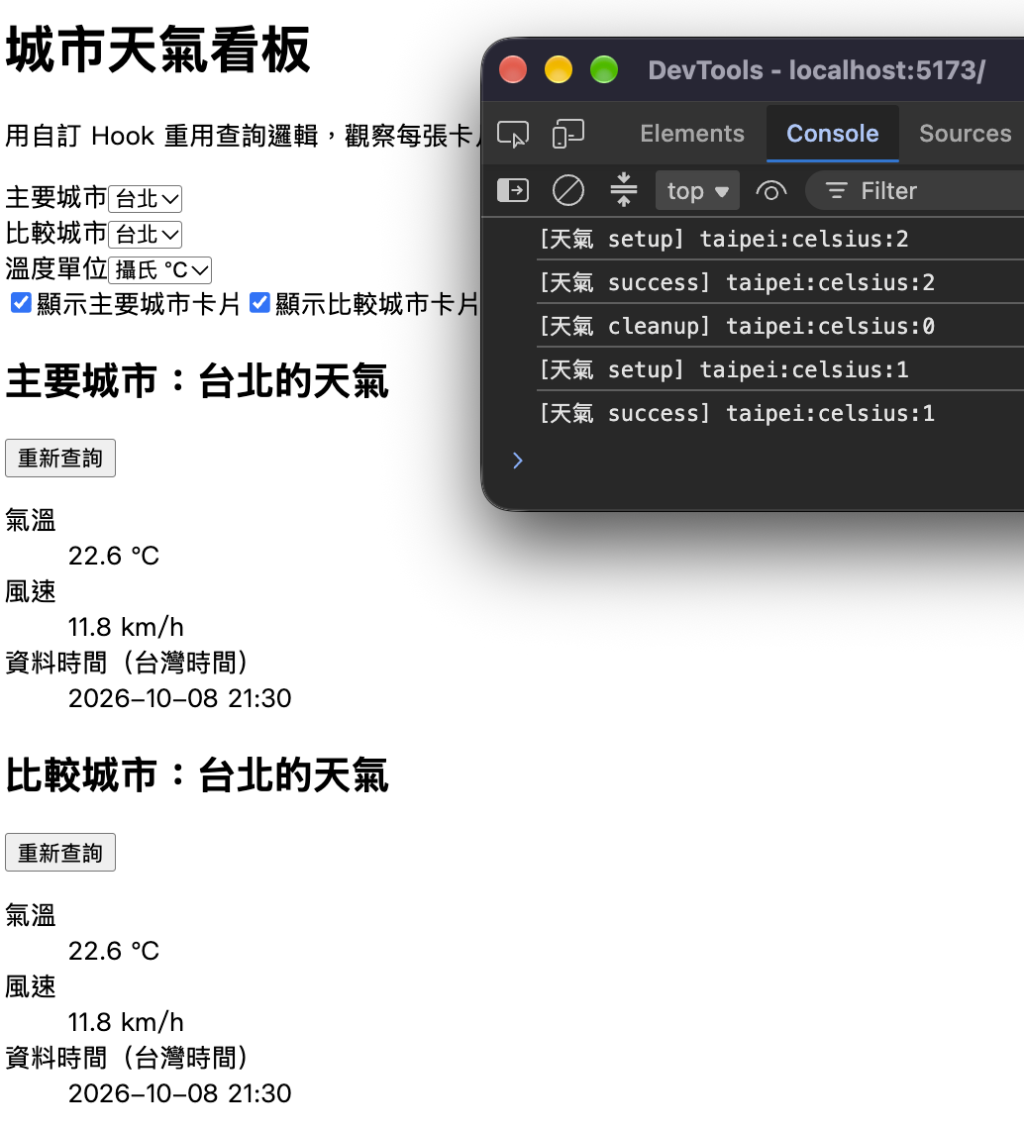
當按下台北的重新查詢,台北進入 loading,高雄保留已取得的結果,切換外層共用的溫度單位,兩張則都會收到新參數,各自重新查詢。即使兩張都切到台北顯示相同氣溫,但實際上並不是同一份 state。
自訂 Hook 重用的是處理流程,每次呼叫的 state 與 Effect 各自獨立。
明天開始我們要來把畫面變美麗。



 iThome鐵人賽
 看影片追技術