
回頭檢查在Day 1 規劃的系統架構下,發現目前的系統中間斷了一段。
Security Event
      ↓
   Suricata
      ↓
   EVE JSON
      ↓
   FastAPI
      ↓
 Event Parser
      ↓
     LLM
      ↓
MITRE ATT&CK
      ↓
React SOC Dashboard
Day 11 到 Day 13 已經可以讀取 Suricata 的 EVE JSON、整理欄位並判斷 Severity,但這些程式只是把結果印在 Terminal。另一方面,Day 10 之後 Dashboard 的資料都來自 SQLite,而資料庫裡的事件是 Mock Data 和 Day 25 手動建立的測試案例。
也就是說,Suricata 偵測到的告警從來沒有真正出現在 Dashboard 上。今天要把這一段接起來。
EVE JSON 裡面有很多種事件。Day 13 已經整理過:HTTP、DNS 這類事件代表的是一般的網路活動,只有 event_type 為 alert 的事件,才是 Suricata 規則判斷為可疑的資安告警。
如果把所有 HTTP 與 DNS 紀錄都放進 Dashboard,真正需要注意的告警反而會被淹沒。所以今天只匯入 Alert。
欄位對應
| events 資料表 | EVE JSON |
|---|---|
| event_type | alert.category |
| src_ip | src_ip |
| dest_ip | dest_ip |
| dest_port | dest_port(ICMP 沒有 Port,填 0) |
| protocol | proto |
| signature | alert.signature |
| severity | alert.severity |
| timestamp | timestamp |
event_type 使用 Suricata 規則本身的分類(category),例如 Potentially Bad Traffic、Attempted Information Leak。
另外,原本的 events 資料表沒有時間欄位,但真實的告警一定有發生時間,而且之後需要用時間來判斷同一筆告警是否已經匯入過,所以新增一個 timestamp 欄位。
在 init_database() 中加入
    # 舊的 events 資料表補上新欄位
    columns = [
        row["name"]
        for row in conn.execute("PRAGMA table_info(events)")
    ]
    if "timestamp" not in columns:
        conn.execute(
            "ALTER TABLE events ADD COLUMN timestamp TEXT"
        )
因為 soc.db 已經存在,CREATE TABLE IF NOT EXISTS 不會修改既有的資料表,所以這裡先用 PRAGMA table_info 檢查欄位是否存在,沒有才用 ALTER TABLE 加上去。原本的 30 筆事件不會受到影響,它們的 timestamp 會是空值。
在 backend 資料夾新增 ingest_suricata.py
import json
import sqlite3
import sys
from pathlib import Path

# 將 Suricata EVE JSON 中的 Alert 匯入 soc.db
# 用法:python ingest_suricata.py [eve.json 路徑]
DATABASE = Path(__file__).resolve().parent / "soc.db"

if len(sys.argv) > 1:
    LOG_FILE = sys.argv[1]
else:
    LOG_FILE = "/var/log/suricata/eve.json"

def alert_to_event(event):
    alert = event.get("alert", {})
    severity = alert.get("severity")

    # Suricata 的 severity 為 1~3,其他數值一律視為 Low
    if severity not in [1, 2, 3]:
        severity = 3

    return (
        alert.get("category") or "Suricata Alert",
        event.get("src_ip", ""),
        event.get("dest_ip", ""),
        # ICMP 沒有 Port
        event.get("dest_port", 0),
        event.get("proto", ""),
        alert.get("signature", ""),
        severity,
        event.get("timestamp")
    )

conn = sqlite3.connect(DATABASE)

# 舊的 events 資料表沒有 timestamp 欄位時先補上
columns = [
    row[1]
    for row in conn.execute("PRAGMA table_info(events)")
]
if "timestamp" not in columns:
    conn.execute("ALTER TABLE events ADD COLUMN timestamp TEXT")

total = 0
alerts = 0
added = 0
skipped = 0
broken = 0

with open(LOG_FILE, "r") as file:
    for line in file:
        try:
            event = json.loads(line)
        except json.JSONDecodeError:
            broken += 1
            continue

        total += 1

        # 只匯入 Alert,HTTP、DNS、Flow 屬於一般網路活動
        if event.get("event_type") != "alert":
            continue

        alerts += 1
        row = alert_to_event(event)

        # 同一筆 Alert 不重複匯入
        exists = conn.execute("""
            SELECT 1 FROM events
            WHERE timestamp = ?
              AND src_ip = ?
              AND dest_ip = ?
              AND signature = ?
        """, (row[7], row[1], row[2], row[5])).fetchone()

        if exists:
            skipped += 1
            continue

        conn.execute("""
            INSERT INTO events
            (event_type, src_ip, dest_ip, dest_port,
             protocol, signature, severity, timestamp)
            VALUES (?, ?, ?, ?, ?, ?, ?, ?)
        """, row)
        added += 1

conn.commit()
total_events = conn.execute("SELECT COUNT(*) FROM events").fetchone()[0]
conn.close()

print("Log file          :", LOG_FILE)
print("EVE records read  :", total)
print("Broken lines      :", broken)
print("Alerts found      :", alerts)
print("Imported          :", added)
print("Skipped (existing):", skipped)
print("Total events in DB:", total_events)
這支程式有三個需要注意的地方:
真實的 eve.json 內容很多,每次測試的結果也不一樣。為了方便重複測試,我在專案的 data 資料夾準備了一份比較小的 sample_eve.json,裡面包含 DNS、HTTP、Flow 與 Alert 幾種事件,最後一行則刻意保留不完整的內容。
其中一筆 Alert 長這樣:
{"timestamp":"2026-10-11T10:15:03.103911+0800","flow_id":912384470121233,"in_iface":"ens33","event_type":"alert","src_ip":"192.168.3.100","src_port":40122,"dest_ip":"192.168.3.141","dest_port":80,"proto":"TCP","tx_id":0,"alert":{"action":"allowed","gid":1,"signature_id":2024364,"rev":4,"signature":"ET SCAN Possible Nmap User-Agent Observed","category":"Web Application Attack","severity":1},"app_proto":"http"}
執行
python ingest_suricata.py ../data/sample_eve.json
Log file          : ../data/sample_eve.json
EVE records read  : 10
Broken lines      : 1
Alerts found      : 6
Imported          : 6
Skipped (existing): 0
Total events in DB: 36
10 筆完整的事件中有 6 筆是 Alert,全部匯入資料庫,另外有 1 行不完整的資料被跳過。
再執行一次
Alerts found      : 6
Imported          : 0
Skipped (existing): 6
Total events in DB: 36
6 筆都被判斷為已經存在,資料庫沒有增加重複的事件。
重新整理 Dashboard,Total Events 變成 36,Event Type Statistics 出現了 Suricata 的分類,事件列表最下方也可以看到剛剛匯入的告警。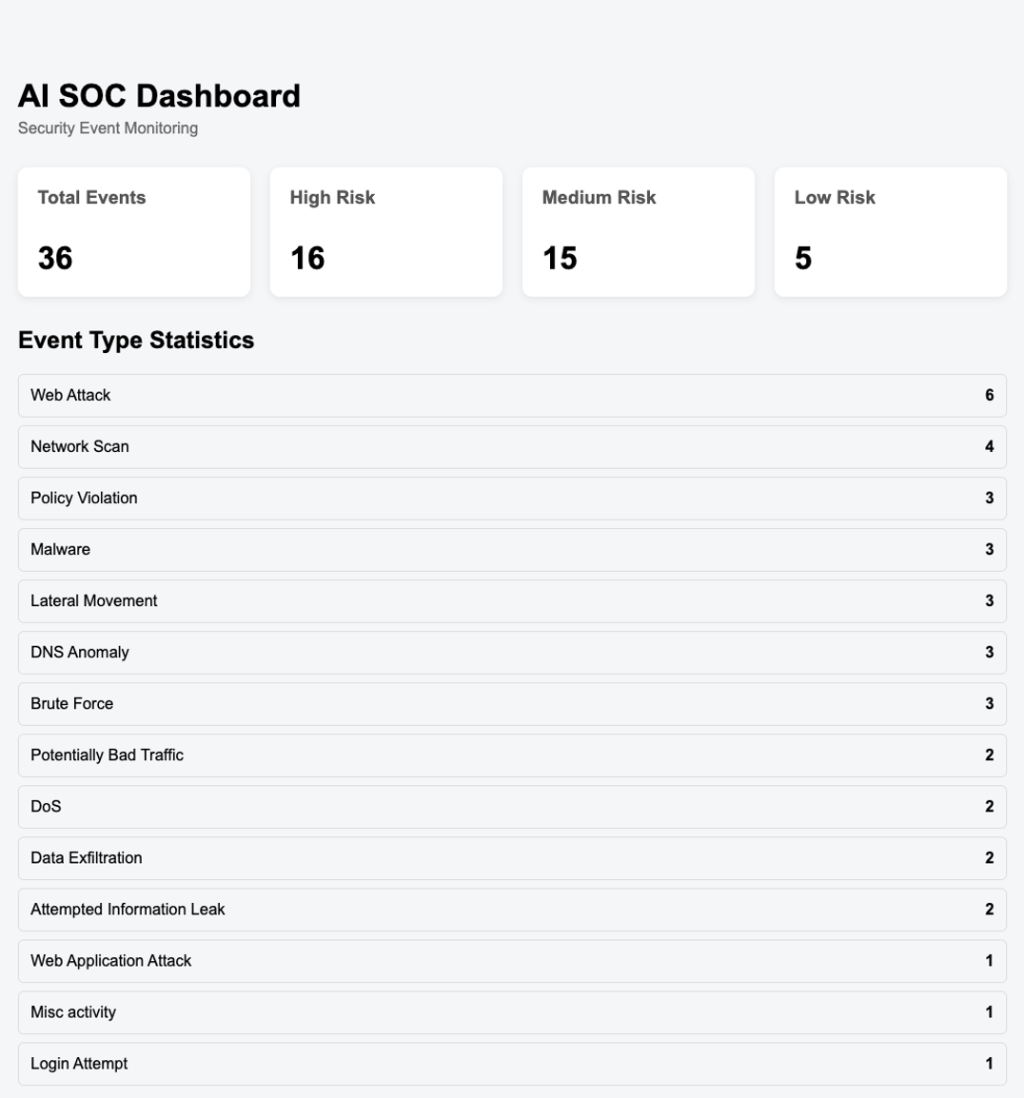
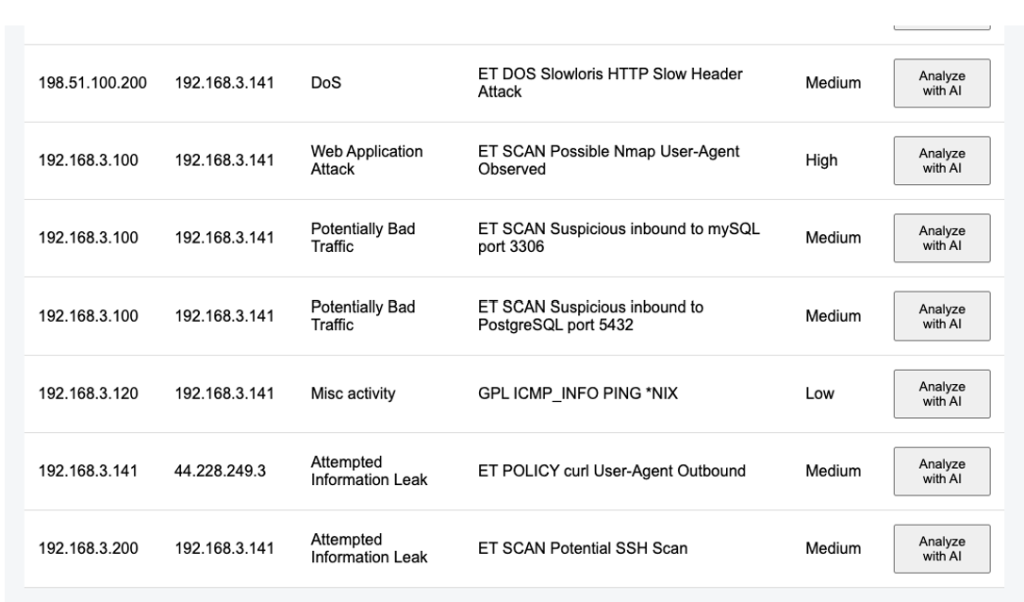
對其中一筆 Suricata 告警按下 Analyze with AI,Day 22 建立的分析流程不需要任何修改就可以直接使用。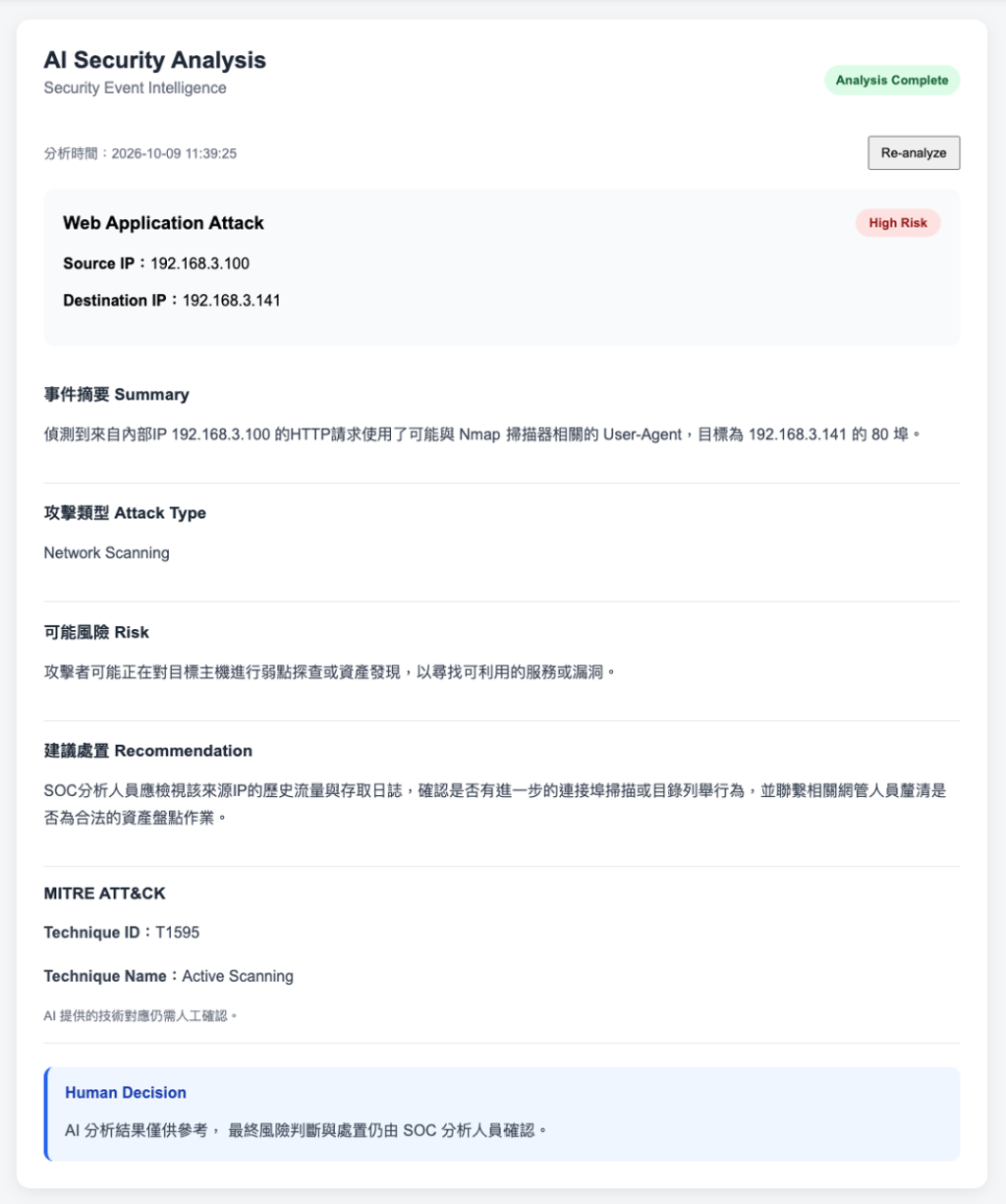
如果要匯入 Suricata 實際產生的告警,直接執行不加參數的版本就可以了
python ingest_suricata.py
今天把 Day 11 到 Day 13 的 Suricata 解析流程接進 SQLite。到這裡,Day 1 畫的架構圖才第一次真正從頭到尾連在一起:Suricata 產生的告警寫入 EVE JSON,經過解析後進入資料庫,在 Dashboard 上顯示,再交給 Gemini 分析並對應 MITRE ATT&CK。
實作時也讓我體會到「真實資料」和「測試資料」的差別。自己建立的測試案例欄位都很完整,但真實的 Log 會有沒有 Port 的 ICMP、寫到一半的資料,以及重複執行時的重複匯入問題,這些都是在處理真實資料時才會遇到的。
目前的匯入還是需要手動執行,並不是即時的。如果要做到 Suricata 一產生告警就出現在 Dashboard,還需要持續監看檔案或是排程定期執行,這部分會放在最後一天的未來方向中一起整理。



 iThome鐵人賽
 看影片追技術