
前一篇用禁止 privileged 的例子,說明 Gatekeeper 如何在資源寫入前檢查設定。今天把這個要求寫成 ConstraintTemplate,再加入 CPU/memory limits 與 image 的規則,看看三條政策怎麼各自設定範圍與執行模式。
以下沿用 Todo API,提供完整的政策 YAML。使用前需要已安裝 Gatekeeper;每組設定都要先建立 Template,等它產生的自訂資源定義(Custom Resource Definition,CRD)就緒,再建立對應的 Constraint。
k8sdeploymentnoprivileged:禁止 privileged先把前一篇的需求實作出來:Todo API 不需要操作主機裝置,因此不允許容器啟用 privileged。
apiVersion: templates.gatekeeper.sh/v1
kind: ConstraintTemplate
metadata:
  name: k8sdeploymentnoprivileged
spec:
  crd:
    spec:
      names:
        # Gatekeeper 會建立這個 Kind,供後面的 Constraint 使用。
        kind: K8sDeploymentNoPrivileged
      validation:
        # 定義 parameters 的格式;這條固定規則不需要額外參數。
        openAPIV3Schema:
          type: object
  targets:
    - target: admission.k8s.gatekeeper.sh
      # | 以下的多行文字是 Rego,不是 YAML 欄位。
      rego: |
        package k8sdeploymentnoprivileged

        # 找到違規容器就回報 msg;是否拒絕由 Constraint 決定。
        violation[{"msg": msg}] {
          input.review.kind.kind == "Deployment"
          # Deployment 的容器在 Pod template 中,不在 spec.containers。
          pod_spec := input.review.object.spec.template.spec
          # := 綁定變數,[_] 逐一取出陣列元素;兩種容器都要檢查。
          field := ["containers", "initContainers"][_]
          container := pod_spec[field][_]

          # 未設定或設為 false 不違規,只有 true 才回報。
          container.securityContext.privileged == true

          msg := sprintf(
            "container <%v> must not enable securityContext.privileged",
            [container.name]
          )
        }
Template 只定義檢查方式,接著用 Constraint 指定要檢查 todo 裡的 Deployment:
apiVersion: constraints.gatekeeper.sh/v1beta1
kind: K8sDeploymentNoPrivileged # 對應 Template 定義的 Kind。
metadata:
  name: todo-no-privileged
spec:
  # 示範正式拒絕模式;首次導入仍應先用 dryrun 盤點。
  enforcementAction: deny
  match:
    namespaces:
      - todo
    kinds:
      - apiGroups: ["apps"]
        kinds: ["Deployment"]
預期啟用 privileged 的容器會被這條 deny 規則拒絕;未啟用的容器不因這條規則被擋,但仍須通過其他檢查。
k8sdeploymentrequiredlimits:要求 CPU 與 memory limits目前 Operator 已替 Todo API 設定 limits,但 todo 裡的其他工作負載不一定有。這條規則同樣檢查 Deployment 的容器設定:
apiVersion: templates.gatekeeper.sh/v1
kind: ConstraintTemplate
metadata:
  name: k8sdeploymentrequiredlimits
spec:
  crd:
    spec:
      names:
        kind: K8sDeploymentRequiredLimits
      validation:
        openAPIV3Schema:
          type: object
  targets:
    - target: admission.k8s.gatekeeper.sh
      rego: |
        package k8sdeploymentrequiredlimits

        # 欄位必須存在且非空;不計算上限是否合適。
        has_limit(container, resource) {
          value := container.resources.limits[resource]
          value != null
          value != ""
        }

        violation[{"msg": msg}] {
          input.review.kind.kind == "Deployment"
          pod_spec := input.review.object.spec.template.spec
          field := ["containers", "initContainers"][_]
          container := pod_spec[field][_]

          # CPU 與 memory 分別檢查,缺哪個就回報哪個。
          resource := ["cpu", "memory"][_]
          # resources 或 limits 整個沒填,也會被判定缺少欄位。
          not has_limit(container, resource)

          msg := sprintf(
            "container <%v> is missing resources.limits.%v",
            [container.name, resource]
          )
        }
這次先用 dryrun 盤點,不立即擋住既有服務的更新:
apiVersion: constraints.gatekeeper.sh/v1beta1
kind: K8sDeploymentRequiredLimits
metadata:
  name: todo-required-limits
spec:
  # 不阻擋違規請求;從 audit 結果找出需要修正的工作負載。
  enforcementAction: dryrun
  match:
    namespaces:
      - todo
    kinds:
      - apiGroups: ["apps"]
        kinds: ["Deployment"]
預期缺少 memory limit 時,違規訊息會包含容器名稱與 resources.limits.memory。目前 Todo API 的 CPU 500m、memory 256Mi 都有設定,能符合這條規則,但不代表額度一定合適,或整個 Namespace 的總用量已受到限制。
k8smicroserviceimagepolicy:限定 image 來源與 digestimage 可以在自訂資源(Custom Resource,CR)的 Microservice.spec.image 就先檢查。目前 CRD 只要求這個欄位是非空字串,像 ghcr.io/yrw9281/it30-todo-api:0.1.0 也能通過 schema 驗證;直接提交 CR 的人又不會經過 Backstage 表單,所以不能只依賴入口限制。
apiVersion: templates.gatekeeper.sh/v1
kind: ConstraintTemplate
metadata:
  name: k8smicroserviceimagepolicy
spec:
  crd:
    spec:
      names:
        kind: K8sMicroserviceImagePolicy
      validation:
        openAPIV3Schema:
          type: object
  targets:
    - target: admission.k8s.gatekeeper.sh
      rego: |
        package k8smicroserviceimagepolicy

        valid_image(image) {
          # 固定 repository,並要求 sha256: 後有 64 位小寫十六進位值。
          # ^ 與 $ 限定整個字串,避免其他來源或尾端多餘文字通過。
          # :0.1.0 這類 tag 可以被重新指向,因此不符合 digest 要求。
          regex.match(
            "^ghcr[.]io/yrw9281/it30-todo-api@sha256:[0-9a-f]{64}$",
            image
          )
        }

        violation[{"msg": msg}] {
          input.review.kind.group == "platform.example.io"
          input.review.kind.kind == "Microservice"
          image := object.get(input.review.object.spec, "image", "")

          # 其他 repository 即使帶有 digest,一樣不符合這條規則。
          not valid_image(image)

          msg := sprintf(
            "Microservice <%v> spec.image must use ghcr.io/yrw9281/it30-todo-api@sha256:<64 lowercase hex characters>",
            [input.review.object.metadata.name]
          )
        }
對應的 Constraint 改為選擇 Microservice,這次示範只提醒、不阻擋的 warn:
apiVersion: constraints.gatekeeper.sh/v1beta1
kind: K8sMicroserviceImagePolicy
metadata:
  name: todo-image-policy
spec:
  # 回傳 API 警告,但提交工具必須能顯示,使用者才看得到。
  enforcementAction: warn
  match:
    namespaces:
      - todo
    kinds:
      - apiGroups: ["platform.example.io"]
        kinds: ["Microservice"]
這個範例限定 todo 裡所有 Microservice 都使用 Todo API 的 repository,適合目前單一服務的情境。預期指定來源加上合法 digest 格式能通過;使用 tag、其他來源或長度不符的 digest 都會違規。這條規則不會掃描漏洞,也不驗證 image 的建置來源。
enforcementAction 的差異spec.enforcementAction |
是否拒絕違規請求 | 回饋方式 |
|---|---|---|
dryrun |
否 | 不回傳政策警告,可從稽核(audit)的 status.violations 查看違規 |
warn |
否 | 回傳 API 警告;提交工具須能顯示 |
deny |
是 | 回傳拒絕原因 |
未指定時預設為 deny。每份 Constraint 可獨立設定模式,但只要違反任何適用的 deny 規則,請求就會被拒絕,其他 warn/dryrun 不會替它放行。
audit 不會修改既有資源,切成 deny 也不會刪除它們;下次更新若仍違反適用的規則,請求才會被拒絕。另外,Gatekeeper 的 dryrun 仍允許寫入,不同於 Kubernetes 不儲存資源的 server-side dry-run。
Todo 平台的交付設計是由 Argo CD 提交 Microservice,Operator 依 CR 提交 Deployment,最後由 Kubernetes 的 controller 建立 Pod。這是不同元件各自提出的 API 請求,錯誤也會回到不同元件。以下假設對應規則使用 deny,並另有 Pod 檢查規則:
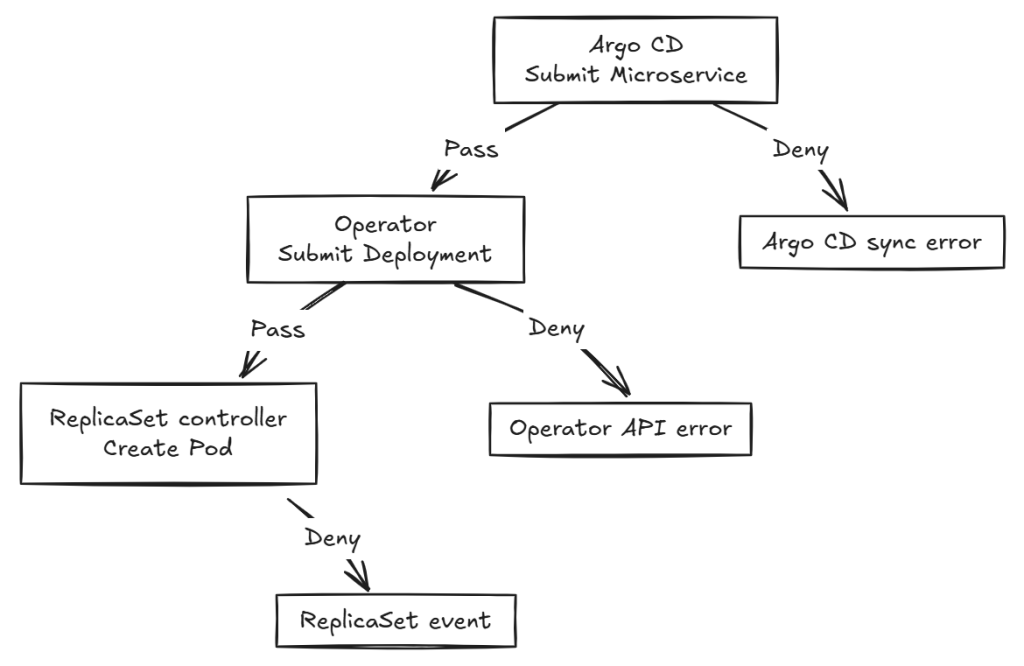
依被拒絕的資源,可以直接對照錯誤位置:
| 被拒絕的資源 | 去哪裡查 | 這次變更的結果 |
|---|---|---|
Microservice |
Argo CD 同步錯誤 | CR 變更未寫入,Operator 不會依這份變更部署 |
Deployment |
Operator 的 API 錯誤 log | CR 已寫入,但工作負載變更未寫入 |
| Pod | ReplicaSet 事件 |
Deployment 已寫入,但遭拒的 Pod 沒有建立,沒有 Pod log 可查 |
找到拒絕原因後,回到設定來源修正:image 改設定 Pull Request(PR)裡的 Microservice.spec.image,limits 則由平台團隊修改 Operator 的預設。不要直接改受管的 Deployment,否則下次 reconcile 可能被還原。調整政策時,也要核對 Backstage 表單與 Git 檢查是否一致。
如果需要例外,可以改 Constraint 的 spec.match 排除例外,不必修改 Rego。整個 Namespace 用 excludedNamespaces;依資源 label 排除則用 labelSelector。例如,要讓 metadata.labels.app 為 todo-api 的 Deployment 不套用 limits 檢查,可以把前面的 todo-required-limits 改成:
apiVersion: constraints.gatekeeper.sh/v1beta1
kind: K8sDeploymentRequiredLimits
metadata:
  name: todo-required-limits # 修改同一份 Constraint,不是另加一條規則。
spec:
  enforcementAction: dryrun
  match:
    namespaces:
      - todo
    kinds:
      - apiGroups: ["apps"]
        kinds: ["Deployment"]
    labelSelector:
      matchExpressions:
        - key: app
          operator: NotIn # 排除 app=todo-api,其餘仍檢查。
          values: ["todo-api"]
這裡比對的是 Deployment.metadata.labels,不是 Pod template 的 label;沒有 app label 的資源仍會被檢查。例外只影響這份 limits Constraint,不會跳過 privileged 或其他規則。這也是 label 比對,不是資源名稱比對:任何能把 app 改成 todo-api 的提交者,都能符合這個排除條件。



 iThome鐵人賽
 看影片追技術