
前面每次都只放一個故障,而且都從 kubectl 開始查。今天三個一起放,規定自己先看 Grafana,不先開終端機
故障版本存成 manifests/broken/final-incident.yaml
apiVersion: apps/v1
kind: Deployment
metadata:
  name: web
  namespace: ithome-lab
spec:
  replicas: 3
  selector:
    matchLabels:
      app: web
  template:
    metadata:
      labels:
        app: web
    spec:
      containers:
        - name: nginx
          image: nginx:alpine
          ports:
            - containerPort: 80
          volumeMounts:
            - name: web-content
              mountPath: /usr/share/nginx/html/index.html
              subPath: index.html
          envFrom:
            - secretRef:
                name: db-cred
          resources:
            requests:
              cpu: "50m"
              memory: "16Mi"
            limits:
              cpu: "200m"
              memory: "16Mi"
          readinessProbe:
            httpGet:
              path: /ready
              port: 80
            initialDelaySeconds: 3
            periodSeconds: 5
          livenessProbe:
            httpGet:
              path: /
              port: 80
            initialDelaySeconds: 10
            periodSeconds: 10
            failureThreshold: 3
      volumes:
        - name: web-content
          configMap:
            name: web-content
---
apiVersion: v1
kind: Service
metadata:
  name: web
  namespace: ithome-lab
spec:
  type: ClusterIP
  selector:
    app: web-app
  ports:
    - port: 80
      targetPort: 80
跟正常版差三個地方。Readiness 的路徑改成 /ready,這是 Day 19 的;記憶體 requests 跟 limits 都壓到 16Mi,Day 21 的;Service 的 selector 改成 app: web-app,Day 18 的
kubectl apply -f manifests/broken/final-incident.yaml
套下去之後離開電腦去泡咖啡,回來打開 Day 28 做的那張 Dashboard
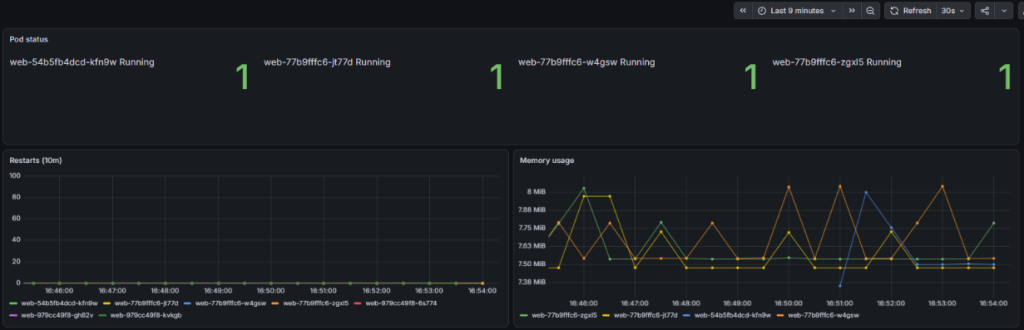
我本來以為三張圖會一起亮,結果沒有。重啟次數是 0,記憶體每條都在 8MiB 上下,沒碰到 16Mi。唯一的變化是 Pod status 從三個變四個,多了一個名字不一樣的 Pod
如果不是自己放的故障,我看到這張圖大概會覺得「喔,有人在部署」然後就關掉了
開網站看看
kubectl port-forward -n ithome-lab service/web 8080:80
這行下去什麼都沒印,平常會出現的 Forwarding from 127.0.0.1:8080 沒有出現,就停在那裡。瀏覽器開 localhost:8080 也連不上

服務是斷的,可是 Dashboard 看不出來
回 Grafana 左邊選單點 Alerting,kube-prometheus-stack 內建的規則裡有一條 KubePodNotReady 在響。它要 Pod 不 ready 超過 15 分鐘才會觸發,所以 17:06 才出來。而且它跟 etcdMembersDown、TargetDown 這幾條混在一起,這幾條從昨天就一直在響(kind 的 scheduler、controller-manager 這些元件預設抓不到指標)
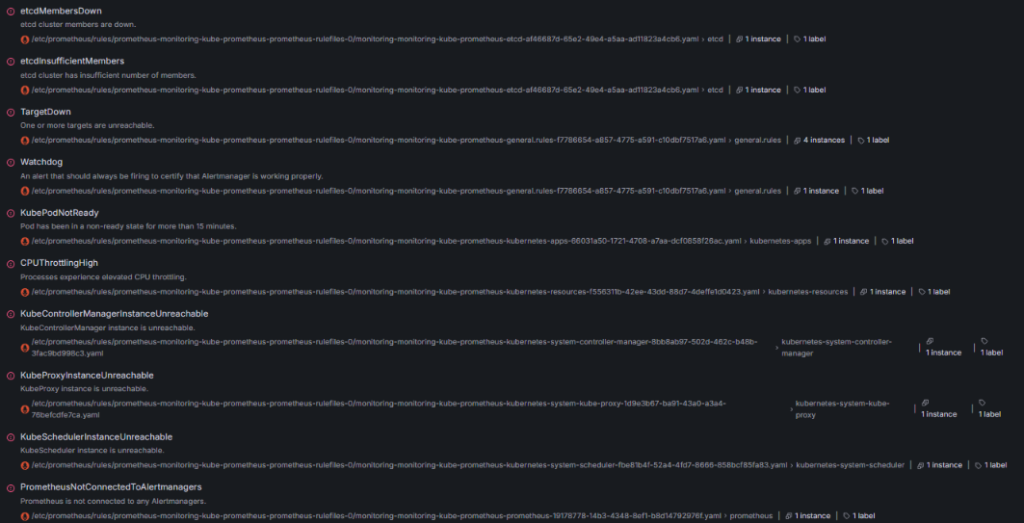
還是回到 kubectl
kubectl get pods -n ithome-lab
kubectl rollout status deployment/web -n ithome-lab
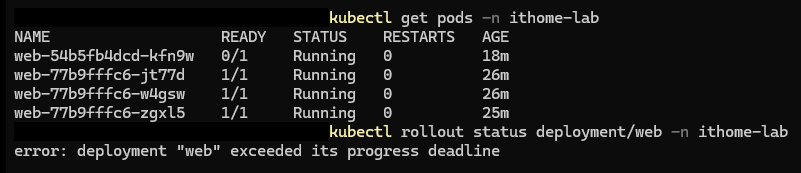
滾動更新要等新 Pod ready 才會去換舊的,新的永遠不 ready,舊的三個就一直留著。沒有重啟、記憶體正常、狀態都是 Running,Dashboard 看的那三樣東西剛好都沒壞
新 Pod 為什麼不 ready
kubectl describe pod <POD_NAME> -n ithome-lab
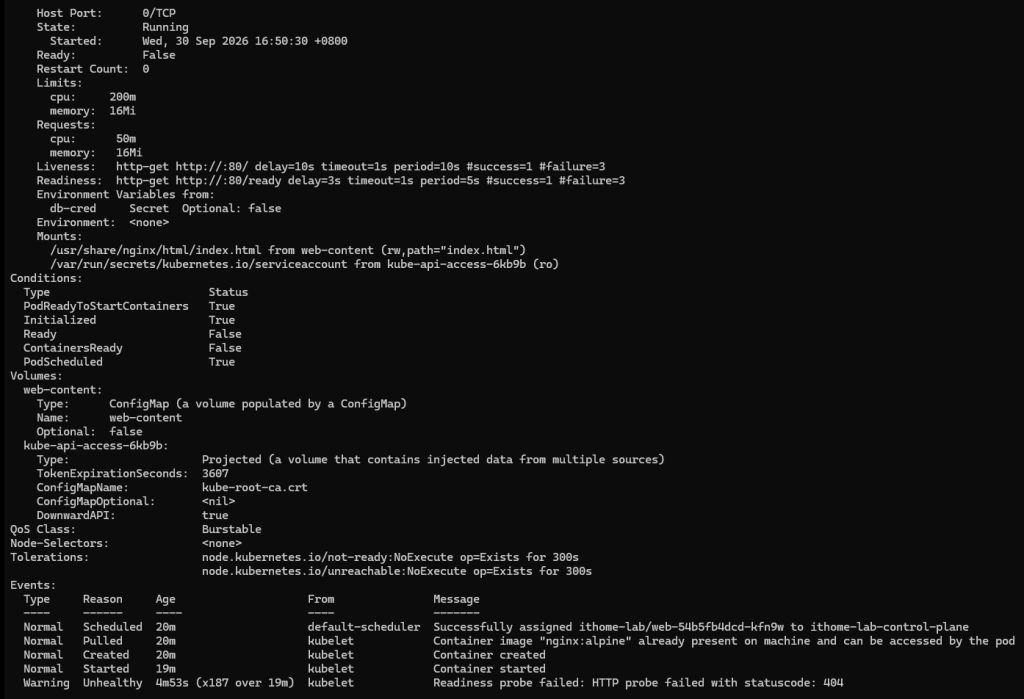
跟 Day 19 一樣,nginx 沒有 /ready 這個路徑,回 404
可是舊的三個 Pod 都是 1/1,網站為什麼還是連不到
kubectl get endpointslices -n ithome-lab
kubectl describe service web -n ithome-lab
kubectl get pods -n ithome-lab --show-labels
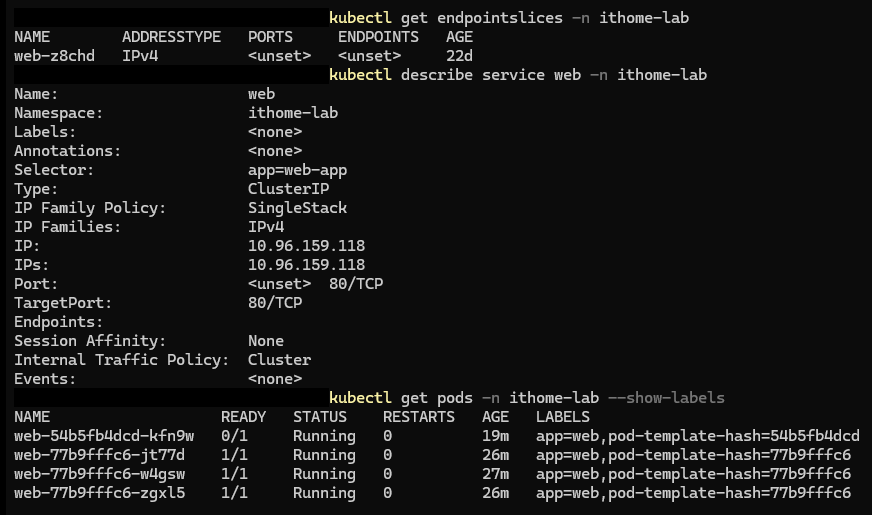
明明有三個 ready 的 Pod,EndpointSlice 卻是空的,那就不是 Pod 的問題,是 Service 沒選到它們。Day 18 那個 selector 對不上
開始修。先修 Service,因為網站連不到是它造成的,而且舊 Pod 都是好的,selector 改回來就能接上
kubectl apply -f manifests/base/service.yaml
kubectl get endpointslices -n ithome-lab

有四個地址,前三個是舊 Pod,+ 1 more 收起來的那個是還沒 ready 的新 Pod(10.244.0.24)。EndpointSlice 會把它列出來,但標成 ready=false,流量不會送過去。再 port-forward 一次,這次有印出 Forwarding from,localhost:8080 打開是 Day 22 改過的那個頁面
剩下兩個故障都在那個卡住的新版本裡。如果先修 probe,滾動更新會繼續往下走,16Mi 的設定就跟著換到三個 Pod 上,所以先改記憶體
kubectl set resources deployment/web -n ithome-lab --requests=memory=64Mi --limits=memory=128Mi
kubectl get pods -n ithome-lab

set resources 可以直接改 Deployment 的 resources,不用開檔案,數字用 Day 13 那組。改完 Deployment 又換了一個新 Pod 上來,probe 還是錯的,所以一樣 0/1
最後是 probe。這時候線上跟 manifests/base 應該只差 probe 的路徑,先 diff 確認
kubectl diff -f manifests/base

PowerShell 裡直接跑會報錯。kubectl diff 要叫外部的 diff 程式,Windows 本身沒有,PowerShell 的 diff 又只是 Compare-Object 的別名,kubectl 叫不到。有裝 Git 的話它附了一個,把路徑加進 PATH 再跑一次
$env:Path += ";C:\Program Files\Git\usr\bin"
kubectl diff -f manifests/base
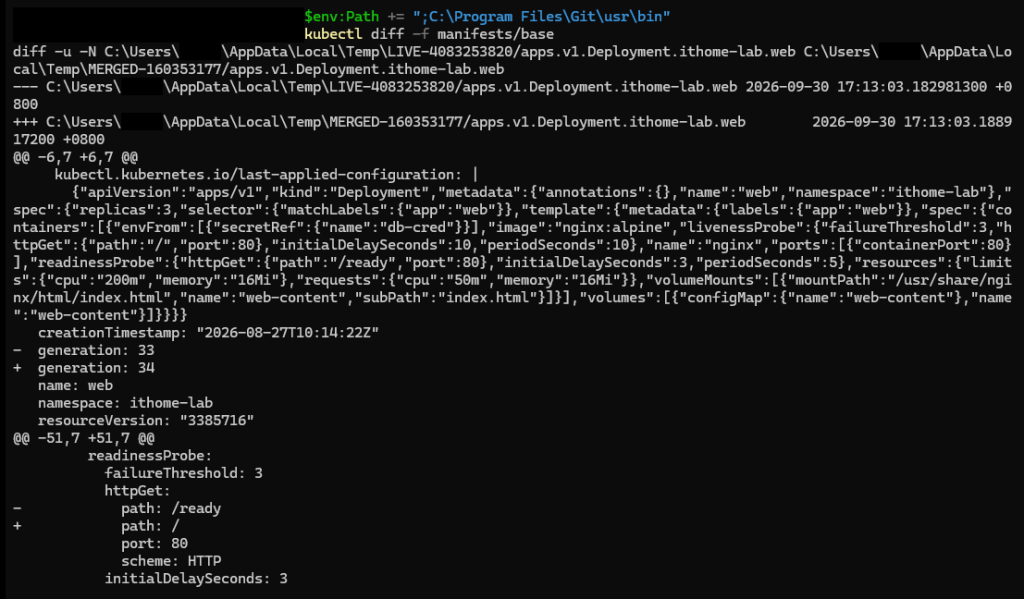
中間那一大串 JSON 是 last-applied-configuration,記的是上一次 apply 的內容,所以裡面還看得到 16Mi 跟 /ready,那不是差異。真正有 - 跟 + 的只有 generation,還有 path: /ready 變成 path: /
kubectl apply -f manifests/base
kubectl rollout status deployment/web -n ithome-lab
kubectl get pods -n ithome-lab
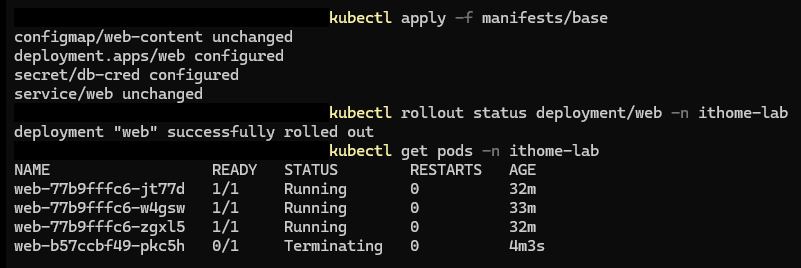
rollout 幾秒就結束了,也沒有新 Pod 冒出來,名字跟 AGE 都是原本那三個(列表裡那個 Terminating 是正在被收掉的新 Pod)。修完之後的 Pod template 跟一開始完全一樣,Deployment 直接拿原本那個 ReplicaSet 來用,把卡住的新 Pod 收掉就結束了。舊的三個從頭到尾沒被動過
Service 的 selector 寫成 app: web-app,跟 Pod 的 app: web 對不上。probe 路徑跟 16Mi 這兩個沒有造成中斷,被滾動更新擋在新版本裡
修復
kubectl apply -f manifests/base/service.yaml 改回 selector,kubectl set resources 改回記憶體,kubectl apply -f manifests/base 改回 probe
明天最後一天,明天見 :D




 iThome鐵人賽
 看影片追技術