

面對最壞的情況,我們如何快速重建整套 BI 平台。
K8S 的宣告式特性讓「重建服務本身」變得容易——只要 Git repo 還在,kubectl apply 或 ArgoCD 就能把 Deployment、Service 這些資源原樣生出來。但這解決不了資料的問題:資料庫裡的實際內容、PVC 裡的檔案,這些是叢集「聲明」不出來的狀態,一旦遺失就是真的沒了。備份策略要解決的正是這一塊。
Velero 是 K8S 生態圈常見的備份工具,能把一個 Namespace 下的所有資源定義(Deployment、Service、ConfigMap、PVC 等)連同 PV 的實際內容打包,存到物件儲存(S3 或相容服務)。復原時反向操作,把整包定義與資料還原到叢集(同一個或另一個)。
本機測試用 MinIO 當 S3 相容的備份目標:
helm install minio minio/minio --namespace velero --set mode=standalone

velero install \
  --provider aws \
  --plugins velero/velero-plugin-for-aws:v1.11.0 \
  --bucket velero-backups \
  --use-node-agent \
  --backup-location-config region=minio,s3ForcePathStyle=true,s3Url=http://minio.velero.svc.cluster.local:9000
--use-node-agent 會在每個節點部署一個 DaemonSet,負責執行檔案系統層級的卷備份(底層用 Kopia 或 Restic)。
在 postgres 裡插入一筆標記資料,備份,然後模擬「手殘刪除」整組資源:
$ velero backup create wafer-bi-daily-backup --include-namespaces k8sdemo \
    --default-volumes-to-fs-backup --wait
Backup completed with status: Completed

$ kubectl delete deployment postgres && kubectl delete pvc postgres-pvc && kubectl delete svc postgres-service
deployment.apps "postgres" deleted
persistentvolumeclaim "postgres-pvc" deleted
service "postgres-service" deleted
postgres 的 Deployment、Service、PVC 定義全部消失。執行復原:
$ velero restore create wafer-bi-restore-01 --from-backup wafer-bi-daily-backup --wait
Restore completed with status: Completed
過程中發現一個問題:kubectl get pvc 顯示 PVC 恢復了,但 Pod 一直卡在 Pending,describe 顯示綁定的 PV 名稱已經不存在。檢查備份日誌找到真正的原因:
Volume pgdata in pod k8sdemo/postgres-... is a hostPath volume
which is not supported for pod volume backup, skipping
Docker Desktop 的預設 StorageClass 是用 hostPath 供應 PV 的,而 Velero 的檔案系統備份機制(Kopia/Restic)明確不支援 hostPath 卷——這是本機開發叢集特有的限制。在真正 CSI 驅動卷的環境(例如 OKE 的 Block Volume、AWS 的 EBS)用的是真正的塊儲存,Velero 對 CSI 卷有原生的 snapshot 支援,理論上不會遇到這個問題,但目前還沒有實際的雲端環境可以驗證(Day 9 提過,雲端部署暫時擱置)。
這提醒了一件事:本機測試通過,不代表雲端環境行為一致——存儲後端的實作方式差異,可能導致同一套備份流程在不同環境下的行為完全不同。真的上雲之後,務必針對目標環境的實際存儲類型重新驗證一次,不能直接假設本機測過就沒事。
Velero 的檔案系統備份是「整顆卷」等級的備份,而資料庫這類工作負載,業界更常見的做法是額外搭配應用層級的邏輯備份(pg_dump/pg_restore),原因有二:不受限於卷的儲存後端類型,而且復原時可以做到「只還原某幾張表」的精細度,而不是整顆卷一次全上。
$ kubectl exec deploy/postgres -- pg_dump -U waferbi waferbi_db > waferbi_backup.sql

# 復原後的資料庫是全新空的
$ kubectl exec deploy/postgres -- psql -U waferbi -d waferbi_db -c "\dt"
Did not find any relations.

# 灌回備份內容
$ cat waferbi_backup.sql | kubectl exec -i deploy/postgres -- psql -U waferbi -d waferbi_db

$ kubectl exec deploy/postgres -- psql -U waferbi -d waferbi_db -c "SELECT id, username, name FROM users;"
完整實測畫面:
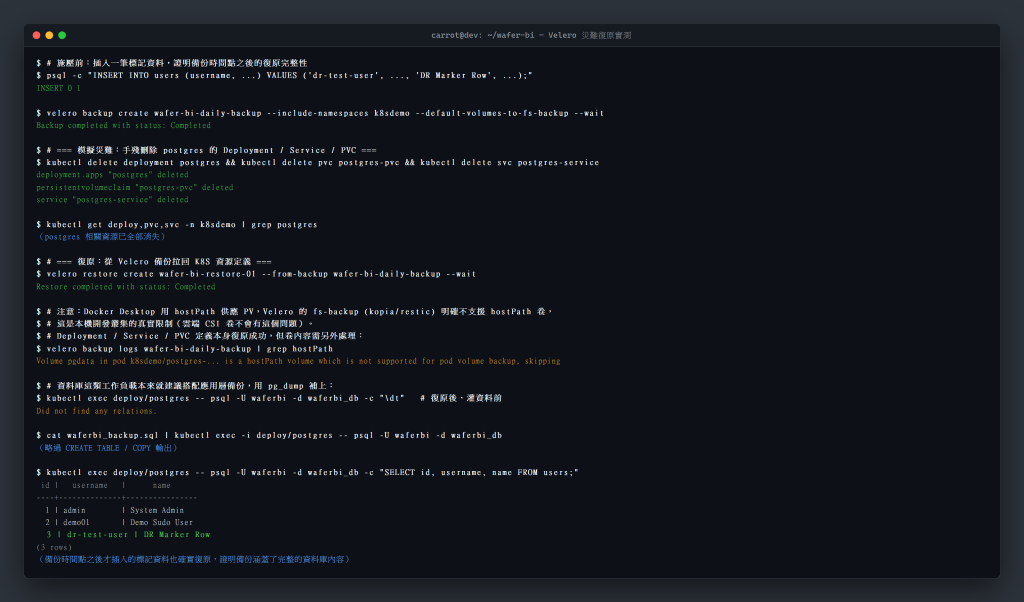
▲ Velero 災難復原實測:插入標記資料 → 備份 → 刪除全部 postgres 資源 → 復原 → 標記資料確實回來,中間記錄了 hostPath 限制的真實排查過程
備份時間點之後才插入的 dr-test-user 標記資料,在整個刪除又復原的流程走完後依然存在——這證明備份確實涵蓋了完整內容,而不是只有結構。
Velero 負責 K8S 資源定義的備份與復原,資料庫這類有狀態工作負載額外用 pg_dump 補上一層應用層備份,兩者互補。同時也踩到了一個環境相依的真實限制——本機測試環境跟正式環境的存儲後端不同,備份行為可能不一樣,這點在制定 DR 策略時要納入考量。明天討論資源調優:如何根據 Java 與 Python 各自的特性設定合理的資源限制。


 iThome鐵人賽
 看影片追技術