

在開發邊緣運算閘道器 (EdgeNode) 時,工程師通常會在 SSH 終端機手動執行 python3 main.py 進行除錯。此時一切看似完美:輸出日誌文字清晰、繁體中文顯示正常、連線斷開時也能手動重新啟動。
然而,當專案轉入生產環境 (Production),並透過 systemd 註冊為開機自動啟動的背景服務 (Daemon) 後,噩夢隨之而來:
journalctl 中的中文變十六進位亂碼:觀察日誌時,原本中文的訊息全部變成 \xe6\xaa\x94\xe6\xa1\x88\xe4\xb8\x8a\xe5\x82\xb3... 或是直接拋出 UnicodeEncodeError: 'ascii' codec can't encode character 導致進程崩潰。journalctl -fu datagateway 卻半天印不出一行字,直到緩衝區 (Buffer) 塞滿或程式崩潰時才一口氣噴出大量舊日誌。systemd 瘋狂重試,造成 CPU 使用率高達 100%,最終被 Linux 核心關閉。許多開發者在面對背景服務化時,經常使用無效或危險的臨時避坑手段:
nohup 或 rc.local 啟動服務# ❌ 極度不推薦的舊式做法 (/etc/rc.local)
nohup /opt/gateway/venv/bin/python3 /opt/gateway/src/main.py > /tmp/app.log 2>&1 &
這種做法無法監控進程生命週期,一旦 Python 程式發生 Unhandled Exception 退出,系統完全無法自動重啟。此外,/tmp/app.log 會無限膨脹直至填滿樹莓派 SD 卡。
encode('ascii', errors='ignore') 強行抹除中文有些工程師為了不讓 UnicodeEncodeError 壓垮系統,乾脆把中文註解與輸出文字全強制轉成 ASCII 或是把例外吞掉 (except: pass)。這導致除錯時完全無法得知設備當下的真實狀態。
PYTHONUNBUFFERED沒有設定無緩衝輸出,導致日誌停留在 stdout 緩衝區中,當發生斷電時,最後關鍵的 4KB Log 完全沒寫入磁碟,無法排查斷電前的異狀。
當在 SSH 互動式 Shell 中執行命令時,Bash 會自動繼承使用者環境變數(如 LANG=zh_TW.UTF-8)。
但當由 systemd 啟動服務時,systemd 預設工作環境是極簡的 C/POSIX Locale。此時 Python 的 sys.stdout.encoding 會降級為 ANSI_X3.4-1968 (ASCII)。只要 print() 印出任何非 ASCII 字元(如中文或 Emoji),Python 3 即會拋出致命的 UnicodeEncodeError。
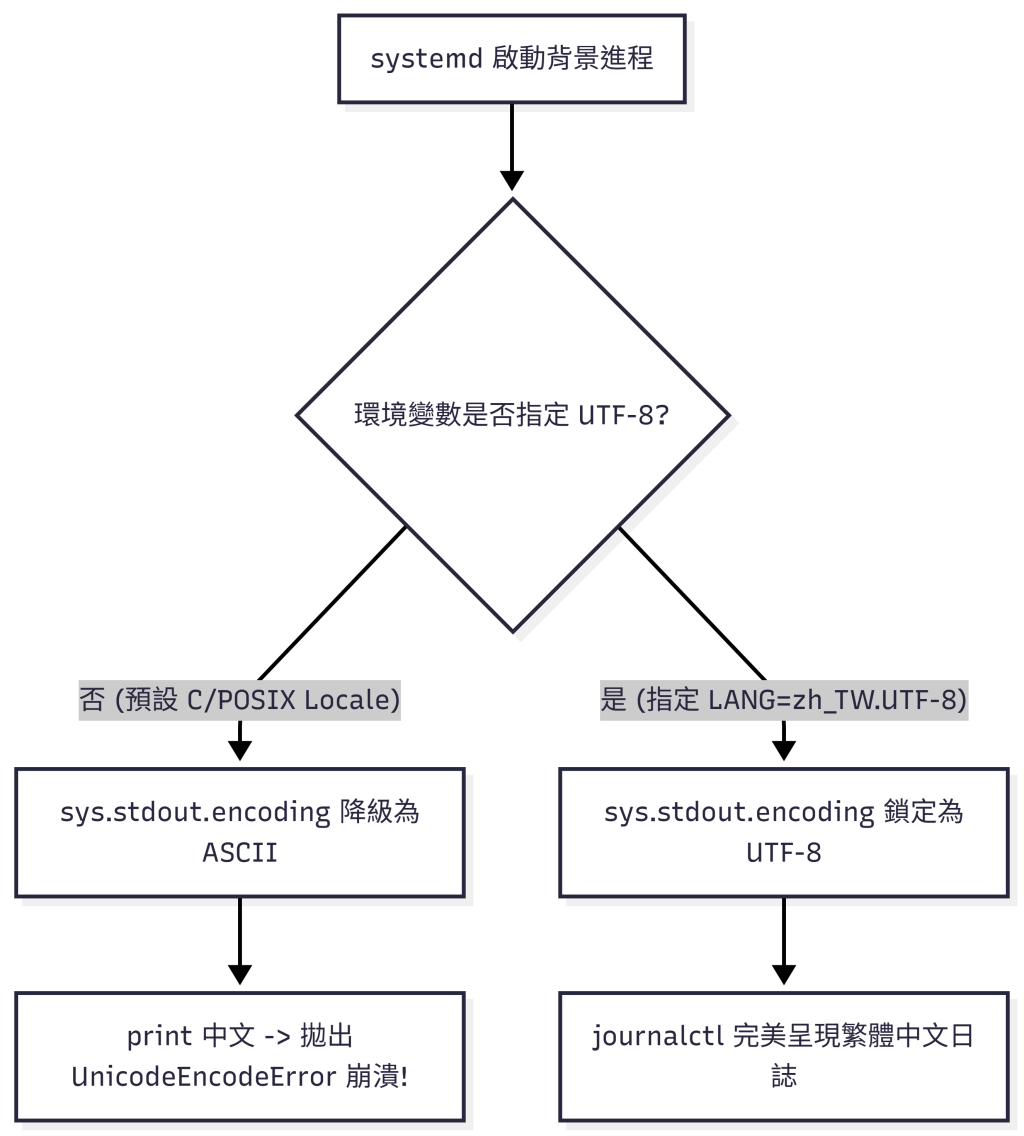
Python 為了提升 I/O 效能,當偵測到 stdout 不是接在互動式 TTY 終端機上(而是接在管道 Pipe 或檔案,即 systemd journal 接收端)時,會自動切換為 Block Buffering (通常為 4096 Bytes)。這就是為何 journalctl 無法即時看到 Log 的根本原因。
為了確保 EdgeNode 在生產環境中具備無人值守的穩定度,我們定義了標準的 Service 檔案與環境變數隔離。
datagateway.service 服務設定在 /etc/systemd/system/datagateway.service 中寫入以下設定:
[Unit]
Description=EdgeNode Industrial Gateway Controller
After=network-online.target local-fs.target systemd-sysctl.service
Wants=network-online.target

[Service]
Type=simple
User=root
WorkingDirectory=/opt/gateway

# 🔑 關鍵 1:鎖定 UTF-8 語系與禁用 Python I/O 緩衝
Environment="LANG=zh_TW.UTF-8"
Environment="LC_ALL=zh_TW.UTF-8"
Environment="PYTHONIOENCODING=utf-8"
Environment="PYTHONUNBUFFERED=1"

# 🔑 關鍵 2:前置修復腳本與主程式
ExecStartPre=/usr/bin/bash /opt/gateway/scripts/fix_storage.sh
ExecStart=/opt/gateway/venv/bin/python3 /opt/gateway/src/main.py

# 🔑 關鍵 3:穩健的重啟策略與崩潰間隔 (避免死循環)
Restart=always
RestartSec=5s
StartLimitIntervalSec=60s
StartLimitBurst=5

# 🔑 關鍵 4:資源上限限制 (防止 Memory Leak 壓垮樹莓派)
MemoryMax=400M
MemoryHigh=350M
CPUQuota=80%

# 標準輸出轉向至 journald
StandardOutput=journal
StandardError=journal

[Install]
WantedBy=multi-user.target
logger.py)除了 systemd 設定外,我們在程式碼內部實作防護,確保在各種極端環境下 print 皆不會崩潰:
import sys
import os
import logging

def setup_safe_logging():
    """設定安全日誌輸出,防止 Console 編碼崩潰"""
    # 確保標準輸出編碼為 UTF-8
    if sys.stdout.encoding.lower() != 'utf-8':
        try:
            sys.stdout.reconfigure(encoding='utf-8', errors='replace')
            sys.stderr.reconfigure(encoding='utf-8', errors='replace')
        except AttributeError:
            # Python < 3.7 備用相容邏輯
            import io
            sys.stdout = io.TextIOWrapper(sys.stdout.buffer, encoding='utf-8', errors='replace')
            sys.stderr = io.TextIOWrapper(sys.stderr.buffer, encoding='utf-8', errors='replace')

    logging.basicConfig(
        level=logging.INFO,
        format='%(asctime)s [%(levelname)s] %(message)s',
        datefmt='%Y-%m-%d %H:%M:%S'
    )

def safe_print(msg: str):
    """安全列印函式,過濾非安全字元"""
    try:
        print(msg, flush=True)
    except UnicodeEncodeError:
        clean_msg = msg.encode('ascii', errors='replace').decode('ascii')
        print(clean_msg, flush=True)
在 Day 28 中,我們克服了背景服務化最常見的「隱形死穴」:
systemd 預設的 POSIX 語系為何會撕裂中文日誌。PYTHONUNBUFFERED=1 的重要性:確保斷電前最後一刻的 Log 依然能即時寫入系統日誌。MemoryMax / StartLimitBurst):防範異常進程將樹莓派硬體資源耗盡。在下一篇 Day 29 中,我們將進行出貨前的終極挑戰:「實機壓力測試:如何寫一支 Fault Injection (錯誤注入) 腳本摧毀自己的系統?」!


 iThome鐵人賽
 看影片追技術