
大家好!歡迎來到「Build on Google AI」工程挑戰的第 21 天。
(我知道, Action Confirmations 又被推遲了!但在真實的軟體開發中,基礎架構的崩潰永遠是最高優先級的 P0 事故!)
昨天我們開心地讓 Agent 透過 Telegram 把腳本推播給 PM。於是,PM 興奮地輸入了一個超級需求:「幫我企劃一支 10 分鐘的品牌微電影,要分 50 個鏡頭!」
結果悲劇發生了。Agent 在背景拼命運算、驗證、自我修正,花了整整 3 分鐘才把完美的 Pydantic 物件生出來。但你的前端網頁和 Google Cloud Run API,早在 60 秒的時候就無情地切斷了連線,拋出了一個刺眼的 504 Gateway Timeout。
在企業級生成式 AI 應用中,「長時間推理 (Long Reasoning)」是常態,傳統的「同步 (Synchronous) HTTP Request-Response」架構根本扛不住。
今天,我們要結合 Day 20 的 Telegram 工具,把系統升級為「非同步 (Asynchronous) 事件驅動架構」。
第一步:非同步架構的核心思維
為了解決 Timeout,我們必須改變 API 的互動模式:
即時受理 (Acknowledge): 當前端或使用者發送請求時,伺服器立刻回傳 HTTP 202 Accepted 與一個 Task ID,在 1 秒內結束 HTTP 請求,絕不 Timeout。
背景處理 (Background Processing): 將 ADK Agent 的 invoke 任務丟到背景執行。
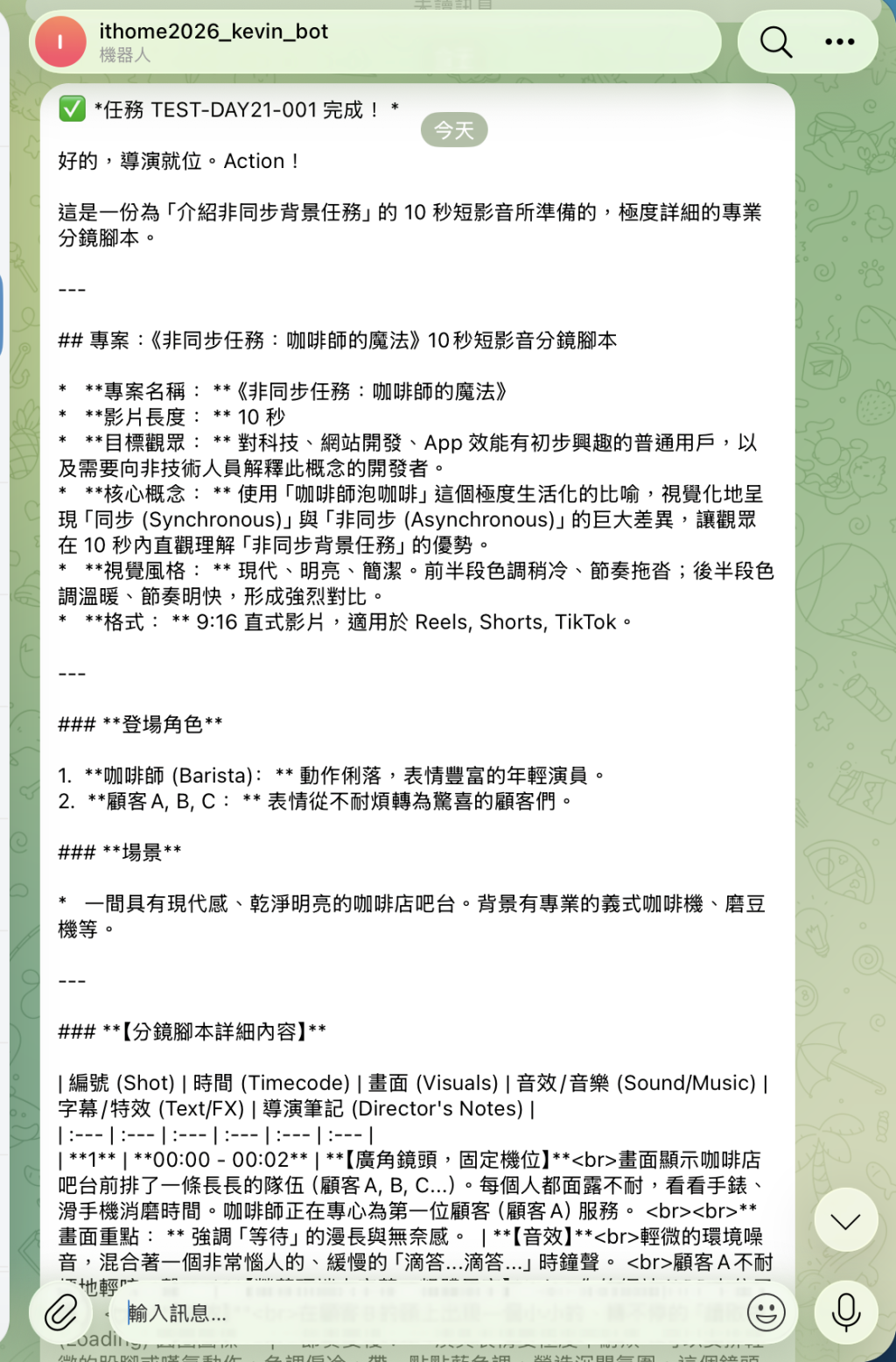
完成回呼 (Callback/Notification): 算完之後,利用 Day 20 寫好的 Telegram 工具,主動把結果「推播」給 PM。
💡 Cloud Run 工程師避坑指南:
預設情況下,Cloud Run 在 HTTP 請求結束後,會將容器的 CPU 限制為 0 (Throttling),導致背景任務停擺。如果你要在 Cloud Run 跑 FastAPI 的背景任務,務必在部署時開啟 CPU always allocated (CPU 隨時分配) 設定!
第二步:完整實作程式碼 (main.py)
我們將使用 Python 業界最流行的 FastAPI 框架,結合其內建的 BackgroundTasks,完美包裝我們的 Google ADK 工作流。
import os
import requests
import logging
from fastapi import FastAPI, BackgroundTasks, HTTPException
from pydantic import BaseModel
from tenacity import retry, retry_if_exception_type, wait_exponential, stop_after_attempt
from google.api_core.exceptions import ResourceExhausted
from google.adk import Agent

# 設定日誌
logging.basicConfig(level=logging.INFO, format='%(asctime)s - %(levelname)s - %(message)s')
logger = logging.getLogger(__name__)

# ==========================================
# [前置設定] 延續 Day 20 的 Telegram 工具
# ==========================================
TELEGRAM_BOT_TOKEN = os.getenv("TELEGRAM_BOT_TOKEN", "你的_BOT_TOKEN")
TELEGRAM_CHAT_ID = os.getenv("TELEGRAM_CHAT_ID", "你的_CHAT_ID")

def push_to_telegram(markdown_message: str):
    """將結果推播到 Telegram"""
    url = f"https://api.telegram.org/bot{TELEGRAM_BOT_TOKEN}/sendMessage"
    payload = {"chat_id": TELEGRAM_CHAT_ID, "text": markdown_message, "parse_mode": "Markdown"}
    try:
        requests.post(url, json=payload).raise_for_status()
        logger.info("📱 成功推播至 Telegram!")
    except Exception as e:
        logger.error(f"Telegram 推播失敗: {e}")

# ==========================================
# [ADK 核心] Agent 定義 (簡化版示意)
# ==========================================
director_agent = Agent(
    name="director_agent",
    model="gemini-2.5-pro",
    instruction="你是一位專業導演,請根據需求產出極度詳細的長篇分鏡腳本,並使用 Markdown 格式排版。"
)

@retry(
    retry=retry_if_exception_type(ResourceExhausted),
    wait=wait_exponential(multiplier=2, min=2, max=30),
    stop=stop_after_attempt(5)
)
def generate_long_script(prompt: str) -> str:
    """模擬耗時極長的 Agent 推理過程"""
    logger.info("開始執行耗時運算 (Agent Reasoning)...")
    response = director_agent.invoke(prompt)
    return response.text

# ==========================================
# 背景任務處理器 (The Worker)
# ==========================================
def agent_background_worker(task_id: str, prompt: str):
    """這個函式會在背景執行,無論跑 3 分鐘還是 10 分鐘都不會造成前端 Timeout"""
    try:
        logger.info(f"[Task {task_id}] 背景任務啟動...")

        # 1. 執行漫長的 Agent 運算與自我修正
        script_markdown = generate_long_script(prompt)

        # 2. 加上任務追蹤標籤
        final_message = f"✅ *任務 {task_id} 完成!*\n\n{script_markdown}"

        # 3. 呼叫 Telegram 工具主動通知人類
        push_to_telegram(final_message)
        logger.info(f"[Task {task_id}] 背景任務圓滿結束!")

    except Exception as e:
        error_msg = f"❌ *任務 {task_id} 失敗!*\n原因:`{e}`"
        push_to_telegram(error_msg)
        logger.error(f"[Task {task_id}] 執行失敗: {e}")

# ==========================================
# FastAPI 應用程式 (The Web API)
# ==========================================
app = FastAPI(title="ADK Async Agent API")

class ScriptRequest(BaseModel):
    task_id: str
    prompt: str

@app.post("/api/generate-script", status_code=202)
async def generate_script_async(request: ScriptRequest, background_tasks: BackgroundTasks):
    """
    非同步 API 端點:接收請求,掛載背景任務,然後【立刻回傳 202 Accepted】
    """
    # 將耗時的 Agent 任務交給 FastAPI 的 BackgroundTasks 處理
    background_tasks.add_task(agent_background_worker, request.task_id, request.prompt)

    # 在 0.1 秒內火速回覆前端,徹底消滅 504 Timeout!
    return {
        "status": "processing",
        "task_id": request.task_id,
        "message": "請求已受理!Agent 正在努力撰寫中,完成後將透過 Telegram 傳送給您。"
    }

# 若要在本地執行測試,請使用指令: uvicorn main:app --reload --port 8080
系統運作體驗 (User Experience)
現在,當 PM 在前端網頁按下「生成 10 分鐘腳本」時,系統的運作將無比絲滑:
第 0.1 秒: 網頁立刻彈出提示:「請求已受理!Agent 正在努力撰寫中,完成後將透過 Telegram 傳送給您。」PM 可以放心地關閉網頁,去喝杯咖啡。
第 1~3 分鐘: Agent 在 Cloud Run 的背景中瘋狂呼叫 Gemini API,進行 Map-Reduce、邏輯驗證與自我修正。
第 3 分半: PM 的手機「叮咚!」響起,Telegram 傳來了排版完美、包含 Emoji 的完整微電影分鏡表!
小結
「同步等待是開發者的直覺,非同步解耦才是架構師的素養。」
今天我們利用 FastAPI 與背景任務,完美解決了生成式 AI 應用中最常見的 Timeout 痛點,結合昨天的 Telegram 推播,實現了真正的「行動化非同步工作流」。



 iThome鐵人賽
 看影片追技術