
在後台系統中,很常會看到頁籤式介面,例如:
每個頁籤可能都對應不同的 Route:
export const routes: Routes = [
  {
    path: 'patients',
    component: PatientsComponent,
  },
  {
    path: 'registrations',
    component: RegistrationsComponent,
  },
  {
    path: 'settings',
    component: SettingsComponent,
  },
];
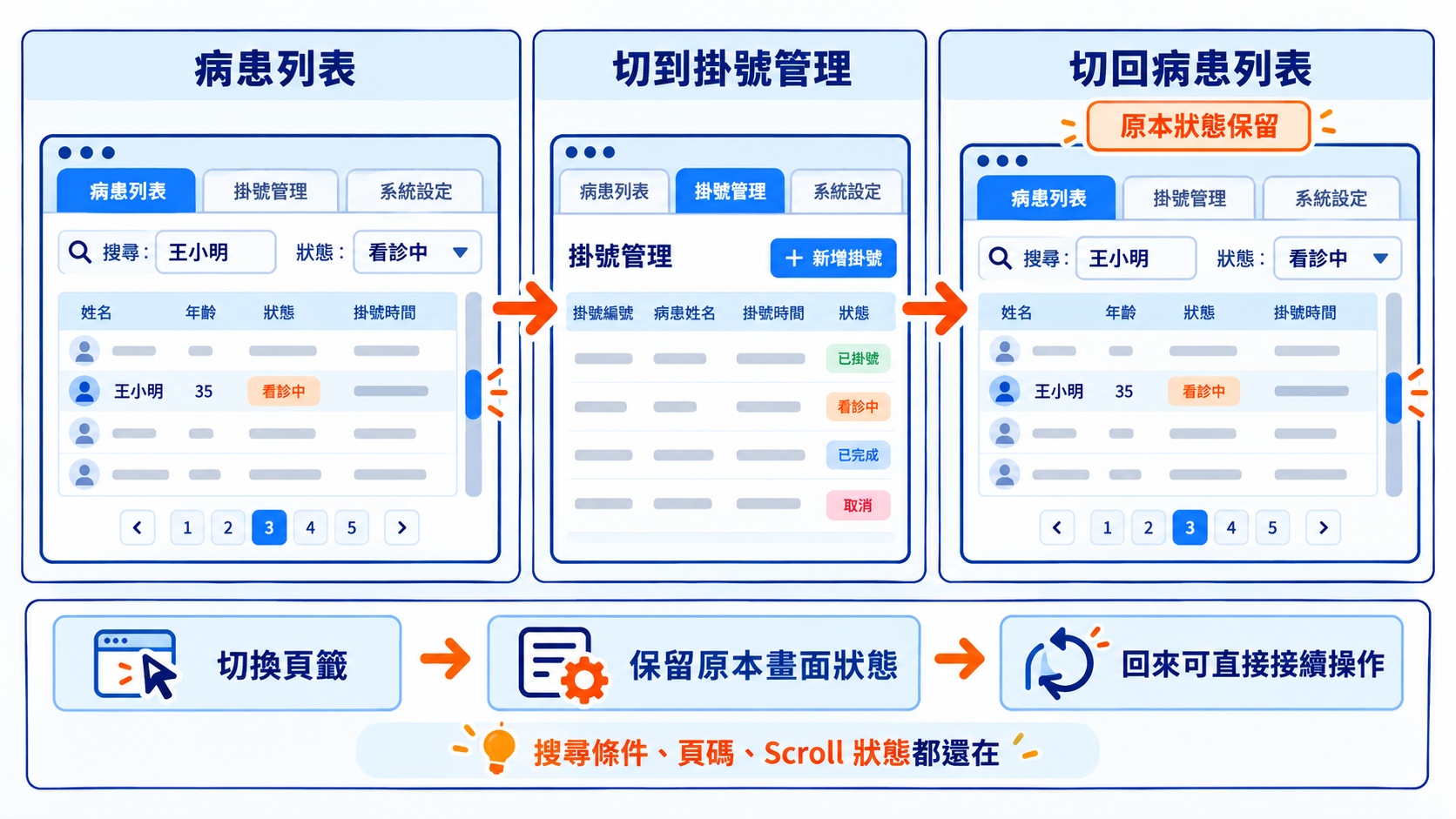
假設現在停在病患列表,而且已經操作了一段時間:
接著切到「掛號管理」,之後再切回「病患列表」。
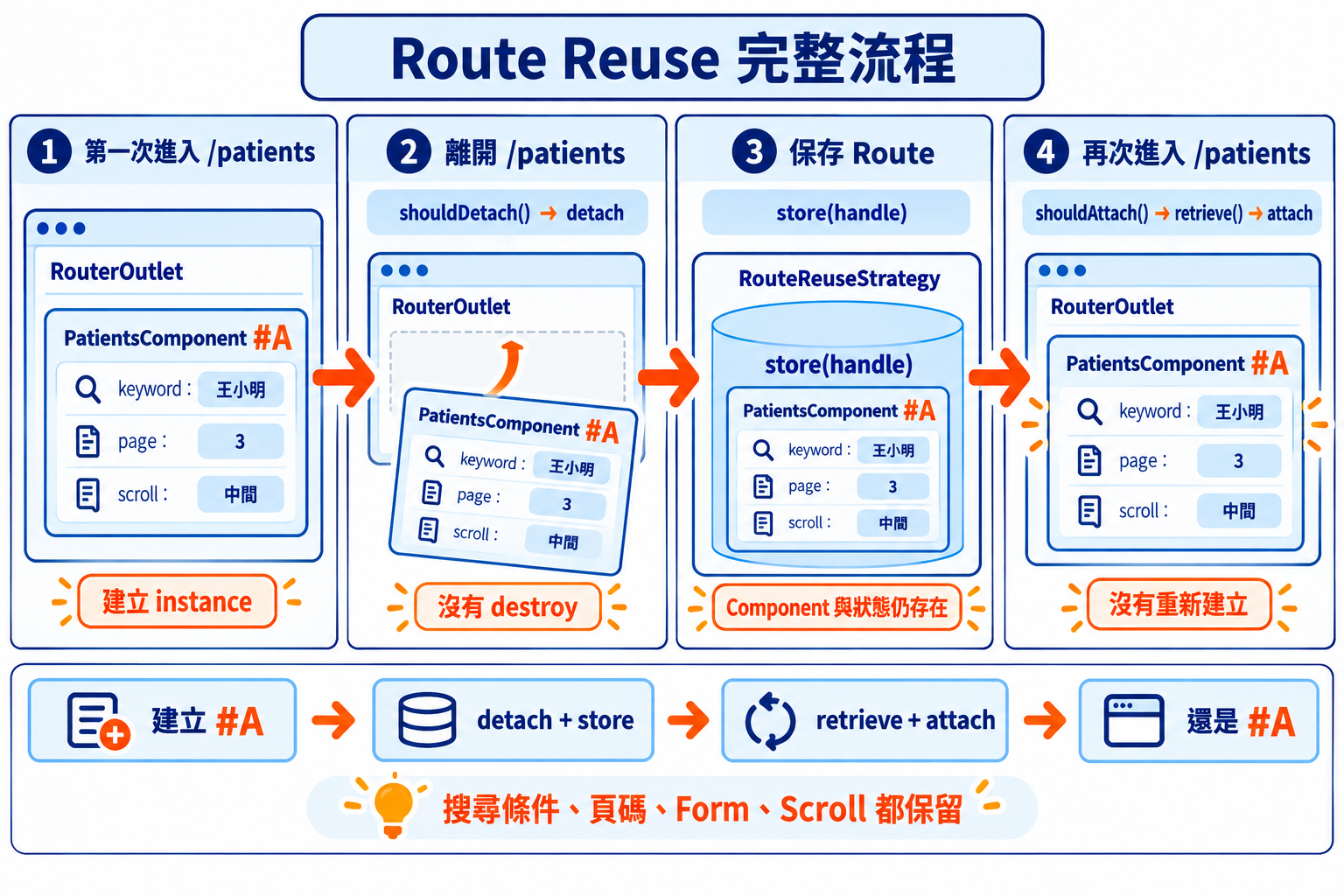
一般情況下,離開 /patients 時,PatientsComponent 會被銷毀;再次進入時,Angular 會建立新的 PatientsComponent。
如果搜尋條件、頁碼或其他畫面狀態只存在 Component 裡,這些資料也會跟著消失。
頁籤式操作通常希望使用者切到其他功能後,原本的頁面先保留下來,等切回來時可以接著操作。
這時就可以使用 RouteReuseStrategy。
在介紹自訂 RouteReuseStrategy 之前,要先知道 Angular Router 本來就有 Route Reuse 的概念。
例如:
{
  path: 'users/:id',
  component: UserComponent,
}
當路由從 /users/1 切換到 /users/2,雖然 URL 不同,但兩邊使用的是同一份 Route Config。
Angular 會繼續使用目前的 UserComponent,不會因為 id 改變就重新建立一個新的 Component。
BaseRouteReuseStrategy 預設會判斷:
future.routeConfig === curr.routeConfig
只要前後使用的是同一份 Route Config,就可以直接 reuse。
因此 Params、Query Params,甚至 URL # 後面的 Fragment 發生改變,都不代表 Component 一定會重新建立。
這篇要處理的是另一種情況:在 /patients、/registrations、/settings 這些不同 Route 之間切換時,希望其中某些頁面離開後仍然保留原本的 Component。
Angular Router 會透過 RouterOutlet 顯示目前 Route 對應的 Component:
<router-outlet />
一般離開 Route 時,目前的 Component 會被 deactivate 並銷毀。
如果希望保留這個 Route,可以改成 detach。Component 會先從 RouterOutlet 中取下,原本的 instance 則繼續保留。
之後再次進入這個 Route 時,再透過 attach 把保存的內容接回來。
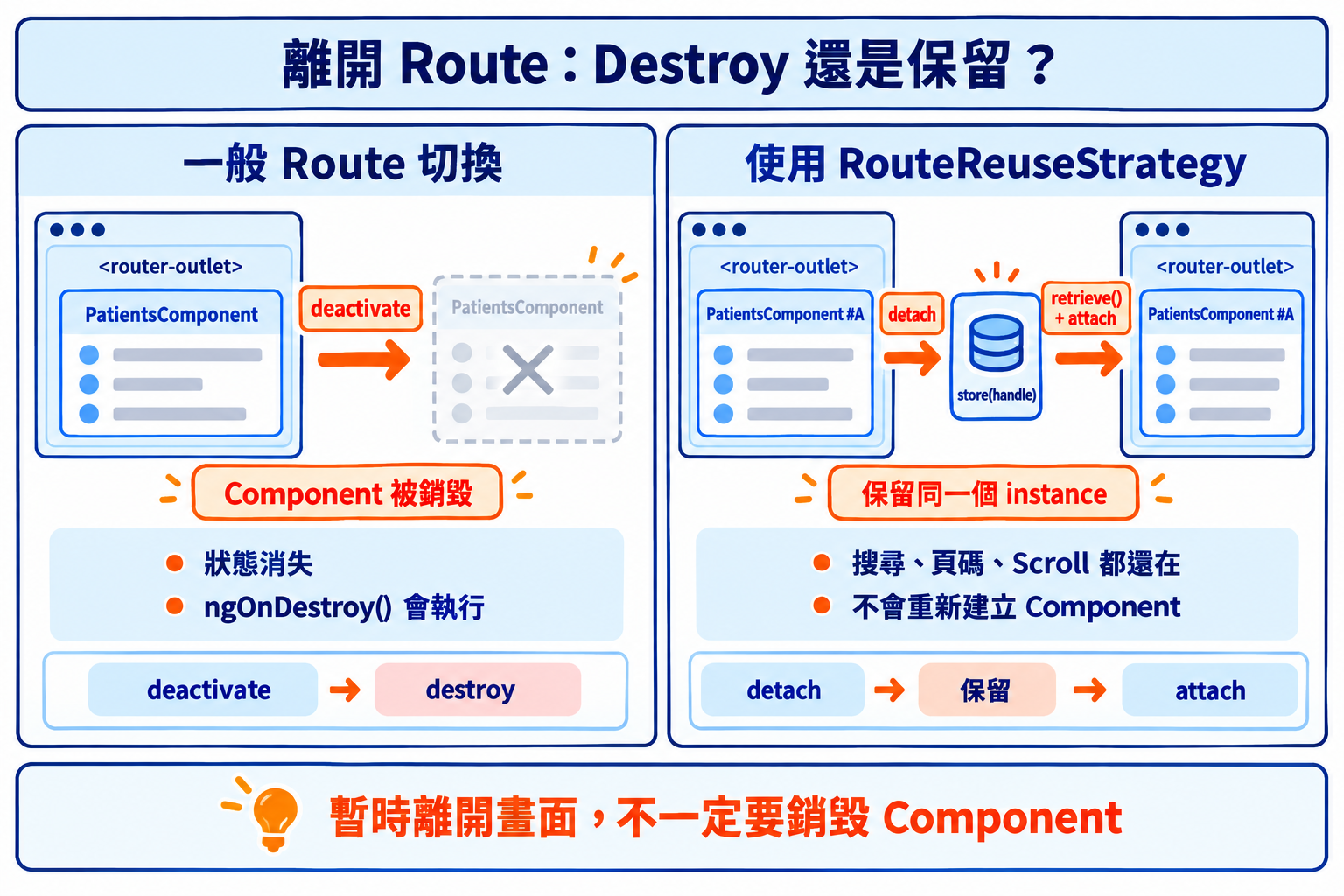
RouteReuseStrategy 就是用來決定哪些 Route 離開時直接銷毀,哪些 Route 要先保存起來。
Angular 的 View API 也有類似設計。
如果手上有一個 ComponentRef,可以先透過 indexOf() 找到這個 Component 對應的 View 在 Container 中的位置:
const index = viewContainerRef.indexOf(componentRef.hostView);
使用 remove() 會把這個 View 從 Container 中移除並銷毀:
viewContainerRef.remove(index);
如果只想暫時把 View 取下來,同時保留 View 本身,可以改用 detach():
const view = viewContainerRef.detach(index);
之後還能透過 insert() 把同一個 View 放回去:
viewContainerRef.insert(view);
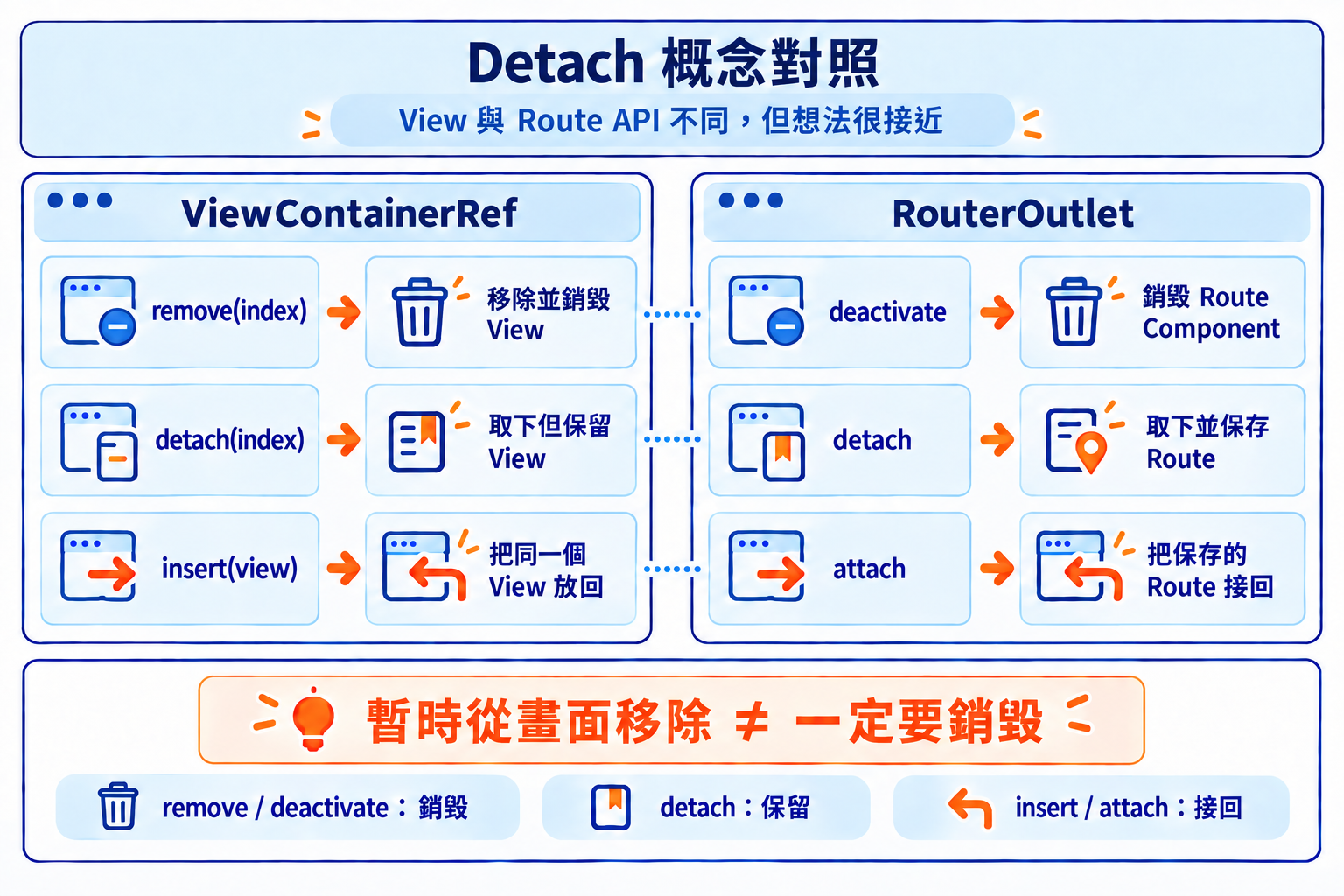
兩邊不是同一套 API,但概念很接近:
暫時從目前的位置移除,不代表一定要把它銷毀。
RouteReuseStrategy 主要會處理五個方法:
| 方法 | 用途 |
|---|---|
shouldDetach() |
離開時判斷要不要保存 |
store() |
保存 detach 下來的 Route |
shouldAttach() |
進入時檢查是否有之前保存的 Route |
retrieve() |
取得之前保存的 Route |
shouldReuseRoute() |
判斷前後 Route 是否直接沿用 |
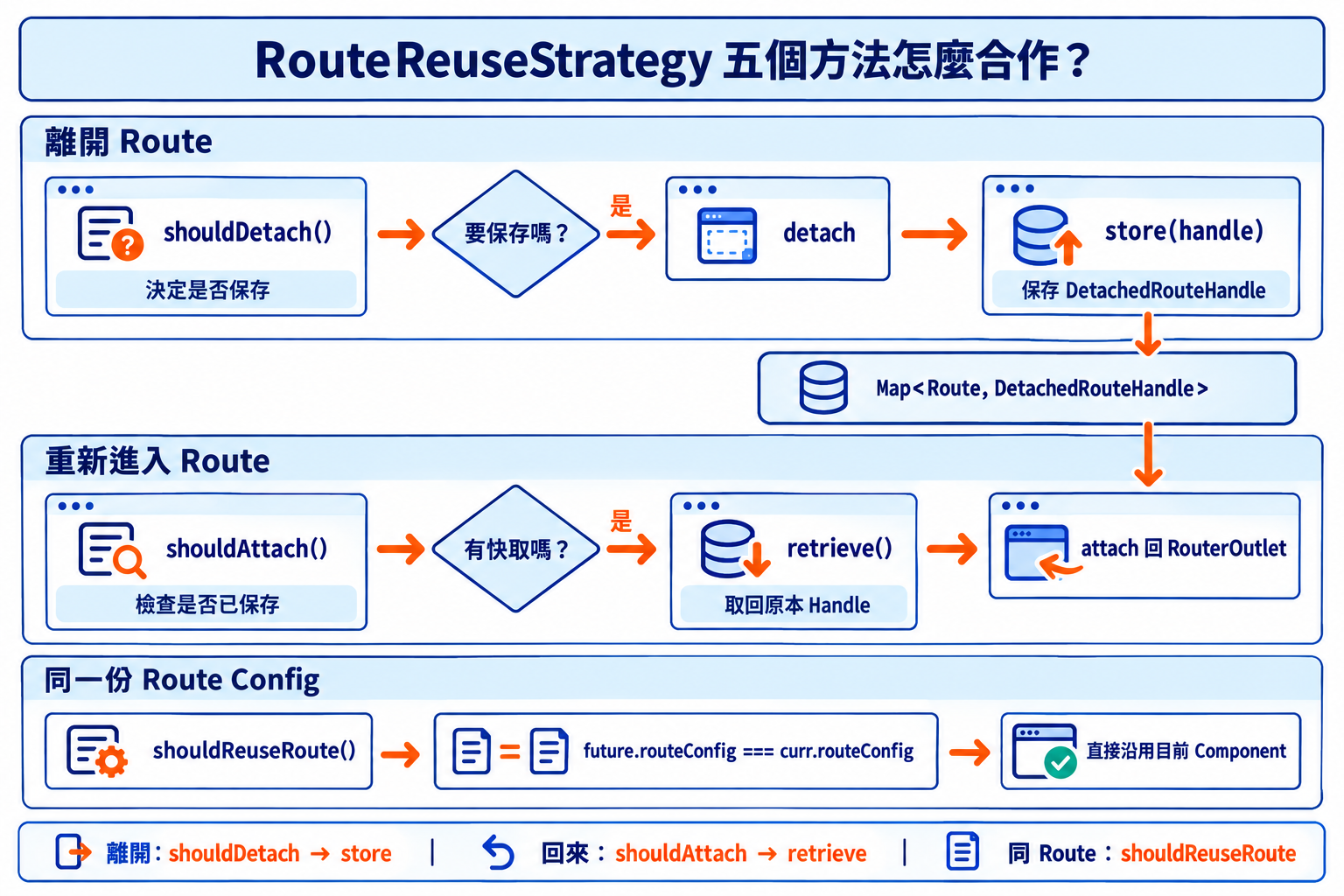
前四個方法可以分成兩組:
shouldDetach()、store():離開 Route 時判斷是否保存,並把內容存起來shouldAttach()、retrieve():再次進入時檢查是否有保存內容,並把它取回來shouldReuseRoute():負責判斷這次 Navigation 是否可以直接沿用目前的 Route。例如從 /users/1 切換到 /users/2 時,兩邊使用的是同一份 Route Config,因此可以直接 reuse。
通常只需要保留特定頁面,可以先透過 Route Data 標記:
export const routes: Routes = [
  {
    path: 'patients',
    component: PatientsComponent,
    data: {
      reuse: true,
    },
  },
  {
    path: 'registrations',
    component: RegistrationsComponent,
  },
  {
    path: 'settings',
    component: SettingsComponent,
  },
];
這裡只有 /patients 設定:
reuse: true
代表離開這個 Route 時,希望先把它保存下來。
接著建立自己的 Strategy。這裡先看整體結構,實際邏輯後面再一段一段拆開:
import { Injectable } from '@angular/core';
import {
  ActivatedRouteSnapshot,
  BaseRouteReuseStrategy,
  DetachedRouteHandle,
  Route,
} from '@angular/router';

@Injectable()
export class CustomRouteReuseStrategy
  extends BaseRouteReuseStrategy {

  private readonly maxCacheSize = 10;

  private readonly handles =
    new Map<Route, DetachedRouteHandle>();

  override shouldDetach(
    route: ActivatedRouteSnapshot
  ): boolean {
    // 判斷目前 Route 是否需要保存
  }

  override store(
    route: ActivatedRouteSnapshot,
    handle: DetachedRouteHandle | null
  ): void {
    // 保存 detach 下來的 Route
    // 超過 Cache 上限時,銷毀並移除最早保存的 Route
  }

  override shouldAttach(
    route: ActivatedRouteSnapshot
  ): boolean {
    // 判斷是否有之前保存的 Route
  }

  override retrieve(
    route: ActivatedRouteSnapshot
  ): DetachedRouteHandle | null {
    // 取得之前保存的 Route
  }
}
這裡直接繼承 BaseRouteReuseStrategy,可以沿用 Angular 原本的 shouldReuseRoute() 行為,不需要把預設規則重新寫一次。
先看 shouldDetach():
override shouldDetach(
  route: ActivatedRouteSnapshot
): boolean {
  return route.data['reuse'] === true;
}
當 Router 準備離開目前 Route 時,會透過 shouldDetach() 判斷這個頁面是否需要保存。
Route 如果設定:
data: {
  reuse: true,
}
就會回傳 true,讓這次離開改用 detach,保留原本的 Component。
detach 下來的內容接著會交給 store():
override store(
  route: ActivatedRouteSnapshot,
  handle: DetachedRouteHandle | null
): void {
  if (!handle || !route.routeConfig) {
    return;
  }

  this.handles.set(route.routeConfig, handle);
}
這裡使用 Map 保存 Route:
private readonly handles =
  new Map<Route, DetachedRouteHandle>();
route.routeConfig 是 Key,用來辨識這是哪一個 Route;handle 則是 Value,保存這個 Route detach 下來的內容。
所以:
this.handles.set(route.routeConfig, handle);
可以理解成把「這是哪個 Route」和「這個 Route 保存下來的內容」一起記錄起來。
Route 被 detach 之後,Component、View 和相關狀態都還存在。如果一直加入新的 Route,Cache 也會跟著增加。
這裡把上限設成:
private readonly maxCacheSize = 10;
當數量超過 10 個時,就移除最早加入的 Route:
if (this.handles.size > this.maxCacheSize) {
  const oldestRoute =
    this.handles.keys().next().value;

  if (oldestRoute) {
    const oldestHandle =
      this.handles.get(oldestRoute);

    if (oldestHandle) {
      destroyDetachedRouteHandle(oldestHandle);
    }

    this.handles.delete(oldestRoute);
  }
}
JavaScript 的 Map 會保留加入順序,所以:
this.handles.keys().next().value
可以取得最早加入的 Route。
當第 11 個 Route 加入時,就會淘汰第 1 個,形成簡單的 FIFO(First In, First Out)策略。
不過這裡不能只有:
this.handles.delete(oldestRoute);
因為這只是把 Handle 從 Map 裡移除,被 detach 的 Component 本身還沒有被銷毀。
Angular 21.1 開始提供 destroyDetachedRouteHandle(),可以在淘汰 Cache 時真正銷毀這個 Handle 對應的 Route 內容:
destroyDetachedRouteHandle(oldestHandle);
this.handles.delete(oldestRoute);
這樣被淘汰的 Component 才會正式進入 Destroy,綁定在 Component 生命週期上的 Cleanup 也會一起執行。
重新進入 /patients 時,Router 會先透過 shouldAttach() 檢查之前是否保存過:
override shouldAttach(
  route: ActivatedRouteSnapshot
): boolean {
  if (!route.routeConfig) {
    return false;
  }

  return this.handles.has(route.routeConfig);
}
如果 Map 裡有對應的 Route,就會回傳 true。
接著 retrieve() 會取回之前保存的 DetachedRouteHandle:
override retrieve(
  route: ActivatedRouteSnapshot
): DetachedRouteHandle | null {
  if (!route.routeConfig) {
    return null;
  }

  return this.handles.get(route.routeConfig) ?? null;
}
Router 取得 Handle 後,就能把原本保存的 Route attach 回 RouterOutlet。
因此重新進入 /patients 時,接回來的是原本的 PatientsComponent instance。
最後把自己的 Strategy 提供給 Angular:
import {
  provideRouter,
  RouteReuseStrategy,
} from '@angular/router';

export const appConfig: ApplicationConfig = {
  providers: [
    provideRouter(routes),
    {
      provide: RouteReuseStrategy,
      useClass: CustomRouteReuseStrategy,
    },
  ],
};
之後 Router 在處理 Navigation 時,就會使用這套規則。
可以在 PatientsComponent 裡加入:
import {
  Component,
  DestroyRef,
  inject,
} from '@angular/core';

@Component({
  selector: 'app-patients',
  template: `
    <p>Patients</p>
  `,
})
export class PatientsComponent {
  private destroyRef = inject(DestroyRef);

  constructor() {
    console.log('Patients created');

    this.destroyRef.onDestroy(() => {
      console.log('Patients destroyed');
    });
  }
}
第一次進入 /patients 時會看到:
Patients created
沒有使用 Route Reuse 時,離開 /patients 會銷毀 Component,因此會看到:
Patients destroyed
設定 reuse: true 後,離開 /patients 時 Component 會被 detach,這次切換不會觸發 DestroyRef.onDestroy()。
再次切回 /patients 時,也不會重新出現 Patients created,因為 Router 接回的是原本保存的 Component。
如果這個 Route 後來因為 FIFO 超過 Cache 上限而被淘汰,destroyDetachedRouteHandle() 會真正銷毀對應的 Component,這時才會看到:
Patients destroyed
RouterOutlet 本身也提供對應事件,可以直接觀察這些行為:
<router-outlet
  (activate)="onActivate($event)"
  (deactivate)="onDeactivate($event)"
  (attach)="onAttach($event)"
  (detach)="onDetach($event)"
/>
| Event | 發生時機 |
|---|---|
activate |
建立新的 Route Component |
deactivate |
Route Component 被銷毀 |
detach |
Route 被暫時取下並保存 |
attach |
保存的 Route 被重新接回 |
如果 Component 裡有:
effect()
平常可能會在 ngOnDestroy() 或 DestroyRef.onDestroy() 裡進行 Cleanup。
detach 會保留 Component,因此這些 Cleanup 會等到 Component 真正被 Destroy 時才執行。
effect() 也是一樣。如果 Effect 的生命週期和 Component 綁定,它會持續存在到 Component 被銷毀為止。
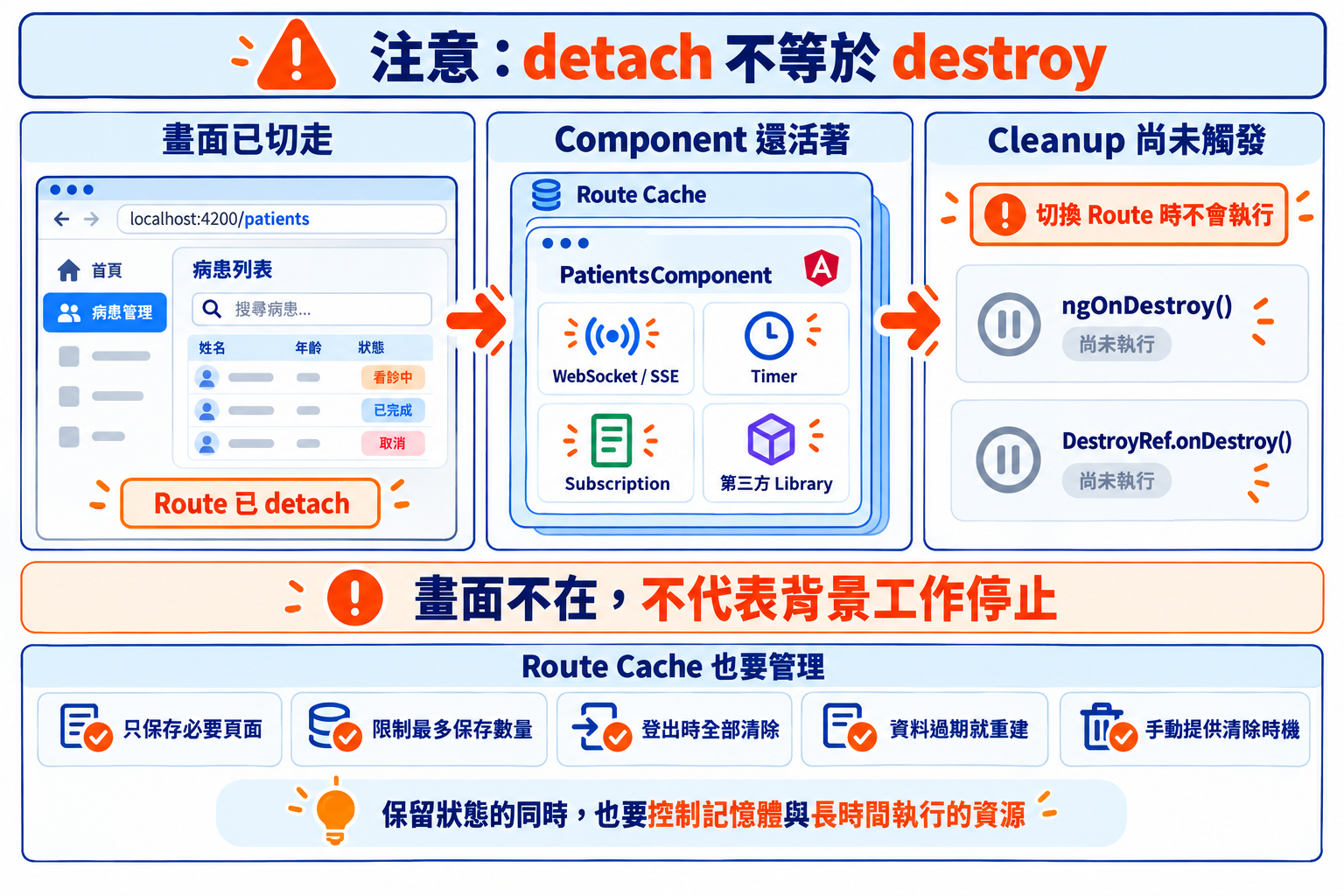
所以畫面雖然已經切走,某些背景工作仍然可能繼續執行。
這也是為什麼 Route Cache 需要清除策略。除了前面的 FIFO,也可以依照實際需求改成逾時清除、登出清除,或針對特定 Route 主動移除。
Angular Router 在切換不同 Route 時,原本的 Component 通常會被銷毀。透過 RouteReuseStrategy,可以讓指定 Route 改用 detach,把原本的 Component instance 暫時保存下來。
再次進入這個 Route 時,Router 會取回之前保存的 DetachedRouteHandle,再 attach 回 RouterOutlet。因為接回的是同一個 Component,原本的搜尋條件、頁碼、表單內容和其他操作狀態都能繼續使用。
Route Cache 也需要有上限。這篇利用 Map 的插入順序做 FIFO,最多保留 10 個 Route,第 11 個加入時就淘汰最早保存的內容。Angular 21.1 起可以透過 destroyDetachedRouteHandle() 把被淘汰的 Component 正確銷毀。
detach 期間 Component 仍然活著,與生命週期綁定的 Effect、連線或其他背景工作也可能持續執行,因此保存 Route 時,也要留意這些資源是否仍有必要繼續存在。
BaseRouteReuseStrategy 用 Route Config 判斷 reuse。destroyDetachedRouteHandle() 銷毀不再保存的 Handle。RouterOutlet 的 activate、deactivate、attach、detach 事件。remove() 會銷毀 View,detach() 取下後可再 insert()。


 iThome鐵人賽
 看影片追技術