

平常在 Angular 中,我們可以透過 providers 決定 Service 的注入範圍。例如註冊在 Root,讓整個 Application 共用同一個實例;或註冊在 Component,讓 Service 隨著 Component 一起建立與銷毀。
除了這兩種方式,Angular Router 也允許我們在 Route 中宣告 providers,讓特定路由及其子路由使用專屬的 Service。
不過,這裡有個容易忽略的問題:當使用者離開路由時,註冊在 Route Providers 的 Service,也會跟著銷毀嗎?
今天就透過一個簡單的範例觀察這個行為,再介紹 Angular 22.2 正式提供的 withAutoCleanupInjectors()。
首先建立一個 CounterService,透過 OnDestroy 觀察 Service 什麼時候被銷毀。
counter/counter.service.ts
import { Injectable, OnDestroy } from '@angular/core';

let nextId = 0;

@Injectable()
export class CounterService implements OnDestroy {
  readonly id = ++nextId;

  constructor() {
    console.log(`CounterService #${this.id} created`);
  }

  ngOnDestroy() {
    console.log(`CounterService #${this.id} destroyed`);
  }
}
這裡用 nextId 記錄 Service 建立的次數,每次建立新實例時,id 就會增加 1。即使 Service 被銷毀,nextId 也不會重設,方便區分不同的實例。
接著建立 Counter 頁面,注入剛才的 Service,並使用 input() 接收路由參數。
counter/counter.component.ts
import { Component, inject, input, OnDestroy } from '@angular/core';
import { CounterService } from './counter.service';

@Component({
  selector: 'app-counter',
  templateUrl: './counter.component.html',
  styleUrl: './counter.component.css',
})
export class CounterComponent implements OnDestroy {
  readonly id = input<string>();
  readonly counterService = inject(CounterService);

  constructor() {
    console.log('CounterComponent created');
  }

  ngOnDestroy() {
    console.log('CounterComponent destroyed');
  }
}
counter/counter.component.html
<h2>Counter 頁面</h2>

<p>Route ID:{{ id() }}</p>
<p>Service ID:{{ counterService.id }}</p>
畫面會顯示路由參數與 Service ID,方便觀察兩者是否會隨著路由切換而重新建立。
接著設定首頁與 Counter 頁面兩個路由。
app.routes.ts
import { Routes } from '@angular/router';
import { CounterService } from './counter/counter.service';

export const routes: Routes = [
  {
    path: '',
    loadComponent: () =>
      import('./home.component').then(m => m.HomeComponent),
  },
  {
    path: 'counter/:id',
    loadComponent: () =>
      import('./counter/counter.component').then(
        m => m.CounterComponent
      ),
    providers: [CounterService],
  },
];
這裡將 CounterService 註冊在 counter/:id 路由的 providers,而不是 Root 或 Component。
Angular 的 DI 主要分成兩種 Injector 階層:
EnvironmentInjector:管理特定環境的依賴,包含 Root Injector 與 Route Injector。
providedIn: 'root' 註冊。providers 註冊。ElementInjector:管理 Component 與 Directive 的依賴,例如透過 Component 的 providers 註冊 Service。這次使用的 Route Providers 屬於 EnvironmentInjector 階層。當 Router 需要這個路由提供的依賴時,就會建立對應的 Injector,管理其中的 Service。
接著在 app.html 加入導覽連結:
<nav>
  <a routerLink="/">首頁</a>
  |
  <a routerLink="/counter/1">Counter 1</a>
  |
  <a routerLink="/counter/2">Counter 2</a>
</nav>

<router-outlet />
app.ts 則引入 RouterLink 與 RouterOutlet:
import { Component } from '@angular/core';
import { RouterLink, RouterOutlet } from '@angular/router';

@Component({
  selector: 'app-root',
  imports: [RouterLink, RouterOutlet],
  templateUrl: './app.html',
  styleUrl: './app.css',
})
export class App {}
首頁只需要簡單的內容,方便切換路由。
home.component.ts
import { Component } from '@angular/core';

@Component({
  selector: 'app-home',
  template: `<h2>首頁</h2>`,
})
export class HomeComponent {}
設定 Router,先不加入自動清理功能。
app.config.ts
import {
  ApplicationConfig,
  provideBrowserGlobalErrorListeners,
} from '@angular/core';

import {
  provideRouter,
  withComponentInputBinding,
} from '@angular/router';

import { routes } from './app.routes';

export const appConfig: ApplicationConfig = {
  providers: [
    provideBrowserGlobalErrorListeners(),
    provideRouter(
      routes,
      withComponentInputBinding()
    ),
  ],
};
這裡使用 withComponentInputBinding(),讓 Router 自動將 :id 綁定到 Component 的 id Input,不需要另外透過 ActivatedRoute 監聽參數。
現在打開瀏覽器的 Console,從首頁切換到 Counter 1。
第一次進入時,會看到:
CounterService #1 created
CounterComponent created
畫面顯示:
Route ID:1
Service ID:1
接著切換到 Counter 2:
Route ID:2
Service ID:1
這時不會有新的 created 或 destroyed 訊息,因為兩個網址使用相同的 Route Configuration,Angular 預設會重用 Component 與 Service。
再返回首頁:
CounterComponent destroyed
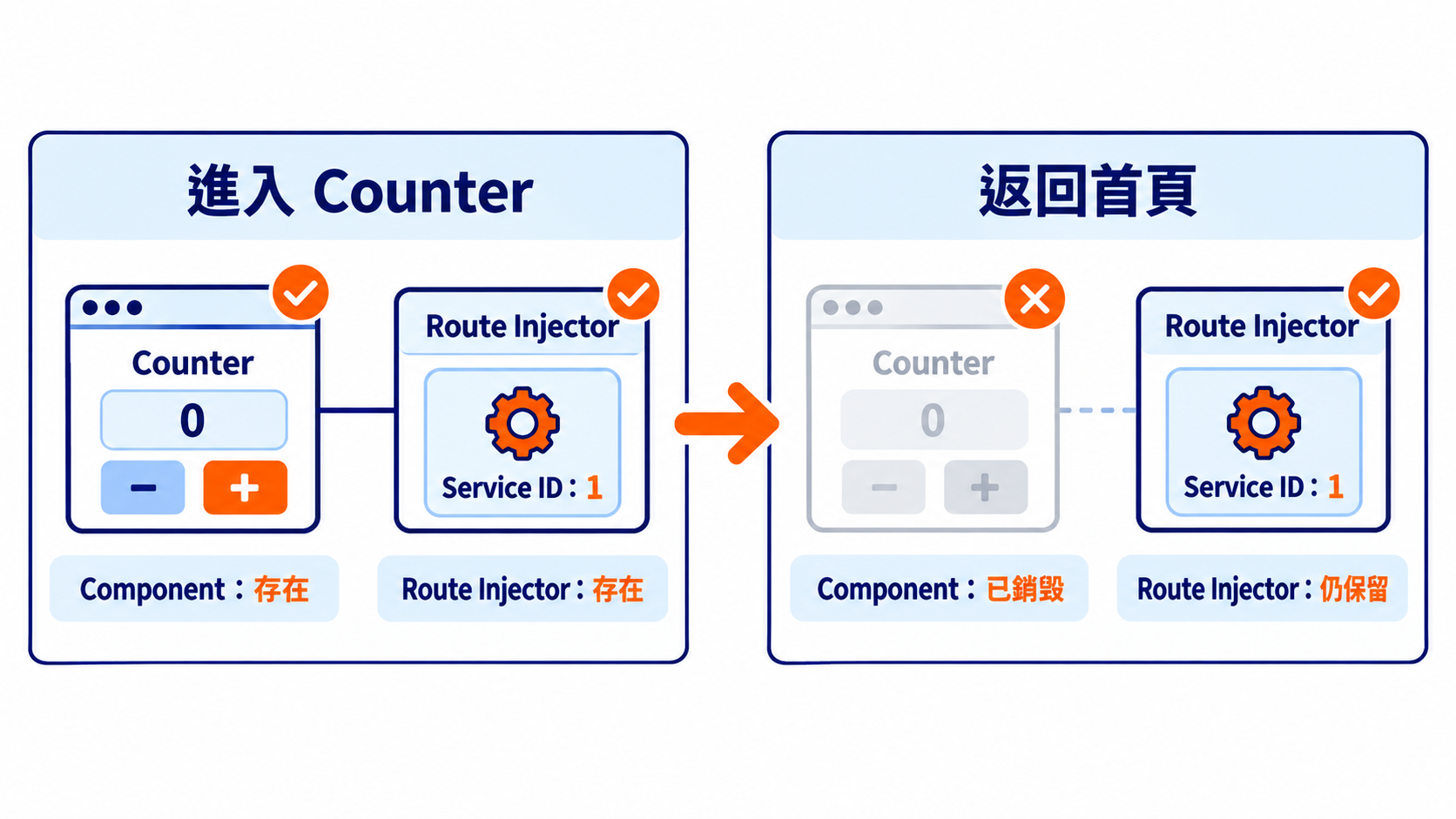
這時會發現,Component 已經銷毀,但 CounterService 並沒有執行 ngOnDestroy()。
如果再次進入 Counter 1,畫面仍然顯示 Service ID:1,也不會再次輸出 CounterService created。
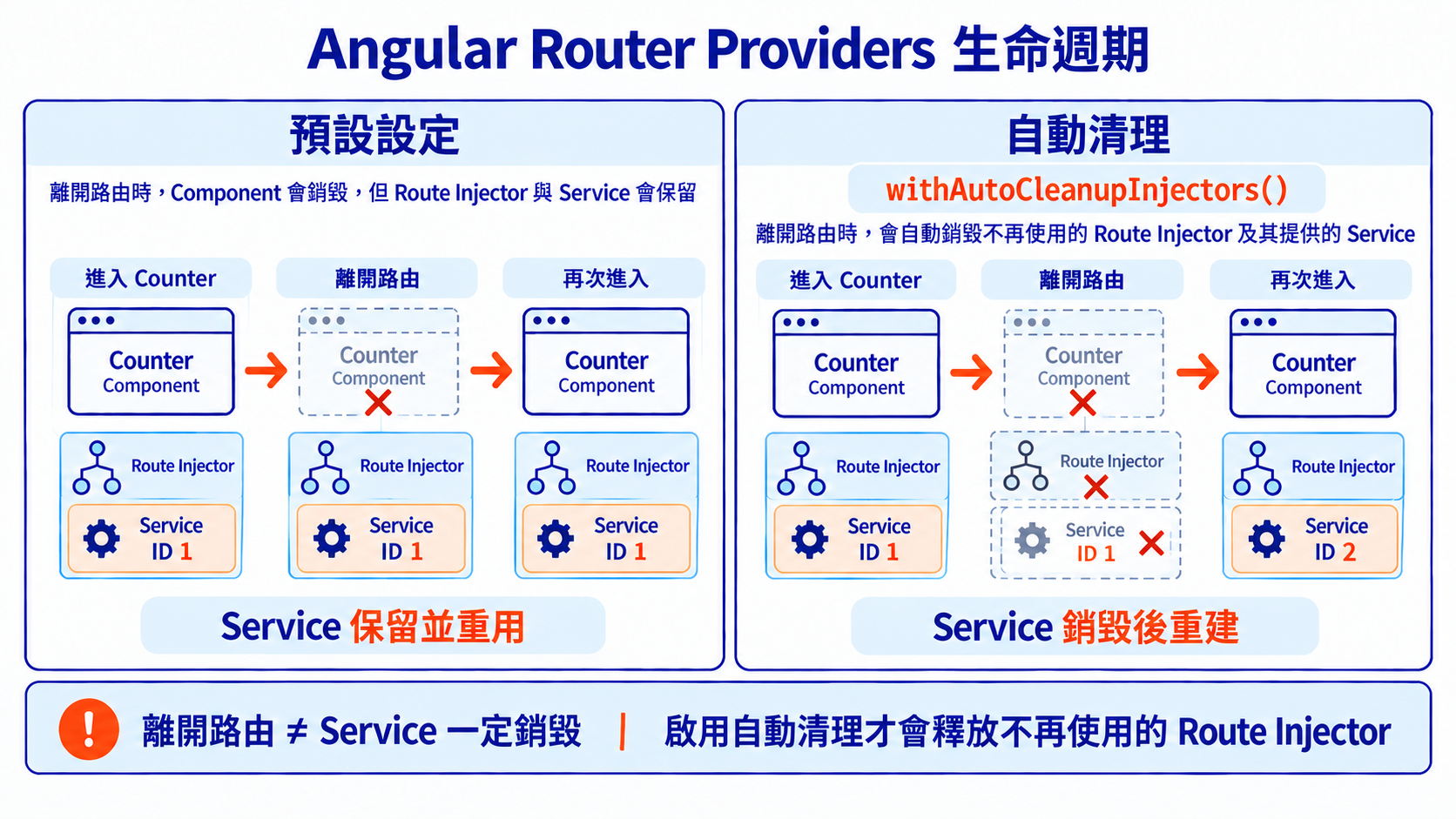
這是因為 Route Providers 所建立的 EnvironmentInjector,預設不會因為離開路由就立即銷毀。當再次進入相同的 Route Configuration 時,仍然會使用原本的 Service 實例。
因此,Component 與 Route Provider 有各自的生命週期,即使 Component 已經銷毀,Service 仍然可能存在。
如果希望離開路由後,能自動清理不再使用的 Route Injector,Angular Router 提供了 withAutoCleanupInjectors()。
這個功能在 Angular 22.2 成為 Stable API,只需要在 provideRouter() 加入設定即可。
app.config.ts
import {
  ApplicationConfig,
  provideBrowserGlobalErrorListeners,
} from '@angular/core';

import {
  provideRouter,
  withComponentInputBinding,
  withAutoCleanupInjectors,
} from '@angular/router';

import { routes } from './app.routes';

export const appConfig: ApplicationConfig = {
  providers: [
    provideBrowserGlobalErrorListeners(),
    provideRouter(
      routes,
      withComponentInputBinding(),
      withAutoCleanupInjectors(),
    ),
  ],
};
原本的 Route、Component 和 Service 都不用修改。
重新整理頁面,再從首頁進入 Counter 1。
CounterService #1 created
CounterComponent created
接著切換到 Counter 2,畫面上的 Route ID 會變成 2,但 Service ID 仍然是 1,Component 和 Service 都沒有重新建立。
這次返回首頁時,Console 會顯示:
CounterComponent destroyed
CounterService #1 destroyed
除了 Component,CounterService 的 ngOnDestroy() 也執行了。
如果再次進入 Counter 1:
CounterService #2 created
CounterComponent created
畫面上的 Service ID 也會變成 2,表示 Router 重新建立了 Injector 與 Service 實例。
比較兩種設定的差異:
| 行為 | 預設設定 | 啟用自動清理 |
|---|---|---|
| 離開路由時銷毀 Component | 是 | 是 |
| 清理不再使用的 Route Injector | 不會自動清理 | 會自動清理 |
| 再次進入相同路由 | 重用原本的 Service | 建立新的 Service |
Service ngOnDestroy() |
不會因離開路由而觸發 | Injector 銷毀時觸發 |
不過,withAutoCleanupInjectors() 並不是每次切換路由都會銷毀所有 Service。Router 會在導航完成後,檢查哪些 Route Injector 已經不再使用,再配合 RouteReuseStrategy 決定是否清理。
在 Day 23 已經介紹過 RouteReuseStrategy 的基本用法,這裡補充它與 withAutoCleanupInjectors() 的關係。
當 Router 啟用自動清理後,除了目前正在使用的路由,也要考慮被 RouteReuseStrategy 保存的路由。如果 Component 只是暫時被 detach,對應的 Injector 也需要保留,否則之後重新 attach 時可能發生問題。
為了配合這個機制,RouteReuseStrategy 另外提供兩個方法:
shouldDestroyInjector():決定 Route Injector 是否允許被銷毀。retrieveStoredRouteHandles():回傳目前保存的 DetachedRouteHandle,讓 Router 知道哪些路由仍然需要保留。如果使用預設的 RouteReuseStrategy,或繼承 BaseRouteReuseStrategy,shouldDestroyInjector() 已經有預設行為。如果自訂策略會保存 DetachedRouteHandle,則需要透過 retrieveStoredRouteHandles() 提供目前保存的內容,避免對應的 Injector 被提前清理。
前面的 Counter 範例也能看到,即使啟用了 withAutoCleanupInjectors(),從 /counter/1 切換到 /counter/2 時,Component 與 Service 仍然會被重用。
這是因為兩個網址使用相同的 Route Configuration,Angular 會直接沿用目前的 Component,不需要透過 detach / attach 保存與還原頁面。由於 Route Injector 仍然在使用中,因此也不會被自動清理。
withAutoCleanupInjectors() 只會清理不再使用的 Route Injector,不會影響 Root Injector。
例如,前面的 CounterService 沒有設定 providedIn: 'root',而是透過 Route Providers 註冊:
{
  path: 'counter/:id',
  providers: [CounterService],
}
當 Route Injector 被銷毀時,CounterService 也會跟著銷毀。
但如果改成在 Root 註冊:
@Injectable({
  providedIn: 'root',
})
export class CounterService {}
而且沒有在 Route Providers 另外註冊,就會使用 Root Injector 提供的實例。即使離開 Counter 頁面,Service 也不會因此被銷毀。
如果兩邊都有註冊,Angular 會優先使用 Route Providers 提供的實例,而 Root 的實例仍由 Root Injector 管理,兩者有各自的生命週期。
不知不覺,今年的鐵人賽也來到最後一天了!到了真正完賽的這一刻,心裡還是覺得很感動。
今年其實猶豫了很久才決定參賽。一方面擔心自己沒辦法好好表達想分享的內容,另一方面也是因為過去沒有真正挑戰過連續 30 天日更。就這樣一路猶豫到報名截止前的 23:50,才終於下定決心,開始思考這次要寫什麼主題。
之所以還是決定參加,是因為我希望自己每一年都能有所進步,哪怕只是一點點也好。同時也想藉由這次機會,重新研究那些過去沒能完全理解的觀念,看看經過 30 天的累積,自己能走到哪裡。
說到 Angular Signal,其實前年就曾經讀過 Connie 分享的 Signal 系列文章。當時從文章中發現許多自己過去沒有深入思考的問題,也試著一篇篇跟著閱讀、動手實作,並將練習整理在 StackBlitz 上。
從 Angular 推出 Signal 開始,我就一直很想更深入了解它,只是當時還有許多不太理解的地方。Connie 的文章讓我學到了不少,也讓我更有動力繼續探索這個主題。如果大家對 Angular Signal 有興趣,也很推薦去看看她的系列文章!
今年除了鐵人賽,也嘗試了許多過去很想做的事情。從擔任講師、站上舞台分享,到和一群熱愛程式技術與研討會的夥伴一起籌辦 Vconf,每一件事情都讓我很期待,也希望自己能做到最好。
但也因為太想把每件事情做好,有時候反而給了自己很大的壓力。甚至曾經因為覺得文章寫得不夠好,一邊修改、一邊難過到默默掉眼淚。這一年,我一直試著在這些事情之間找到自己的節奏,也慢慢體會到什麼是 「有限度的完美」。
我還是希望自己能把事情做好,也不想因為時間有限就隨便應付。但有時候,真的需要接受自己的能力和時間都有極限。對我來說,有限度的完美不是降低標準,而是在自己能做到的範圍內盡力,也學著接受那些暫時還不夠好的地方。
我想,這也是今年很重要的一個收穫吧。即使還有很多不滿意的地方,回頭看看,還是能發現自己比過去又多走了一小段路。
另外,也想趁最後一天小小宣傳一下!今年很開心能以開發人員的身分參與 Vconf Taiwan 2026,和夥伴們一起完成這次的 官方網站。研討會就在 10 月 17 日,如果大家對 Vue 或前端技術有興趣,也很歡迎來現場一起交流!
最後的最後,真的很感謝這 30 天願意閱讀文章、給予鼓勵,以及陪伴我走到這裡的每一個人。
當然,也想謝謝自己,總是允許自己那麼任性。明明知道會很辛苦,卻還是願意為了那些想做的事情,再努力試試看。
希望未來回頭看這 30 天時,記得的不只是每天趕著完成文章的日子,還有那個即使不太有把握,仍然願意鼓起勇氣挑戰的自己。


恭喜完賽,我一開始也是擔心寫不完、斷賽,但最後還是逼自己參加,雖然每天都是衝刺到最後一刻,但過程中的收穫還是挺充實,光是打字思考都順了很多哈哈
有機會再一起來做好玩的東西!
完全能理解這種心情!!雖然過程中難免會有壓力,但每次結束後回頭看看,都會覺得很感謝當初有堅持下來的自己!!!
也期待之後有機會一起做更多好玩的東西!!

很棒的博文,我很喜歡。
近年來,我將重心從 Angular 轉向了 AI 和 Firebase。看到大家在 iThome Ironman 挑戰賽中撰寫高品質的 Angular 博文,我感到非常興奮。
謝謝你的喜歡!!這次鐵人賽也讓我重新深入研究 Angular,發現這幾年真的有不少令人興奮的變化。很開心能透過文章和大家交流,也期待未來能有機會一起聊聊 AI 和 Firebase 相關的技術!
我需要花時間研究一下 Angular 的最新功能。

滿大街都是 React 的年代還能看到 Angular 的技術文真是難能可貴 
賀完賽!

耶~感謝 Shin。因為 Angular 很少,所以一直有想寫這個主題 ❤️

恭喜安東順利完賽🎉🥳㊗🍾👏
在這麼忙的期間,還能順利完成真的很不簡單
其實平時可以感受得到你對自己的要求很高,但我想跟你說,你超棒的!!!
趁著完賽的空檔稍微休息一下吧,有時候說不定會帶來意外的啟發
最後也感謝你的鼓勵,讓我下定決心報名參加(雖然拖了一年就是了XD
也期許我們都能有所成長,朝各自的目標邁進🏃
去!去!去。台灣人會這樣說嗎?
好的,這段時間我會好好休息充電!!
希望我們都可以離我們最終理想的目標更近一步

 iThome鐵人賽
 看影片追技術