

在開發 NestJS 時,為了統一 API 回傳格式,團隊通常會註冊全域 Interceptor,建立一致的回應結構。原本 API 都依循這個規則,直到某次為了處理自訂 Header 或 Cookie,我們在 Controller 中使用了原生 Express 的 @Res()。
資料順利傳送,但這時前端卻回報說:
「這支 API 回傳的資料結構跑掉了!」
有些人遇到這個問題時,可能會誤會:
「是不是只要使用了 @Res(),NestJS 的 Interceptor 就會被強制停用?」
但實際上並非如此。這篇文章,我們將拆解 @Res() 出現時,底層的回應機制究竟發生了什麼變化。
為了觀察這個問題,我們先建立一個全域 EnvelopeInterceptor,在進入點加上一個自訂 Header,作為驗證 Interceptor 是否真的有被觸發執行的觀察點,並透過 RxJS 的 map() 將 Handler 回傳的值包進 data 中:
import {
  CallHandler,
  ExecutionContext,
  Injectable,
  NestInterceptor,
} from '@nestjs/common';
import type { Response } from 'express';
import { Observable } from 'rxjs';
import { map } from 'rxjs/operators';

export interface ResponseEnvelope<T> {
  data: T;
}

@Injectable()
export class EnvelopeInterceptor<T>
  implements NestInterceptor<T, ResponseEnvelope<T>>
{
  intercept(
    context: ExecutionContext,
    next: CallHandler<T>,
  ): Observable<ResponseEnvelope<T>> {
    const response = context.switchToHttp().getResponse<Response>();

    // 觀察點:透過 Header 確認 Interceptor 是否有執行
    response.setHeader('x-envelope-interceptor', 'entered');

    return next.handle().pipe(
      map((data) => {
        console.log('interceptor after:', data);

        return { data };
      }),
    );
  }
}
接著透過 APP_INTERCEPTOR 進行全域註冊:
@Module({
  controllers: [PostsController],
  providers: [
    {
      provide: APP_INTERCEPTOR,
      useClass: EnvelopeInterceptor,
    },
  ],
})
export class AppModule {}
為了方便比較,下面幾個端點都會回傳同一筆資料:
export const DEMO_POST: Post = {
  id: 24,
  title: '第一篇文章',
};
我們先看標準的 API 寫法:
@Get()
getPost(): Post {
  return DEMO_POST;
}
發送請求:
GET /posts
用戶端收到的 Response Body 為:
{
  "data": {
    "id": 24,
    "title": "第一篇文章"
  }
}
這完全符合預期。Controller 只負責 return 資料,後續的 Interceptor 順利完成加工,最後由 NestJS 自動寫回 HTTP 回應。
@Res() 模式接著,我們改用注入 @Res() 的寫法進行對照:
@Get('manual')
getPostWithExpressResponse(@Res() response: Response): Post {
  response.json(DEMO_POST);

  // 刻意保留 return,觀察 Interceptor 能否取得 Handler 結果
  return DEMO_POST;
}
發送請求:
GET /posts/manual
用戶端收到的 Response Body 卻是:
{
  "id": 24,
  "title": "第一篇文章"
}
原本的 data 包裝確實消失了。但如果檢查回應標頭(Response Header),會發現:
x-envelope-interceptor: entered
這個 Header 標記 依然存在!
這證實了 Interceptor 確實有執行,而 map() 中的 console.log() 則能進一步確認 Handler 的回傳值仍然有流回 Interceptor。
既然 Interceptor 有執行、資料也有轉換,為什麼最終送到用戶端手上的卻是未經包裝的原始資料?
@Res() 讓 Nest 略過標準回應處理問題的關鍵不在於 Interceptor 有沒有執行,而是最終是由「誰」負責把 HTTP 回應送出去。
在沒有 @Res() 的情況下,Controller 的 return 並不會直接寫入 HTTP 回應,而是把控制權交還給 NestJS:
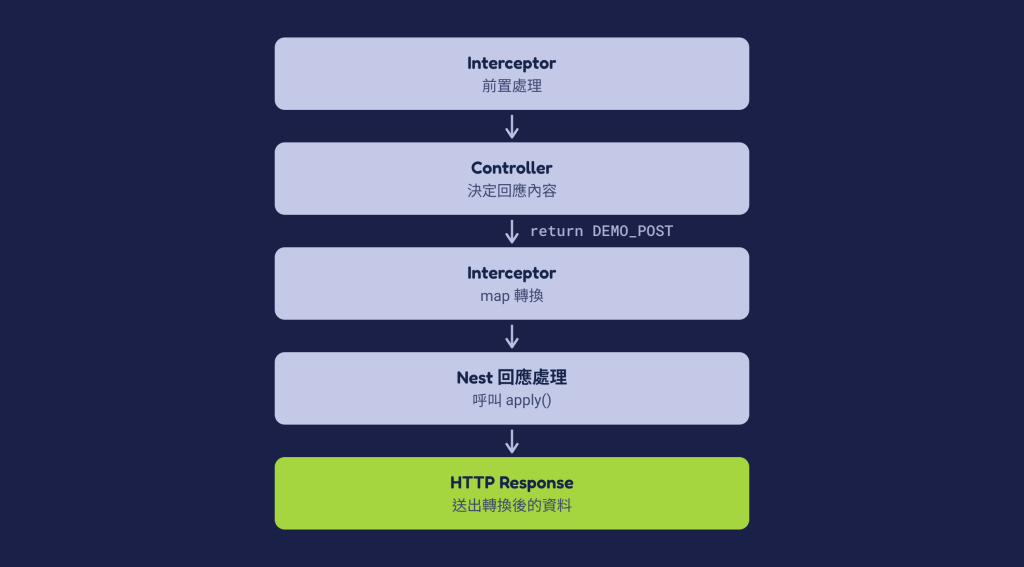
Controller 決定「回應內容是什麼」,NestJS 負責「最終如何發送」。
當你在 Controller 參數注入了 @Res() 並且主動呼叫 response.json() 時,這個分工流程就改變了:
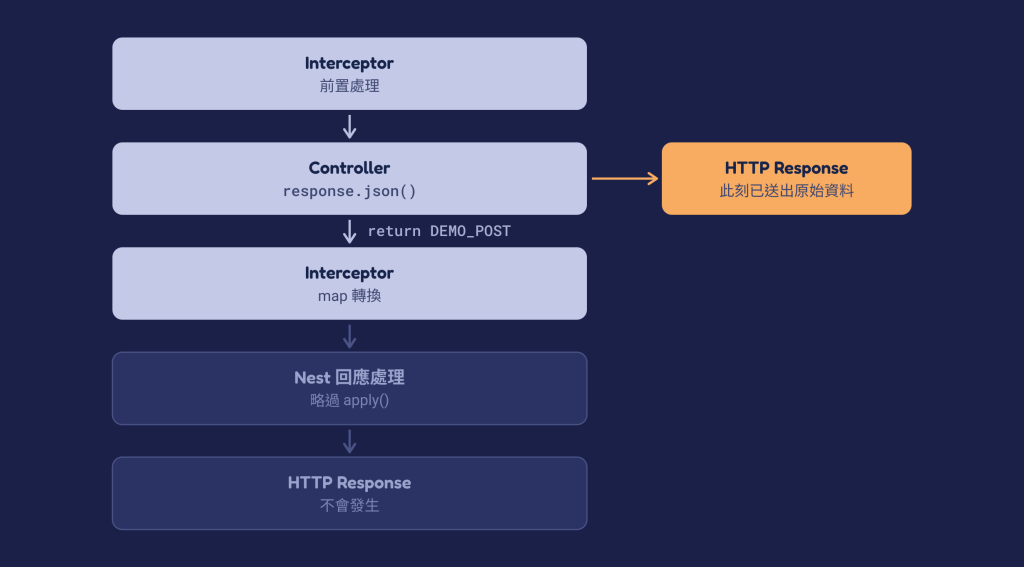
當 response.json() 被呼叫的那一刻,底層的 Express 就已經將 HTTP Response Body 發送給用戶端。雖然 Interceptor 隨後依然從 return 接到了資料並執行 map() 轉換,但這份加工後的資料已經無法再送出了。
NestJS 又是如何判斷自己「不需要再處理 Response」的?它並不是在執行到 response.json() 時才動態阻擋,而是在初始化路由階段,就已確立明確的處置流程。
NestJS 會檢查 Handler 是否使用了 @Res() 或 @Next(),以及 @Res() 是否開啟 passthrough。
底層的核心判斷邏輯可簡化如下:
const isResponseHandled =
  hasResponseOrNextDecorator && !isPassthroughEnabled;

const result = await runInterceptorsAndHandler();

if (!isResponseHandled) {
  await applyResponse(result);
}
這裡的 applyResponse() 是為了說明流程而使用的簡化名稱,並不是 Nest Core 裡實際存在的方法名稱。
總結來說:@Res() 改變的從來不是 Interceptor 的執行與否,而是「HTTP 回應的主導權與送出責任」。
return(推薦預設)如果只是一般的 JSON API,不需要直接操作底層 Response,維持 Controller 的標準寫法即可:
@Get()
getPost(): Post {
  return DEMO_POST;
}
保持 Controller 的純粹性,能確保全域 Response Envelope、Serialization 機制正常運作,在進行單元測試時也不需要模擬 Express 的 Response 物件。
有些情況需要操作 Response,例如設定自訂 Header 或 Cookie,但 Response Body 仍然希望交給 NestJS 處理。這時可以使用 @Res({ passthrough: true }):
@Get('passthrough')
getPostWithPassthrough(
  @Res({ passthrough: true }) response: Response,
): Post {
  response.setHeader('x-demo-mode', 'passthrough');
  response.cookie('sessionId', 'xyz123');

  // 依然透過 return 將 Response Body 交付給 NestJS
  return DEMO_POST;
}
如此設定後,x-demo-mode Header 會順利帶上,用戶端也能收到經 Interceptor 包裝後的 data 結構。
⚠️ 注意:
使用passthrough: true時,請勿呼叫response.json()或response.send(),否則會導致回應重複寫入或發送錯誤。
當需求真的需要直接操作底層 HTTP Response,例如直接控制原生 Stream、自行決定 Response 的送出時機時,可以考慮使用一般的 @Res():
@Get('download')
downloadFile(@Res() response: Response) {
  response.setHeader('Content-Type', 'application/pdf');
  fileStream.pipe(response);
}
採用此模式意味著開發者需完全承擔 Response 的處理責任(包含 HTTP 狀態碼、Headers、Response Body 與 Stream 關閉)。
| 需求場景 | 建議寫法 | Response Body 由誰送出 | Nest Response Mapping / Serialization |
|---|---|---|---|
| 一般 JSON API | 直接 return 資料 |
NestJS | ✅ |
| 需要設定 Cookie / Header | @Res({ passthrough: true }) + return |
NestJS | ✅ |
| 完全主導回應 | @Res() + response.send() / pipe() |
Controller (Express) | ❌ |
後處理機制失效所帶來的影響,不僅限於回應格式包裝,在安全性上更值得關注的是 ClassSerializerInterceptor 的失效。
假設在 Entity 中定義了敏感欄位:
export class UserEntity {
  id: number;

  name: string;

  @Exclude()
  password: string;
}
在標準 return 流程下,ClassSerializerInterceptor 會自動將標註 @Exclude() 的 password 剔除。但如果直接使用 @Res() 送出:
@Get('user')
getUser(@Res() response: Response) {
  const user = new UserEntity(...);

  // 注意:原始 user 物件會被直接序列化送出
  response.json(user);
}
此時 Express 會直接將包含 password 的原始物件序列化並傳送給用戶端。即使後續 Interceptor 仍然完成資料轉換,也無法回頭修改已經送出的 Response。
@Res() 不會讓 Interceptor 失效: 使用 @Res() 並不代表 Interceptor 不會執行,它們依然會在 Controller 執行前後運作,next.handle() 也同樣能拿到回傳值。@Res() 會改變 Response 的控制權: 使用未開啟 passthrough 的 @Res() 時,NestJS 便會預設由開發者自行接管回應流程,最後不再透過標準流程將 Handler Result 寫入 Response。@Res({ passthrough: true }) 即可在保留原生 Response 操作權限的同時,將資料發送與後處理責任繼續交由 NestJS 處理。

 iThome鐵人賽
 看影片追技術