
在 Angular 開發中,如果資料只會被單一 Component 使用,通常可以直接透過 signal() 管理。但當多個 Component 需要共用同一份資料時,就得考慮狀態應該放在哪裡。
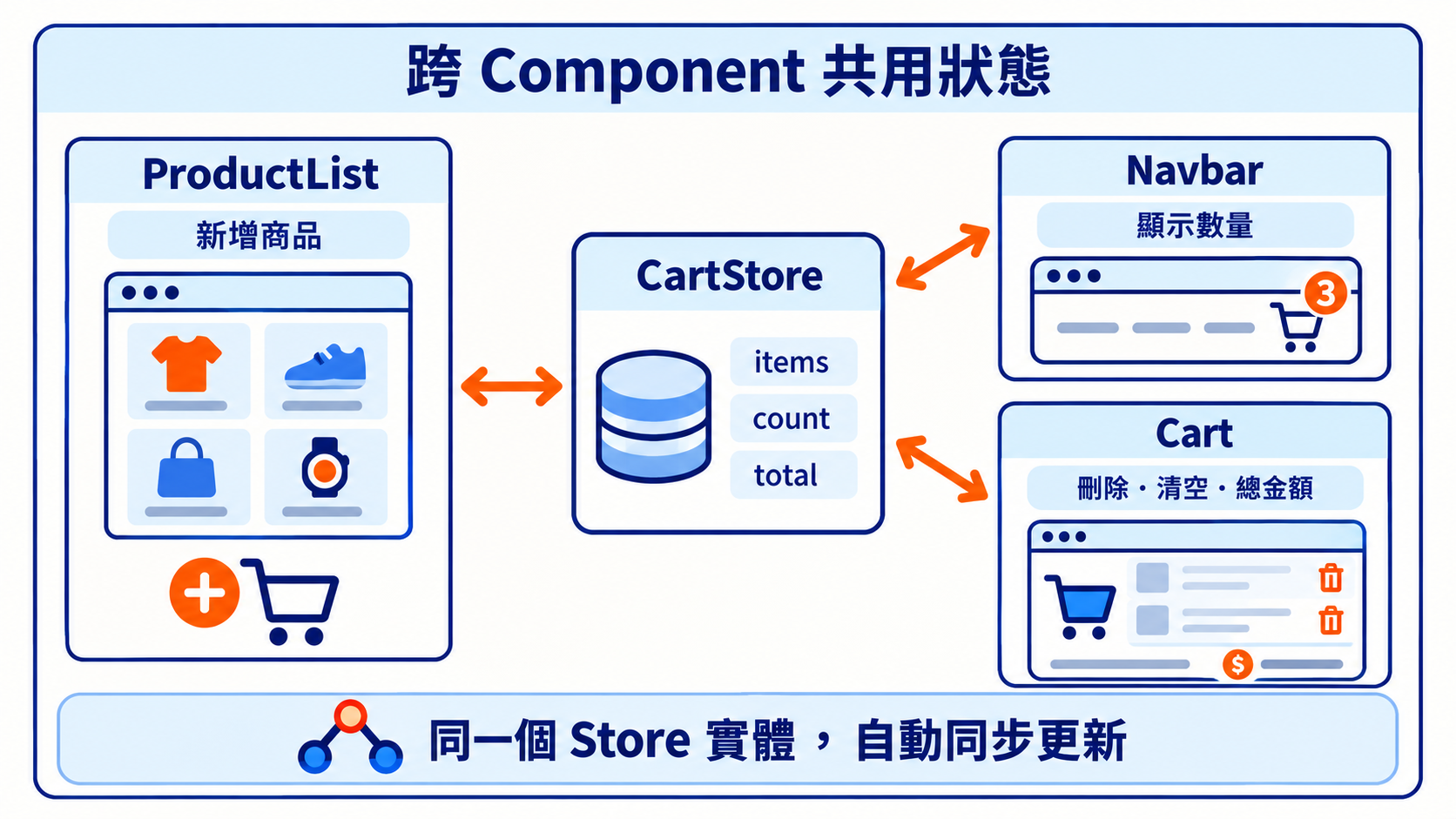
例如電商網站的購物車,商品列表需要新增商品、Navbar 需要顯示購物車數量,購物車頁面則需要計算總金額。如果每個 Component 都管理自己的資料,就得額外處理彼此之間的同步。
過去我們可能會使用 RxJS BehaviorSubject,或引入 NgRx 這類狀態管理工具。但現在 Angular 已經提供 signal()、computed() 與 Dependency Injection(DI),是不是也能直接用這些功能建立 Store?
這篇會先使用原生 Signal 實作購物車,再改用 NgRx SignalStore 完成相同功能,看看兩種寫法有什麼差別。
Store 不一定要透過 Library 才能實作,可以先把它理解成一個集中管理狀態的地方。
以購物車為例,Store 需要管理三種內容:
使用 Angular 原生的 signal()、computed() 與 Service,就能完成這些功能。
先定義商品資料結構:
cart.types.ts
export interface Product {
  id: number;
  name: string;
  price: number;
}

export interface CartItem extends Product {
  quantity: number;
}
CartItem 除了商品資訊,還會透過 quantity 記錄購買數量。
cart.store.ts
import { Injectable, signal, computed } from '@angular/core';
import { CartItem, Product } from './cart.types';

@Injectable({ providedIn: 'root' })
export class CartStore {
  private readonly _items = signal<CartItem[]>([]);

  readonly items = this._items.asReadonly();

  readonly count = computed(() =>
    this.items().reduce(
      (sum, item) => sum + item.quantity,
      0
    )
  );

  readonly total = computed(() =>
    this.items().reduce(
      (sum, item) => sum + item.price * item.quantity,
      0
    )
  );

  add(product: Product) {
    this._items.update(items => {
      const existing = items.find(
        item => item.id === product.id
      );

      if (existing) {
        return items.map(item =>
          item.id === product.id
            ? { ...item, quantity: item.quantity + 1 }
            : item
        );
      }

      return [...items, { ...product, quantity: 1 }];
    });
  }

  remove(id: number) {
    this._items.update(items =>
      items.filter(item => item.id !== id)
    );
  }

  clear() {
    this._items.set([]);
  }
}
這個 Service 已經具備基本 Store 的功能。signal() 保存商品資料、computed() 計算數量與總金額,Methods 則負責修改購物車內容。
其中比較需要注意的是狀態封裝:
private readonly _items = signal<CartItem[]>([]);

readonly items = this._items.asReadonly();
將 WritableSignal 設為 private,再透過 asReadonly() 對外提供唯讀 Signal。這樣 Component 可以讀取 items(),但不能直接呼叫 set() 或 update(),而是要透過 Store 提供的方法修改。
不過,asReadonly() 不會深層凍結物件,因此仍然需要避免直接修改陣列內的商品資料。
新增商品或調整數量時,update() 會回傳新的陣列,而不是直接修改原本的資料。當 items 更新後,count 和 total 也會依據最新的商品資料計算。
有了 Store 之後,不同 Component 就能直接注入同一個 CartStore,不需要透過父元件逐層傳遞購物車資料。
product-list.ts
import { Component, inject } from '@angular/core';
import { CartStore } from './cart.store';

@Component({
  selector: 'app-product-list',
  template: `
    @for (product of products; track product.id) {
      <div>
        <span>{{ product.name }} - NT$ {{ product.price }}</span>

        <button (click)="store.add(product)">
          加入購物車
        </button>
      </div>
    }
  `
})
export class ProductList {
  readonly store = inject(CartStore);

  readonly products = [
    { id: 1, name: '鍵盤', price: 1200 },
    { id: 2, name: '滑鼠', price: 800 }
  ];
}
Navbar 只需要讀取購物車數量:
navbar.ts
import { Component, inject } from '@angular/core';
import { CartStore } from './cart.store';

@Component({
  selector: 'app-navbar',
  template: `
    <nav>
      購物車 ({{ store.count() }})
    </nav>
  `
})
export class Navbar {
  readonly store = inject(CartStore);
}
購物車頁面則顯示商品清單、總金額,並提供刪除與清空功能:
cart.ts
import { Component, inject } from '@angular/core';
import { CartStore } from './cart.store';

@Component({
  selector: 'app-cart',
  template: `
    @for (item of store.items(); track item.id) {
      <div>
        {{ item.name }} × {{ item.quantity }}

        <button (click)="store.remove(item.id)">
          刪除
        </button>
      </div>
    }

    <p>總金額:NT$ {{ store.total() }}</p>

    <button (click)="store.clear()">
      清空購物車
    </button>
  `
})
export class Cart {
  readonly store = inject(CartStore);
}
由於 CartStore 設定了 providedIn: 'root',這三個 Component 在沒有覆寫 Provider 的情況下,會取得同一個 Service 實體。
所以當商品列表加入商品時,Navbar 的數量與購物車頁面的總金額也會跟著更新。
到這裡,我們已經使用原生 Signal 完成一個簡單的購物車 Store,完全不需要 NgRx。
既然原生 Signal 就能建立 Store,為什麼還需要 NgRx SignalStore?
當 Store 開始加入更多狀態、非同步請求與操作方法時,Service 可能會越寫越大。雖然可以自行拆分,但也需要考慮各個 Store 的程式碼該怎麼組織,以及共通功能要怎麼重複使用。
NgRx SignalStore 是 NgRx 提供的狀態管理工具,建立在 Angular 原生 Signal 之上。它將 State、Computed 與 Methods 拆成不同的 Feature,讓我們可以依照需求組合 Store。
這裡要注意,NgRx SignalStore 與傳統 NgRx Store 是不同的方案。傳統 NgRx Store 主要使用 Action、Reducer 等架構,而 SignalStore 則以 Signal 與 Method 為核心。
這次會使用 NgRx SignalStore 22,搭配 Angular 22 進行實作。
NgRx SignalStore 主要提供以下 API:
| API | 用途 |
|---|---|
signalStore() |
建立 Store |
withState() |
定義初始狀態 |
withComputed() |
建立衍生狀態 |
withMethods() |
定義操作方法 |
patchState() |
更新 Store 狀態 |
我們使用相同的購物車需求重新實作。
ngrx-cart.store.ts
import { computed } from '@angular/core';
import {
  signalStore,
  withState,
  withComputed,
  withMethods,
  patchState
} from '@ngrx/signals';

import { CartItem, Product } from './cart.types';

export const NgRxCartStore = signalStore(
  { providedIn: 'root' },

  withState({
    items: [] as CartItem[]
  }),

  withComputed(({ items }) => ({
    count: computed(() =>
      items().reduce(
        (sum, item) => sum + item.quantity,
        0
      )
    ),

    total: computed(() =>
      items().reduce(
        (sum, item) => sum + item.price * item.quantity,
        0
      )
    )
  })),

  withMethods(store => ({
    add(product: Product) {
      patchState(store, state => {
        const existing = state.items.find(
          item => item.id === product.id
        );

        const items = existing
          ? state.items.map(item =>
              item.id === product.id
                ? { ...item, quantity: item.quantity + 1 }
                : item
            )
          : [...state.items, { ...product, quantity: 1 }];

        return { items };
      });
    },

    remove(id: number) {
      patchState(store, state => ({
        items: state.items.filter(item => item.id !== id)
      }));
    },

    clear() {
      patchState(store, { items: [] });
    }
  }))
);
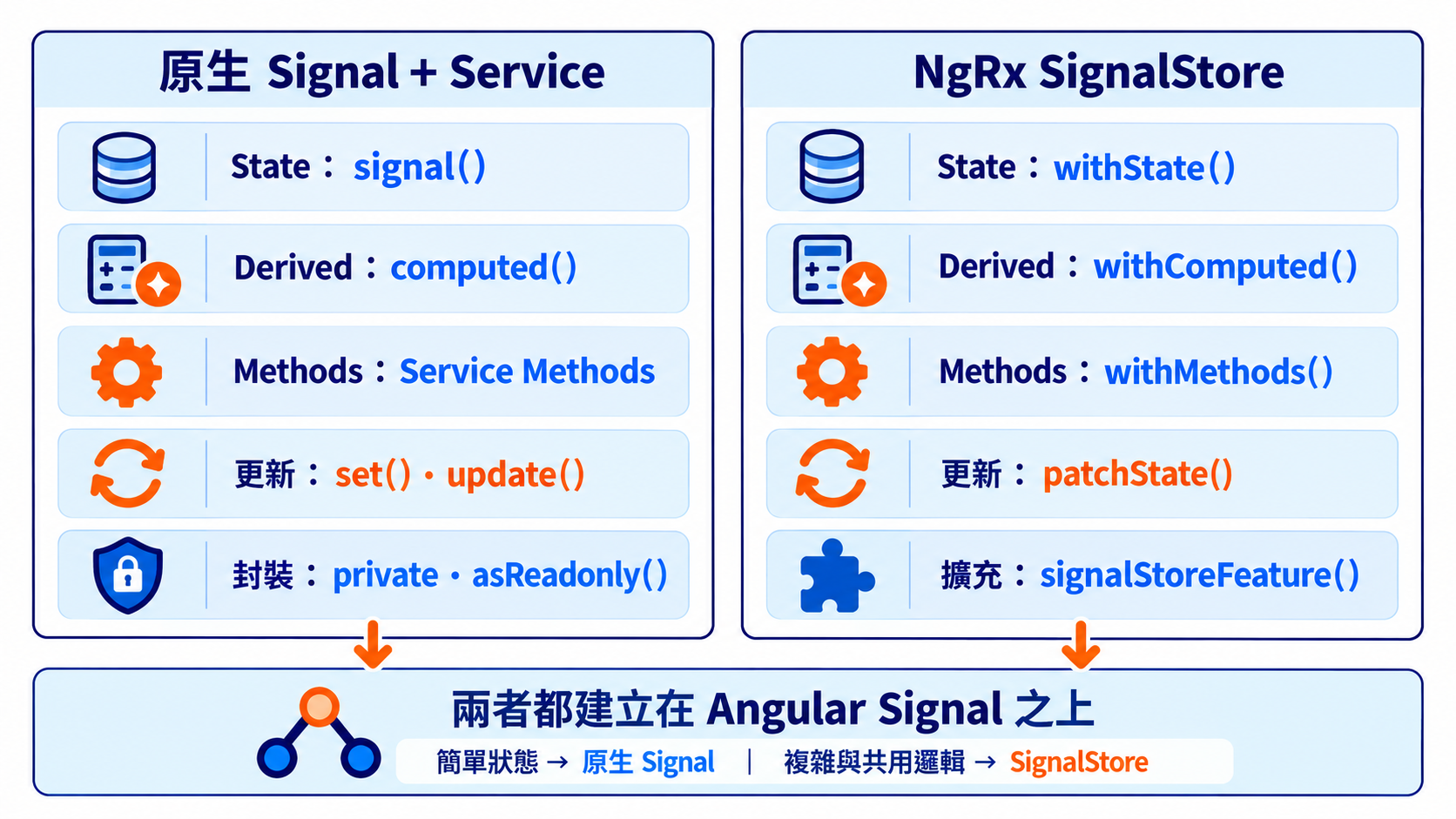
購物車的功能沒有改變,但 State、Computed 與 Methods 有了各自的位置。
原本需要自行建立 private signal(),再透過 asReadonly() 對外提供資料;SignalStore 則使用 withState() 定義狀態,並自動提供對應的唯讀 Signal。
修改狀態時,原本使用的 set() 或 update(),現在則改成 NgRx 提供的 patchState():
patchState(store, { items: [] });
patchState() 可以直接指定新值,也能根據目前的 State 計算更新結果,而且只會修改指定的屬性。
它通常會搭配 withMethods() 使用,讓 Component 透過 add()、remove() 等方法操作狀態。SignalStore 預設也會保護 State,外部無法直接對受保護的 Store 呼叫 patchState(),避免狀態被隨意修改。
如果讓前面的 Navbar 改用 NgRx SignalStore,只需要注入新的 Store:
import { Component, inject } from '@angular/core';
import { NgRxCartStore } from './ngrx-cart.store';

@Component({
  selector: 'app-navbar',
  template: `
    <nav>
      購物車 ({{ store.count() }})
    </nav>
  `
})
export class Navbar {
  readonly store = inject(NgRxCartStore);
}
Template 仍然透過 store.count() 讀取資料,因為 SignalStore 對外提供的也是 Signal。
這次兩個 Store 剛好使用相同的 Property 與 Method 名稱,因此 Component 的寫法很接近。不過,如果要在實際專案中替換 Store,仍然需要確認原本的功能與介面是否一致。
從剛剛的購物車實作可以發現,兩種方式都能完成相同的功能,而且使用 SignalStore 不一定能減少程式碼。
SignalStore 比較大的差別,是它提供了一套可以組合與重複使用的 Store 結構。
| 比較項目 | 原生 Signal + Service | NgRx SignalStore |
|---|---|---|
| 狀態管理 | signal() |
withState() |
| 衍生狀態 | computed() |
withComputed() |
| 修改狀態 | set()、update() |
patchState() |
| 操作方法 | Service Methods | withMethods() |
| 狀態封裝 | private、asReadonly() |
預設保護 State |
| 非同步操作 | Promise、RxJS、Resource 等 | Promise、rxMethod() 等 |
| 共通邏輯擴充 | Service、函式或組合設計 | signalStoreFeature() |
| 額外依賴 | 無 | @ngrx/signals |
以目前的購物車來說,原生 Signal 就很夠用了。但如果之後需要加入 API 請求、Loading、Error,或是多個 Store 都需要相同的功能,就可以考慮 SignalStore 的 Feature 設計。
例如購物車需要從後端載入資料,可以在 Store 中加入 Loading 與 Error 狀態:
withState({
  items: [] as CartItem[],
  isLoading: false,
  error: null as string | null
})
並透過 withMethods() 處理 API 請求:
import { inject } from '@angular/core';

withMethods((store, api = inject(CartApiService)) => ({
  async load() {
    patchState(store, {
      isLoading: true,
      error: null
    });

    try {
      const items = await api.getItems();

      patchState(store, {
        items,
        isLoading: false
      });
    } catch {
      patchState(store, {
        error: '載入失敗',
        isLoading: false
      });
    }
  }
}))
這裡假設 CartApiService.getItems() 回傳 Promise<CartItem[]>。
如果其他 Store 也需要 Loading 功能,就可以透過 signalStoreFeature() 封裝起來。
例如自己建立一個 withLoading():
import {
  signalStoreFeature,
  withState,
  withMethods,
  patchState
} from '@ngrx/signals';

export function withLoading() {
  return signalStoreFeature(
    withState({ isLoading: false }),

    withMethods(store => ({
      setLoading(isLoading: boolean) {
        patchState(store, { isLoading });
      }
    }))
  );
}
signalStoreFeature() 是 NgRx 提供的函式,可以將多個 Store Feature 組合起來。這裡的 withLoading() 則是我們自己定義的功能。
例如 ProductStore 和 UserStore 都需要 Loading 狀態:
export const ProductStore = signalStore(
  withState({ products: [] }),
  withLoading()
);

export const UserStore = signalStore(
  withState({ users: [] }),
  withLoading()
);
兩個 Store 都會擁有 isLoading State 與 setLoading() Method,不需要各自重新實作。
SignalStore 也提供 rxMethod(),讓我們可以在 Store 中搭配 RxJS Operator 處理非同步操作。
例如商品搜尋,希望使用者停止輸入 300ms 後才發送 API,並在搜尋新關鍵字時取消前一次尚未完成的請求。
import { inject } from '@angular/core';
import { signalStore, withMethods } from '@ngrx/signals';
import { rxMethod } from '@ngrx/signals/rxjs-interop';
import {
  pipe,
  debounceTime,
  distinctUntilChanged,
  filter,
  switchMap
} from 'rxjs';

export const ProductSearchStore = signalStore(
  { providedIn: 'root' },

  withMethods((store, api = inject(ProductApiService)) => ({
    search: rxMethod<string>(
      pipe(
        debounceTime(300),
        distinctUntilChanged(),
        filter(keyword => keyword.trim().length > 0),
        switchMap(keyword => api.search(keyword))
      )
    )
  }))
);
這個範例假設 api.search() 回傳 Observable,先省略搜尋結果的保存與錯誤處理,讓我們專注在 rxMethod() 的使用方式。
其中幾個 RxJS Operator 分別負責:
debounceTime(300):停止輸入 300ms 後才搜尋。distinctUntilChanged():避免連續處理相同的關鍵字。filter():忽略空白關鍵字。switchMap():開始新搜尋時,取消訂閱前一次尚未完成的請求。rxMethod() 比較特別的地方,是它不只能接收一般的值,也能直接接收 Signal。
例如 Component 使用 signal() 管理搜尋關鍵字:
import { Component, inject, signal } from '@angular/core';
import { ProductSearchStore } from './product-search.store';

@Component({
  selector: 'app-product-search',
  template: `
    <input
      [value]="keyword()"
      (input)="keyword.set($any($event.target).value)"
      placeholder="搜尋商品"
    />
  `
})
export class ProductSearch {
  readonly store = inject(ProductSearchStore);
  readonly keyword = signal('');

  constructor() {
    this.store.search(this.keyword);
  }
}
這裡要注意 this.keyword() 與 this.keyword 的差別:
this.store.search(this.keyword()); // 傳入目前的字串值

this.store.search(this.keyword);   // 傳入 Signal 本身
第一種只會將當下的字串送進 rxMethod(),後續 keyword 改變不會自動觸發搜尋。
第二種則會讓 rxMethod() 追蹤 Signal。使用者輸入文字時,keyword 的新值就會送進 RxJS Pipeline,不需要另外使用 effect() 監聽,也不用每次手動呼叫搜尋方法。
傳入 Signal 時也會讀取初始值,因此範例透過 filter() 忽略空字串。實際使用時,如果需要清空舊搜尋結果,或處理 API 失敗的情況,也要另外補上對應邏輯。
我覺得不需要單純根據專案大小決定,而是看狀態管理本身有多複雜。
如果只是購物車、側邊欄開關、使用者偏好等簡單狀態,原生 Signal 搭配 Service 通常就很夠用。
但如果同一個功能需要管理大量狀態、非同步請求與錯誤處理,或是多個 Store 開始出現重複的功能,那麼 SignalStore 提供的 Feature 設計就會比較方便。
這次使用原生 Signal 完成了一個購物車 Store。搭配 Service 與 Dependency Injection,就能讓不同 Component 共用狀態,不一定要另外引入 NgRx。
NgRx SignalStore 同樣建立在 Angular Signal 之上,但透過 withState()、withComputed() 與 withMethods(),讓 State、衍生資料與操作方法有各自的位置,也能使用 patchState() 更新狀態。
除了基本的 Store 功能,signalStoreFeature() 可以將重複的邏輯封裝起來,rxMethod() 則能搭配 RxJS 處理搜尋、延遲請求等非同步操作。如果專案中有許多類似需求,這些功能就會比較實用。
不過,使用 SignalStore 不代表一定比較好。如果原生 Signal 已經能滿足需求,就不需要特別增加 Library。



 iThome鐵人賽
 看影片追技術