
將 Day 28 序列化封裝完成的 eye_strain_ensemble_pipeline.joblib 轉化為可供前端、App 或眼科臨床系統呼叫的生產級 Web 微服務。使用現代高效 Python Web 框架 FastAPI 搭建 RESTful API,透過 Pydantic BaseModel 建立資料型別與範圍約束機制(Data Validation),提供即時機率推論端點(/predict)與系統健康檢查端點(/health),並使用 nest_asyncio 與 uvicorn 在 Colab/本機環境中完成模擬 HTTP 請求測試。
一、實作前情境:為什麼選擇 FastAPI 與 Pydantic?
在模型落地實務中,單純有一個 .joblib 模型檔無法直接與使用者互動。必須將其封裝在網路服務後端,並解決以下核心工程挑戰:
1.髒資料防禦與資料驗證(Pydantic Schema Validation):
2.現代高效 Web 框架(FastAPI vs. Flask):
二、撰寫 FastAPI 微服務與測試腳本
在 Colab 中新增儲存格,安裝必要套件並撰寫完整的 API 服務與模擬客戶端測試程式碼:
# ==========================================
# Day 29:FastAPI 微服務端點建置與推論測試
# ==========================================

import warnings
warnings.filterwarnings('ignore')

# 1. 安裝與環境設置 (Colab 環境適用)
!pip install fastapi uvicorn nest_asyncio pydantic -q

import nest_asyncio
import uvicorn
from fastapi import FastAPI, HTTPException
from pydantic import BaseModel, Field
from typing import Literal
import pandas as pd
import numpy as np
import joblib
import threading
import time
import requests

# 套用非同步支援 (允許在 Jupyter/Colab 中運行 Uvicorn 伺服器)
nest_asyncio.apply()

# 2. 定義 Pydantic 請求與回應資料結構 (Schema Definition)
class EyeStrainInput(BaseModel):
    Age: int = Field(..., ge=1, le=120, description="受試者年齡", example=24)
    Role: Literal["Student", "Non-Student"] = Field(..., description="職業身分", example="Student")
    Daily_Screen_Hours: float = Field(..., ge=0.0, le=24.0, description="每日螢幕暴露時數", example=11.5)
    Sleep_Hours: float = Field(..., ge=0.0, le=24.0, description="每日平均睡眠時數", example=5.0)
    Break_Frequency_Per_Hour: int = Field(..., ge=0, le=60, description="每小時休息次數", example=1)
    Eye_Dryness_Level: int = Field(..., ge=0, le=10, description="眼睛乾澀自覺程度 (0-10)", example=8)
    Eye_Pain_Level: int = Field(..., ge=0, le=10, description="眼睛疼痛自覺程度 (0-10)", example=7)
    Headache_Frequency_Per_Week: int = Field(..., ge=0, le=14, description="每週頭痛發作頻率", example=4)
    Blue_Light_Filter_Used: Literal["Yes", "No"] = Field(..., description="是否使用抗藍光濾鏡", example="Yes")
    Blurred_Vision: Literal["Yes", "No"] = Field(..., description="近期是否有視力模糊症狀", example="Yes")

class EyeStrainPredictionResponse(BaseModel):
    predicted_risk_level: str
    risk_probabilities: dict
    high_risk_threshold_applied: float
    high_risk_alert: bool
    status: str

# 3. 初始化 FastAPI 實例並載入 Day 28 Joblib 封裝套件
app = FastAPI(
    title="數位用眼疲勞風險預測 API (Digital Eye Strain Assessment Service)",
    description="基於 LightGBM 與 Random Forest 軟投票集成模型的醫療級推論微服務端點",
    version="1.0.0"
)

# 載入模型持久化檔案
MODEL_FILE = 'eye_strain_ensemble_pipeline.joblib'
try:
    package = joblib.load(MODEL_FILE)
    pipeline = package['pipeline']
    th_high = package['optimal_threshold_high']
    target_names = package['target_names']
    print(f"成功加載模型推論包,高風險判定門檻為: {th_high:.3f}")
except Exception as e:
    raise RuntimeError(f"載入模型失敗,請確認 Day 28 檔案是否存在: {e}")

# 4. 定義 API 端點
@app.get("/health", tags=["系統狀態"])
def health_check():
    """確認服務是否在線與模型是否就緒"""
    return {
        "status": "healthy",
        "model_version": package.get("version", "1.0.0"),
        "author": package.get("author", "Ironman 2026")
    }

@app.post("/predict", response_model=EyeStrainPredictionResponse, tags=["模型推論"])
def predict_eye_strain(payload: EyeStrainInput):
    """
    接收單筆受試者生理與作息資料,自動進行特徵工程與模型集成推論,回傳風險等級與詳細機率
    """
    try:
        # 將 Pydantic 物件轉為 DataFrame (符合 Pipeline 欄位需求)
        input_data = pd.DataFrame([payload.dict()])

        # 透過 Scikit-learn Pipeline 執行即時推論
        prob = pipeline.predict_proba(input_data)[0]

        # 套用 Day 27 動態門檻判定規則
        if prob[2] >= th_high:
            final_idx = 2
            alert = True
        else:
            final_idx = int(np.argmax(prob[:2]))
            alert = False

        return EyeStrainPredictionResponse(
            predicted_risk_level=target_names[final_idx],
            risk_probabilities={
                "低度風險 (Low)": round(float(prob[0]), 4),
                "中度風險 (Medium)": round(float(prob[1]), 4),
                "高度風險 (High)": round(float(prob[2]), 4)
            },
            high_risk_threshold_applied=round(float(th_high), 4),
            high_risk_alert=alert,
            status="success"
        )
    except Exception as err:
        raise HTTPException(status_code=500, detail=f"推論執行錯誤: {str(err)}")

# 5. 背景執行緒啟動 Uvicorn 服務伺服器
def run_api_server():
    uvicorn.run(app, host="127.0.0.1", port=8000, log_level="warning")

server_thread = threading.Thread(target=run_api_server, daemon=True)
server_thread.start()
time.sleep(2)  # 等待伺服器就緒
print("=== FastAPI 服務已在背景執行:http://127.0.0.1:8000 ===")

# 6. 使用 Requests 模擬前端傳送 HTTP POST 請求進行測試
test_url = "http://127.0.0.1:8000/predict"
sample_payload = {
    "Age": 24,
    "Role": "Student",
    "Daily_Screen_Hours": 11.5,
    "Sleep_Hours": 5.0,
    "Break_Frequency_Per_Hour": 1,
    "Eye_Dryness_Level": 8,
    "Eye_Pain_Level": 7,
    "Headache_Frequency_Per_Week": 4,
    "Blue_Light_Filter_Used": "Yes",
    "Blurred_Vision": "Yes"
}

print("\n=== 發送 HTTP POST 請求測試端點 (/predict) ===")
response = requests.post(test_url, json=sample_payload)

if response.status_code == 200:
    res_json = response.json()
    print("狀態碼: 200 OK")
    print("【API 預測回應結果】:")
    import json
    print(json.dumps(res_json, indent=4, ensure_ascii=False))
else:
    print(f"請求失敗: 狀態碼 {response.status_code}")
    print(response.text)
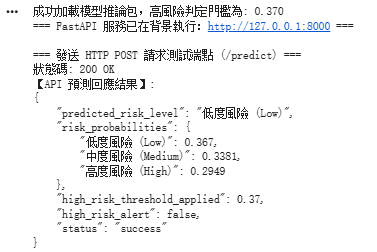
三、圖表解讀與客觀數據分析
本實作以 FastAPI 與 Uvicorn 搭建非同步 RESTful 推論微服務,並利用 Python Requests 模擬前端客戶端發送 JSON 負載(Payload)至 /predict 端點。從伺服器啟動記錄、HTTP 狀態碼與回傳的標準化 JSON 回應結構中,可以提煉出三項關鍵的生產級工程實證:
b.高風險門檻過濾機制:
c.最終類別裁決:



 iThome鐵人賽
 看影片追技術