
主張:Agent Config(YAML)跟「多模型支援」是兩件不同的事,搞混了就會照著 YAML 範例去接 Claude,結果發現行不通。
讀完能做到:寫出一個 agent 的三個必要成分(identity、instruction、tools),並選對 Gemini/Claude/本地模型各自正確的接入方式。
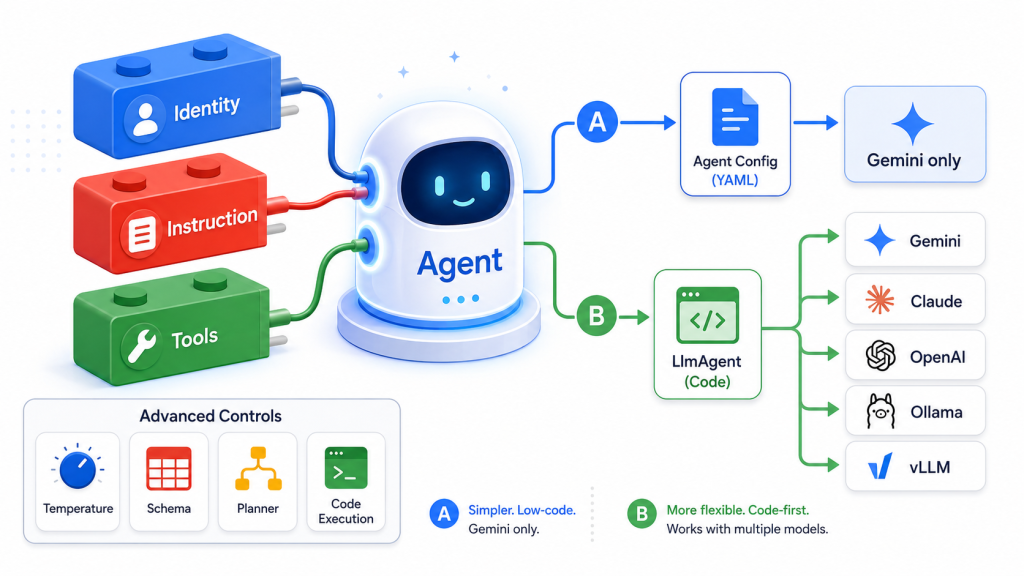
不管你選哪一種寫法,一個 ADK agent 的核心骨架都一樣,由三個部分組成:身份(identity)、指令(instruction)、工具(tools)。
name 與 description 定義了 agent 是誰。這裡有一個很多人會忽略的細節:description 不是給人類讀者看的註解,而是父 agent 用來判斷「該不該把任務交給你」的依據。在多 agent 的架構裡(這個系列第三篇會深入),一個 coordinator agent 面對多個 subagent 時,它憑什麼決定要委派給哪一個?答案就是比對每個 subagent 的 description。如果你把 description 寫成「一個助理」這種空泛的句子,委派邏輯在複雜系統裡就會開始出錯——這個坑現在埋下,Day 17、18 會回來處理。
官方文件示範的最小身份定義:
from google.adk.agents import LlmAgent

capital_agent = LlmAgent(
    model="gemini-3.5-flash",
    name="capital_agent",
    description="Answers user questions about the capital city of a given country."
    # instruction and tools will be added next
)
instruction 決定 agent 該怎麼理解任務、怎麼使用工具、怎麼回應。加上指令之後:
capital_agent = LlmAgent(
    model="gemini-3.5-flash",
    name="capital_agent",
    description="Answers user questions about the capital city of a given country.",
    instruction="""You are an agent that provides the capital city of a country.
Use the `get_capital_city` tool to look up the answer, and always pass the
country name explicitly. If the tool returns an error status, tell the user
you don't know that country's capital.

Example Query: "What's the capital of France?"
Example Response: "The capital of France is Paris."
""",
    # tools will be added next
)
注意這段指令的寫法:它不只是說「你是一個回答首都的助理」,而是明確拆解出識別 → 呼叫工具 → 回應三個步驟,並給了具體的輸入輸出範例。這種「把流程拆成明確步驟」的寫法,正是 Day 1 提過的問題的縮影——指令越長越複雜,agent 是否真的每一步都照做就越難保證,這也是為什麼 ADK 2.0 要引入 Graph Workflows,把這類流程外顯成程式碼而不是塞進一段自然語言指令裡。
def get_capital_city(country: str) -> str:
  """Retrieves the capital city for a given country."""
  capitals = {
      "france": "Paris",
      "japan": "Tokyo",
      "canada": "Ottawa",
      "taiwan": "Taipei",
      "germany": "Berlin",
      "italy": "Rome",
      "spain": "Madrid",
  }
  capital = capitals.get(country.lower())
  if capital is None:
    return {"status": "error", "error_message": f"I don't know the capital of {country}."}
  return {"status": "success", "capital": capital}

capital_agent = LlmAgent(
    model="gemini-3.5-flash",
    name="capital_agent",
    description="Answers user questions about the capital city of a given country.",
    instruction="""...(同上)...""",
    tools=[get_capital_city]
)
Python 端最直接的地方在於:可以直接把一個函式丟進 tools 列表,ADK 會從函式簽章與 docstring 自動產生工具的 schema。這件事的細節(docstring 怎麼寫才有效、context injection、長時間執行的工具)會在 Day 6 完整展開,今天先建立「工具就是一個帶說明文件的函式」這個直覺。
如果你不想寫 Python,ADK 提供一個叫 Agent Config 的替代方案——用一份 YAML 檔描述 agent,不寫程式碼。這個功能標記為 Experimental,支援 Python v1.11.0、Java v0.3.0、Go v0.3.0。
最小可跑的樣子:
name: assistant_agent
model: gemini-flash-latest
description: A helper agent that can answer users' questions.
instruction: You are an agent to help answer users' various questions.
建立方式:
adk create --type=config my_agent
會產生 my_agent/root_agent.yaml 與 .env。編輯 YAML 時,官方建議在檔案第一行加上 schema 註解,讓支援 YAML language server 的編輯器有自動完成與型別檢查:
# yaml-language-server: $schema=https://raw.githubusercontent.com/google/adk-python/refs/heads/main/src/google/adk/agents/config_schemas/AgentConfig.json
Agent Config 也支援工具與子 agent。內建工具的寫法:
tools:
  - name: google_search
自訂工具則用完整限定的 Python 函式名指向你自己寫的程式碼(例如 ma_llm.check_prime)。跑起來的方式跟一般 agent 一樣:adk web、adk run、或 adk api_server。也可以在程式裡動態載入:
from google.adk.agents import config_agent_utils
agent = config_agent_utils.from_config("my_agent/root_agent.yaml")
Agent Config 的兩個硬限制,務必先知道:官方文件明說「目前只支援 Gemini 模型」,而且執行環境目前需要 Python(即使你設定的是別的語言的 agent 定義)。如果你的計畫是接 Claude 或本地模型,這條路線現在就走不通,直接跳到下一節。
LlmAgent 給的是完整的能力,而模型接入這件事,ADK 官方文件分成三種機制:
Direct String / Registry——直接給模型名稱字串,ADK 內部的 registry 解析成對應的後端。這是最簡單的路,適用範圍包含 Gemini(Google AI Studio 或 Agent Platform)、Claude,以及 Agent Platform 上託管的模型。
Model connectors(骨子裡其實是同一套 LiteLLM)——路線一涵蓋的是 Gemini、Claude 這種 Google 生態系內、原生字串就能接的模型。一旦跨出這個範圍,ADK 並沒有為每一家模型重新寫一套串接邏輯,而是統一交給開源專案 LiteLLM 打底——Ollama、vLLM 這些選項,說穿了都只是 LiteLlm 這個 wrapper 類別的不同參數而已。
LiteLLM 做的事很單純:把上百家模型服務都包成同一種 OpenAI 相容介面,寫法固定成 LiteLlm(model="供應商前綴/模型名稱")。官方範例:
LiteLlm(model="openai/gpt-4o")
LiteLlm(model="anthropic/claude-3-haiku-20240307")
LiteLlm(model="ollama_chat/gemma3:latest")
換句話說,只要換掉前面那個前綴,同一段程式碼理論上就能通吃 OpenAI、Anthropic、vLLM、Ollama、LM Studio、DeepSeek、OpenRouter 等上百家供應商,不用為每一家另外學一套 API。(Gemini、Claude 因為有路線一那種更直接的原生捷徑,一般不會特地繞道 LiteLLM,但 LiteLLM 自己的供應商清單裡也找得到它們。)想確認某家供應商的前綴怎麼寫,查 LiteLLM 官方的供應商清單最準。
一個實務上的判斷準則:如果你確定只用 Gemini,而且喜歡低程式碼的方式,用 Agent Config;只要牽涉到接其他家模型,一律走 LlmAgent 程式碼路線。
除了三個基本成分,LlmAgent 還有幾個值得在起步階段就知道存在的設定:
微調模型生成行為——透過 generate_content_config 控制溫度、輸出長度上限、安全設定等:
from google.genai import types

agent = LlmAgent(
    # ... other params
    generate_content_config=types.GenerateContentConfig(
        temperature=0.2, # More deterministic output
        max_output_tokens=250,
        safety_settings=[
            types.SafetySetting(
                category=types.HarmCategory.HARM_CATEGORY_DANGEROUS_CONTENT,
                threshold=types.HarmBlockThreshold.BLOCK_LOW_AND_ABOVE,
            )
        ]
    )
)
設定專案層級的預設模型(Python v1.22.0 以上)——不必每個 agent 都重複寫一次模型名稱:
from google.adk.agents import LlmAgent

# Set a new default model for all agents
LlmAgent.set_default_model("gemini-3.5-flash")

# This agent will now use "gemini-3.5-flash" by default
agent_with_default_model = LlmAgent(
    name="default_model_agent",
    instruction="You are a helpful assistant."
)

# You can still override the default for specific agents
specific_agent = LlmAgent(
    name="specific_model_agent",
    model="gemini-pro-latest",
    instruction="You are a creative writer."
)
結構化輸入輸出——用 input_schema / output_schema 接 Pydantic BaseModel,強制 agent 只能輸出符合結構的 JSON:
from pydantic import BaseModel, Field

class CapitalOutput(BaseModel):
    capital: str = Field(description="The capital of the country.")

structured_capital_agent = LlmAgent(
    # ... name, model, description
    instruction="""You are a Capital Information Agent. Given a country, respond ONLY with a JSON object containing the capital. Format: {"capital": "capital_name"}""",
    output_schema=CapitalOutput, # Enforce JSON output
    output_key="found_capital"  # Store result in state['found_capital']
    # Cannot use tools=[get_capital_city] effectively here
)
這裡官方文件的註解值得特別留意:一旦設定 output_schema 強制 JSON 輸出,這個 agent 就沒辦法有效使用工具——這是 Day 14(資料流與 Schema)會再深入的限制,先在這裡埋個伏筆。
此外還有 Planner與 Code Execution——這兩項在後續會有專門篇幅處理,今天先知道它們的存在。
寫完你的第一個有明確身份、指令、工具的 agent 之後,問自己三個問題:
description 寫得夠具體,足以讓另一個 agent 判斷「這個任務該不該給我」嗎?instruction 是不是已經開始堆疊「先做 A、再做 B、如果 C 就做 D」這種多步驟邏輯?如果是,這正是 Day 13 之後 Graph Workflows 要解決的問題。Google ADK 官方網站
GitHub - Agent Development Kit (ADK) 2.0
GitHub 開源實作:https://github.com/SeanLinH/adk_tutor
下一章 Day 04 - 視覺化戰情室:Runtime、Web UI 與 Visual Builder



 iThome鐵人賽
 看影片追技術