
前 25 章都把 Roblox Studio 內建 Assistant 當作主線。這是刻意的。
初學者最需要的不是一開始就把所有工具接起來,而是先建立穩定節奏:
給 Assistant context
下 prompt
觀察生成結果
拆解 DataModel / Script / UI
Playtest
修正 prompt
整理工程結構
到了第 26 章,你已經有一個完整的 AI Adventure Island,也有測試、發布前檢查與 release workflow。這時候才適合介紹進階工具:Studio MCP server、Script Sync、外部 AI coding client 和 Git。
MCP 可以讓外部 AI 工具直接連到開啟中的 Roblox Studio session。這很強,也代表風險更高。
本章的重點不是追逐工具,而是建立一套安全的進階協作流程。
完成本章後,你會得到:
AI Adventure Island 的 maintenance report prompt。本章不要求你一定使用特定外部 AI client。工具會變,工作流要穩。
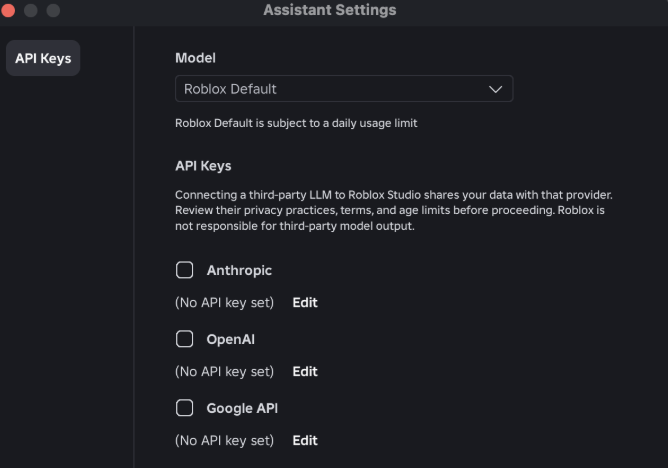
圖 26-1 進階 AI 工作流會涉及外部模型與工具;金鑰、權限和可執行動作必須分開管理並限制範圍。
請先把以下 context 給 Assistant 或外部 AI client:
【Ch26 Context|以 MCP 維護專案】
我們要將「AI Adventure Island」的工作流程從 Roblox Studio Assistant 擴充成進階的 MCP-based workflow。

目前專案:
- AI Adventure Island 是一個 Roblox 冒險 experience。
- 包含 terrain、models、collectibles、Guide 任務、敵人巡邏、WindDash、商店升級、HUD、client/server remotes、存檔流程、回歸測試與 private 發布流程。

目標:
- 使用 Studio MCP server 和/或 Script Sync 檢查及維護專案。
- 從 read-only exploration 開始。
- 編輯前先產出 maintenance report。
- 只進行小範圍且經過審查的修改。
- 使用 Playtest 與 Output 檢查驗證修改。

限制:
- 不要發布。
- 不要更改 audience settings。
- 不要啟用高風險 Experience Settings。
- 不要重寫整個系統。
- 不要假設生成的修改一定正確。
- 如果開啟多個 Studio 視窗,先確認 active Studio instance。
stdio transport,讓 AI client 和 Studio session 溝通。.luau 檔案。假設你現在想讓外部 AI 工具幫你檢查整個 AI Adventure Island。
你可以在外部工具裡說:
連接 Roblox Studio 並改善我的遊戲。
這太危險。
如果 MCP 已連線,外部 AI client 可能不只是回答問題。它可能讀取 DataModel、讀 Script、寫 Script、執行 Luau、啟動 Playtest、插入 asset,甚至在你不小心同意時做大範圍修改。
比較好的第一句是:
【Ch26 安全|限制 MCP 唯讀檢查】
以 read-only mode 使用 Roblox Studio MCP connection。

首先列出已連接的 Studio instances。
確認 active Studio instance 是 AI Adventure Island。
接著檢查 game tree 到主要 services 的層級。
不要編輯任何內容。
不要執行有副作用的 Luau。
不要插入 assets。

只產出 maintenance report。
這就是本章最重要的觀念:
MCP 工作流必須先探索,再計畫,再修改,再驗證。
先做 read-only exploration。
【Ch26 主任務|以 MCP 維護專案】
以 read-only mode 使用 Roblox Studio MCP connection 檢查 AI Adventure Island。

步驟:
1. 列出已連接的 Roblox Studio instances。
2. 確認目前 active 的 Studio instance。
3. 在 game tree 中尋找:
   - ServerScriptService
   - ReplicatedStorage
   - StarterGui
   - StarterPlayer
   - Workspace
4. 尋找與以下項目相關的 scripts:
   - QuestService
   - EnemyAIService
   - AbilityService
   - ShopService
   - SaveService
   - AdventureHUD
5. 一開始只讀取 script 名稱與 paths。
6. 不要編輯 scripts。
7. 不要執行 Luau。
8. 目前先不要啟動 Playtest。

輸出:
- 專案結構摘要。
- 找到的主要系統。
- 缺少或可疑的系統。
- 進行任何編輯前要確認的問題。
這個 Prompt 的關鍵是 read-only mode。不是每個 client 都會真正有只讀權限,所以你還要在對話中明確限制行為,並在工具呼叫時審查它想做什麼。
外部 AI client 可能回報:
Connected Studio instances:
- AI Adventure Island - active

Main services:
- Workspace
  - IslandGreybox
  - Collectibles
  - GuideNPC
  - EnemyPatrols
- ServerScriptService
  - QuestService
  - EnemyAIService
  - AbilityService
  - ShopService
  - SaveService
- ReplicatedStorage
  - Remotes
  - SharedConfig
- StarterGui
  - AdventureHUD
- StarterPlayer
  - StarterPlayerScripts
    - AdventureClient

Initial observations:
- Main systems are present.
- RemoteEvent naming appears centralized.
- Need to inspect scripts before judging architecture.
- No edits performed.
這是一個好結果,因為它沒有急著修改。
接著你可以要求它讀取幾個 Script:
【Ch26 分析|追蹤 WindDash 資料流】
讀取與 AbilityService、AdventureClient 及 Remotes 相關的 scripts。

目標:
- 了解 WindDash 如何從 input 流向 server validation,再到 UI cooldown。

目前先不要編輯。
以文字建立 data flow diagram。
標示所有高風險 assumptions。
可能回報:
WindDash flow:
1. AdventureClient listens for keyboard Q and DashButton.
2. Client fires RequestAbility with "WindDash".
3. AbilityService receives the request.
4. Server validates player state and cooldown.
5. Server applies temporary movement effect.
6. Server fires AbilityUpdate to update HUD cooldown.

Potential risks:
- Client sends ability name as string; server must validate against allowlist.
- DashButton visibility should match device input.
- Cooldown should be server-authoritative.
這種分析就很適合第 26 章:它運用外部 AI client 的上下文能力,但仍然延續第 12、16、20、22、23 章的技術原則。
Studio MCP server 是 Roblox Studio 內建的 MCP server。它讓外部 AI client 和你目前開啟的 Studio session 溝通。
官方文件列出的能力很多,可以分成幾類。
script_read
multi_edit
script_search
script_grep
這些工具讓外部 client 可以讀取 Script、搜尋 Script、跨 Script 搜尋字串,甚至一次套用多個修改。
multi_edit 很方便,但它也是最需要小心的工具之一。一次改多個 Script 很容易造成:
所以第一次使用 MCP 修改專案時,應該要求:
一次只做一項小修改。
提供一個清楚的理由。
執行一個驗證步驟。
search_game_tree
inspect_instance
這類工具讓 AI 不只看 Script,還能看 Studio instance hierarchy。
這對 Roblox 專案很重要,因為很多 bug 不在 code 裡,而在 DataModel 裡:
RemoteEvent 放錯位置。ScreenGui 名稱和 LocalScript 期待的不一致。ProximityPrompt 不在正確的 Part 下。SpawnLocation 被刪掉。Model 沒有 PrimaryPart。內建 Assistant 已經能理解場景,但 MCP 讓外部 coding client 也能拿到這些 context。
execute_luau
這個能力很有用,但要非常謹慎。
你可以用它做 read-only query:
return #game:GetService("Players"):GetPlayers()
也可以做有副作用的操作:
game.Workspace.SomeModel:Destroy()
所以 Prompt 要寫清楚:
【Ch26 安全|限制 Luau 唯讀查詢】
只執行 read-only Luau queries。
不要建立、修改、移動或刪除 instances。
如果程式碼有副作用,執行前先顯示內容。
get_studio_state
start_stop_play
get_console_output
screen_capture
character_navigation
user_keyboard_input
user_mouse_input
這讓外部 AI client 可以協助跑第 23 章的測試流程。
例如:
【Ch26 測試|自動驗證 Guide Prompt】
啟動 Playtest。
將角色移動到 GuideNPC 附近。
觸發 ProximityPrompt。
讀取 console output。
擷取 viewport。
回報 QuestPanel 是否更新。
停止 Playtest。
但你仍要避免太大的自動化範圍。AI 可以協助測,但不能取代你對體驗品質的判斷。
generate_mesh
generate_material
generate_procedural_model
search_asset
insert_asset
upload_image
store_image
這些能力和第 6、7、24 章有關。外部 client 可以透過 MCP 生成或插入內容,但每個素材都要走 asset provenance register:
Asset name
Source
Prompt
Tool
License / usage note
Roblox asset ID
Moderation status
Performance note
Where used
MCP 不會讓授權問題自動消失。
Script Sync 是另一個不同層次的工具。
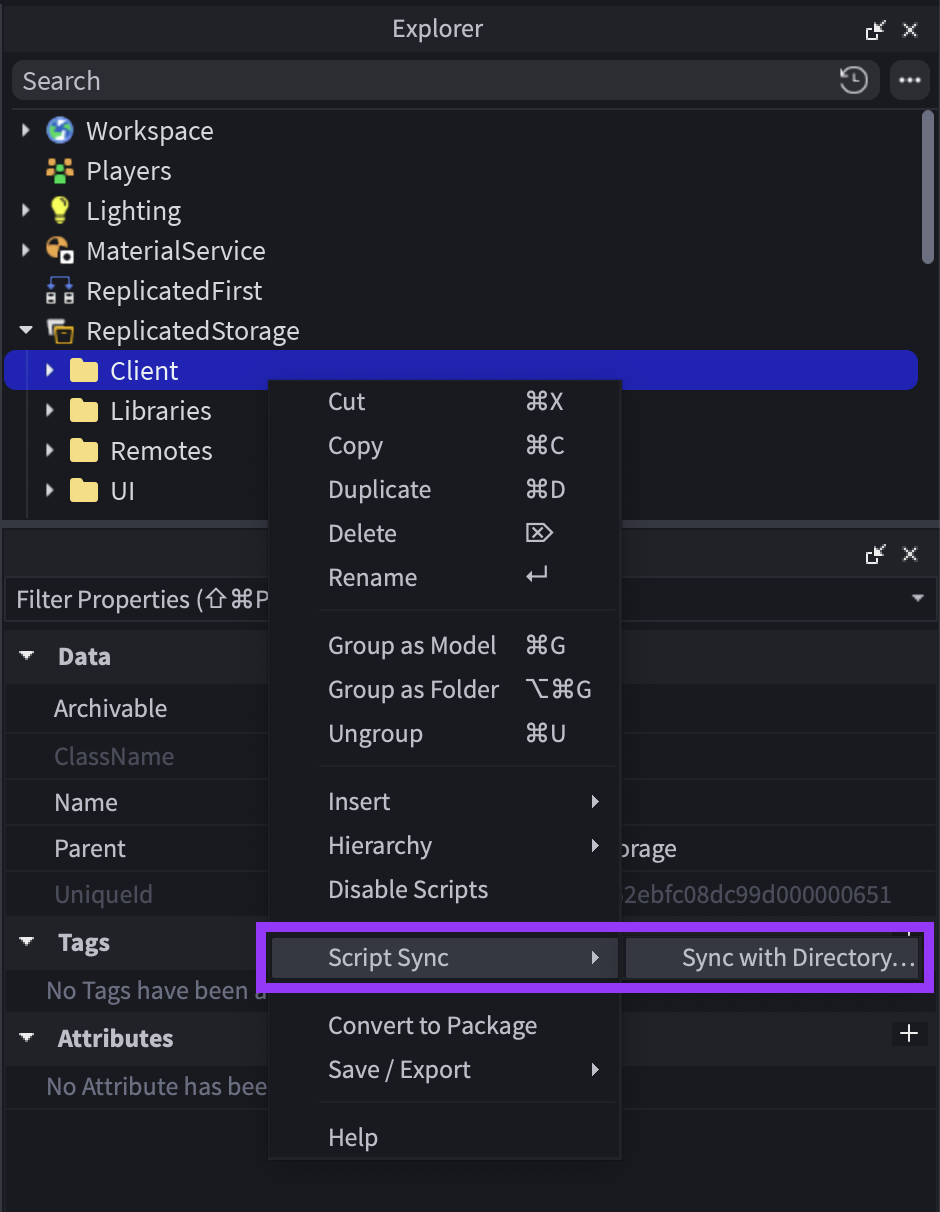
圖 26-2 從 Explorer 對 Script 或 Folder 啟動 Script Sync;選擇同步位置前先確認 Studio 與磁碟哪一側是正確版本。
MCP 讓 AI client 直接和 Studio session 溝通;Script Sync 則把 Studio 裡的 Script 同步成本機 .luau 檔案,讓你可以用外部 editor、LSP、formatter、Git 來管理 code。
適合 Script Sync 的內容:
ServerScriptService
ReplicatedStorage 裡的 ModuleScriptStarterPlayerScripts
不適合把整個世界都想成 Script Sync:
官方文件也提醒,Script Sync 只同步 Script、LocalScript、ModuleScript、Folder。
可以這樣理解:
Script Sync:
- 把 Luau code 放進檔案系統。
- 適合 Git、外部 editor、formatter、LSP。
- 重點是 script source。

MCP:
- 讓 AI client 操作目前 Studio session。
- 適合讀 DataModel、inspect instance、playtest、讀 Output、截圖、修改 Script、插入資產。
- 重點是 Studio live context。
兩者可以一起用:
Script Sync 管 code 檔案。
MCP 管 Studio context 與驗證。
Git 管可回復的工程歷史。
官方文件提到 quick connect 可支援多種 client,也可用 JSON configuration 或 CLI command 連接支援 stdio MCP 的 client。
本書不把某個 client 當成唯一答案。你應該關心的是:
不要因為某個 client 能接 MCP,就把 production project 無條件交給它。
第 26 章的 Playtest 是測工具鏈,不是測新 gameplay。
【Ch26 檢查|確認 MCP 連線安全】
啟用 MCP 前:
- 保存 place。
- 建立 version notes 或 local backup。
- 關閉無關的 Studio 視窗。
- 確認畫面上沒有敏感測試資料。
- 確認你信任這個 AI client。
- 確認你了解 client 可能讀取與修改已開啟的 places。
在 Studio 中:
Assistant -> ... -> Manage MCP Servers -> Enable Studio as MCP server
確認:
- MCP server enabled.
- Client connected.
- Green indicator appears.
- Correct client is connected.
如果使用 quick connect,從 Studio 的設定面板選擇 client。若沒有 quick connect,依 client 支援方式使用 JSON configuration 或 CLI command。
在外部 AI client 輸入:
【Ch26 驗證|確認 MCP 連線設定】
使用 Roblox Studio MCP connection 驗證設定。

步驟:
1. 列出已連接的 Studio instances。
2. 確認 active Studio instance。
3. 讀取 depth 2 的 game tree。
4. 回報 Workspace、ServerScriptService、ReplicatedStorage、StarterGui 與 StarterPlayer 下的內容。

不要編輯任何內容。
不要執行 Luau。
不要啟動 Playtest。
通過條件:
- Client can see the correct Studio instance.
- Client can list major services.
- Client does not modify anything.
- Output is understandable.
第一次 edit 不要修核心系統。選一個低風險修改,例如加一個 warning message 或改內部註解。
【Ch26 實作|加入未知能力警告】
只進行一項小修改。

目標:
ServerScriptService/AbilityService

修改:
收到未知 ability name 的 request 時加入 warning,但不要更改現有 cooldown 或 movement logic。

規則:
- 先顯示預計套用的 diff。
- 不要編輯任何其他 script。
- 不要重新命名 RemoteEvents。
- 編輯後啟動 Playtest 並讀取 Output。
- 精確摘要修改內容。
如果 client 直接想重寫 AbilityService,拒絕,改回更小的任務。
修改後要求:
【Ch26 測試|執行 MCP Smoke Test】
透過 MCP 執行 smoke test。

步驟:
1. 啟動 Playtest。
2. 生成角色後讀取 Output。
3. 如果可以,按 Q 觸發 WindDash。
4. 再次讀取 Output。
5. 停止 Playtest。

回報:
- Playtest 是否成功啟動?
- 是否出現紅色 errors?
- 是否出現新的 warning?
- 這項修改是否影響預期流程?
這個測試不取代玩家體感測試,但可以快速確認 AI 修改沒有立刻造成 runtime error。
【Ch26 修正 1|確認正確 Studio Instance】
我可能同時開啟多個 Roblox Studio 視窗。

進行其他操作前:
1. 使用 list_roblox_studios。
2. 顯示每一個已連接的 Studio instance。
3. 詢問我應該使用哪一個 instance。
4. 在我確認前,不要檢查、編輯、執行 Luau 或啟動 Playtest。
多個 Studio 視窗是 MCP 工作流的高風險情境。操作錯專案會比單純生成錯 Script 更麻煩。
【Ch26 修正 2|處理 Script Sync 衝突】
Script Sync 回報 Studio 與 disk 之間發生 conflicts。

背景:
- 我可能同時在 Studio 與外部 editor 編輯過 scripts。
- 我不想遺失任何工作成果。

任務:
- 解釋選擇 Keep Studio 或 Keep Disk 前應比較哪些資訊。
- 建立 conflict resolution checklist。
- 沒有證據時,不要直接叫我選擇其中一邊。
這個 Prompt 不讓 AI 替你猜。Script Sync 衝突需要看實際差異。
【Ch26 修正 3|Agent 提出大範圍重寫方案】
Agent 提出大範圍重寫方案。

目前規則:
- 不要重寫整個系統。
- 我們需要範圍最小且安全的修改。

任務:
- 將方案拆成較小的步驟。
- 找出哪些步驟是 read-only。
- 找出哪些步驟可以復原。
- 建議最小且有用的第一個 patch。
- 加入該 patch 的驗證方式。
這延續第 19、20、23 章的原則:先界定問題,再小步修改。
【Ch26 修正 4|產生唯讀維護報告】
以 read-only mode 使用 MCP,為「AI Adventure Island」建立 maintenance report。

檢查:
- 主要 scripts 與 modules。
- RemoteEvent 名稱與位置。
- UI controllers。
- Server services。
- 明顯的 TODO 或 warning comments。
- 執行一次 Playtest 後的 Output 訊息。

不要編輯任何內容。
不要插入 assets。
不要執行有副作用的 Luau。

輸出:
1. 架構摘要。
2. 前 5 項可維護性風險。
3. 前 5 項測試缺口。
4. 建議的後續 patches,從最小範圍開始。
5. 要詢問創作者本人的問題。
這是第 26 章最實用的 Prompt。你不一定要讓外部 agent 直接寫 code,但可以讓它先幫你整理維護視角。
連接前:
- Studio 已保存。
- 已有 version notes 或 backup。
- 已開啟正確的 place。
- 無關的 Studio 視窗已關閉或清楚命名。
- Client 值得信任。
- Client tool calls 可以逐一審查。
- Scripts 中沒有敏感 secrets。
- 不允許發布或更改 audience。

Session 期間:
- 從 read-only 開始。
- 確認 active Studio instance。
- 編輯前先探索。
- 使用 multi_edit 前先要求計畫。
- 一次只套用一個 patch。
- 每個 patch 後都要驗證。
- 記錄修改過的 scripts 與 instances。

Session 結束後:
- 執行回歸測試或 smoke test。
- 檢查 Output。
- 搭配 version notes 保存。
- 更新 maintenance notes。
- 不再需要時中斷 client 連線。
階段 1:探索
- 列出 Studio instances
- 設定 active Studio
- 搜尋 game tree
- 搜尋 scripts
- 讀取相關 scripts
- 不進行編輯

階段 2:計畫
- 摘要目前行為
- 找出問題
- 提出小範圍 patch
- 列出受影響的 scripts
- 列出驗證步驟

階段 3:編輯
- 套用一個 patch
- 避免無關的重構
- 保持 RemoteEvent contracts 不變
- 除非明確要修改,否則保持 DataStore schema 不變

階段 4:驗證
- 啟動 Playtest
- 操作要測試的功能
- 讀取 Output
- 如果是視覺問題,擷取畫面
- 停止 Playtest

階段 5:記錄
- 修改過的 paths
- 修改原因
- 測試結果
- 已知限制
- 下一個 patch
如果你要把 AI Adventure Island 的主要 scripts 同步到本機,可以用這種概念:
AIAdventureIsland/
├── ServerScriptService/
│   ├── QuestService.server.luau
│   ├── EnemyAIService.server.luau
│   ├── AbilityService.server.luau
│   ├── ShopService.server.luau
│   └── SaveService.server.luau
├── ReplicatedStorage/
│   ├── SharedConfig.luau
│   └── Remotes/
└── StarterPlayerScripts/
    └── AdventureClient.client.luau
實際命名要依 Script Sync 規則調整。官方文件列出:
name.luau -> ModuleScript
name.server.luau -> Script with Server RunContext
name.client.luau -> Script with Client RunContext
name.local.luau -> LocalScript
name/ -> Folder
不要把非 Script 資產誤以為會被 Script Sync 完整管理。
適合使用 Studio Assistant 的情況:
- 你正在 Studio 裡逐步建立功能。
- 你要生成場景、模型、材質、UI 初版。
- 你要請它解釋選取的 Script。
- 你要用 Planning Mode 拆功能。

適合使用 MCP/external client 的情況:
- 你要跨多個 Script 做維護檢查。
- 你要用外部 editor 和 Git 管 Luau code。
- 你要讓 agent 讀 DataModel 後產生 maintenance report。
- 你要自動跑 playtest、讀 Output、截圖。
- 你已經能審查 agent 的工具呼叫與修改計畫。
如果你還不確定 DataModel、RemoteEvent、server authority、DataStore、發布流程,先不要急著把 MCP 當主力。工具越強,越需要你知道它正在改什麼。
第七部會引入 Studio 以外的 AI 生成工具:音樂、音效、2D 美術、3D 模型。MCP 在那裡會變成一個整合層:
但原則不變:
外部 AI 產生素材。
Roblox Studio 整合素材。
MCP 協助檢查與維護。
創作者負責審查、授權與發布。
本章把 AI 工作流從 Studio 內建 Assistant 延伸到 MCP、Script Sync、外部 AI client 與 Git。
你現在應該記住:
multi_edit 和 execute_luau 都要小心,尤其是有副作用的操作。下一章會把整本書的範例專案轉換成可複製的 Roblox AI 開發藍圖。那一章會回收前面所有 prompt pattern、context pack 與工程整理規則,讓讀者能把 AI Adventure Island 換成自己的遊戲題材。
嗨!我是 Wolke,曾任 Google Developer Expert(GDE,2019–2023) 與 LINE API Expert。
我熱衷於研究 AI Agent、n8n 自動化工作流與全端開發架構,致力於將 AI 技術轉化為真正能落地的生產力工具。
如果你喜歡這篇文章,歡迎透過以下方式與我交流:
📚 技術著作
《實用的 Gemini API 開發點子書》:帶你運用 Gemini App、Google AI Studio、Gemini CLI 與 Antigravity IDE,打造 AI Agent 與實用產品。
📝 技術部落格
歡迎追蹤我的 Medium,我會持續分享 Agentic Automation、架構設計與實際開發的踩坑心得。
🎤 技術講座與合作
我持續受邀至技術社群及研討會,分享 AI Agent、自動化工作流、DevOps 與全端開發實戰。
我曾於 DevOpsDays Taipei 2026 主講「不再只是寫腳本!讓 AI 代理人成為你的 SRE 最佳夥伴」工作坊。
如果你的企業、社群或學校正在尋找相關主題講者,歡迎私訊聯繫,洽談講座與工作坊合作!
🎮 我的 Roblox 遊戲
🎁 免費贈送 OpenAI 或 Claude AI 額度
為了鼓勵大家實際動手打造自己的 Roblox 體驗,我每個月會開放:
參加方式:
確認完成後,我會邀請你加入並設定 50 點額度。名額有限,歡迎把握機會!



 iThome鐵人賽
 看影片追技術