
第 24 章完成的是發布前自檢。你已經整理了 metadata draft、內容成熟度筆記、AI / asset provenance register、Experience Settings audit checklist,也知道不能把「用 Assistant 協助開發」誤寫成「遊戲內有玩家互動式 AI」。
現在才輪到真正的發布。
但發布不是按一次 Publish to Roblox 就結束。Roblox 的發布流程至少包含四個層次:
Save / Publish place
Create or update experience
Configure audience and settings
Track release version and post-publish behavior
本章會把 AI Adventure Island 發布成 Roblox experience,並建立一套可以重複使用的 release workflow。
完成本章後,你會得到:
AI Adventure Island Publish Experience 欄位草稿。本章不保證你的遊戲一定會通過 moderation,也不建議還沒測試就直接 Public。它的重點是:讓發布成為可檢查、可追蹤、可回復的工程流程。
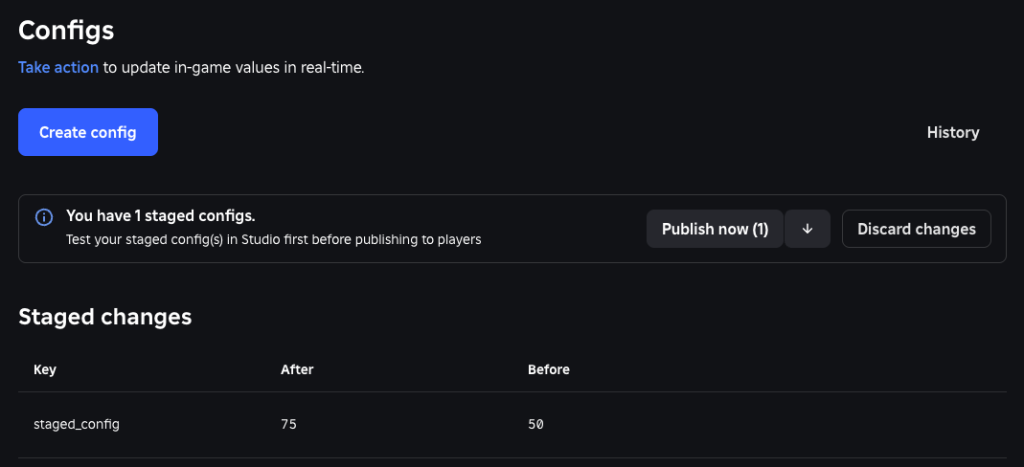
圖 25-1 發布前要再次確認目標 experience、place 與設定環境,避免把測試設定寫入正式版本。
請先把以下 context 給 Assistant:
【Ch25 Context|規劃 Roblox 發布】
我們正準備將「AI Adventure Island」發布為 Roblox experience。

目前遊戲:
- 適合初學者的 Roblox 冒險島嶼。
- 玩家探索島嶼、收集水晶、與 Guide NPC 交談、避開簡單的敵人巡邏、使用 WindDash、賺取 Gold、購買升級並保存進度。
- 遊戲使用 Roblox Studio Assistant 開發。
- 目前遊戲不包含面向玩家的生成式 AI 聊天、AI NPC 對話、玩家文字生成、圖片生成或 extended AI interactions。

目前發布狀態:
- 已有回歸 Playtest 清單。
- 已有發布前內容安全檢查清單。
- 已有 metadata 草稿。
- 已有 asset provenance register。
- 已準備 content maturity notes,但必須由創作者本人確認。
- 新 experience 預設為 Private。
- Public/Limited 的發布資格與可觸及年齡層不同。
- 若要觸及 16 歲以下的 Roblox Kids/Select,必須完成額外的帳號驗證、發布資格與 evaluation。

目標:
- 準備一套保守的首次發布工作流程。
- 除非已確認所有公開發布需求,否則首次發布的 experience 應保持 private。
- 建立 publish fields、version notes、dashboard checks 與發布後 smoke tests。
- 分開規劃 16+/Trusted Friends 與 all-ages(包含 Kids/Select)的 release gates。

不要:
- 宣稱遊戲已符合規範。
- 宣稱遊戲已發布。
- 捏造功能。
- 在沒有明確理由時,建議啟用高風險 security settings。
Audience > Reach 查看。你現在可能很想直接把遊戲公開:
File -> Publish to Roblox
Audience -> Public
Save
這樣做太快。
AI Adventure Island 雖然已經能玩,但第一版發布應該更像下面這樣:
1. Publish to Roblox,建立雲端 experience。
2. 保持 Private。
3. 到 Creator Dashboard 檢查 metadata、Audience、Content Maturity、Places。
4. 寫 version notes。
5. 用自己的帳號進入 published version 做 smoke test。
6. 找測試者時改 Limited / Playtesters。
7. 確認內容、裝置、存檔、錯誤都可接受後,再考慮先向已驗齡 16+ audience 開放 Public + Beta Mode。
8. 若目標包含 16 歲以下玩家,到 Audience > Reach 追蹤 Kids / Select evaluation,不要把 Public 誤認成已經 all-ages。
這不是保守到不發布,而是把發布拆成可控制的步驟。
Roblox 文件也明確區分:發布到 cloud 和公開給所有玩家不是同一件事。新 game 預設是 private,這對初學者很重要。你可以先把 experience 存到雲端,再慢慢整理受眾、圖示、縮圖、內容成熟度與測試者權限。
本節依 2026 年 7 月 Roblox 官方文件整理。Kids/Select 制度仍標示為逐步推出中,實際可用選項、資格與費用應以 Creator Dashboard 和最新官方文件為準。
目前的發布模型不能只寫成「Private 或 Public」。Public/Limited 之後,還要看這個 game 有資格觸及哪一層 audience。
第一層是已驗齡 16+ 與 Trusted Friends。創作者要先符合基本發布條件:帳號狀態良好且建立至少 2 天、完成 age check,並提交 Maturity & Compliance Questionnaire。這不代表新 game 一建立就自動公開給 16+;它仍然預設 Private,必須由創作者主動設定 Audience。
第二層是 all-ages,也就是包含 Roblox Kids(約 5–8 歲)與 Roblox Select(約 9–15 歲)。如果你希望 AI Adventure Island 讓 16 歲以下玩家也能搜尋與加入,除了內容成熟度要適合,創作者還需要:
這裡的 publishing fee 是每個 game 1,000 Robux,不是加速審查費。官方說明的退費條件包括:game 維持 100 位 highly engaged players 達 60 天,且沒有因違反 Community Standards 遭永久 moderation 或下架。實際付款與退費資格仍應以 Creator Dashboard 顯示為準。
一般 evaluation 不是單純按下「送人工審核」。新 game 會先只觸及已驗齡 16+ 玩家,Roblox 會分析 real-time moderation、gameplay 與 engagement。當最近 60 天內累積 500 次由 highly engaged、age-checked 玩家產生的 unique plays,才完成 evaluation 並取得 Kids/Select eligibility。實際進度要到 Creator Dashboard 的 Audience > Reach 查看。
如果有定時上市或站外宣傳需求,可以選擇支付每個 game 100,000 Robux 的 refundable expedited review fee,以加速 Kids/Select 的 safety 與 compliance review。官方說明的目標是 48 小時;如果審查發現輕微違規,修正並重新提交後,48 小時計時會重新開始。這筆費用不會降低審查標準,也不應在書中寫成「付費保證通過」。
Expedited review fee 在 90 天後才可申請退還。若 game 保持良好狀態並維持 100 位 highly engaged players,可以取回費用並維持 Kids/Select eligibility;若尚未達到自然門檻,也可以讓費用繼續保留,以維持 eligibility。若 game 因違反 Community Standards 遭永久 moderation 或下架,費用不會退還。
對本書的第一版專案,較穩健的順序是:
1. Publish to Roblox,保持 Private。
2. 完成 Maturity & Compliance Questionnaire 與帳號發布資格檢查。
3. 先用 Limited/Playtesters 做發布版 smoke test。
4. 符合條件後,先開放給已驗齡 16+ audience。
5. 在 Audience > Reach 追蹤 Kids/Select evaluation。
6. 達成一般 evaluation,或確有上市時程才評估 expedited review。
7. Kids/Select eligibility 生效後,再驗證 16 歲以下帳號實際能否搜尋與加入。
先讓 Assistant 產生發布流程,不要讓它直接改任何設定。
【Ch25 主任務|規劃 Roblox 發布】
為「AI Adventure Island」建立一套保守的首次發布工作流程。

遊戲事實:
- 冒險島嶼探索遊戲。
- 玩家收集水晶、賺取 Gold、與 Guide NPC 交談、避開簡單的巡邏敵人、使用 WindDash、購買升級並保存進度。
- 遊戲使用 Roblox Studio Assistant 開發。
- 遊戲不包含面向玩家的生成式 AI 或 extended AI interactions。

目前準備狀態:
- 已有回歸測試清單。
- 已有發布前內容安全檢查清單。
- 已有 metadata 草稿。
- 已有 asset provenance register。

輸出:
1. Publish Experience 欄位草稿:
   - Name
   - Description
   - Creator 選擇
   - Devices
2. Audience 決策表:
   - Private
   - Limited / Playtesters
   - Public:16+ 與 Trusted Friends
   - Public:all-ages(包含 Kids/Select)
   - Public + Beta Mode
3. Audience eligibility 檢查:
   - Account standing 與 account age
   - Age check 與 ID verification
   - 2FA
   - Roblox Plus/Premium 或 refundable publishing fee
   - Maturity & Compliance Questionnaire
   - Kids/Select evaluation progress
   - 500 highly engaged unique plays/60 days 門檻
   - 是否真的需要 expedited review
4. Creator Dashboard 檢查清單。
5. v0.1.0 的 version notes 草稿。
6. 發布後 smoke test 清單。
7. Rollback 與 restart-server 決策指南。

限制:
- 不要捏造功能。
- 不要宣稱已通過 moderation。
- 不要將遊戲描述為 AI chatbot 或 AI NPC experience。
- 除非明確需要,否則不要建議啟用 HTTP、third-party sales、third-party teleports、voice 或 camera。
- 不要把 16+ reach 說成 all-ages reach。
- 不要把 expedited review 說成付費保證通過。
這個 Prompt 的重點不是「幫我發布」,而是「幫我準備發布」。發布權限、受眾、內容成熟度、是否 Public 都應該由創作者本人決定。
Assistant 可能先給你一份像這樣的發布草稿:
Publish Experience Draft

Name:
AI Adventure Island

Description:
Explore AI Adventure Island, a compact Roblox adventure about crystal collecting, quests, upgrades, and movement. Help the Guide, dodge simple patrol enemies, unlock WindDash upgrades, and return later with your progress saved.

Creator:
- Use personal account for a solo learning project.
- Use a group if this is a team project or if ownership should not depend on one personal account.

Devices:
- Desktop: yes, tested.
- Mobile: yes, tested with Device Emulator.
- Tablet: yes, tested with responsive UI checks.
- Gamepad: yes only if controller flow passed the Chapter 22 checklist.
- Console / VR: no unless platform-specific checks are completed.
它也可能產生 Audience decision table:
Audience Decision

Private:
- Best for first publish.
- Only creator and permitted collaborators can access.
- Use this immediately after Publish to Roblox.

Limited / Playtesters:
- Use when you want invited testers to try the published build.
- Requires appropriate publishing requirements and permissions.
- Good before public beta.

Public:
- Use only after content maturity, metadata, moderation expectations, smoke tests, and device support are ready.
- Public does not automatically mean all ages.
- A new eligible game may first reach age-checked 16+ users and Trusted Friends while Kids / Select evaluation is still in progress.

Public + Beta Mode:
- Public, but with more limited reach.
- Useful for a first public release when you still want real players but do not want to treat the game as a polished launch.

All ages, including Kids / Select:
- Requires ID verification, 2FA, a qualifying Plus / Premium subscription or refundable publishing fee, and successful evaluation.
- Track eligibility under Audience > Reach.
- Do not claim this reach until the dashboard confirms it.
再加上一份 version notes:
Version name:
v0.1.0-first-private-release

Version notes:
- First private Roblox cloud publish for AI Adventure Island.
- Includes island exploration, crystal collection, Guide NPC quest, simple enemy patrols, WindDash ability, shop upgrades, HUD, and DEV save flow.
- Known limitations:
  - Not a monetized release.
  - No player-facing generative AI interactions.
  - Public audience not enabled yet.
  - External AI asset register will expand in later chapters.
這些結果大致有用,但你仍然要檢查幾件事。
第一,Devices 不能用想像。第 22 章測過桌面、手機、平板、gamepad,才可以在 metadata 或發布欄位中勾選相應裝置。Console 和 VR 若沒做平台規範測試,不要宣稱支援。
第二,Creator 是很重要的所有權決策。個人學習專案可以用個人帳號;團隊專案、投稿合作、長期營運專案通常應該考慮 group。
第三,DEV save flow 這句要小心。正式發布前,如果第 18 章的存檔仍使用 development namespace 或測試 key,version notes 可以寫給自己看,但對玩家描述不要說得像完整 live save 已經長期驗證。內部 release notes 可以誠實記錄限制。
這章的「元件」不是新的 Part 或 Script,而是 Roblox 發布系統裡的概念。理解這些概念,比知道按鈕在哪裡更重要。
Roblox 文件會提到 game 和 place。
在 Studio 裡,你編輯的是一個 place 的 DataModel。DataModel 裡有 Workspace、ServerScriptService、StarterGui、ReplicatedStorage、Lighting 等服務,也有 Part、Model、Script、UI、Terrain 和各種資產參照。
玩家看到的是 experience。當玩家按下 Play,會先進入 start place。
簡化來說:
Experience
└── Start Place
    ├── Workspace
    ├── ServerScriptService
    ├── StarterGui
    ├── ReplicatedStorage
    └── ...
AI Adventure Island 目前適合單一 start place。你不需要為了看起來專業就拆成多個 place。多 place 適合大型世界、不同關卡或傳送架構;在第一版裡,單一 place 更容易測試與發布。
Publish to Roblox 會把目前 place 的 DataModel 儲存到 Roblox cloud。這一步有幾個效果:
.rbxl。但這不等於已經對所有人公開。
新的 game 預設是 private。這讓你可以先發布到雲端,再完成後續設定。
Publish to Roblox As... 用在另一種情境:把目前 place 發布到既有 game、覆寫既有 place、或新增一個 place。
初學者最常犯的錯是分不清:
Publish to Roblox
Publish to Roblox As...
本章的第一版建議:
AI Adventure Island:用 Publish to Roblox。Publish to Roblox As...。如果你不確定,先停下來,不要連續按下一步。
Audience 不是行銷分類,而是誰能玩。
常見狀態:
Private:
Only creator / permitted editors.

Limited:
Only selected user categories, such as playtesters.

Public, 16+ / Trusted Friends reach:
Available to the eligible public audience while Kids / Select evaluation may still be in progress.

Public, all-ages reach:
Also available to eligible users under 16 after the additional publishing requirements and evaluation are complete.
Public 還可以搭配 Beta Mode。Beta games 仍然是 public,只是曝光方式較保守,適合第一個公開版本。
對本書專案來說,推薦流程是:
Private
-> Limited Playtesters
-> Public Beta(先觸及已驗齡 16+)
-> Kids / Select evaluation
-> Public all-ages(確認 eligibility 後)
不是每個專案都需要完整走完,但你應該知道每一步的意義。
Experience Settings 包含:
第 24 章已經做過安全 audit,第 25 章要在發布前再確認一次。
特別是 Security:
Allow HTTP Requests
Enable Studio Access to API Services
Allow Third Party Sales
Allow Third Party Teleports
Allow Mesh / Image APIs
不要因為 Assistant 說「可能需要」就全部打開。每個選項都應該對應到實際需求。
對 AI Adventure Island 第一版來說:
第 17 章的 ShopPanel 只使用遊戲內 Gold,不是 Roblox 官方 Shop,也不代表 experience 已經有 Pass、Developer Product 或 Robux 收入。
第一版發布時請確認:
Passes: none unless created and reviewed by the human owner
Developer Products: none unless receipt delivery is implemented and tested
Subscriptions: inactive unless benefits and expiry behavior are complete
Global Shop button: do not enable for an empty or untested catalog
ProcessReceipt: exactly one owner before any Developer Product goes live
本章只做發布檢查,不展開真實營利實作。第八部第 32–40 章會完整處理商品、receipt、定價、analytics、漏斗與廣告。任何付款、上架或廣告支出都保留人工確認。
Version History 讓你追蹤 saved 和 published versions,也可以加入 version notes。
這對 AI 協作開發特別重要,因為 Assistant 可能一次改很多地方。如果你沒有版本註記,日後只會看到一串時間點,很難知道哪個版本是「第 25 章第一次 private publish」、哪個是「修正 mobile dash」、哪個是「更換存檔 schema」。
好的 version notes 應該回答:
這版包含什麼?
這版修了什麼?
這版限制是什麼?
這版是否改變資料格式?
這版是否需要 restart server?
發布更新後,舊 server 不會立刻全部消失。玩家可能還在舊版本 server 裡,直到 server 自然關閉。
這通常是好事,因為它不會打斷玩家。
但如果你改了資料格式、修了嚴重 bug、或發布活動內容,可能需要 restart outdated servers。
判斷方式:
只是美術、文字、小 UI 調整:
通常不用 restart。

修正嚴重漏洞:
考慮 restart outdated servers。

DataStore schema 變更:
強烈考慮 restart,並確認 migration。

限時活動上線:
視時間敏感度決定。
本章第一版 private publish 沒有玩家流量,所以通常不需要處理 server restart。但你要在這章先建立觀念。
發布前你已經在 Studio 裡測過。發布後還要測一次,因為 published experience 的狀態不完全等於 Studio playtest。
在按下 Publish 前,先跑這份清單:
Studio:
- Play mode 沒有紅色 Output error。
- Server & Clients 測試主要 RemoteEvent。
- Device Emulator 測試主要 UI。
- Controller Emulator 測試 gamepad 路徑。
- DataStore 測試環境已確認,不會污染正式資料。
- No temporary debug parts in Workspace.
- No accidental admin-only scripts.
- No secrets in Script source.
Content:
- Description 不誇大。
- Icon / thumbnail 草稿符合實際 gameplay。
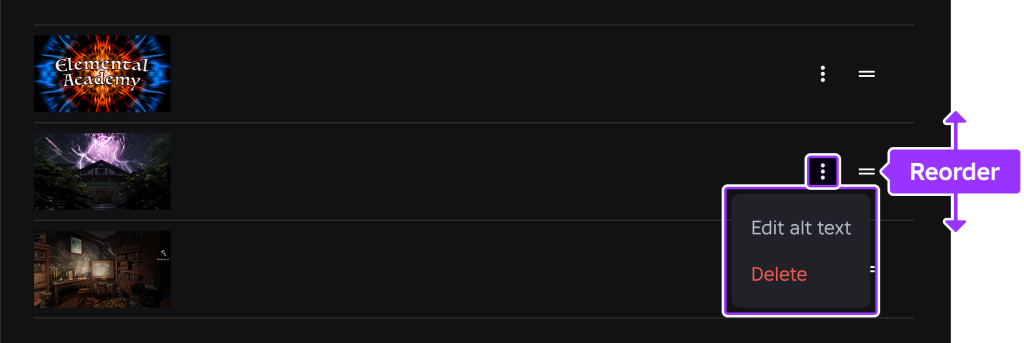
圖 25-2 發布後到 Creator Dashboard 管理 thumbnails,檢查排序、顯示內容與版本;宣傳圖必須和目前可玩的內容一致。
- Content maturity notes prepared.
- AI development usage not misrepresented as player-facing AI.
- Asset provenance register updated.
Settings:
- Creator selected intentionally.
- Devices checked against actual testing.
- Security settings reviewed.
- Communication settings reviewed.
- World settings not accidentally changed.
建議流程:
1. Open AI Adventure Island in Studio.
2. File -> Publish to Roblox.
3. In Publish Experience:
   - Name: AI Adventure Island
   - Description: use reviewed metadata draft.
   - Creator: choose personal account or group intentionally.
   - Devices: select only tested devices.
4. Click Create.
5. Keep the experience private.
6. Open Creator Dashboard and inspect the new experience.
不要在同一個情緒裡完成 Publish、Public、分享連結、邀請所有人。第一次發布後,先檢查。
發布完成後,做一輪最小 smoke test:
Published Experience Smoke Test

Access:
- Can open the experience details page.
- Audience is Private or intended setting.
- Creator is correct.
- Name and description display correctly.

Launch:
- Click Play using the Roblox app.
- Character spawns at expected SpawnLocation.
- Island loads.
- No obvious missing mesh / image / audio.

Gameplay:
- Collect one crystal.
- Gold / Crystal HUD updates.
- Talk to Guide NPC.
- Trigger one quest step.
- Use WindDash.
- Open ShopPanel.
- Buy one upgrade if test currency allows.

Systems:
- Output / Developer Console shows no severe runtime error.
- Save flow behavior matches current release plan.
- Mobile UI still usable if mobile support is enabled.

Post-test:
- Record issue list.
- Do not immediately Public if any major issue is found.
這份 smoke test 不取代第 23 章的完整 regression。它只確認「發布出來的版本能進、能玩、沒有明顯破掉」。
發布流程很容易出現「設定類問題」。這些問題不一定靠改 Script 解決,所以 Prompt 要把問題分類清楚。
【Ch25 修正 1|診斷發布版素材缺失】
將「AI Adventure Island」以 private 形式發布後,Roblox app 中有一張圖片或 mesh 消失。

證據:
- 該 asset 在 Studio 中正常顯示。
- 在已發布的 experience 中,物件呈現空白/不可見/缺失。
- Output 或 Developer Console 訊息:
  [貼上完整訊息]

已知背景:
- 部分 assets 可能是 Restricted,或需要授予遊戲 permission。
- Asset Privacy 可能影響 Images、Decals 與 Meshes。

請分析可能原因。
不要重寫 gameplay scripts。
建議如何檢查 asset permission、asset ownership、moderation status 與 asset IDs。
這個 Prompt 明確告訴 Assistant:問題可能在 asset permission,不是 gameplay。
【Ch25 修正 2|校正 Experience 描述】
檢查這份 Roblox experience 描述是否準確。

遊戲事實:
- 玩家探索一座島嶼。
- 玩家收集水晶與 Gold。
- 玩家與 Guide NPC 交談。
- 玩家避開簡單的巡邏敵人。
- 玩家可以使用 WindDash 並購買升級。
- 遊戲進度可以保存。
- 沒有面向玩家的生成式 AI 功能。

草稿:
[貼上描述]

任務:
- 移除會誤導玩家的宣稱。
- 讓前 160 個字元清楚易懂。
- 不要使用 hashtags。
- 不要列出 controls。
- 內容應適合所有年齡層。
- 產出一份精簡版本與一份稍微詳細的版本。
這個 Prompt 會比「make it exciting」安全很多。
【Ch25 修正 3|判斷 Public Beta 資格】
協助我判斷「AI Adventure Island」是否已適合從 Private 切換為 Public Beta。

目前證據:
- 回歸測試清單結果:
  [貼上摘要]
- Smoke test 結果:
  [貼上摘要]
- Content maturity 狀態:
  [貼上狀態]
- Asset moderation 狀態:
  [貼上狀態]
- Audience > Reach 狀態:
  [貼上 16+/Kids/Select eligibility 與 evaluation progress]
- Account publishing requirements:
  [貼上 age check/ID verification/2FA/subscription or fee 狀態]
- 已知問題:
  [貼上清單]
- 已測試裝置:
  [貼上清單]

輸出:
- 已準備完成/尚未準備完成/只適合 Limited playtesters。
- Blocking issues。
- Non-blocking issues。
- 建議的下一個 release gate。
- 清楚區分 16+ Public Beta 與 all-ages release。
- 如果尚未達到 Kids/Select eligibility,說明一般 evaluation 與 expedited review 兩條路徑的差異。

不要假設已符合規範。
不要忽略已知問題。
不要把 Public 狀態誤報為已觸及所有年齡。
不要把 expedited review 說成保證通過。
這個 Prompt 讓 Assistant 做 release gate 分析,而不是幫你自我說服。
【Ch25 修正 4|判斷是否重啟 Servers】
判斷這次更新是否需要重新啟動過時的 Roblox servers。

更新:
[描述更新]

變更:
- Scripts:
- DataStore schema:
- RemoteEvent contract:
- Monetization:
- Visual-only:
- Time-sensitive content:

目前 audience:
- Private / Limited / Public

問題:
我應該只重新啟動過時的 servers、延後重新啟動,還是讓舊 servers 自然結束?

請解釋風險並提出建議。
本書前面多次強調 server authority。發布時也一樣:如果 server 正在跑舊版本,玩家就可能同時遇到不同規則。尤其資料格式改變時,不能只想「我已經 publish 了」。
保留一份可貼到 Studio 的草稿:
Name:
AI Adventure Island

Short hook:
Explore an adventure island, collect crystals, help the Guide, unlock WindDash upgrades, and save your progress.

Description:
Explore AI Adventure Island, a compact Roblox adventure built around clear quests and progression. Collect crystals, earn Gold, help the Guide, dodge simple patrol enemies, unlock WindDash upgrades, and return later with your progress saved.

Device support:
- Desktop: enabled if latest checklist passed.
- Mobile: enabled if Device Emulator and real-device check passed.
- Tablet: enabled if UI scaling passed.
- Gamepad: enabled if controller flow passed.
- Console / VR: disabled unless separately tested.
如果你的實際專案少了某個功能,刪掉它。發布描述不應該替未來功能佔位。
Private
- Use for first publish.
- Best when metadata, maturity, and smoke tests are not complete.
- Not discoverable to general players.

Limited / Playtesters
- Use for invited testing.
- Best after private smoke test passes.
- Requires permission and publishing requirement review.

Public + Beta Mode
- Use for first public release.
- Best when core game works but you still expect feedback and iteration.
- Still public, so do not treat it as private testing.
- May initially reach only age-checked 16+ users and Trusted Friends.

Public, all-ages
- Use when the game is ready for broad discovery.
- Requires stronger confidence in content, performance, devices, and player support.
- Requires Kids / Select publishing eligibility and completed evaluation.
- Confirm actual reach in Audience > Reach before announcing an all-ages launch.
本書專案建議第 25 章先做到:
Publish to Roblox: yes
Audience: Private
Public release: not yet
第 25 章的成功標準不是「所有人都玩得到」,而是「第一個雲端版本可追蹤、可檢查、可繼續發布」。
每次發布都填這份:
Version:
v0.1.0-first-private-release

Release type:
Private publish

Summary:
First Roblox cloud publish for AI Adventure Island.

Included:
- Island exploration
- Crystal collection
- Guide NPC quest
- Simple patrol enemies
- WindDash ability
- Shop upgrades
- HUD
- Save flow

Changed since previous publish:
- N/A, first publish.

Known limitations:
- Public audience not enabled.
- External AI asset workflow not yet introduced.
- Content maturity answers must be confirmed before public release.

Data changes:
- No live data migration.

Server restart:
- Not required for first private publish.

Smoke test:
- Pending / Passed / Failed
後續每次更新都改版號,例如:
v0.1.1-mobile-dash-fix
v0.1.2-thumbnail-update
v0.2.0-public-beta
版號不需要追求大型軟體專案的完整語意化規則,但要讓人看得懂。
發布後到 Creator Dashboard 檢查:
Overview:
- Correct experience appears.
- Correct creator appears.
- Landing page opens.
- Copy URL works.

Configure / Settings:
- Audience matches intended state.
- Age / geography restrictions reviewed if needed.
- Content Maturity & Compliance status reviewed.

Basic Info:
- Name correct.
- Description correct.
- Icon status checked.
- Thumbnail status checked.
- Playable devices match testing.

Places:
- Correct start place.
- Version History visible.
- No accidental extra place.

Security / Communication:
- HTTP disabled unless needed.
- Third party sales disabled unless needed.
- Third party teleports disabled unless needed.
- Voice / camera disabled unless needed.

Access:
- Collaborators and playtesters reviewed.
這份清單要和第 24 章的內容安全檢查表一起保存。
如果發布後發現嚴重問題,先判斷類型:
Metadata typo:
- Fix metadata.
- No place rollback needed.

Broken UI or script:
- Consider restoring previous place version or publishing a fix.
- Run smoke test again.

Data corruption risk:
- Stop and assess.
- Do not repeatedly publish guesses.
- Consider making game private if public.
- Review DataStore keys and schema.

Misleading / rejected thumbnail:
- Replace media.
- Keep game private or beta until corrected.
Version History 可以讓你開啟或 restore previous version,但要記住:restore previous version 會建立新版本,不會自動讓 public live game 完成所有後續操作。若 live game 要回到修正後版本,你仍要 publish,並視情況 restart outdated servers。
No restart:
- Description / icon / thumbnail only.
- Minor non-critical visual changes.
- Private test publish with no active testers.

Let servers drain:
- Small gameplay tweaks.
- Non-critical UI fixes.
- No data format change.

Restart outdated servers:
- Security fix.
- Broken core gameplay fix.
- DataStore schema change with migration.
- RemoteEvent contract change.
- Time-sensitive event or content.

Delay restart:
- Public game with active players.
- Need to give players time to finish session.
- Update is important but not emergency.
如果你還是初學者,第一版 public release 之前最好避免資料格式頻繁變動。資料一旦進入玩家帳號,修復成本會比本機原型高很多。
本章把 AI Adventure Island 從 Studio 內的專案推進到 Roblox 發布流程。
你現在應該記住:
下一章會離開單純的 Studio Assistant 主線,介紹 MCP 與外部 AI client 如何接入 Roblox Studio。它是進階工作流,不取代本書前 25 章建立的基本原則:AI 可以協助,但創作者要負責驗證、發布與維護。
完成外部 AI 素材章節後,第八部會回到營運面,建立 Roblox 盈利、數據與成長流程。
嗨!我是 Wolke,曾任 Google Developer Expert(GDE,2019–2023) 與 LINE API Expert。
我熱衷於研究 AI Agent、n8n 自動化工作流與全端開發架構,致力於將 AI 技術轉化為真正能落地的生產力工具。
如果你喜歡這篇文章,歡迎透過以下方式與我交流:
📚 技術著作
《實用的 Gemini API 開發點子書》:帶你運用 Gemini App、Google AI Studio、Gemini CLI 與 Antigravity IDE,打造 AI Agent 與實用產品。
📝 技術部落格
歡迎追蹤我的 Medium,我會持續分享 Agentic Automation、架構設計與實際開發的踩坑心得。
🎤 技術講座與合作
我持續受邀至技術社群及研討會,分享 AI Agent、自動化工作流、DevOps 與全端開發實戰。
我曾於 DevOpsDays Taipei 2026 主講「不再只是寫腳本!讓 AI 代理人成為你的 SRE 最佳夥伴」工作坊。
如果你的企業、社群或學校正在尋找相關主題講者,歡迎私訊聯繫,洽談講座與工作坊合作!
🎮 我的 Roblox 遊戲
🎁 免費贈送 OpenAI 或 Claude AI 額度
為了鼓勵大家實際動手打造自己的 Roblox 體驗,我每個月會開放:
參加方式:
確認完成後,我會邀請你加入並設定 50 點額度。名額有限,歡迎把握機會!



 iThome鐵人賽
 看影片追技術