
到這裡,AI Adventure Island 已經不只是練習場景。
它有 terrain、模型、材質、procedural model、可互動物件、收集物、玩家狀態、HUD、client/server RemoteEvent、任務、敵人、能力、商店、存檔、架構整理、安全檢查、效能檢查、跨裝置檢查、回歸測試、發布前檢查、private publish workflow,以及 MCP 進階工作流。
但本書真正要教的不是「做一個冒險島」。
真正要教的是:
如何用 Roblox Studio Assistant 從 prompt 開始,
長出功能,
拆解 Roblox 元件,
驗證生成結果,
整理成可維護架構,
最後發布成 experience。
第 27 章要把這套方法抽出來,變成你下一個 Roblox 專案也能用的 AI 開發藍圖。
完成本章後,你會得到:
這章不新增 gameplay。它把整本書的方法變成可複製的工程模板。

圖 27-1 範例資產只是起點;改造成自己的遊戲時要重新整理玩法、視覺、資料與授權來源。
請先把以下 context 給 Assistant:
【Ch27 Context|建立可重用開發藍圖】
我們要將「AI Adventure Island」整理成可重用的 Roblox AI 開發藍圖。

目前範例專案:
- 島嶼探索。
- 水晶收集。
- Guide NPC 任務。
- 敵人巡邏。
- WindDash 能力。
- 商店升級。
- HUD.
- Client/server RemoteEvent 流程。
- 存檔系統。
- 回歸測試。
- 發布前安全檢查。
- Private 發布流程。
- 可選用的 MCP maintenance workflow。

目標:
- 協助創作者使用相同工作流程設計下一款 Roblox 遊戲。
- 不要直接重寫專案。
- 建立 system mapping 與 adaptation plan。
- 盡可能保留已測試的架構。
- 找出新題材需要修改的部分。
依你下一個專案主題,回頭讀前面章節的 context:
假設你不想做冒險島了。你想做一個太空採礦遊戲。
最直接的 Prompt 可能是:
將這款冒險島嶼遊戲改造成太空採礦遊戲。
這太大,也太模糊。
Assistant 可能會:
比較好的方式是先做對照:
【Ch27 規劃|轉換成太空採礦題材】
目前先不要編輯專案。

建立一份將「AI Adventure Island」改造成太空採礦遊戲的轉換計畫。

對應:
- 島嶼 -> 小行星基地
- 水晶 -> 礦石
- Guide NPC -> 任務控制 NPC
- WindDash -> jet boost
- 商店升級 -> 採礦工具升級
- 敵人巡邏 -> security drones

保留:
- 除非重新命名計畫已獲核准,否則保留 client/server RemoteEvent contracts。
- Server authority。
- HUD update pattern。
- 除非已有 migration plan,否則保留 SaveService schema。
- 回歸測試工作流程。

輸出分階段計畫,並在編輯前提出問題。
這才是本章要教的能力:不要讓 AI 直接把專案變形,而是先把題材替換成系統對照表。
先讓 Assistant 產生 reusable blueprint。
【Ch27 主任務|建立可重用開發藍圖】
以「AI Adventure Island」為基礎,建立一份可重用的 Roblox AI 開發藍圖。

不要編輯任何 Roblox Studio instance 或 script。

輸出:
1. 從構想到發布的核心工作流程。
2. 系統骨架:
   - 世界
   - 收集物
   - NPC/任務
   - 敵人/危險
   - 能力/工具
   - 商店/升級
   - HUD
   - client/server remotes
   - 存檔系統
   - 測試
   - 發布
3. 題材替換矩陣。
4. 啟動新專案用的 Prompt library。
5. Context pack template。
6. 工程檢查清單。
7. 發布檢查清單。

規則:
- 工作流程保持 Assistant-first。
- 保留 server authority。
- 保持先測試再發布的紀律。
- 不要假設每種題材都需要所有系統。
- 標示可選用的部分。
這個 Prompt 會把整本書的內容抽成模板。
Assistant 可能先整理出這樣的骨架:
Reusable Roblox AI Development Blueprint

1. Idea
   - Define theme.
   - Define player goal.
   - Define core loop.
   - Define target devices.

2. World
   - Generate terrain / greybox.
   - Add spawn and route.
   - Add visual style.
   - Add performance constraints.

3. Interaction
   - Add collectibles.
   - Add NPC / prompt.
   - Add reward feedback.

4. Systems
   - Player state.
   - HUD.
   - Quest.
   - Ability / tool.
   - Enemy / hazard.
   - Shop / upgrades.
   - Save.

5. Engineering
   - Client/server boundaries.
   - ModuleScript services.
   - Remote validation.
   - Debug and Output.
   - Performance.
   - Cross-device controls.

6. Release
   - Regression test.
   - Content safety.
   - Metadata.
   - Private publish.
   - Limited playtest.
   - Public beta.
這個結果有用,但還不夠。下一步要把 AI Adventure Island 的名詞換成新題材名詞。
例如太空採礦:
Theme: Space Mining Outpost

Island -> AsteroidOutpost
Crystals -> OreChunks
GuideNPC -> MissionControlBot
WindDash -> JetBoost
EnemyPatrols -> SecurityDrones
Shop -> UpgradeTerminal
Gold -> Credits
QuestPanel -> MissionPanel
或者校園任務:
Theme: School Quest Club

Island -> Campus
Crystals -> Notebooks
GuideNPC -> TeacherMentor
WindDash -> Sprint
EnemyPatrols -> HallMonitors
Shop -> ClubRoomUpgradeDesk
Gold -> MeritPoints
QuestPanel -> AssignmentPanel
好的改造不是只替換字串,而是保留系統責任。
AI Adventure Island 的表層是冒險島,底層是常見 Roblox game loop:
玩家進入世界
看到目標
移動與探索
和物件互動
取得資源
完成任務
解鎖能力
購買升級
保存進度
回來繼續玩
這個 loop 可以換題材:
太空:採礦、修基地、升級噴射背包
農場:種菜、交貨、升級工具
校園:收集筆記、完成社團任務
城市:跑酷、收集徽章、解鎖路線
魔法:收集符文、學習法術、解鎖魔杖
Roblox 元件也可以保留:
Workspace:
- world geometry
- interactable objects
- NPCs
- hazards

ReplicatedStorage:
- RemoteEvents
- shared config
- shared modules

ServerScriptService:
- authoritative services
- DataStore wrapper
- validation

StarterGui:
- HUD
- panels
- feedback

StarterPlayerScripts:
- input
- UI controller
- client feedback
這就是 DataModel 作為 source of truth 的意義。你換題材時,不應該把整個 DataModel 責任打散。
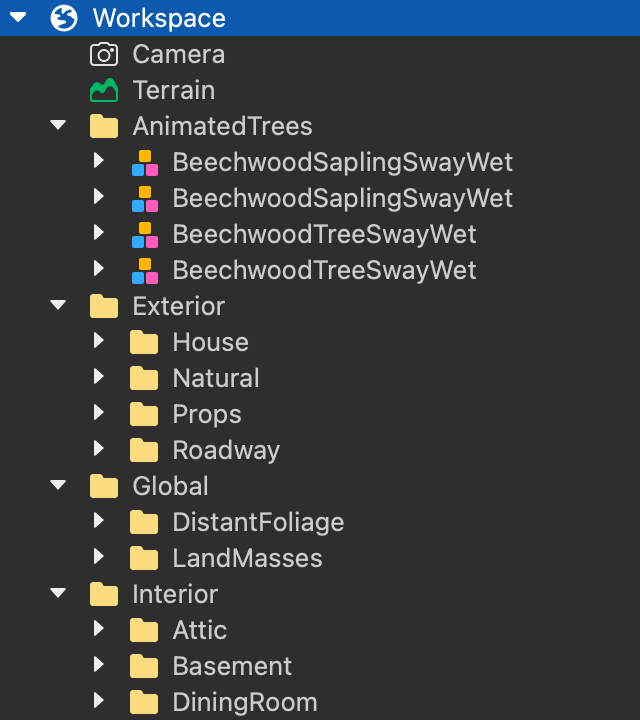
圖 27-2 改造範例遊戲時先整理 Folder 與命名,再逐一替換內容;題材可以改變,但服務責任和 DataModel 結構要維持清楚。
前面章節反覆使用同一個節奏:
【Ch27 模板|撰寫結構化 Prompt】
背景:
目前專案狀態。

目標:
這次要做什麼可見功能。

限制:
不能改什麼、不能發明什麼、server/client 邊界。

輸出:
希望 Assistant 產生什麼。

驗證:
如何 Playtest、看 Output、驗收。
這比單純說「幫我做一個商店」穩定很多。
新的專案也要這樣寫:
【Ch27 模板 2|新增單一遊戲功能】
我們正在製作 [遊戲名稱]。

目前狀態:
- [現有系統]

目標:
- 加入 [一項功能]。

限制:
- 除非必要,否則保留 RemoteEvent 名稱。
- Server 必須驗證獎勵。
- Client 只處理 UI 與 input。
- 不要重寫無關的 scripts。

輸出:
- 列出建立的 instances。
- 列出修改的 scripts。
- 解釋流程。
- 提供 Playtest 步驟。
Context pack 是本書最重要的寫作與開發工具之一。
你不需要每次把全部 Roblox 文件丟給 Assistant。你要按章節、按功能挑 context。
例如新專案要做任務:
Context pack:
- Assistant prompt guide
- ProximityPrompt docs
- Events docs
- UI docs
- RemoteEvent docs
- ModuleScript docs
- Existing QuestService summary
新專案要做存檔:
Context pack:
- DataStore docs
- Experience Settings security notes
- SaveService current schema
- Error handling pattern
- Version and migration notes
新專案要發布:
Context pack:
- publishing games and places
- descriptions
- thumbnails
- icons
- content maturity
- asset privacy
- accessibility
這樣 Assistant 的回答才會貼近你當前問題,而不是泛泛而談。
如果你前面把系統整理成 ModuleScript 或 service-like scripts,你就能替換題材而不重寫所有 code。
例如:
QuestService
AbilityService
ShopService
SaveService
EnemyAIService
SharedConfig
題材變了,這些名稱可以保留,也可以改名。但更重要的是責任:
QuestService:
- 檢查任務條件。
- 發獎勵。
- 通知 UI。

AbilityService:
- 驗證能力使用。
- 套用 cooldown。
- 做 server-authoritative 效果。

ShopService:
- 檢查玩家貨幣。
- 驗證商品。
- 套用升級。

SaveService:
- 讀寫玩家資料。
- 處理失敗。
- 管理 schema。
如果你要從冒險島改成農場,QuestService 還是可以存在,只是任務從「收集水晶」變成「收成作物」。
不是所有內容都應該重用。
應該重用:
- Prompt pattern
- Context pack discipline
- Server authority
- Remote validation
- ModuleScript responsibility
- UI feedback pattern
- Regression test workflow
- Release checklist
要小心重用:
- DataStore schema
- RemoteEvent names
- UI labels
- Asset IDs
- Currency names
- Content maturity notes
通常要替換:
- 場景模型
- 題材名詞
- 主要目標
- NPC 外觀與對話
- Icon / thumbnail
- Description
- Asset register
最大風險是「表面換皮,底層沒有重新驗證」。只要你改了題材,就要重新跑測試與發布檢查。
第 27 章的 Playtest 是「改造計畫驗收」,不是完整實作。
假設你選太空採礦。先不要讓 Assistant 改完整專案,只做計畫驗收:
Theme Conversion Smoke Test

Theme:
Space Mining Outpost

Check:
- Does the new theme have a clear player goal?
- Does the core loop still fit?
- Are collectibles mapped?
- Is the NPC role mapped?
- Is the ability mapped?
- Is the shop role mapped?
- Is the currency mapped?
- Are enemies or hazards mapped?
- Does the save data need schema changes?
- Does content maturity change?
- Do thumbnails and description need replacement?
如果這份表都填不出來,不要開始改 Studio。
保留:
- RemoteEvent folder 位置。
- Client/server 分工。
- Server validation。
- HUD update flow。
- SaveService error handling。
- 回歸測試格式。
- 發布檢查清單。

修改前檢查:
- DataStore keys。
- 貨幣名稱。
- Upgrade IDs。
- Quest IDs。
- Ability IDs。

替換:
- 世界 assets。
- NPC 對話。
- UI labels。
- Metadata。
- Icon/thumbnail。
如果要真正開始改造,第一個切片應該很小:
【Ch27 實作|先替換 UI 與 Metadata】
只將 UI 與 metadata labels 從冒險島嶼改成太空採礦題材。

不要更改 RemoteEvent 名稱。
不要更改 DataStore schema。
不要更改 gameplay logic。

修改後:
- HUD 仍可載入。
- Crystal count label 可以暫時改成 Ore label。
- Gold label 可以暫時改成 Credits label。
- QuestPanel 仍會更新。
- Output 沒有紅色 errors。
先換可見文字,再換資產,再換系統設定。不要一口氣重寫所有玩法。
【Ch27 修正 1|縮小題材改造範圍】
你的計畫重寫範圍太大。

請修改轉換計畫。

規則:
- 保留現有且經過測試的架構。
- 第一階段不要更改 RemoteEvent contracts。
- 第一階段不要更改 DataStore schema。
- 目前先不要重寫 ShopService、AbilityService、QuestService 或 SaveService。
- 從 labels、metadata 與非程式碼 assets 開始。
- 接著提出一項小範圍玩法改造。

輸出:
- 階段 1:只修改外觀/metadata。
- 階段 2:替換 assets。
- 階段 3:改造一項玩法對應。
- 階段 4:檢查 data/schema。
- 每個階段完成後的驗證方式。
【Ch27 修正 2|篩選新題材所需系統】
新的遊戲題材可能不需要「AI Adventure Island」的每一個系統。

題材:
[貼上題材]

現有系統:
- 收集物
- Guide 任務
- 敵人巡邏
- WindDash
- 商店升級
- 保存進度

任務:
- 將每個系統標示為保留/修改/移除/替換。
- 解釋原因。
- 找出新題材需要的新系統。
- 不要編輯任何內容。
例如純社交 hangout 可能不需要敵人;競速遊戲可能不需要 Guide 任務;農場遊戲可能需要時間循環或作物成長。
【Ch27 修正 3|重查內容成熟度】
檢查這次題材轉換是否會改變 content maturity answers。

舊題材:
AI Adventure Island

新題材:
[貼上新題材]

變更:
- 新敵人:
- 新危險:
- 新 audio/fear elements:
- 新 user-generated content:
- 新 AI interactions:
- 新 monetization:

輸出:
- 可能的 questionnaire changes。
- Metadata changes。
- Asset review changes。
- 是否應延後公開發布。

不要宣稱已符合規範。
這個 Prompt 讓第 24 章的內容安全流程在新專案中繼續有效。
【Ch27 修正 4|建立新專案 Context Pack】
為我的下一個 Roblox AI 專案建立 context pack。

專案構想:
[貼上構想]

規劃的第一個可玩版本:
- 世界:
- 互動:
- 玩家狀態:
- UI:
- Server logic:
- 存檔:
- 目標裝置:

輸出:
- 依主題分類的必要 Roblox 文件。
- 可重用的本書既有章節。
- Prompt 限制。
- 前 5 個 Assistant prompts。
- 驗證清單。
這會把本書變成你的專案啟動器。
把整本書整理成一份模板:
1. Define the game
- theme
- player fantasy
- core loop
- target devices
- content risk

2. Build the first world
- terrain / greybox
- spawn
- route
- landmarks
- visual style

3. Add interaction
- collectible
- prompt / button / touch
- reward feedback
- Output debug

4. Add player state
- leaderstats or state values
- HUD
- UI update flow

5. Add client/server contract
- RemoteEvents
- LocalScript input
- server validation
- UI feedback

6. Add gameplay systems
- quest
- enemy / hazard
- ability / tool
- shop / upgrades
- save

7. Organize generated code
- services
- modules
- config
- naming
- responsibilities

8. Harden
- security
- performance
- cross-device
- regression test

9. Publish
- content safety
- metadata
- asset register
- private publish
- smoke test
- limited / public beta decision

10. Extend
- MCP
- external AI assets
- next project template
| System | Adventure Island | Space Mining | Farm | School Quest |
| --- | --- | --- | --- | --- |
| World | Island | Asteroid base | Farm field | Campus |
| Collectible | Crystal | Ore | Crop | Notebook |
| Currency | Gold | Credits | Coins | Merit Points |
| Guide | Guide NPC | Mission Bot | Farmer Mentor | Teacher |
| Ability | WindDash | JetBoost | WaterBurst | Sprint |
| Enemy/Hazard | Patrol enemy | Drone | Pest | Hall monitor |
| Shop | Upgrade shop | Tool terminal | Farm shed | Club desk |
| Quest | Help Guide | Complete mission | Fulfill order | Finish assignment |
| Save | Progress | Mining license | Farm record | Club progress |
這張表不只是文案。它會影響:
保留一組可重用 Prompt。
【Ch27 範本 1|規劃新 Roblox 專案】
為 Assistant-first development 規劃一個 Roblox 遊戲專案。

題材:
[題材]

目標玩家:
[玩家]

核心循環:
[循環]

輸出:
- 第一個可玩版本的範圍。
- 必要的 Roblox 系統。
- 章節/context pack 對應。
- 前 10 個 prompts。
- 風險與測試計畫。

目前先不要撰寫程式碼。
【Ch27 範本 2|建立首個可玩 Greybox】
為 [遊戲名稱] 建立第一個可玩的 greybox。

需求:
- SpawnLocation.
- 主要路線。
- 3 個地標。
- 5 個收集物。
- 1 個 NPC placeholder。
- 清楚的命名。

限制:
- 先使用簡單 parts。
- 目前先不要加入複雜 scripts。
- 列出每一個建立的 instance。
- 提供 Playtest 步驟。
【Ch27 範本 3|加入單一遊戲功能】
將 [功能] 加入 [遊戲名稱]。

目前系統:
[摘要]

需求:
[需求]

Client/server 規則:
- Client 處理 input 與 UI。
- Server 驗證獎勵與狀態。
- 不要信任 client 提供的貨幣或任務進度。

輸出:
- 建立的 instances。
- 修改的 scripts。
- Data flow。
- Playtest 檢查清單。
【Ch27 範本 4|審查 AI 生成實作】
檢查 [功能] 的 AI-generated implementation。

檢查:
- 命名。
- Script 位置。
- Client/server boundary。
- RemoteEvent validation。
- 使用 ModuleScript 的機會。
- Error handling。
- Output warnings。
- 測試缺口。

目前先不要重寫。
建議範圍最小且安全的重構。
【Ch27 範本 5|稽核發布前狀態】
稽核 [遊戲名稱] 的發布前準備狀態。

檢查:
- Description 是否準確。
- Icon/thumbnail 是否如實呈現遊戲。
- Content maturity notes。
- Asset provenance。
- Data sharing。
- Experience Settings。
- Device support。
- 回歸測試狀態。

不要宣稱已符合規範。
不要發布。
# [專案名稱] Context Pack

## 遊戲摘要
- 題材:
- 玩家目標:
- 核心循環:
- 目標裝置:
- Audience:

## 目前狀態
- 世界:
- 互動:
- 玩家狀態:
- UI:
- Server systems:
- 存檔:
- 已知問題:

## 必要文件
- Assistant:
- DataModel:
- UI:
- Scripting:
- Client/server:
- DataStore:
- Publishing:

## 限制
- 不要捏造功能。
- 保留 server authority。
- 修改範圍保持小而明確。
- 使用 Playtest 驗證。
- 記錄修改過的 instances 與 scripts。

## 完成條件
- 可見結果:
- Output 狀態:
- UI 狀態:
- Server validation:
- 裝置檢查:
- 回歸檢查:
如果你要從 AI Adventure Island 分岔成新專案,順序建議如下:
1. Copy or branch project.
2. Write new theme brief.
3. Create system mapping.
4. Update metadata draft.
5. Update UI labels only.
6. Replace non-code assets.
7. Update NPC dialogue.
8. Update config values.
9. Modify one gameplay system.
10. Run regression.
11. Review content maturity.
12. Update asset register.
13. Private publish.
注意第一步是 copy 或 branch。不要在唯一版本上直接讓 Assistant 大改。
第七部會加入外部 AI 生成工具:
第 27 章建立的是專案骨架。第七部要處理的是:當你用外部 AI 製作素材時,如何把它們安全、可追蹤、可審核地放回 Roblox 專案。
本章把 AI Adventure Island 從單一範例整理成 Roblox AI 開發藍圖。
你現在應該記住:
第六部到這裡結束。接下來第七部會處理 Studio Assistant 以外的 AI 生成工具,從音樂、音效、美術到 3D 模型,重點會放在素材進入 Roblox 專案時的轉檔、匯入、授權、審核與資產管理。
嗨!我是 Wolke,曾任 Google Developer Expert(GDE,2019–2023) 與 LINE API Expert。
我熱衷於研究 AI Agent、n8n 自動化工作流與全端開發架構,致力於將 AI 技術轉化為真正能落地的生產力工具。
如果你喜歡這篇文章,歡迎透過以下方式與我交流:
📚 技術著作
《實用的 Gemini API 開發點子書》:帶你運用 Gemini App、Google AI Studio、Gemini CLI 與 Antigravity IDE,打造 AI Agent 與實用產品。
📝 技術部落格
歡迎追蹤我的 Medium,我會持續分享 Agentic Automation、架構設計與實際開發的踩坑心得。
🎤 技術講座與合作
我持續受邀至技術社群及研討會,分享 AI Agent、自動化工作流、DevOps 與全端開發實戰。
我曾於 DevOpsDays Taipei 2026 主講「不再只是寫腳本!讓 AI 代理人成為你的 SRE 最佳夥伴」工作坊。
如果你的企業、社群或學校正在尋找相關主題講者,歡迎私訊聯繫,洽談講座與工作坊合作!
🎮 我的 Roblox 遊戲
🎁 免費贈送 OpenAI 或 Claude AI 額度
為了鼓勵大家實際動手打造自己的 Roblox 體驗,我每個月會開放:
參加方式:
確認完成後,我會邀請你加入並設定 50 點額度。名額有限,歡迎把握機會!



 iThome鐵人賽
 看影片追技術