
第 23 章讓我們有一份可重複的 Playtest 流程。功能測過、Output 沒有紅色錯誤、跨裝置 UI 也能操作,這些都很重要。
但發布前還有另一層檢查:內容是否適合發布。
Roblox experience 不是只把 .rbxl 放上去就結束。你還需要處理名稱、描述、圖示、縮圖、內容成熟度、素材來源、AI 生成內容、資料分享偏好、Experience Settings 與資產權限。尤其本書主軸是 AI 協助開發,更要清楚區分:
用 AI 協助開發遊戲
不等於
遊戲內有玩家互動式生成 AI
這兩件事在發布檢查上差很多。
完成本章後,你會得到:
AI Adventure Island metadata draft。本章不是法律意見,也不是 Roblox moderation 保證。它是一套發布前自檢流程,讓你不要在最後一步才發現描述誇大、縮圖誤導、素材來源不清、設定開錯或內容成熟度沒填。

圖 24-1 發布前除了功能測試,也要檢查內容安全、文字與資產審核,以及玩家回報與自動洞察。
請先把以下 context 給 Assistant:
【Ch24 Context|檢查發布內容安全】
我們正在為「AI Adventure Island」進行發布前審查準備。

遊戲摘要:
- 適合初學者的 Roblox 冒險島嶼體驗。
- 玩家探索島嶼、收集水晶、與 Guide NPC 交談、避開簡單的敵人巡邏、使用 WindDash、賺取 Gold、購買升級並保存進度。

重要說明:
- 開發過程使用了 Roblox Studio Assistant。
- 目前遊戲不包含面向玩家的生成式 AI 聊天、AI NPC 對話、玩家文字生成、圖片生成或遊戲內 AI model responses。
- 除非確實加入相關功能,否則不要將遊戲描述為 AI chatbot 或 extended AI interaction experience。

目標:
- 稽核 metadata、content maturity、AI-generated content、asset sources、experience settings、accessibility、icon、thumbnail 與 data sharing。
- 目前先不要發布遊戲。
- 產出供人工審查的檢查清單與文字草稿。
假設你現在準備發布第一版 AI Adventure Island。你可能已經想寫:
An AI-powered adventure where anything is possible!
這句聽起來很吸引人,但它有兩個問題。
第一,目前遊戲沒有玩家面向的 AI 系統。它是用 Studio Assistant 協助開發,不是玩家在遊戲內和 AI 對話,也不是玩家能用 AI 生成內容。
第二,anything is possible 會誤導玩家。玩家實際能做的是探索島嶼、收集水晶、完成 Guide 任務、使用 WindDash、購買升級、保存進度。
比較好的描述應該誠實:
Explore AI Adventure Island, collect crystals, help the Guide, dodge patrol enemies, unlock WindDash upgrades, and save your progress.
這句話沒有誇大,也能讓玩家知道加入後要做什麼。
本章所有檢查都圍繞同一個原則:
發布素材要真實、可追蹤、可審查。
先請 Assistant 做發布前 audit,不要直接產生最終上架素材。
【Ch24 主任務|檢查發布內容安全】
稽核「AI Adventure Island」發布前的內容安全與 metadata 完整度。

不要發布任何內容。
不要宣稱遊戲已符合規範。
建立一份供人工審查的檢查清單。

涵蓋:
1. 遊戲名稱
2. Description
3. Icon
4. Thumbnails
5. Content Maturity questionnaire notes
6. Generative AI disclosure
7. AI data sharing preferences
8. Creator Store 與外部 asset sources
9. Asset Privacy 與 asset permission risks
10. Experience Settings security options
11. Accessibility checks
12. Device support claims

重要事項:
- 遊戲使用 Roblox Studio Assistant 開發。
- 目前遊戲不包含面向玩家的 AI chat 或 extended AI interactions。
- 不要撰寫會誤導玩家的行銷文案。
- 不要捏造遊戲中不存在的功能。
- 標示所有需要人工確認的項目。
這個 Prompt 的重點是「不要宣稱遊戲已符合規範」。Assistant 可以幫你整理,但不能替你保證 Roblox 會審核通過。
Assistant 可能產生這樣的檢查表。
Item: Description

Current risk:
- If the description says "AI-powered world" players may expect in-game AI features.

Recommended direction:
- Describe actual gameplay.
- Mention exploration, crystals, Guide quest, WindDash, upgrades, save progress.
- Avoid saying players can generate worlds or talk to AI unless implemented.

Manual confirmation:
- Confirm final description matches current gameplay.
- Confirm it is appropriate for all ages.
Content maturity 可能像這樣:
Item: Content Maturity

Current gameplay:
- Simple enemy patrol.
- Possible danger feedback.
- No blood.
- No horror focus.
- No player chat AI.
- No free-form user creation.
- No paid random items.

Questionnaire notes:
- Disclose violence only if enemy contact is represented as violence or harm.
- Answer based on the most mature content players can encounter.
- Retake questionnaire if future updates add weapons, stronger combat, horror, blood, chat AI, or user-generated content.
素材來源可能像這樣:
Item: Asset provenance

Need register for:
- Roblox Assistant generated meshes/materials.
- Creator Store models.
- External AI images/audio/3D.
- Manually created images.

Fields:
- Asset name
- Source
- Tool
- Prompt or search query
- License / plan / permission note
- Roblox asset id
- In-game use
- Moderation status
- Open Use / Restricted status
這些不是最後答案,而是發布前整理工作。
本書一直使用 Roblox Studio Assistant。這代表 AI 是開發流程的一部分。
但如果遊戲本身沒有讓玩家:
那它就不是玩家面向的 extended AI interaction experience。
發布前描述要避免混淆。
可以寫:
Built as a learning project with Roblox Studio Assistant during development.
但不建議放在玩家向描述裡,因為玩家更關心遊戲內容。也不要寫:
Talk to an AI Guide who remembers you.
除非你真的做了這個功能,並處理對應的內容成熟度、揭露與安全需求。
Content Maturity questionnaire 要根據玩家能遇到的內容回答。
AI Adventure Island 目前可能要檢查:
本書範例應該維持簡單、明確、低風險:
No blood.
No horror focus.
No player-generated free-form content.
No player-facing AI conversation.
No paid random items.
No third-party sales required.
如果未來你讓敵人戰鬥變激烈、加入恐怖廢墟、加入 AI 對話 NPC,Content Maturity questionnaire 就要重填。
發布時要注意 AI data sharing 偏好。
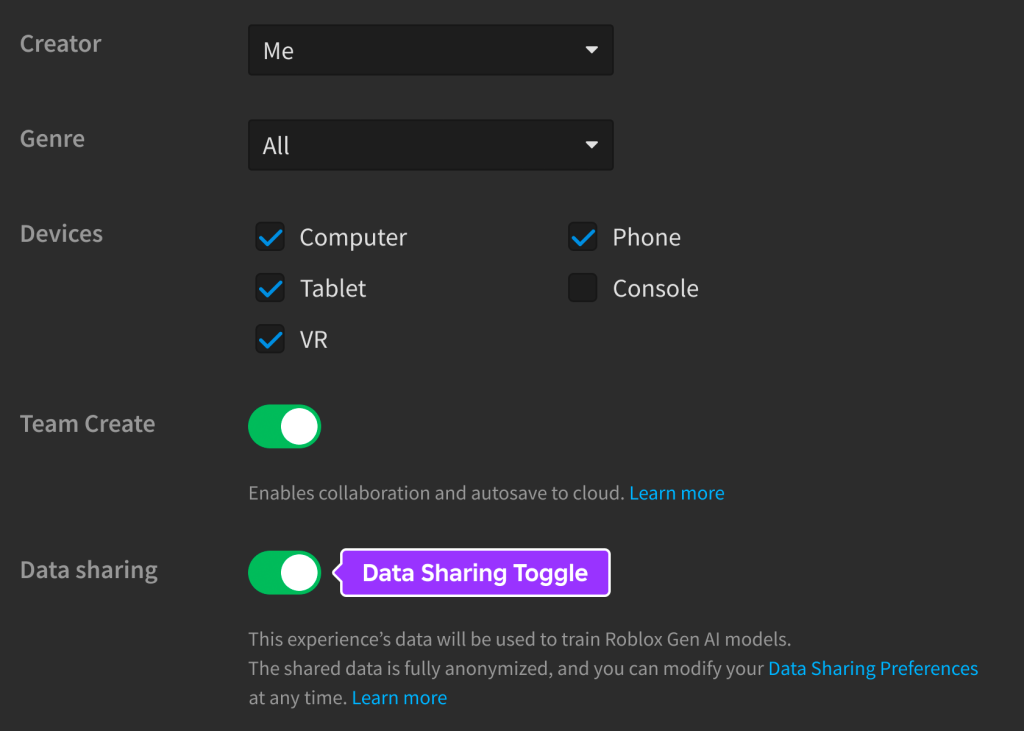
圖 24-2 發布時再次確認 Data Sharing 勾選狀態,不要只依賴全域預設;團隊或客戶專案應在發布前取得一致決定。
Roblox 的 AI data sharing 文件指出,games、avatar items、paid Creator Store assets 的預設分享狀態會依發布時間與 Creator Hub 設定而不同。你可以在 Creator Hub 設定 global preference,也可以在發布時覆寫。
但 free Creator Store assets 不同:它們因為本來就是讓其他創作者使用,預設會分享且不能關閉。
本章建議在發布前記錄:
AI data sharing:
- Creator Hub global setting checked: yes/no
- Publish dialog data sharing option checked: yes/no
- Decision for this game: share / do not share
- Reason:
- Date:
這不是要求一定關或一定開,而是不要在不了解狀態時發布。
描述應該說明玩家進入後要做什麼。
AI Adventure Island 可以先擬:
Explore AI Adventure Island, collect crystals, help the Guide, dodge patrol enemies, unlock WindDash upgrades, and save your progress.

Adventure through a compact island built for learning Roblox gameplay systems. Collect crystals, earn Gold, complete the Guide quest, use WindDash to cross danger zones, and buy upgrades from the island shop.

Playable on desktop, mobile, tablet, and gamepad-supported setups.
檢查:
Icon 是方形,建議 512x512。
本專案 icon 可以是:
不要用:
Icon 要在縮小時仍看得懂。發布前用小尺寸預覽。
Thumbnail 建議 16:9、1920x1080。
本專案可以準備三張:
Thumbnail 1:
- 玩家站在島上看向水晶路線。

Thumbnail 2:
- Guide NPC + QuestPanel。

Thumbnail 3:
- WindDash 穿越敵人巡邏區。
檢查:
如果使用 video thumbnail,要更嚴格:影片必須真實呈現 gameplay,不可展示不存在的功能,也不可用會誤導玩家的外部素材。
Experience Settings 裡有幾個發布前必看項目。
Basic Info:
- Name
- Description
- Content Maturity Label
- Game Icon
- Screenshots & Videos
- Playable Devices

Communication:
- Microphone
- Camera

Permissions:
- Playability

Security:
- Allow HTTP Requests
- Secrets
- Enable Studio Access to API Services
- Allow Third Party Sales
- Allow Third Party Teleports
- Allow Mesh / Image APIs

World:
- Gravity
- Jump
- Walk
- Slope
本書範例通常不需要:
Enable Studio Access to API Services 在第 18 章用於 Studio 測 DataStore,但發布前要明確知道它為何開啟、對測試資料與正式資料的影響。不要把 DataStore 測試設定當成不需要理解的預設值。
第七部會深入外部 AI 素材。第 24 章先建立 register 格式。
Asset name:
Asset type:
- Image / Decal / Mesh / Audio / Model / Material / Script / Thumbnail / Icon

Source:
- Created manually
- Roblox Assistant
- Roblox Creator Store
- External AI tool
- Other third-party source

Tool / creator:

Prompt / search query:

License / permission note:

Roblox asset ID:

Used in:

Moderation status:

Privacy / access:
- Restricted
- Open Use
- Game permission granted

Risk notes:
這份表不是官樣文章。它能避免你三週後忘記某張縮圖從哪裡來、某個 mesh 是否可以商用、某個 restricted asset 是否已授權給 game。
Asset Privacy 主要影響 Images、Decals、Meshes。
發布前要確認:
特別注意:
Open Use is irreversible.
Game grants are permanent.
Asset Privacy does not affect every asset type.
如果使用外部 AI 生成圖片做 icon 或 thumbnail,也要記錄來源與權限,並確認通過 Roblox moderation。
第 22 章已處理跨裝置 UI。第 24 章從發布角度再看一次 accessibility:
這不只是友善設計,也會降低玩家理解成本。
本章 Playtest 不是測玩法,而是測發布前呈現。
Steps:
1. 打開 draft name、description。
2. 對照實際 gameplay。
3. 列出每一句描述對應的遊戲功能。

Expected:
- 沒有不存在的功能。
- 沒有誇大 AI 互動。
- 沒有不適合年齡的文字。
Steps:
1. 檢查 icon 是否 512x512 square。
2. 檢查 thumbnail 是否 16:9。
3. 縮小預覽 icon。
4. 確認 thumbnail 是實際 gameplay 或真實場景。

Expected:
- 圖像清楚反映遊戲。
- 沒有展示不存在功能。
- 沒有誤導玩家。
- 準備送 Roblox moderation。
Steps:
1. 列出玩家能遇到的所有成熟內容。
2. 檢查敵人、危險、音效、恐怖、血腥、AI 互動、玩家輸入。
3. 根據最成熟內容準備 questionnaire 筆記。

Expected:
- 可回答 questionnaire。
- 知道未來哪些功能會要求重填。
Steps:
1. 開啟 Experience Settings。
2. 檢查 Basic Info。
3. 檢查 Security。
4. 檢查 Playable Devices。
5. 檢查 Communication。
6. 檢查 World settings 是否符合 gameplay。

Expected:
- 不必要的高風險開關未開啟。
- DataStore / API settings 有明確理由。
- Playable Devices 與第 22 章測試結果一致。
Steps:
1. 列出 icon、thumbnail、mesh、audio、Creator Store models、generated content。
2. 填寫 source、tool、permission、Roblox asset ID。
3. 檢查 restricted assets 是否授權給 game。
4. 檢查 Output 是否有 asset permission error。

Expected:
- 每個發布素材都有來源記錄。
- 外部 AI 素材有授權與使用範圍筆記。
- Roblox asset permission 不阻擋 runtime。
【Ch24 修正 1|Metadata Audit】
檢查這份 Roblox 遊戲描述是否準確且安全。

遊戲:
- AI Adventure Island
- 實際玩法:收集水晶、Guide 任務、敵人巡邏、WindDash、商店升級、保存進度。
- 使用 Roblox Studio Assistant 開發,但沒有面向玩家的 AI chatbot 或 extended AI interaction。

描述草稿:
[貼上描述]

請:
1. 標示會誤導玩家的宣稱。
2. 標示遊戲中不存在的功能。
3. 建議一段 160 字元以內、更清楚的 hook。
4. 建議一份精簡的完整描述。
5. 內容應適合所有年齡層。
【Ch24 修正 2|Content Maturity Prep】
為「AI Adventure Island」準備 Content Maturity questionnaire notes。

目前內容:
- 島嶼探索
- 水晶收集
- Guide NPC
- 簡單的敵人巡邏
- WindDash 移動能力
- 使用遊戲中賺取的 Gold 購買商店升級
- 沒有血腥內容
- 不以恐怖內容為主
- 沒有面向玩家的 AI 對話
- 沒有自由形式的使用者創作
- 沒有付費隨機物品

請:
- 列出需要審查的類別。
- 找出可能屬於低風險的答案。
- 標示所有需要人工確認的項目。
- 不要宣稱已最終符合規範。
【Ch24 修正 3|Asset Register】
為「AI Adventure Island」建立一份 asset provenance register 範本。

包含以下欄位:
- Asset 名稱
- Asset 類型
- 來源
- 工具/創作者
- Prompt 或搜尋 query
- License/permission note
- Roblox asset ID
- 遊戲內用途
- Moderation 狀態
- Privacy/access 狀態
- 風險筆記

另外提供以下項目的範例列:
- 遊戲 icon
- Thumbnail 1
- 水晶 mesh/material
- Guide NPC model
- WindDash sound effect
【Ch24 修正 4|Experience Settings Audit】
建立一份發布前 Experience Settings 稽核清單。

針對每個 section:
- Basic Info
- Communication
- Permissions
- Security
- Places
- Localization
- World

列出:
- 要檢查的內容
- 這個專案的建議預設值
- 錯誤啟用時的風險
- 是否需要人工確認

除非有明確理由,否則不要建議啟用 HTTP、microphone、camera、third-party sales 或 third-party teleports。
【Ch24 修正 5|Thumbnail Safety】
檢查這個用於 Roblox 發布的 thumbnail 概念。

概念:
[描述 thumbnail]

遊戲實際功能:
- 收集水晶
- Guide 任務
- WindDash
- 敵人巡邏
- 商店升級

請檢查:
- 是否反映實際玩法?
- 是否暗示遊戲中不存在的功能?
- 文字是否可能過多?
- 重要內容是否避開底部 metadata 區域?
- 上傳前應修改哪些內容?
Metadata:
- Name matches game.
- Description is accurate.
- Hook is clear.
- No misleading AI claims.
- Device support claims match tested devices.

Icon:
- 512x512 square.
- Clear at small size.
- Reflects actual theme.
- No misleading characters or features.

Thumbnails:
- 16:9.
- Actual gameplay or true scene.
- No fake mechanics.
- No excessive claims.
- Ready for moderation.

Content Maturity:
- Questionnaire notes prepared.
- Violence / fear / blood / AI interaction / user creation reviewed.
- Future update triggers documented.

AI:
- Development AI vs player-facing AI clearly separated.
- No extended AI interaction unless actually implemented.
- If future AI NPC is added, disclosure and maturity rules revisited.

Data Sharing:
- Creator Hub global preference checked.
- Publish dialog decision recorded.
- Free Creator Store asset rule understood.

Assets:
- Asset register created.
- External AI assets documented.
- Creator Store assets documented.
- Restricted assets permissions checked.
- Output checked for asset permission errors.

Experience Settings:
- Basic Info reviewed.
- Security reviewed.
- Communication reviewed.
- Playable Devices reviewed.
- World settings reviewed.

Accessibility:
- Text readable.
- Contrast sufficient.
- Not color-only.
- Not sound-only.
- Reduced motion considered.
本章可先保留一份 draft:
Name:
AI Adventure Island

Hook:
Explore an adventure island, collect crystals, help the Guide, use WindDash, buy upgrades, and save your progress.

Description:
Explore AI Adventure Island, a compact Roblox adventure built around clear quests and progression. Collect crystals, earn Gold, help the Guide, dodge simple enemy patrols, unlock WindDash upgrades, and return later with your progress saved.

Playable on desktop, mobile, tablet, and gamepad-supported setups.
這份不是最終行銷文案,但它很誠實,適合作為發布前審查起點。
第七部會正式加入外部 AI 生成工具,例如:
那時候本章的 asset register 會變成必要工具。每個外部生成素材都要記錄來源、Prompt、授權、輸出檔、Roblox asset ID、是否修改、是否通過 moderation。
本章讓專案從「測試過功能」推進到「準備好做發布前內容檢查」。
你現在應該記住:
下一章會正式發布 Roblox Experience。第 24 章完成的是發布前自檢;第 25 章才會處理發布流程、版本與上架後的基本管理。
嗨!我是 Wolke,曾任 Google Developer Expert(GDE,2019–2023) 與 LINE API Expert。
我熱衷於研究 AI Agent、n8n 自動化工作流與全端開發架構,致力於將 AI 技術轉化為真正能落地的生產力工具。
如果你喜歡這篇文章,歡迎透過以下方式與我交流:
📚 技術著作
《實用的 Gemini API 開發點子書》:帶你運用 Gemini App、Google AI Studio、Gemini CLI 與 Antigravity IDE,打造 AI Agent 與實用產品。
📝 技術部落格
歡迎追蹤我的 Medium,我會持續分享 Agentic Automation、架構設計與實際開發的踩坑心得。
🎤 技術講座與合作
我持續受邀至技術社群及研討會,分享 AI Agent、自動化工作流、DevOps 與全端開發實戰。
我曾於 DevOpsDays Taipei 2026 主講「不再只是寫腳本!讓 AI 代理人成為你的 SRE 最佳夥伴」工作坊。
如果你的企業、社群或學校正在尋找相關主題講者,歡迎私訊聯繫,洽談講座與工作坊合作!
🎮 我的 Roblox 遊戲
🎁 免費贈送 OpenAI 或 Claude AI 額度
為了鼓勵大家實際動手打造自己的 Roblox 體驗,我每個月會開放:
參加方式:
確認完成後,我會邀請你加入並設定 50 點額度。名額有限,歡迎把握機會!



 iThome鐵人賽
 看影片追技術