
如果 Tool 找不到資料就 throw new Error('Not found'),Agent 很容易把「正常沒有結果」和「系統壞掉」混在一起。
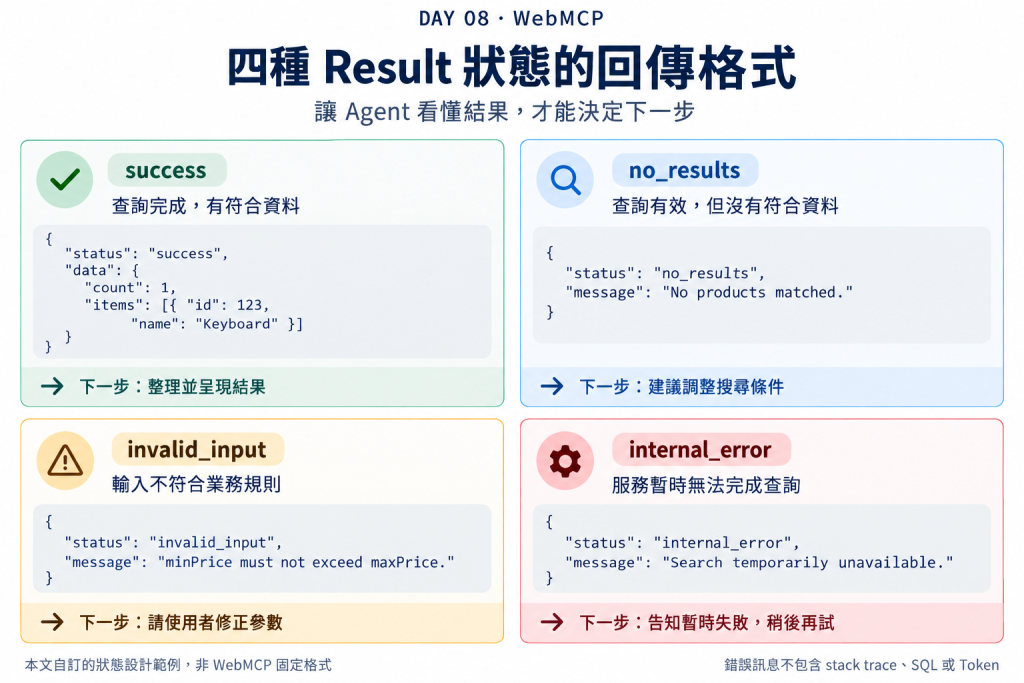
今天把 Tool 結果拆成四種:success、no_results、invalid_input、internal_error。重點不是規定大家一定用這四個字,而是讓 Agent 可以分辨:任務狀態、使用者輸入問題、系統故障不是同一件事。
execute: async ({ keyword }) => {
  const items = await searchProducts(keyword);

  if (!items.length) {
    throw new Error('No products found');
  }

  return JSON.stringify(items);
}
「沒有符合商品」其實可能是完全正常的搜尋結果。
例如:
找 100 元以下的 MacBook
結果是 0 筆,不代表資料庫掛掉。
function ok(data) {
  return JSON.stringify({
    status: 'success',
    data
  });
}

function noResults(message) {
  return JSON.stringify({
    status: 'no_results',
    message
  });
}
搜尋 Tool:
execute: async ({ keyword, maxPrice }) => {
  const items = await searchProducts({ keyword, maxPrice });

  if (items.length === 0) {
    return noResults(
      'No products matched the current keyword and price filters.'
    );
  }

  return ok({
    count: items.length,
    items: items.slice(0, 10)
  });
}
這樣 Agent 可以自然回:
沒找到 100 元以下的 MacBook,要不要提高預算?
而不是:
工具執行失敗。
真的完成任務:
{
  "status": "success",
  "data": {
    "count": 2,
    "items": []
  }
}
查詢有效,只是沒有資料:
{
  "status": "no_results",
  "message": "No products matched the filters."
}
輸入在業務規則上不合理。
雖然 JSON Schema 可以擋一部分,但還是有 Schema 表達不了的跨欄位規則:
if (minPrice > maxPrice) {
  return JSON.stringify({
    status: 'invalid_input',
    message: 'minPrice must not be greater than maxPrice.'
  });
}
真的系統錯誤,例如 API timeout、資料庫異常。
這類可以 throw,或轉成安全錯誤輸出;重點是不要把 stack trace、SQL、Token 等內部資訊直接送回 Agent。
try {
  const items = await searchProducts(input);
  // ...
} catch (error) {
  console.error(error);

  return JSON.stringify({
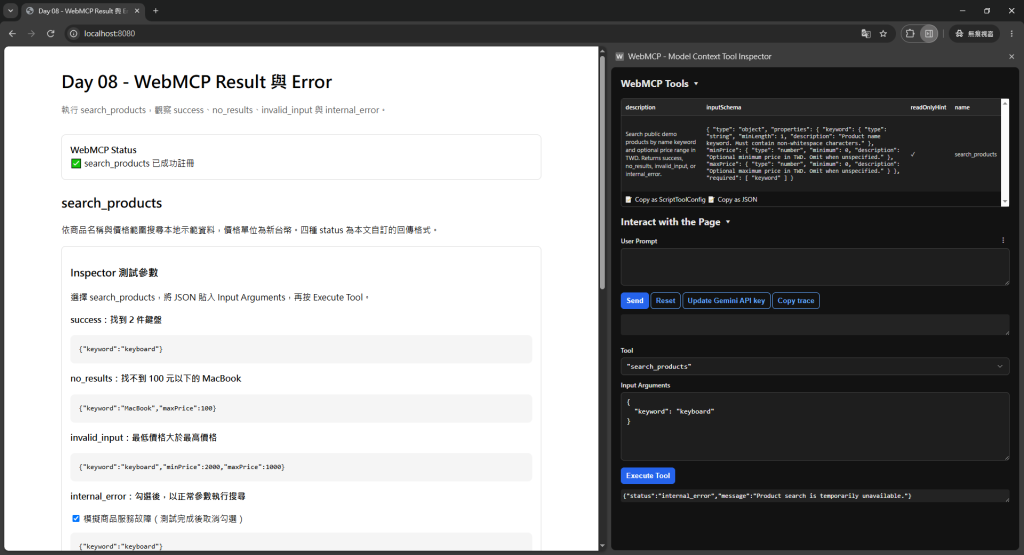
    status: 'internal_error',
    message: 'Product search is temporarily unavailable.'
  });
}
📸 圖片 1|四種 Result 狀態的回傳格式
假設 REST API 回:
{
  "id": 123,
  "name": "Keyboard",
  "price": 1200,
  "html_description": "<p>...</p>",
  "internal_flags": {},
  "seo": {},
  "debug": {},
  "metadata": {},
  "...": "很多資料"
}
Agent 其實可能只需要:
{
  "id": 123,
  "name": "Keyboard",
  "price": 1200,
  "url": "/products/123"
}
Chrome 的 WebMCP security guidance 目前也建議保持 Tool description 與 output 簡潔,因為 Tool 數量與輸出都會消耗 Agent context。
例如 Tool 回傳:
這些內容可能藏著 Prompt Injection。
可以標示:
annotations: {
  readOnlyHint: true,
  untrustedContentHint: true
}
它不是萬靈丹,但至少把「這份資料不可信」這個語意交給 Agent/Browser。
await document.modelContext.registerTool({
  name: 'search_products',
  description: 'Search public products by keyword and optional price range.',
  inputSchema: {
    type: 'object',
    properties: {
      keyword: { type: 'string', minLength: 1 },
      minPrice: { type: 'number', minimum: 0 },
      maxPrice: { type: 'number', minimum: 0 }
    },
    required: ['keyword']
  },
  annotations: {
    readOnlyHint: true
  },
  execute: async ({ keyword, minPrice, maxPrice }) => {
    if (
      minPrice !== undefined &&
      maxPrice !== undefined &&
      minPrice > maxPrice
    ) {
      return JSON.stringify({
        status: 'invalid_input',
        message: 'minPrice must not be greater than maxPrice.'
      });
    }

    try {
      const items = await searchProducts({ keyword, minPrice, maxPrice });

      if (items.length === 0) {
        return JSON.stringify({
          status: 'no_results',
          message: 'No products matched the current filters.'
        });
      }

      return JSON.stringify({
        status: 'success',
        data: {
          count: items.length,
          items: items.slice(0, 10).map(({ id, name, price, url }) => ({
            id, name, price, url
          }))
        }
      });
    } catch (error) {
      console.error(error);

      return JSON.stringify({
        status: 'internal_error',
        message: 'Product search is temporarily unavailable.'
      });
    }
  }
});
以下使用本地 Day 08 Demo 的商品資料:Keyboard(1200 元)、Wireless Keyboard(2400 元)、Mouse(800 元)與 MacBook Air(34900 元)。價格單位為新台幣。執行前需備妥包含 searchProducts() 與示範資料的 app.js,以及顯示註冊狀態、Arguments、Result 和「模擬商品服務故障」開關的 index.html;上方程式碼主要展示 Tool 的註冊與回傳設計。
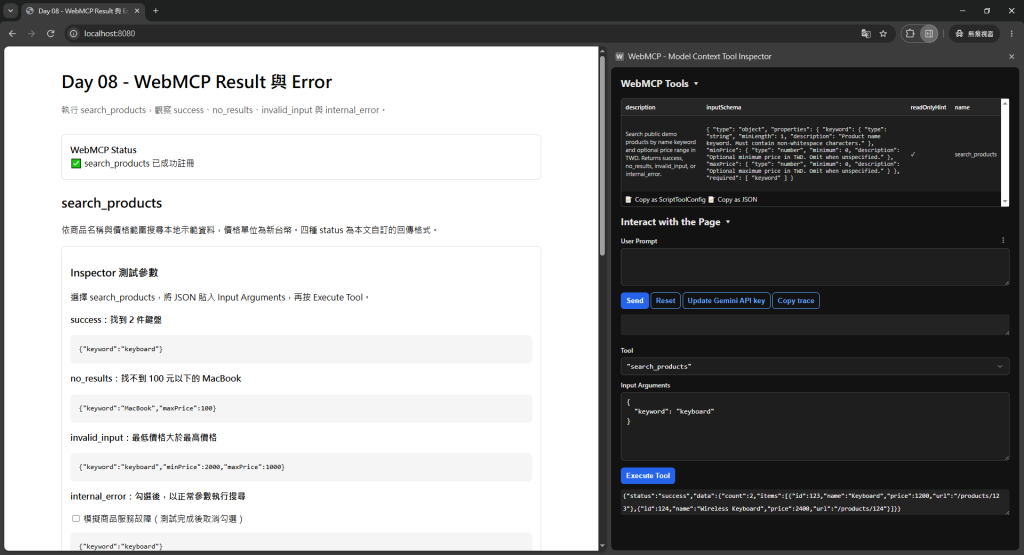
search_products。這次要觀察 Tool 的實際回傳格式,直接使用 Input Arguments → Execute Tool 即可,不需要透過自然語言呼叫。
在 Input Arguments 貼上:
{
  "keyword": "keyboard"
}
按下 Execute Tool,預期回傳:
{
  "status": "success",
  "data": {
    "count": 2,
    "items": [
      {
        "id": 123,
        "name": "Keyboard",
        "price": 1200,
        "url": "/products/123"
      },
      {
        "id": 124,
        "name": "Wireless Keyboard",
        "price": 2400,
        "url": "/products/124"
      }
    ]
  }
}
這表示搜尋完成,找到兩件符合名稱的商品。商品 URL 是示範路徑。
📸 圖片 2-1|搜尋成功,回傳符合的商品
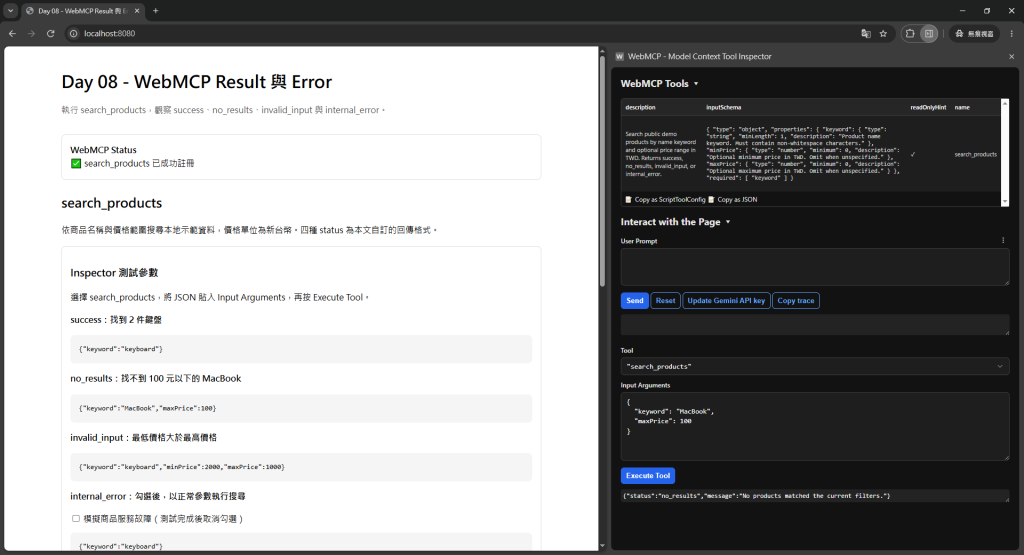
將 Input Arguments 換成:
{
  "keyword": "MacBook",
  "maxPrice": 100
}
按下 Execute Tool,預期回傳:
{
  "status": "no_results",
  "message": "No products matched the current filters."
}
搜尋已正常完成,只是沒有 100 元以下的 MacBook。Agent 可以根據這個狀態建議調整條件。
📸 圖片 2-2|搜尋正常完成,但沒有符合資料
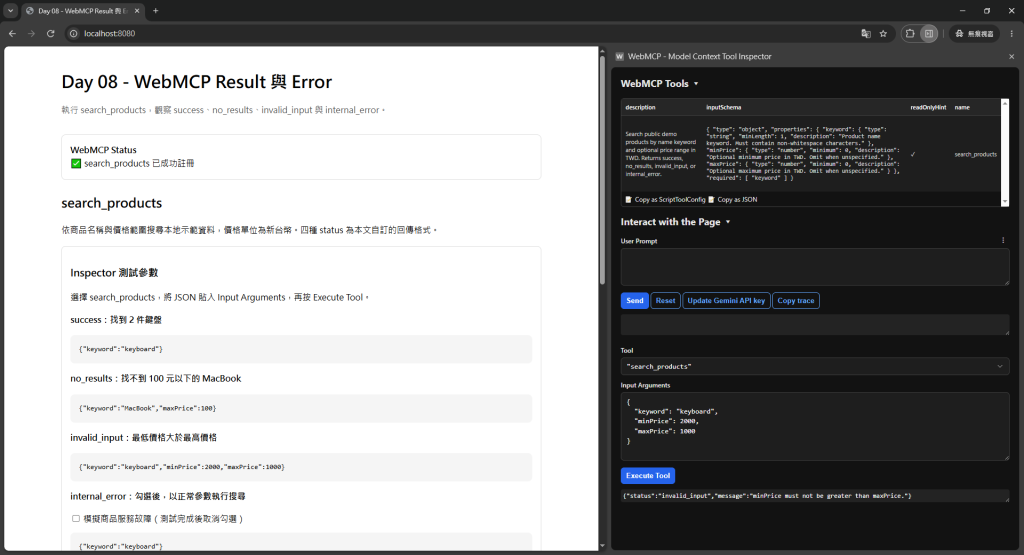
將 Input Arguments 換成:
{
  "keyword": "keyboard",
  "minPrice": 2000,
  "maxPrice": 1000
}
按下 Execute Tool,預期回傳:
{
  "status": "invalid_input",
  "message": "minPrice must not be greater than maxPrice."
}
兩個價格都是合法的非負數,但最低價格大於最高價格。這裡由 app.js 的業務規則檢查回傳 invalid_input。
📸 圖片 2-3|價格範圍不合理,回傳輸入錯誤
{
  "keyword": "keyboard"
}
{
  "status": "internal_error",
  "message": "Product search is temporarily unavailable."
}
這是由 Demo 刻意觸發的服務故障,用來確認錯誤處理分支會回傳安全訊息。詳細錯誤留在開發者 Console,回傳給 Agent 的結果不包含 stack trace、SQL 或 Token。
📸 圖片 2-4|模擬商品服務故障,回傳 internal_error
untrustedContentHint。


 iThome鐵人賽
 看影片追技術