
! 本篇文章將會介紹 opencode 的 GitHub / GitLab 整合,讓 AI 隊友直接住在你的 repo 裡,一聲令下就開工 :D
TL;DR: https://dev.benben.me/slides/s/ironman-19-github-gitlab
讀完這篇你會學到:
opencode github install)/opencode 或 /oc 發號施令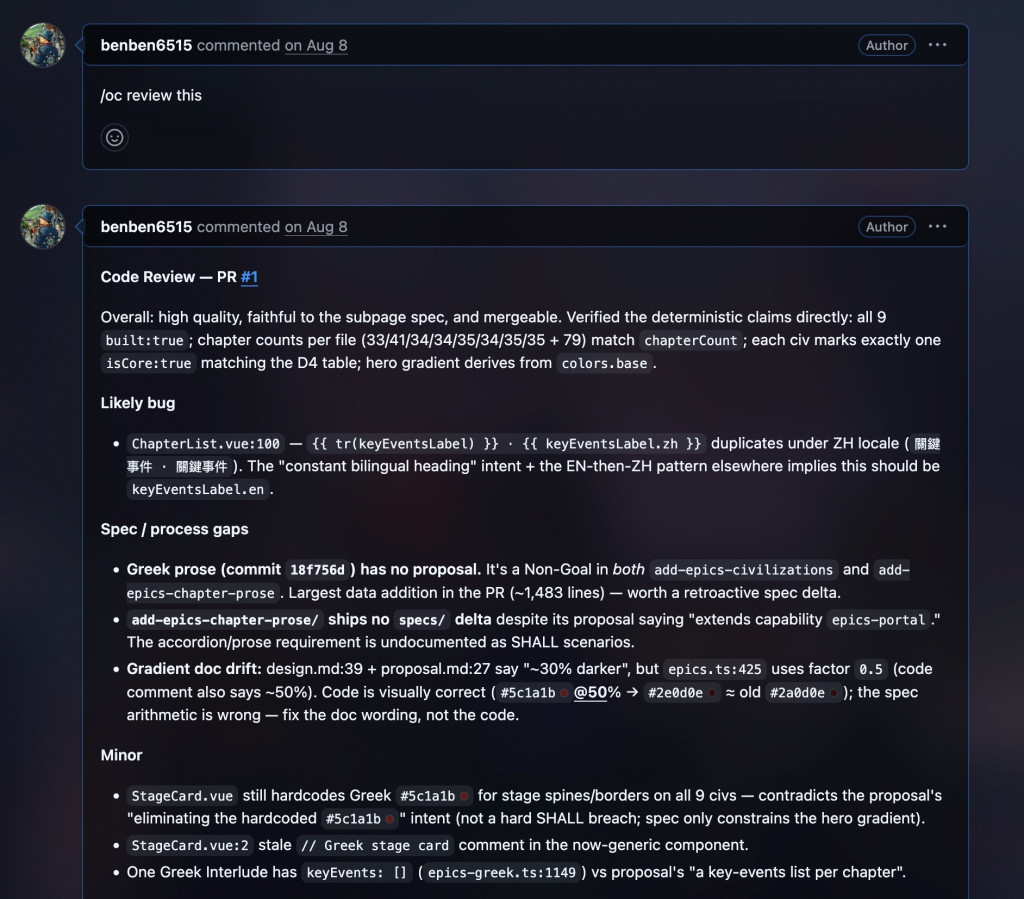
如果成功的話,就會像這樣
到目前為止,AI 都待在你的 terminal。GitHub 整合反過來——你在 issue 或 PR 留言,AI 在 GitHub Actions runner 上開工:
在 repo 目錄下執行:
opencode github install
這個精靈會帶你完成三件事:裝 GitHub App、建 workflow、設 secrets。想手動的話:
.github/workflows/opencode.yml:name: opencode
on:
issue_comment:
types: [created]
pull_request_review_comment:
types: [created]
jobs:
opencode:
if: |
contains(github.event.comment.body, '/oc') ||
contains(github.event.comment.body, '/opencode')
runs-on: ubuntu-latest
permissions:
id-token: write
steps:
- uses: actions/checkout@v6
with:
fetch-depth: 1
persist-credentials: false
- uses: anomalyco/opencode/github@latest
env:
ANTHROPIC_API_KEY: ${{ secrets.ANTHROPIC_API_KEY }}
with:
model: anthropic/claude-sonnet-4-20250514
在 issue 留言:
/opencode explain this issue
AI 讀完整討論串,回覆清楚的解釋——triage 神器。
/opencode fix this
AI 建新 branch、實作修復、開好 PR 附說明。「看到 bug → 一行留言 → 收 PR」的循環就是這麼短。
在 PR 的 Files tab 直接在程式碼行上留言:
/oc add error handling here
AI 自動收到檔案路徑、行號、diff 前後文——不用再說「那個那個哪個檔案的第幾行」,改完直接 commit 回同一個 PR。
workflow 的 on 不只吃 comment:
| 事件 | 觸發 | 備註 |
|---|---|---|
issue_comment / pull_request_review_comment |
留言含 /oc |
上面玩的 |
issues |
issue 建立或編輯 | 需帶 prompt,自動 triage |
pull_request |
PR 開啟/更新 | 不帶 prompt 就預設做 review |
schedule |
cron 排程 | 定時巡檢、開 issue |
workflow_dispatch |
手動觸發 | Actions 頁面按下去 |
例如 PR 自動 review:
on:
  pull_request:
    types: [opened, synchronize, reopened]
prompt 換成你團隊的 review 準則,每一位隊友的 PR 都有 AI 先掃一輪。
with: 常用參數:
model(必填):provider/model 格式agent:指定 primary agentshare:公開 repo 預設 true,session 會自動分享prompt:覆寫預設行為,塞你的 review 準則mentions:自訂觸發詞(預設 /opencode,/oc)use_github_token: true:不裝 GitHub App、直接用 GITHUB_TOKEN 跑(要自開 permissions)在 GitLab 環境設定好後,語法是 @opencode mention(GitLab 用 @,GitHub 用 /oc,別搞混):
@opencode explain this issue
@opencode review this merge request
一樣會建 branch、開 merge request。需要 GitLab Premium/Ultimate 訂閱與 Duo Agent Platform 設定,細節照官方 GitLab docs 走。
沒有 Duo 也能玩——社群維護的 nagyv/gitlab-opencode 把 opencode 包成 GitLab CI component:
include:
  - component: $CI_SERVER_FQDN/nagyv/gitlab-opencode/opencode@2
    inputs:
      auth_json: $OPENCODE_AUTH_JSON
      message: 'Your prompt here'
同樣跑在你自己的 GitLab runner 上。
Q:AI 亂改 code 怎麼辦?
A:它開的是新 branch + PR,merge 按鈕在你手上。把它當「超積極的自動化實習生」:產出快、量多,但 final review 永遠是人。
Q:成本怎麼算?
A:跑在你自己的 runner,運算免費;消耗的是 model API(key 放在 secrets)。建議先從便宜 model 開始,觀察幾週再升級。
Q:私有 repo 安全嗎?
A:code 全程在你的 runner 上,opencode 團隊拿不到。要注意的反而是 share——私有 repo 預設不分享,若手動開了,連結是公開可見的(Day 10 的提醒上線)。
opencode github install 五分鐘裝完,GitHub 觸發詞 /opencode 或 /oc
@opencode(Duo)或社群 CI componentDay 20:多模型策略——provider 切換、任務 × 模型選型、成本控管,把每一塊錢花在刀口上。
有任何疑問但沒有 iT 邦幫忙帳號,或是想匿名提問?
歡迎到 https://dev.benben.me/q/P3C5U6 提問或加油打氣,沒意外的話會在完賽之後一起回答 :D


 iThome鐵人賽
 看影片追技術