
一、前言:
今天我們將採用最穩定、擴充性極佳的 Save Point (紀錄點) JSON 存檔系統!透過 C# 的 JsonUtility,只需將玩家解鎖的紀錄點資料(包含場景名稱、金錢、聲譽與儲存時間)寫入硬碟 JSON 純文字檔,就能以極低的開發成本實現 100% 穩定的跨場景存讀檔!
二、Save Point 系統設計架構
在我們的辦公桌決策遊戲中,Save Point 運作邏輯如下:
1. 結構化資料結構 (SaveItem & SaveData):
2. 全域存讀檔管理器 (SavePointManager):
三、核心程式碼實作
1. 存檔資料結構 (SaveData.cs)
在 Assets/Scripts/ 資料夾下建立 SaveData.cs 腳本:
using System;
using System.Collections.Generic;
/// 單一紀錄點資料結構
[Serializable]
public class SaveItem {
    public string saveName;   // 紀錄點顯示名稱 (例如: "Day 1 辦公桌", "Day 2 辦公桌")
    public string sceneName;  // 對應的 Unity 場景名稱
    public int money;         // 當時的金錢
    public int reputation;    // 當時的聲譽
    public string saveTime;   // 存檔時間 (例如: "2026/08/31 12:00")
}
/// 總存檔資料庫 (包含所有解鎖的紀錄點)
[Serializable]
public class SaveData {
    public List<SaveItem> saveList = new List<SaveItem>();
}
2. 存讀檔核心管理器 (SavePointManager.cs)
在 Assets/Scripts/ 資料夾下建立 SavePointManager.cs 腳本:
using UnityEngine;
using System.IO;
using System.Collections.Generic;
public class SavePointManager : MonoBehaviour {
    public static SavePointManager Instance { get; private set; }

    private string saveFilePath;
    public SaveData currentSaveData = new SaveData();

    private void Awake() {
        // Singleton 單例模式:確保跨場景不被銷毀
        if (Instance == null)
        {
            Instance = this;
            DontDestroyOnLoad(gameObject);

            // 設定本機硬碟存檔路徑
            saveFilePath = Path.Combine(Application.persistentDataPath, "savepoint.json");

            // 遊戲開局自動載入歷史紀錄點
            LoadAllCheckPoints();
        }
        else {
            Destroy(gameObject);
        }
    }
    /// 新增或更新 Save Point 紀錄點 (當玩家蓋章或達成條件時呼叫)
    /// <param name="saveName">顯示名稱 (例如: Day 1 辦公桌)</param>
    /// <param name="sceneName">Unity 場景名稱</param>
    /// <param name="money">當前金錢</param>
    /// <param name="reputation">當前聲譽</param>
    public void SaveAtCheckPoint(string saveName, string sceneName, int money, int reputation) {
        // 檢查是否已經存在同名的紀錄點
        SaveItem existingItem = currentSaveData.saveList.Find(item => item.saveName == saveName);
        if (existingItem != null)  {
            existingItem.money = money;
            existingItem.reputation = reputation;
            existingItem.saveTime = System.DateTime.Now.ToString("yyyy/MM/dd HH:mm");
        }
        else {
            SaveItem newItem = new SaveItem {
                saveName = saveName,
                sceneName = sceneName,
                money = money,
                reputation = reputation,
                saveTime = System.DateTime.Now.ToString("yyyy/MM/dd HH:mm")
            };
            currentSaveData.saveList.Add(newItem);
        }
        // 將數據轉成 JSON 並寫入檔案
        string json = JsonUtility.ToJson(currentSaveData, true);
        File.WriteAllText(saveFilePath, json);
        Debug.Log($"[SavePoint] 已成功寫入紀錄點: {saveName} (路徑: {saveFilePath})");
    }
    /// 從硬碟讀取所有紀錄點
    public void LoadAllCheckPoints() {
        if (File.Exists(saveFilePath)) {
            string json = File.ReadAllText(saveFilePath);
            currentSaveData = JsonUtility.FromJson<SaveData>(json);
            Debug.Log($"[SavePoint] 成功讀取歷史存檔,共 {currentSaveData.saveList.Count} 筆紀錄點。");
        }
        else {
            currentSaveData = new SaveData();
            Debug.Log("[SavePoint] 未發現舊存檔,建立初始清單。");
        }
    }
    /// 檢查是否有存檔紀錄
    public bool HasSaveFile() {
        return File.Exists(saveFilePath) && currentSaveData.saveList.Count > 0;
    }
    /// 清除存檔 (新遊戲時使用)
    public void DeleteSaveFile() {
        if (File.Exists(saveFilePath)) {
            File.Delete(saveFilePath);
            currentSaveData = new SaveData();
            Debug.Log("[SavePoint] 舊存檔已刪除。");
        }
    }
}
四、Unity 現場配置與驗收流程
1. Hierarchy 物件配置:
1)開啟第一個遊戲場景(例如 SampleScene 或 MainMenu)。
2)點擊右鍵建立空物件,命名為 SavePointManager。
3)將 SavePointManager.cs 腳本拖曳掛載上該物件。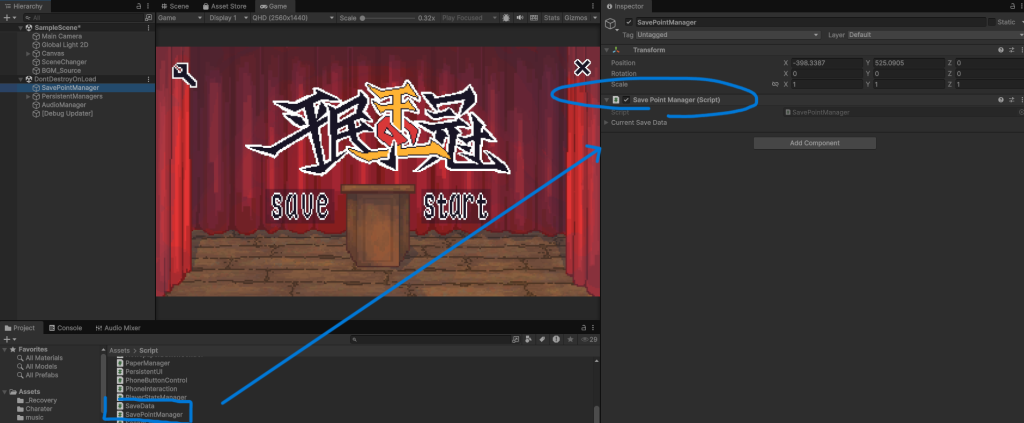
圖一、掛載示意圖
2. 驗證 JSON 實體檔案產出:
執行遊戲並呼叫存檔方法後,系統會自動在硬碟的 Application.persistentDataPath(Windows 路徑為 AppData\LocalLow\DefaultCompany\crown\)產生 savepoint.json 檔案。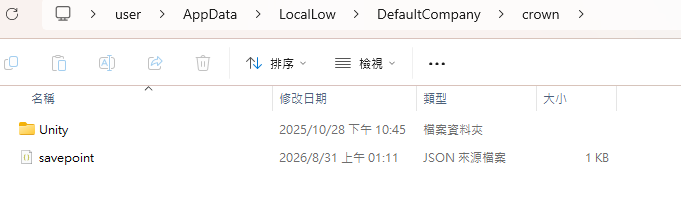
圖二、本機 JSON 存檔實體檔案 (savepoint.json) 產出驗證
五、今日成果與小結
因為從這一天開始,專案正式跨入了「資料持久化與存讀檔系統(Save/Load System)」的範疇,這和前面的鄉比起來,在功能模組上是完全獨立的。所以今天要開一個名為 feature/save-system 的新分支來專門處理存讀檔相關的開發與提交。
1.建立並切換到新分支:
git checkout -b feature/save-system
2.檢查修改狀態
git status
3.加入暫存區並提交 Commit
git add .
git commit -m "feat: 實作 SavePointManager 與 SaveData JSON 本機存讀檔架構與 Singleton 常駐管理器"
4.推送到遠端開發分支
git push origin feature/save-system



 iThome鐵人賽
 看影片追技術