
解決了前面「啟動期」那些繁瑣的 DI 與模組依賴,今天我們正式進入「路由與請求進入」的新階段。請求進到 NestJS 進行路由匹配時,如果使用預設的 Express Adapter 與路由解析策略,控制器中的宣告順序可能直接影響 API 最後會進入哪一個 Handler。而今天我們要拆解的,正是實務上極易發生的靜態路由被動態路徑攔截的地雷。
這類屬於邏輯層面的盲區,連 TypeScript 和 ESLint 都無法察覺。只要應用程式能正常啟動、且未主動啟用路由衝突檢查,系統就不會給出任何警告——直到請求發出,你才發現它早已被前面的動態路徑給截胡,根本進不到預期的 Handler。
假設我們正在開發使用者相關的 API,初期需求是提供一支給前端查詢特定 ID 的路由(/users/:id)。隨著功能迭代,我們後來又補上了一支查詢當前登入者個人資料的路由(/users/profile)。
這兩支路由共用的 UsersService 如下,分別回傳個人資料與指定 ID 的使用者資料:
import { Injectable } from '@nestjs/common';

@Injectable()
export class UsersService {
  getProfile() {
    return {
      name: 'John Doe',
      email: 'john.doe@example.com',
      membership: 'Gold',
      message: 'This is your profile information.',
    };
  }

  getUserById(userId: string) {
    return {
      id: userId,
      name: `User ${userId}`,
      age: 25,
      email: `user${userId}@example.com`,
      message: 'This is the information for user with ID.',
    };
  }
}
若是照著需求的順序開發,很自然會寫出這樣的排列:
import { Controller, Get, Param } from '@nestjs/common';
import { UsersService } from '../users.service';

@Controller('users')
export class UsersController {
  constructor(private readonly usersService: UsersService) {}

  // 地雷:動態路由宣告在前,會把 'profile' 當作 :id 吃掉
  @Get(':id')
  getUserById(@Param('id') userId: string) {
    return this.usersService.getUserById(userId);
  }

  @Get('profile')
  getProfile() {
    return this.usersService.getProfile();
  }
}
開發當下你可能會預期:
「profile 是一個很明確的字串,NestJS 應該能把請求正確導到對應的路由吧?」
但實際發出請求後,結果完全不是這樣:
GET /users/profile
拿到的回應是:
{
  "id": "profile",
  "name": "User profile",
  "age": 25,
  "email": "userprofile@example.com",
  "message": "This is the information for user with ID."
}
'profile' 這個字串被當作 :id 的值傳進去了,getProfile() 根本不會被執行。
造成這個現象的根本原因,在於 NestJS 預設的路由註冊與匹配機制:
預設情況下,NestJS 使用 declaration 策略,依照控制器中的宣告順序註冊路由。當搭配預設的 Express Adapter 時,由於 Express 的路由匹配會受到註冊順序影響,因此前面的參數化路由可能會遮蔽後方較具體的靜態路由。
簡單來說,就是「越早宣告,優先權越高」,一旦請求被前面的規則匹配到,NestJS 就不會再往下尋找了。
:id 屬於路由參數,可以匹配所在位置上的任意單一路徑片段,除了數字 123 之外,像 profile 或 settings 這類字串同樣符合條件。
當 @Get(':id') 擺在 @Get('profile') 上方時,GET /users/profile 進來的瞬間就會優先符合 /users/:id 的規則,profile 隨即被解析為 id 參數傳入 getUserById(),排在下方的 @Get('profile') 自然就成了永遠無法抵達的無效 Handler。
最直接且不依賴框架設定的排雷方式,就是調整宣告順序:將具體的靜態路徑優先宣告,讓參數化路徑退居後方。
import { Controller, Get, Param } from '@nestjs/common';
import { UsersService } from '../users.service';

@Controller('users')
export class UsersController {
  constructor(private readonly usersService: UsersService) {}

  // 靜態路由放前面,讓精確匹配先被命中
  @Get('profile')
  getProfile() {
    return this.usersService.getProfile();
  }

  // 動態路由放後面,作為最後的匹配
  @Get(':id')
  getUserById(@Param('id') userId: string) {
    return this.usersService.getUserById(userId);
  }
}
現在當請求進來時:
GET /users/profile 會先命中 @Get('profile'),回傳個人資料。GET /users/123 不符合 @Get('profile'),往下匹配到 @Get(':id'),回傳 ID 為 123 的使用者。僅僅調整宣告順序,兩支 API 就能如期運作。
這種把具體路徑擺前面的排列方式,是最通用的防雷寫法。即使未來切換 HTTP Adapter 或升級框架版本,良好的路由順序依然能維持極高的程式碼可讀性與穩定度。
從 NestJS v12 開始,框架提供了 routeResolutionStrategy 設定,讓我們能夠擺脫「宣告順序決定一切」的限制,改由路由路徑的具體程度(Specificity)來決定註冊的優先順序。
在 main.ts 初始化應用程式時,可以傳入此設定:
const app = await NestFactory.create(AppModule, {
  routeResolutionStrategy: 'specificity',
});
為了確保向下相容,NestJS v12 的預設值依然是 'declaration'(亦即維持依宣告順序註冊)。因此必須像這樣顯式指定為 'specificity',這套按路徑專一程度排序的機制才會生效。
啟用 'specificity' 後,NestJS 會優先註冊較具體的路由,優先權如下:
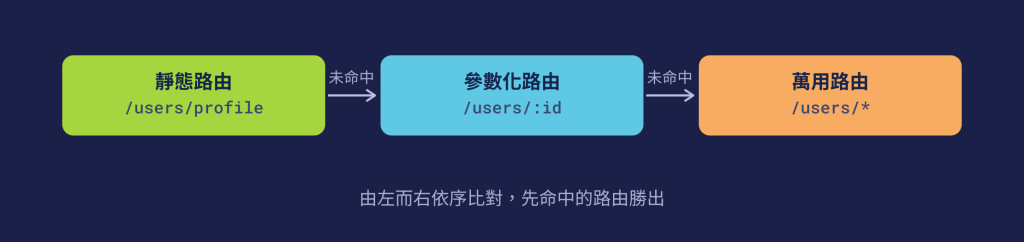
在此策略下,即使控制器維持著原本的排列:
@Controller('users')
export class UsersController {
  @Get(':id')
  getUserById(@Param('id') userId: string) {
    return this.usersService.getUserById(userId);
  }

  @Get('profile')
  getProfile() {
    return this.usersService.getProfile();
  }
}
當 GET /users/profile 請求進來時,系統依然會精準命中 /users/profile,不會再被 /users/:id 攔截。
💡 補充說明:使用
routeConflictPolicy提前發現路由衝突
除了改變匹配優先序外,NestJS v12 還同步推出了routeConflictPolicy。它能在應用程式啟動階段檢查可能互相衝突的路由,一旦發現潛在的路由遮蔽風險,就能提早預警:const app = await NestFactory.create(AppModule, { routeConflictPolicy: { shadow: 'warn', }, });需注意的是
routeConflictPolicy本身不會改變路由的比對結果,它的核心價值在於把「排雷防線」提前到了應用程式啟動階段。
declaration 策略與 Express Adapter 下,會嚴格依據控制器內的宣告順序註冊路由,一旦找到首個符合條件的路徑即停止搜尋。routeResolutionStrategy: 'specificity' 改由路徑具體程度決定優先序,並搭配 routeConflictPolicy 在應用程式啟動時提早偵測路由遮蔽風險。


 iThome鐵人賽
 看影片追技術