

前面的 Agent 服務已經把應用程式中的工作階段與 Agent Runtime 分開管理,用戶端可以透過自己的 Application Session ID 持續操作同一段工作。不過,目前每一次訊息處理仍然會讓 HTTP 請求一路等待 Agent 完成。當工作需要經過更多 Turn、模型處理時間逐漸拉長,甚至加入工具執行後,原本單純的請求與回應流程就可能先遇到逾時、連線中斷,或使用者已經離開目前頁面的情況。
HTTP 請求結束,只代表用戶端不再等待這次回應,Agent Runtime 中的工作仍可能繼續執行。這時就需要把一段持續存在的 Session,和其中某一次實際執行的工作進一步分開,讓服務可以在原本的 HTTP 請求結束後繼續追蹤執行狀態、串流輸出,並在需要時接受取消。
對執行時間較短的 Agent 工作來說,讓一次 HTTP 請求等待工作完成,再直接回傳最後結果,是相對單純的處理方式。用戶端送出要求後,只需要等待這次請求結束,就能取得 Agent 的回應;應用程式也不需要另外保存一筆獨立的執行狀態。
目前的同步訊息流程是透過 sendAndWait() 送出 Prompt,並等待這次 Agent 工作停止:
const response = await session.sendAndWait({ prompt }, 120_000);
sendAndWait() 會將訊息送入 Session,並等待 Session 回到 session.idle。指定的 timeout 只控制呼叫端願意等待多久,不會因為逾時就中止仍在進行的 Agent 工作。
同步流程可以表示成:
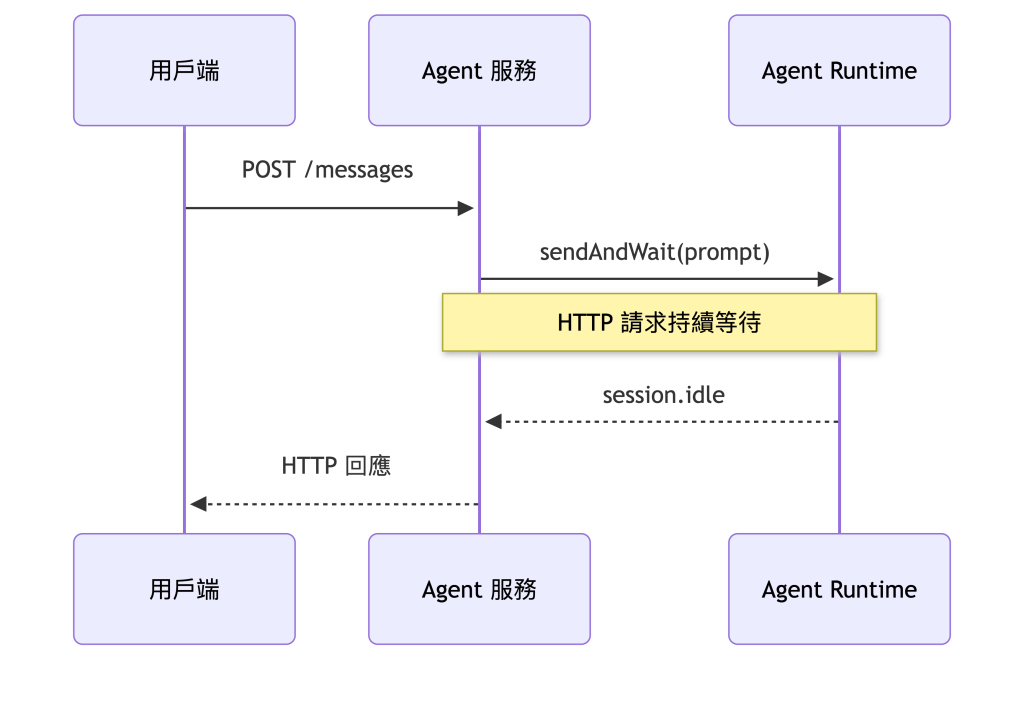
只要 Agent 能在合理時間內完成,這條路徑沒有太大問題。工作時間拉長後,原本綁在一起的幾個生命週期就會開始產生差異:
例如 sendAndWait() 等待 120 秒後拋出 timeout,Agent 服務雖然可以停止等待並結束這次 HTTP 處理,Runtime 卻不會因此自動停止。真正需要停止 Runtime 的處理時,Copilot SDK 另外提供 session.abort(),用來中止 Session 中正在處理的訊息。
因此,長任務服務需要先把三個生命週期拆開:

拆開這三層後,還需要一個由 Agent 服務管理的執行資源,承接已經離開 HTTP 請求的工作狀態。這就是接下來 Application Run 要處理的問題。
Application Session 描述的是應用程式中一段持續存在的工作階段。同一個 Session 可以接收多次前後相關的使用者要求,並持續對應同一個 Runtime Session,讓後續工作延續已經累積的 Context。
不過,Session 本身只能表示這段工作階段仍然存在,無法完整描述其中某一次 Agent 執行的狀態。當服務需要知道某一次工作是否仍在執行、最後是否成功完成,或使用者準備取消哪一筆工作時,就需要另外建立能夠追蹤單次執行的資源。
因此,在 Application Session 之下再建立 Application Run,用來表示一次被 Agent 服務接受並交給 Runtime 執行的工作:
整體關係可以表示成:
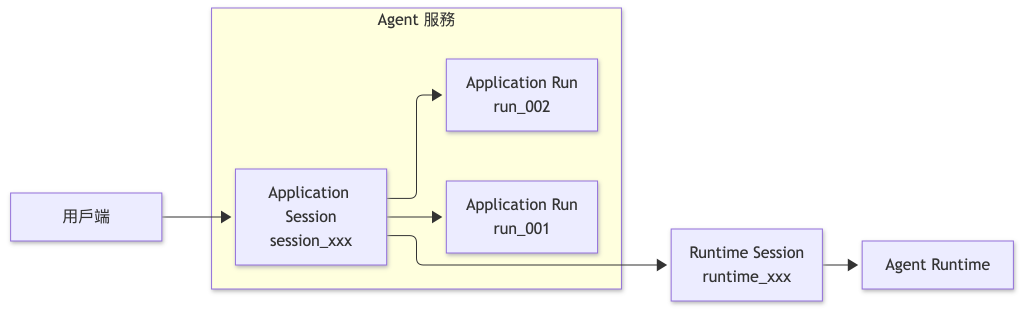
Application Session 可以持續存在並承接後續互動,每一次實際執行的工作則分別形成 Application Run。前一筆 Run 完成後,後續要求仍然可以在相同的 Application Session 中建立新的 Run,並延續同一個 Runtime Session 已經累積的工作脈絡。
NOTE:
Application Run是這套 Agent 服務自行建立的應用程式層模型。Copilot SDK 提供CopilotSession、Runtime 訊息與 Session 事件;Run ID、Run 狀態與對外 API 契約則由應用程式自行定義。Runtime 訊息 ID 繼續留在服務內部,不直接作為對外資源識別碼。
Application Run 建立後,Agent 服務還需要持續追蹤這次工作的執行情況。用戶端可能在不同時間查詢狀態、建立 SSE 連線或提出取消要求,因此除了知道 Run 已經建立,也要能區分工作仍在執行、正在取消,或已經以某種結果結束。
Application Run 可以整理成五種狀態:
export type RunStatus =
  | "running"
  | "cancelling"
  | "completed"
  | "failed"
  | "cancelled";
running 表示這次工作已經由 Agent 服務接受,正在送入 Runtime 或等待後續執行結果。工作正常結束時進入 completed;執行期間發生錯誤,而且這次 Run 無法繼續時,則進入 failed。
取消流程需要額外保留一個中間狀態。使用者提出取消要求後,Application 先將 Run 更新成 cancelling,表示中止流程已經開始,但 Runtime 中的工作仍可能尚未真正停止。等 Runtime 回報最後的停止結果後,Application 再決定這次 Run 應該進入哪一個終止狀態。
主要狀態轉移可以表示成:
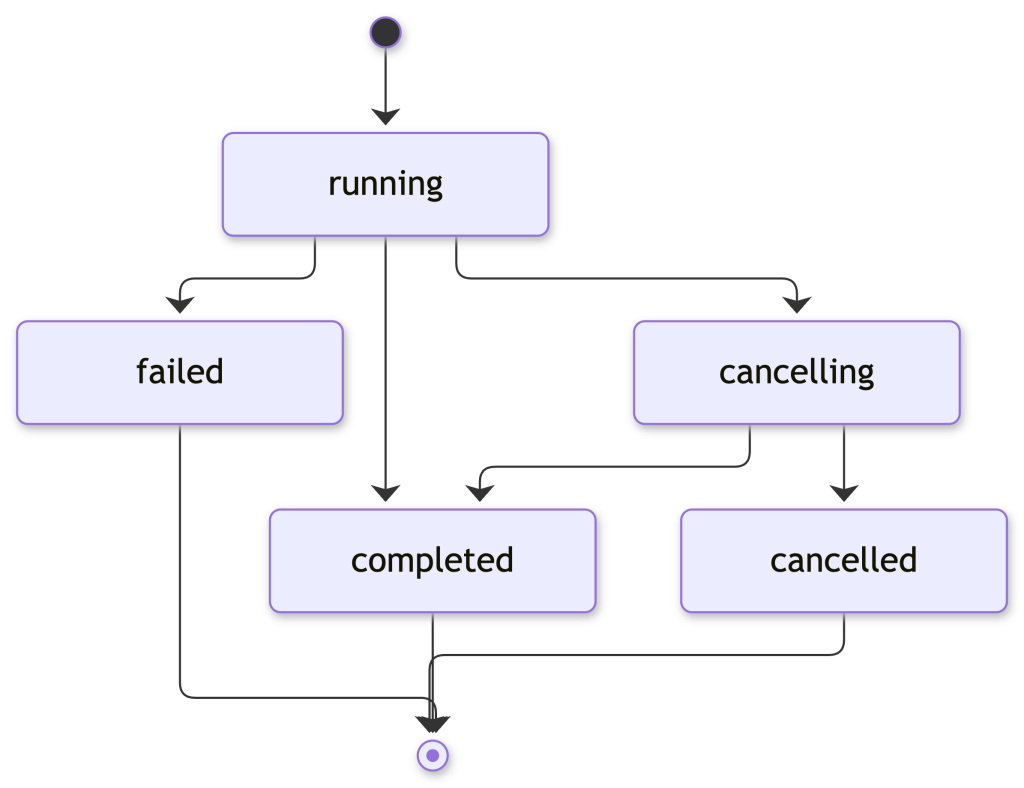
如果 Runtime 最後確認這次工作因中止而停止,Run 就會從 cancelling 進入 cancelled。取消要求送出後,Agent 仍可能在中止真正生效前自然完成,此時最後狀態會是 completed。因此,Application 會等 Runtime 回報實際的停止結果後,再收束這次 Run 的最終狀態。
NOTE:
同一個 Application Session 中的多次 Run 會共用同一個 Runtime Session。為了讓 Runtime 產生的執行事件能明確對應目前這筆 Application Run,目前 Agent 服務限制同一個 Application Session 在同一時間最多只有一筆尚未結束的 Run。如果已經存在running或cancellingRun,再建立新的 Run 時會回傳409 Conflict。這是 Agent 服務自行定義的執行政策,用來維持 Application Run 與 Runtime 執行狀態之間清楚的對應關係。 |
Application Run 將一次 Agent 執行獨立成由 Agent 服務管理的資源後,用戶端就不需要透過同一個 HTTP 請求一路等待工作完成。建立工作、查詢狀態、接收執行事件與提出取消要求,可以分別透過不同 API 處理,讓每一次 HTTP 請求只負責目前需要的操作。
原本同步的 /messages API 因此可以調整成一組以 Application Run 為中心的 API:
| Method | Endpoint | 用途 |
|---|---|---|
POST |
/api/sessions/:sessionId/runs |
建立新的 Application Run |
GET |
/api/runs/:runId |
查詢 Run 狀態與最後結果 |
GET |
/api/runs/:runId/events |
透過 SSE 接收 Run 事件 |
POST |
/api/runs/:runId/cancel |
要求取消目前 Run |
建立 Run 時,用戶端仍然只需要知道 Application Session ID:
POST /api/sessions/session_123/runs
Content-Type: application/json
{
  "prompt": "請分析目前的系統設計,整理主要風險與改善建議。"
}
Agent 服務完成 Session 歸屬與輸入檢查後,先建立 Application Run,再透過 session.send() 將工作送進 Runtime:
const runtimeMessageId = await session.send({
  prompt: run.prompt,
});
send() 會在訊息提交到 Session 後回傳訊息 ID,不需要等待整段 Agent 執行完成。後續的執行狀態與輸出則透過 Session 事件持續取得,再更新對應的 Application Run。
因此,只要訊息已經成功提交到 Runtime,POST /runs 就可以先回傳 202 Accepted:
{
  "id": "run_...",
  "sessionId": "session_123",
  "status": "running",
  "createdAt": "2026-08-24T12:00:00.000Z"
}
用戶端取得 Run ID 後,可以透過 GET /api/runs/run_123 查詢目前狀態,或連接 GET /api/runs/run_123/events 接收 SSE 事件。建立 Run 的 HTTP 請求到這裡就已經完成,後續 Agent 執行由服務繼續追蹤。
Runtime 訊息 ID 只保存於 Application Run 的服務內部資料中,可以協助 Log、Trace 或 Runtime 除錯。服務 API 則繼續使用 Application Run ID,避免 SDK 或 Runtime 的識別資訊直接成為對外 API 契約;查詢、串流與取消 Run 時,也仍需要先透過 Application Session 完成歸屬與授權檢查。
Application Run 建立後,真正的 Agent 工作仍然由 Runtime 執行。模型產生內容、Agent Loop 停止或執行發生錯誤時,Agent 服務都需要根據 Session 事件更新對應的 Run 狀態,才能讓查詢 API 與 SSE 反映目前的執行情況。
不過,Session 事件描述的是 Runtime 的執行過程,其中包含 Runtime 自己的事件名稱、資料結構與識別資訊。如果直接將完整的 SessionEvent 暴露在服務 API 中,用戶端也會跟著依賴這些 Runtime 細節。Application 因此需要在兩者之間建立自己的 Run 事件契約,只保留 Application Run 真正需要的執行資訊。
Run 事件可以先整理成:
export type RunEventData =
  | { type: "run.started" }
  | { type: "run.output.delta"; delta: string }
  | { type: "run.cancelling" }
  | { type: "run.cancel_failed"; error: string }
  | { type: "run.completed"; output?: string }
  | { type: "run.failed"; error: string }
  | { type: "run.cancelled" };
這組事件描述的是 Application Run 在 Agent 服務中的執行狀態,包括工作開始、增量輸出、取消流程,以及最後完成、失敗或取消等結果。Runtime 原始事件仍然保留在 Agent 服務內部,再依照需要轉換成對應的 Run 事件。
主要對應關係可以整理成:
| Runtime 事件 | Application 處理 |
|---|---|
assistant.message_delta |
轉成 run.output.delta,提供執行期間的增量文字 |
assistant.message |
更新 Run 目前保存的完整輸出 |
session.idle |
根據 aborted 收束成 completed 或 cancelled |
session.error |
範例將目前 Run 收束成 failed |
其中,session.idle 表示 Agent Loop 已經停止,適合作為目前 Run 收束狀態的主要依據。session.task_complete 則需要模型主動產生,一般工作不保證一定會出現,因此不適合作為 Run 的完成條件。
Run 事件契約建立後,還需要決定 Runtime 產生的內容如何進入 Run 事件。即時輸出與完整訊息的用途不同,因此會分別使用 assistant.message_delta 與 assistant.message。
要取得模型生成期間的增量內容,需要在建立 Session 時啟用 Streaming:
const session = await client.createSession({
  model,
  provider,
  streaming: true,
  availableTools: [],
});
streaming: true 是 Session 層級的設定。啟用後,模型產生內容期間,Runtime 會持續提供 assistant.message_delta。每一筆事件只包含這次新增的文字片段,Application 可以將主要 Agent 的增量內容轉成 run.output.delta,再透過 SSE 即時送給用戶端。
這些增量事件反映的是 Agent 執行期間產生的 Assistant 輸出,不需要將每一筆增量內容視為這次 Run 的最終結果。
assistant.message 則代表一次 LLM 呼叫形成的完整 Assistant 訊息,過程中可能因為 Agent Loop 經過多個 Turn 而出現多次。Application 可以持續以主要 Agent 的完整訊息更新目前 Run 保存的 output;等 session.idle 發生後,最後保存的完整輸出就成為這次 Run 的結果。
Runtime 的 messageId、turnId、toolCallId 與完整 Session 事件仍然可以保留在 Log 或 Trace 中協助追蹤執行,不需要成為服務 API 的一部分。
完成 Runtime 事件到 Run 事件的映射後,還有另一個問題需要處理。建立 Run 與連接 SSE 是兩次獨立的 HTTP 請求,用戶端可能在工作已經開始一段時間後才建立串流,也可能在接收途中斷線,因此先前已經產生的 Run 事件需要有地方可以重新取得。
Run 建立後,Runtime 就可以開始執行,但用戶端通常要先取得 Run ID,才會另外建立 SSE 連線。這兩個動作分屬不同的 HTTP 請求,因此 SSE 真正連線前,Run 可能已經產生部分事件。
整體時序可以表示成:
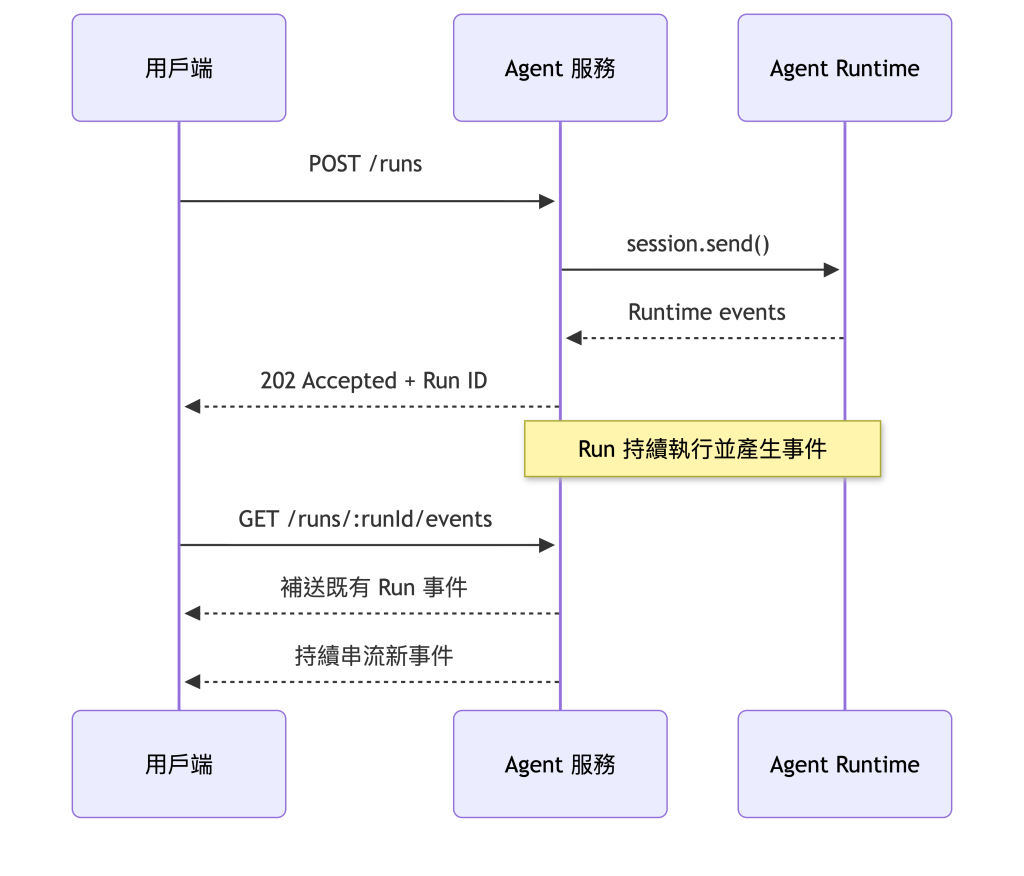
如果 Agent 服務只在 SSE 連線存在時轉送事件,用戶端就可能遺漏連線建立前已經產生的內容。連線中途斷開時也有相同問題,重新連線後需要知道先前已經處理到哪一筆事件,才能接著取得後續內容。
另外,assistant.message_delta 與 session.idle 都屬於暫時性 Runtime 事件,只在執行期間提供,不會保存到 Session 事件紀錄,也不會在恢復 Session 時重新播放。因此,Run 的即時事件還需要由 Application 自己保存,才能支援 Run 事件的補送與重新連線。
每一筆 Run 事件可以加入持續遞增的 sequence:
export type RunEvent = RunEventData & {
  sequence: number;
  runId: string;
  timestamp: string;
};
事件產生後,Application 會先將它寫入目前 Run 的事件紀錄,再送給已經連線的 SSE 用戶端。SSE 同時將 sequence 寫入事件的 id,讓用戶端知道目前已經處理到哪一筆事件。
如果連線中斷,用戶端重新建立 SSE 時,可以透過標準的 Last-Event-ID 標頭帶回最後已經收到的事件序號。Agent 服務再從 Run 事件紀錄中補送該序號之後的內容,完成後繼續傳送新產生的事件。
接下來直接延續上一篇的 copilot-sdk-agent-service。Application Session、Session Store、External Runtime 與 BYOK 模型提供者都繼續沿用;這次移除同步 /messages 流程與 activeMessageSessions,加入 Application Run、Run 事件紀錄與對應 API。
專案結構調整為:
copilot-sdk-agent-service/
├── src/
│   ├── types.ts
│   ├── store.ts
│   ├── run-store.ts
│   ├── runtime.ts
│   ├── run-manager.ts
│   └── server.ts
└── package.json
各檔案負責:
types.ts:定義 Application Session、Application Run 與 Run 事件。store.ts:沿用上一篇的 Application Session 儲存層。run-store.ts:保存 Run 狀態、事件紀錄與 SSE 訂閱者。runtime.ts:管理 Runtime Session、Streaming 與取消。run-manager.ts:將 Run 送入 Runtime,再根據 Session 事件更新 Application 狀態。server.ts:提供 Session、Run、SSE 與取消 API。其中,store.ts 不需要調整,直接沿用上一篇已經建立的 Application Session 與 Session 歸屬邏輯。
先更新 src/types.ts:
export type ApplicationSession = {
  id: string;
  ownerId: string;
  runtimeSessionId: string;
  createdAt: string;
};

export type RunStatus =
  | "running"
  | "cancelling"
  | "completed"
  | "failed"
  | "cancelled";

export type ApplicationRun = {
  id: string;
  sessionId: string;
  status: RunStatus;
  prompt: string;
  runtimeMessageId?: string;
  output?: string;
  error?: string;
  createdAt: string;
  completedAt?: string;
};

export type RunEventData =
  | { type: "run.started" }
  | { type: "run.output.delta"; delta: string }
  | { type: "run.cancelling" }
  | { type: "run.cancel_failed"; error: string }
  | { type: "run.completed"; output?: string }
  | { type: "run.failed"; error: string }
  | { type: "run.cancelled" };

export type RunEvent = RunEventData & {
  sequence: number;
  runId: string;
  timestamp: string;
};
ApplicationRun.id 是提供給用戶端的 Application Run ID,sessionId 則指向上一篇建立的 Application Session。runtimeMessageId 保存 session.send() 回傳的 Runtime 訊息 ID,只作為服務內部關聯資訊。
prompt 同樣不會直接出現在後面的 Run 回應。正式服務如果需要長期保存 Prompt,還要依照資料分類、敏感資訊與保存期限決定實際儲存方式。
Run 事件只保留用戶端需要理解的執行狀態。Runtime 原始事件仍然由 Copilot SDK 提供,Application 再選擇需要的部分映射成自己的 Run 事件。
新增 src/run-store.ts:
import { randomUUID } from "node:crypto";
import type {
  ApplicationRun,
  RunEvent,
  RunEventData,
  RunStatus,
} from "./types.js";

type RunEventListener = (event: RunEvent) => void;

const runs = new Map<string, ApplicationRun>();
const activeRunBySession = new Map<string, string>();
const eventsByRun = new Map<string, RunEvent[]>();
const listenersByRun = new Map<string, Set<RunEventListener>>();

const terminalStatuses = new Set<RunStatus>([
  "completed",
  "failed",
  "cancelled",
]);

function createId(prefix: string): string {
  return `${prefix}_${randomUUID()}`;
}

function updateRun(
  runId: string,
  patch: Partial<ApplicationRun>,
): ApplicationRun | undefined {
  const current = runs.get(runId);
  if (!current) return undefined;

  const updated = { ...current, ...patch };
  runs.set(runId, updated);
  return updated;
}

function releaseActiveRun(run: ApplicationRun): void {
  if (activeRunBySession.get(run.sessionId) === run.id) {
    activeRunBySession.delete(run.sessionId);
  }
}

export function isTerminalRunStatus(status: RunStatus): boolean {
  return terminalStatuses.has(status);
}

export function createRun(
  sessionId: string,
  prompt: string,
): ApplicationRun | undefined {
  const activeRunId = activeRunBySession.get(sessionId);

  if (activeRunId) {
    const activeRun = runs.get(activeRunId);

    if (activeRun && !terminalStatuses.has(activeRun.status)) {
      return undefined;
    }

    activeRunBySession.delete(sessionId);
  }

  const run: ApplicationRun = {
    id: createId("run"),
    sessionId,
    status: "running",
    prompt,
    createdAt: new Date().toISOString(),
  };

  runs.set(run.id, run);
  activeRunBySession.set(sessionId, run.id);
  eventsByRun.set(run.id, []);
  return run;
}

export function getRun(runId: string): ApplicationRun | undefined {
  return runs.get(runId);
}

export function setRuntimeMessageId(
  runId: string,
  runtimeMessageId: string,
): void {
  updateRun(runId, { runtimeMessageId });
}

export function setRunOutput(runId: string, output: string): void {
  updateRun(runId, { output });
}

export function markRunCancelling(
  runId: string,
): ApplicationRun | undefined {
  const run = runs.get(runId);
  if (!run || run.status !== "running") return undefined;

  return updateRun(runId, { status: "cancelling" });
}

export function restoreRunRunning(
  runId: string,
): ApplicationRun | undefined {
  const run = runs.get(runId);
  if (!run || run.status !== "cancelling") return run;

  return updateRun(runId, { status: "running" });
}

export function completeRun(runId: string): ApplicationRun | undefined {
  const run = runs.get(runId);
  if (!run || terminalStatuses.has(run.status)) return undefined;

  const completed = updateRun(runId, {
    status: "completed",
    completedAt: new Date().toISOString(),
  });

  if (completed) releaseActiveRun(completed);
  return completed;
}

export function failRun(
  runId: string,
  error: string,
): ApplicationRun | undefined {
  const run = runs.get(runId);
  if (!run || terminalStatuses.has(run.status)) return undefined;

  const failed = updateRun(runId, {
    status: "failed",
    error,
    completedAt: new Date().toISOString(),
  });

  if (failed) releaseActiveRun(failed);
  return failed;
}

export function cancelRun(runId: string): ApplicationRun | undefined {
  const run = runs.get(runId);
  if (!run || terminalStatuses.has(run.status)) return undefined;

  const cancelled = updateRun(runId, {
    status: "cancelled",
    completedAt: new Date().toISOString(),
  });

  if (cancelled) releaseActiveRun(cancelled);
  return cancelled;
}

export function publishRunEvent(
  runId: string,
  data: RunEventData,
): RunEvent {
  const history = eventsByRun.get(runId) ?? [];

  const event: RunEvent = {
    ...data,
    sequence: history.length + 1,
    runId,
    timestamp: new Date().toISOString(),
  };

  history.push(event);
  eventsByRun.set(runId, history);

  for (const listener of listenersByRun.get(runId) ?? []) {
    try {
      listener(event);
    } catch {
      // 單一 SSE 用戶端的問題不影響 Run 狀態更新。
    }
  }

  return event;
}

export function getRunEvents(
  runId: string,
  afterSequence = 0,
): RunEvent[] {
  return (eventsByRun.get(runId) ?? []).filter(
    (event) => event.sequence > afterSequence,
  );
}

export function subscribeRunEvents(
  runId: string,
  listener: RunEventListener,
): () => void {
  const listeners =
    listenersByRun.get(runId) ?? new Set<RunEventListener>();

  listeners.add(listener);
  listenersByRun.set(runId, listeners);

  return () => {
    listeners.delete(listener);

    if (listeners.size === 0) {
      listenersByRun.delete(runId);
    }
  };
}
run-store.ts 主要處理兩類狀態。runs 與 activeRunBySession 保存 Application Run,並確保同一個 Session 同時間只有一筆尚未結束的 Run;Run 進入 completed、failed 或 cancelled 後,再釋放這項執行限制。
eventsByRun 與 listenersByRun 則負責事件紀錄與 SSE 訂閱。每一筆新事件都取得遞增的 sequence,先寫入目前 Run 的事件紀錄,再通知已連線的 SSE 用戶端。後續建立或重新建立連線時,Application 就能從自己的事件紀錄補回已經發生的內容。
另外,Run 已經進入終止狀態後,completeRun()、failRun() 與 cancelRun() 都不會再次完成狀態轉移。這可以避免不同 Runtime 訊號在接近時間點抵達時,重複產生終止事件。
接著調整 src/runtime.ts:
import {
  CopilotClient,
  RuntimeConnection,
  type CopilotSession,
  type ProviderConfig,
} from "@github/copilot-sdk";
import type { ApplicationSession } from "./types.js";

const runtimeUrl = process.env.COPILOT_RUNTIME_URL ?? "localhost:4321";
const model = process.env.MODEL_ID;
const baseUrl = process.env.MODEL_BASE_URL;
const apiKey = process.env.MODEL_API_KEY;

if (!model || !baseUrl || !apiKey) {
  throw new Error("MODEL_ID、MODEL_BASE_URL 與 MODEL_API_KEY 都必須提供。");
}

const provider: ProviderConfig = {
  type: "openai",
  baseUrl,
  apiKey,
};

const client = new CopilotClient({
  connection: RuntimeConnection.forUri(runtimeUrl),
  mode: "empty",
});

const runtimeSessions = new Map<string, CopilotSession>();

export async function createRuntimeSession(
  session: ApplicationSession,
): Promise<void> {
  const runtimeSession = await client.createSession({
    sessionId: session.runtimeSessionId,
    model,
    provider,
    streaming: true,
    availableTools: [],
  });

  runtimeSessions.set(session.runtimeSessionId, runtimeSession);
}

export async function getRuntimeSession(
  runtimeSessionId: string,
): Promise<CopilotSession> {
  const current = runtimeSessions.get(runtimeSessionId);
  if (current) return current;

  const resumed = await client.resumeSession(runtimeSessionId, {
    model,
    provider,
    streaming: true,
    availableTools: [],
  });

  runtimeSessions.set(runtimeSessionId, resumed);
  return resumed;
}

export async function abortRuntimeSession(
  runtimeSessionId: string,
): Promise<void> {
  const session = await getRuntimeSession(runtimeSessionId);
  await session.abort();
}
BYOK、External Runtime 與 mode: "empty" 都沿用上一篇的設定。這次新增 streaming: true,讓 Run 管理器可以取得 assistant.message_delta;取消操作則集中由 Runtime 整合層承接,讓後面的 Run 管理流程不需要直接操作 CopilotSession。
HTTP API 同樣不直接持有 CopilotSession,所有 SDK 操作繼續收斂在 Runtime 整合層。
Run 狀態與事件保存方式準備完成後,下一步是將建立好的 Application Run 送入 Runtime,並讓後續 Session 事件持續更新這筆 Run。新增 src/run-manager.ts:
import { getRuntimeSession } from "./runtime.js";
import {
  cancelRun,
  completeRun,
  failRun,
  getRun,
  isTerminalRunStatus,
  publishRunEvent,
  setRunOutput,
  setRuntimeMessageId,
} from "./run-store.js";
import type { ApplicationRun } from "./types.js";

function getErrorMessage(error: unknown): string {
  return error instanceof Error ? error.message : "Unknown Runtime error";
}

export async function startRun(
  run: ApplicationRun,
  runtimeSessionId: string,
): Promise<void> {
  const runtimeSession = await getRuntimeSession(runtimeSessionId);

  let unsubscribe = () => {};

  unsubscribe = runtimeSession.on((event) => {
    switch (event.type) {
      case "assistant.message_delta":
        if (!event.agentId && event.data.deltaContent) {
          publishRunEvent(run.id, {
            type: "run.output.delta",
            delta: event.data.deltaContent,
          });
        }
        break;

      case "assistant.message":
        if (!event.agentId && event.data.content) {
          setRunOutput(run.id, event.data.content);
        }
        break;

      case "session.error": {
        const failed = failRun(run.id, event.data.message);

        if (failed) {
          publishRunEvent(run.id, {
            type: "run.failed",
            error: event.data.message,
          });
        }

        unsubscribe();
        break;
      }

      case "session.idle": {
        const current = getRun(run.id);

        if (!current || isTerminalRunStatus(current.status)) {
          unsubscribe();
          break;
        }

        if (event.data.aborted) {
          const cancelled = cancelRun(run.id);

          if (cancelled) {
            publishRunEvent(run.id, {
              type: "run.cancelled",
            });
          }
        } else {
          const completed = completeRun(run.id);

          if (completed) {
            publishRunEvent(run.id, {
              type: "run.completed",
              output: completed.output,
            });
          }
        }

        unsubscribe();
        break;
      }
    }
  });

  publishRunEvent(run.id, {
    type: "run.started",
  });

  try {
    const runtimeMessageId = await runtimeSession.send({
      prompt: run.prompt,
    });

    setRuntimeMessageId(run.id, runtimeMessageId);
  } catch (error) {
    unsubscribe();

    const message = getErrorMessage(error);
    const failed = failRun(run.id, message);

    if (failed) {
      publishRunEvent(run.id, {
        type: "run.failed",
        error: message,
      });
    }

    throw error;
  }
}
程式會先訂閱 Session 事件,再將訊息送入 Runtime。這樣即使 Runtime 很快開始工作,後續產生的事件也已經有對應的處理位置。
訊息成功提交後,Runtime 訊息 ID 會保存到 Application Run。接下來的狀態則交由 Session 事件更新。主要 Agent 的 assistant.message_delta 形成即時輸出的 run.output.delta;每一筆完整的 assistant.message 則更新 Run 目前保存的輸出,直到 session.idle 或 session.error 收束這次執行。
程式中的 event.agentId 用來略過 Sub-agent 產生的 Assistant 事件,避免其中的輸出直接進入 Agent 服務提供的 Run 串流。這項處理只控制服務輸出的範圍,不會改變 Sub-agent 在 Runtime 中原本的執行方式。
同一個 Application Session 同時間只允許一筆尚未結束的 Run,因此這些 Session 事件可以直接歸屬到目前的 Application Run,不需要再額外推測事件屬於哪一次執行。
Application Run 的狀態、事件與 Runtime 執行流程準備完成後,最後再將它們接進 HTTP API。更新 src/server.ts:
import express, { type Response } from "express";
import {
  createApplicationSession,
  deleteApplicationSession,
  getOwnedSession,
} from "./store.js";
import {
  createRun,
  getRun,
  getRunEvents,
  isTerminalRunStatus,
  markRunCancelling,
  publishRunEvent,
  restoreRunRunning,
  subscribeRunEvents,
} from "./run-store.js";
import {
  abortRuntimeSession,
  createRuntimeSession,
} from "./runtime.js";
import { startRun } from "./run-manager.js";
import type {
  ApplicationRun,
  ApplicationSession,
  RunEvent,
} from "./types.js";

const app = express();
app.use(express.json());

const currentUser = { id: "demo-user" };

function toSessionResponse(session: ApplicationSession) {
  return {
    id: session.id,
    createdAt: session.createdAt,
  };
}

function toRunResponse(run: ApplicationRun) {
  return {
    id: run.id,
    sessionId: run.sessionId,
    status: run.status,
    output: run.output,
    error: run.error,
    createdAt: run.createdAt,
    completedAt: run.completedAt,
  };
}

function writeRunEvent(res: Response, event: RunEvent): void {
  res.write(`id: ${event.sequence}\n`);
  res.write(`event: ${event.type}\n`);
  res.write(`data: ${JSON.stringify(event)}\n\n`);
}

function isTerminalRunEvent(event: RunEvent): boolean {
  return (
    event.type === "run.completed" ||
    event.type === "run.failed" ||
    event.type === "run.cancelled"
  );
}

app.post("/api/sessions", async (_req, res) => {
  const session = createApplicationSession(currentUser.id);

  try {
    await createRuntimeSession(session);
    res.status(201).json(toSessionResponse(session));
  } catch (error) {
    deleteApplicationSession(session.id);
    console.error(error);

    res.status(502).json({
      error: "Unable to create Runtime Session",
    });
  }
});

app.get("/api/sessions/:sessionId", (req, res) => {
  const session = getOwnedSession(req.params.sessionId, currentUser.id);

  if (!session) {
    res.status(404).json({
      error: "Session not found",
    });
    return;
  }

  res.json(toSessionResponse(session));
});

app.post("/api/sessions/:sessionId/runs", async (req, res) => {
  const prompt =
    typeof req.body.prompt === "string"
      ? req.body.prompt.trim()
      : "";

  if (!prompt) {
    res.status(400).json({
      error: "prompt is required",
    });
    return;
  }

  const session = getOwnedSession(req.params.sessionId, currentUser.id);

  if (!session) {
    res.status(404).json({
      error: "Session not found",
    });
    return;
  }

  const run = createRun(session.id, prompt);

  if (!run) {
    res.status(409).json({
      error: "Session already has an active Run",
    });
    return;
  }

  try {
    await startRun(run, session.runtimeSessionId);
    res.status(202).json(toRunResponse(getRun(run.id) ?? run));
  } catch (error) {
    console.error(error);

    const failed = getRun(run.id);

    res.status(502).json({
      error: "Unable to start Agent Run",
      run: failed ? toRunResponse(failed) : undefined,
    });
  }
});

app.get("/api/runs/:runId", (req, res) => {
  const run = getRun(req.params.runId);

  if (!run) {
    res.status(404).json({
      error: "Run not found",
    });
    return;
  }

  const session = getOwnedSession(run.sessionId, currentUser.id);

  if (!session) {
    res.status(404).json({
      error: "Run not found",
    });
    return;
  }

  res.json(toRunResponse(run));
});

app.get("/api/runs/:runId/events", (req, res) => {
  const run = getRun(req.params.runId);

  if (!run) {
    res.status(404).json({
      error: "Run not found",
    });
    return;
  }

  const session = getOwnedSession(run.sessionId, currentUser.id);

  if (!session) {
    res.status(404).json({
      error: "Run not found",
    });
    return;
  }

  res.set({
    "Content-Type": "text/event-stream",
    "Cache-Control": "no-cache",
    Connection: "keep-alive",
  });
  res.flushHeaders();

  const lastEventId = Number(req.header("Last-Event-ID")) || 0;

  let unsubscribe = () => {};
  let replaying = true;
  const pendingEvents: RunEvent[] = [];

  const sendEvent = (event: RunEvent) => {
    writeRunEvent(res, event);

    if (isTerminalRunEvent(event)) {
      unsubscribe();
      res.end();
    }
  };

  const onEvent = (event: RunEvent) => {
    if (replaying) {
      pendingEvents.push(event);
      return;
    }

    sendEvent(event);
  };

  unsubscribe = subscribeRunEvents(run.id, onEvent);

  const history = getRunEvents(run.id, lastEventId);
  let lastSequence = lastEventId;

  for (const event of history) {
    sendEvent(event);
    lastSequence = event.sequence;

    if (isTerminalRunEvent(event)) return;
  }

  replaying = false;

  for (const event of pendingEvents) {
    if (event.sequence <= lastSequence) continue;

    sendEvent(event);
    lastSequence = event.sequence;

    if (isTerminalRunEvent(event)) return;
  }

  const current = getRun(run.id);

  if (current && isTerminalRunStatus(current.status)) {
    unsubscribe();
    res.end();
    return;
  }

  req.on("close", unsubscribe);
});

app.post("/api/runs/:runId/cancel", async (req, res) => {
  const run = getRun(req.params.runId);

  if (!run) {
    res.status(404).json({
      error: "Run not found",
    });
    return;
  }

  const session = getOwnedSession(run.sessionId, currentUser.id);

  if (!session) {
    res.status(404).json({
      error: "Run not found",
    });
    return;
  }

  if (isTerminalRunStatus(run.status)) {
    res.status(409).json({
      error: "Run has already finished",
      run: toRunResponse(run),
    });
    return;
  }

  if (run.status === "cancelling") {
    res.status(202).json(toRunResponse(run));
    return;
  }

  const cancelling = markRunCancelling(run.id);

  if (!cancelling) {
    res.status(409).json({
      error: "Run cannot be cancelled",
    });
    return;
  }

  publishRunEvent(run.id, {
    type: "run.cancelling",
  });

  try {
    await abortRuntimeSession(session.runtimeSessionId);
    res.status(202).json(toRunResponse(getRun(run.id) ?? cancelling));
  } catch (error) {
    console.error(error);

    const current = getRun(run.id);

    if (current && !isTerminalRunStatus(current.status)) {
      restoreRunRunning(run.id);

      publishRunEvent(run.id, {
        type: "run.cancel_failed",
        error: "Unable to abort Runtime execution",
      });
    }

    res.status(502).json({
      error: "Unable to cancel Agent Run",
    });
  }
});

app.listen(3000, () => {
  console.log("Agent service listening on http://localhost:3000");
});
原本的 /messages Endpoint 與 activeMessageSessions 已經移除。Application Run 本身就負責表示目前是否有工作仍在進行,因此不再需要另外使用一個只和同步 HTTP 請求綁定的 Set 保存活動狀態。
收到建立 Run 的請求後,Agent 服務會先完成 Prompt、Application Session 與 Session 歸屬檢查,再建立這次工作的 Application Run:
const run = createRun(session.id, prompt);
如果目前 Session 已經有尚未結束的 Run,建立操作會回覆 409 Conflict,維持前面定義的單一執行中 Run 政策。
建立成功後,再將工作交給 Run 管理器:
await startRun(run, session.runtimeSessionId);
只要訊息已經成功提交到 Runtime,就可以回傳 202 Accepted 與 Application Run。原本建立工作的 HTTP 請求到這裡即可結束,後續執行狀態再由 Session 事件持續更新。
Run 建立後,用戶端可以連接 GET /api/runs/:runId/events 接收這次工作的事件。Server 會先從 Last-Event-ID 取得用戶端最後已經處理的事件序號:
const lastEventId = Number(req.header("Last-Event-ID")) || 0;
這裡需要處理的是補送既有事件與接收新事件之間的時間差。程式先建立事件訂閱,訂閱期間新產生的事件暫時放進 pendingEvents,再讀取目前保存的事件紀錄。
既有事件補送完成後,再將 pendingEvents 中序號較新的事件依序送出,接著切換成即時串流。這樣可以避免 SSE 建立期間剛好有新事件產生時,在補送與即時訂閱之間留下事件遺漏的空窗。
收到 run.completed、run.failed 或 run.cancelled 任一終止事件後,SSE 回應就可以結束。用戶端如果稍後才建立連線,而 Run 已經完成,Server 仍然會先補送保存的事件,再關閉這次連線。
使用者要求取消仍在執行的 Run 時,Agent 服務會先將 Application Run 更新成 cancelling,並產生對應的 run.cancelling 事件:
const cancelling = markRunCancelling(run.id);

publishRunEvent(run.id, {
  type: "run.cancelling",
});
接著才要求 Runtime 中止目前工作:
await abortRuntimeSession(session.runtimeSessionId);
Application Run 不會在這個呼叫完成後立即進入 cancelled。最後的狀態仍然交由 Run 管理器根據後續 session.idle 回報的停止結果判斷。如果 Runtime 確認工作因中止而停止,就進入 cancelled;如果 Agent 已經先自然完成,則維持實際發生的 completed。
如果 abort() 呼叫拋出錯誤,而且 Run 尚未進入終止狀態,這個範例會將它恢復成 running,並產生 run.cancel_failed。這是為了維持目前簡化狀態模型採用的應用程式政策;正式服務如果遇到網路中斷等無法確認 Runtime 是否已經收到中止要求的情況,還需要另外處理取消結果不確定的狀態。
abort() 只負責中止 Runtime 中尚未完成的 Agent 執行,不會回滾先前已經完成的外部副作用。如果 Agent 已經透過 Tool 寫入資料、送出外部請求或完成其他操作,這些結果不會因後續中止自動撤銷。具有副作用的工作仍然需要由應用程式根據實際業務需求處理冪等、補償或其他復原機制。
確認 External Runtime 與 BYOK 模型提供者都已經準備完成後,啟動 Agent 服務:
$ npx tsx src/server.ts
先建立 Application Session:
$ curl -s -X POST \
  http://localhost:3000/api/sessions
回應可能如下:
{
  "id": "session_<uuid>",
  "createdAt": "2026-08-24T12:00:00.000Z"
}
將實際取得的 Session ID 保存到環境變數:
$ export SESSION_ID="session_<uuid>"
接著建立 Application Run:
$ curl -s -X POST \
  -H "Content-Type: application/json" \
  -d '{
    "prompt": "請分析一套準備正式上線的 Agent 服務,整理主要的執行可靠性、狀態管理、錯誤處理與維運風險。"
  }' \
  "http://localhost:3000/api/sessions/$SESSION_ID/runs"
如果訊息成功提交到 Runtime,會先取得:
{
  "id": "run_<uuid>",
  "sessionId": "session_<uuid>",
  "status": "running",
  "createdAt": "2026-08-24T12:01:00.000Z"
}
保存實際 Run ID:
$ export RUN_ID="run_<uuid>"
接著另外開啟一個終端機,建立 SSE 連線:
$ curl -N \
  "http://localhost:3000/api/runs/$RUN_ID/events"
執行期間會先看到 run.started,並隨著 Runtime 執行情況收到 run.output.delta,最後再收到對應的終止事件。實際增量事件數量、生成速度與自然語言內容都會依模型與 Runtime 執行情況不同。觀察重點是建立 Run 的 HTTP 請求已經結束,SSE 仍然可以持續取得這筆工作的後續輸出。
也可以直接查詢 Run:
$ curl \
  "http://localhost:3000/api/runs/$RUN_ID"
完成後可能看到:
{
  "id": "run_<uuid>",
  "sessionId": "session_<uuid>",
  "status": "completed",
  "output": "...",
  "createdAt": "2026-08-24T12:01:00.000Z",
  "completedAt": "2026-08-24T12:01:18.000Z"
}
如果 SSE 中途斷線,而且最後已經收到事件 3,可以重新連線:
$ curl -N \
  -H "Last-Event-ID: 3" \
  "http://localhost:3000/api/runs/$RUN_ID/events"
Server 只會補送序號 3 之後保存在目前事件紀錄中的內容。
要測試取消,可以建立另一筆 Run,在它仍然是 running 時呼叫:
$ curl -X POST \
  "http://localhost:3000/api/runs/$RUN_ID/cancel"
取消要求成功送入 Runtime 後,SSE 會先收到 run.cancelling;等 Runtime 停止目前處理後,再根據實際結果形成 run.cancelled 或 run.completed。
實際 Agent 工作可能很快就完成。如果取消要求抵達前 Run 已經進入終止狀態,API 會回傳 409 Conflict;如果取消要求提出後 Agent 剛好先自然完成,最後則可能看到 completed。執行時主要觀察 Run 狀態是否依照 Runtime 的實際停止結果正確收束。
完成前面的拆分後,Agent 執行已經不需要綁在建立工作的 HTTP 請求上。用戶端可以先取得 Application Run ID,再透過查詢、SSE 或取消 API 操作這筆工作,Agent 服務則持續根據 Runtime 事件更新執行狀態。
目前這套設計仍然建立在單一 Agent Service 程序中。Application Session、Application Run、Run 事件紀錄與執行中的 Run 關係都保存在目前程序的記憶體,只要服務重新啟動,這些應用程式狀態就會消失。正式服務如果希望 Application Run 可以跨越部署與程序生命週期持續存在,就需要進一步處理幾個問題:
這些問題都位在 Application 層。Runtime Session 可以保存 Agent 已經累積的工作脈絡,Application 仍然需要保存 Application Session、Application Run 與彼此的執行關係,並決定後續請求應該由哪個執行環境承接。
因此,目前的 Application Run 已經解決 HTTP 請求與 Agent 執行生命週期的分離,也建立了查詢、事件串流與取消所需要的應用程式模型。當 Agent 服務進一步部署成多實例架構時,這些原本保存在單一程序中的狀態與協調關係,就需要移到可以共享與持久化的服務基礎設施中。
當 Agent 工作時間開始超出單一 HTTP 請求適合承載的範圍,服務需要將 HTTP 連線與實際執行拆開,另外建立可以持續追蹤的 Application Run,讓工作在原本請求結束後仍然能由 Agent 服務管理:
Last-Event-ID 處理連線中斷後的事件補送。完成這層拆分後,Application Session 負責保存持續工作的範圍,Application Run 追蹤其中一次實際執行,Runtime Session 則維護 Agent 的 Context 與執行狀態。這些責任分開後,Agent 服務就具備處理長時間工作的基本模型,也能進一步將應用程式狀態、執行協調與 Runtime 管理納入正式服務架構。


 iThome鐵人賽
 看影片追技術