
昨天已讓六個 Deployment 各自維持 Pod。現在 api-b 要呼叫 api-a,Gateway 也要把 request 轉送到兩個 API,該填哪個位址?今天將為這些 workload 建立穩定的 Service 名稱。
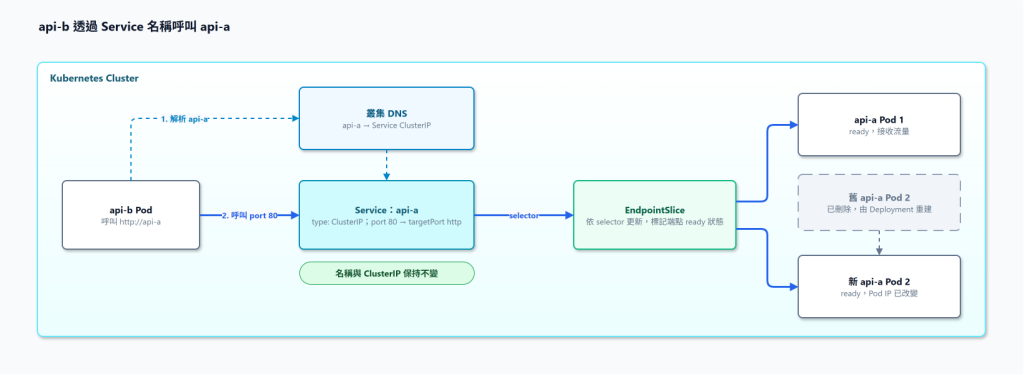
先看 api-a 的 ClusterIP Service:
apiVersion: v1
kind: Service
metadata:
  name: api-a
  namespace: team-a
spec:
  type: ClusterIP
  selector:
    app: api-a
  ports:
    - name: http
      port: 80
      targetPort: http
selector 要選中 api-a Pod;port: 80 是呼叫端使用的 Service port;targetPort: http 則指向 Deployment 裡命名為 http 的 container port,也就是 8080。若 selector 拼錯,Service 物件仍可能建立成功,卻沒有對應的後端。
以下將 api-a 以及其餘五個 Service 放在同一份 app-services.yaml。
apiVersion: v1
kind: Service
metadata:
  name: api-a
  namespace: team-a
spec:
  type: ClusterIP
  selector:
    app: api-a
  ports:
    - name: http
      port: 80
      targetPort: http
---
apiVersion: v1
kind: Service
metadata:
  name: api-b
  namespace: team-a
spec:
  type: ClusterIP
  selector:
    app: api-b
  ports:
    - name: http
      port: 80
      targetPort: http
---
apiVersion: v1
kind: Service
metadata:
  name: api-gateway
  namespace: team-a
spec:
  type: ClusterIP
  selector:
    app: api-gateway
  ports:
    - name: http
      port: 80
      targetPort: http
---
apiVersion: v1
kind: Service
metadata:
  name: portal-web
  namespace: team-a
spec:
  type: ClusterIP
  selector:
    app: portal-web
  ports:
    - name: http
      port: 80
      targetPort: http
---
apiVersion: v1
kind: Service
metadata:
  name: frontend-a
  namespace: team-a
spec:
  type: ClusterIP
  selector:
    app: frontend-a
  ports:
    - name: http
      port: 80
      targetPort: http
---
apiVersion: v1
kind: Service
metadata:
  name: frontend-b
  namespace: team-a
spec:
  type: ClusterIP
  selector:
    app: frontend-b
  ports:
    - name: http
      port: 80
      targetPort: http
kubectl apply -f app-services.yaml
kubectl -n team-a get services
kubectl -n team-a get endpointslices -l kubernetes.io/service-name=api-a
預期看到六個 ClusterIP Service,EndpointSlice 會列出 Service 對應的端點。
假設 api-b 原本就會讀取 API_A_BASE_URL 這個環境變數,可在它的 Deployment container 設定中加入:
env:
  - name: API_A_BASE_URL
    value: http://api-a
沿用 Day 14 的 other-deployments.yaml,就修改其中 api-b 的 container,再重新 kubectl apply -f other-deployments.yaml。
應用 Gateway 的兩條下游 route 也要指向 api-a、api-b 的 Service。
api-b 若與 api-a 同在 team-a,可用 http://api-a 呼叫 Service port 80。而跨 Namespace 時,使用 http://api-a.team-a.svc.cluster.local 才會呼叫成功,看起來的寫法也比較明確,不過叢集 DNS domain 未必是 cluster.local,需按實際配置核對。
在 Docker Compose 裡,同一 network 內的服務可以用 service name 互相找到。Kubernetes 由 Service 與叢集 DNS 提供類似的存取方式,而 Service 對應的 Pod 可以更換。
到目前為止,應已可以從 api-b Pod 發起真正的 request 給 api-a,經 api-a Service 得到預期回應,而且重建一顆 api-a Pod 後,呼叫仍能成功。
單純 DNS 解析成功還不算整條呼叫路徑驗證,若失敗,依序看 DNS、Service selector、EndpointSlice、Pod 監聽 port 與應用 log。
Gateway 路由及前端載入也應用各自的實際 request 測試,不能只靠六個 Service 存在就判定架構已連通。



 iThome鐵人賽
 看影片追技術