iT邦幫忙

2026 iThome 鐵人賽

DAY 14
0
AI 自動化

從單一 Agent 到 Supervisor 架構:用 n8n 實作會自己分工的 Multi-Agent AI 部門系列 第 14 篇

Day 14|資料在 Agent 之間怎麼傳:Structured Output 與 JSON Schema 規範化

  • 分享至 

  • xImage
  •  

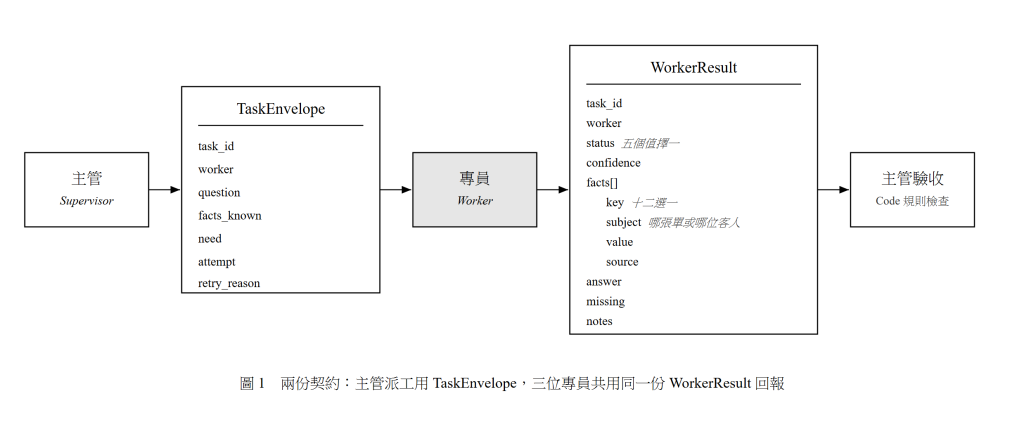
今天要做的事:把前三天散落各處的 JSON 收攏成兩份正式契約,並解決一個很煩的現實問題 ——
Structured Output Parser 會失敗,而且失敗得很難看。

為什麼「契約」這個詞很重要

第二週做完三位 Worker 之後,我發現真正的難點不在任何一位 Worker 身上,而在它們之間的介面。

單兵 Agent 沒有這個問題,因為所有東西都在同一個 context 裡流動。Multi-Agent 一拆開,你就得回答:

  • Supervisor 要傳什麼給 W1?傳整封信嗎?
  • W1 回報的東西,Supervisor 怎麼知道「這算成功還是失敗」?
  • W1 和 W2 的回報格式不一樣的話,Supervisor 要寫兩套處理邏輯嗎?

這就是為什麼我用「契約」而不是「格式」。格式是長相,契約是承諾。 契約規定的是:我保證會給你這些欄位、我保證 status 只會是這五個值之一、我保證每個 fact 都有 source。

有了承諾,下游才能寫出確定的邏輯。

契約一:TaskEnvelope(Supervisor → Worker)

{
  "$schema": "haodou/task-envelope/v1",
  "type": "object",
  "properties": {
    "task_id":    { "type": "string", "description": "唯一工單編號" },
    "case_id":    { "type": "string", "description": "所屬案件編號" },
    "worker":     { "type": "string", "enum": ["order_lookup", "knowledge", "reply_writer"] },
    "question":   { "type": "string", "description": "要這位專員做什麼,一句話" },
    "facts_known":{ "type": "object", "description": "主管已知、且這位專員需要的事實" },
    "need":       { "type": "array",  "items": { "type": "string" }, "description": "主管要求回報的欄位" },
    "constraints": {
      "type": "object",
      "properties": {
        "max_tool_calls":   { "type": "number" },
        "must_cite_source": { "type": "boolean" }
      }
    },
    "attempt":      { "type": "number", "description": "第幾次嘗試,從 1 開始" },
    "retry_reason": { "type": "string", "description": "重派時,上一次被退件的原因" }
  },
  "required": ["task_id", "case_id", "worker", "question", "attempt"]
}

三個設計決定,以及我為什麼這樣選

1. question 是自然語言,不是結構化的。

我試過把它做成結構化的({action: "lookup", target: "order", id: "A10293"})。結果 Worker 的表現變差。

原因:結構化的指令等於把方法也一起指定了。action: "lookup" 就已經預設了「用查詢的方式」。而自然語言的「查出這張單目前的狀態與預計到貨時間」留給 Worker 自己決定用哪個工具、要不要變通。

Day 09 的派工原則第一條「給任務,不給步驟」,在這裡就是具體的實作決定。

2. facts_known 是物件,不是陣列。

W1 需要的是 order_id 和 customer_email,用物件直接取 key 最方便。但 Worker 回報的 facts 是陣列(因為需要帶 source、且可能有多筆同類)。

輸入用物件、輸出用陣列,看起來不對稱,但各自符合使用場景。我一開始為了「一致性」把兩邊都做成陣列,結果 W1 的 prompt 要多花力氣解釋「請從 facts_known 陣列裡找 key 等於 order_id 的那一筆」—— 完全是自找麻煩。

3. retry_reason 只在 attempt > 1 時出現。

這是 Day 21 退件機制的關鍵。重派的時候,一定要告訴 Worker 上次哪裡不對,不然它會做出一樣的東西。

我實測過:不帶 retry_reason 重派,第二次的結果跟第一次幾乎一樣(因為輸入相同、temperature 又低)。重試不帶理由等於白花錢。

契約二:WorkerResult(Worker → Supervisor)

{
  "$schema": "haodou/worker-result/v1",
  "type": "object",
  "properties": {
    "task_id": { "type": "string" },
    "worker":  { "type": "string" },
    "status": {
      "type": "string",
      "enum": ["ok", "not_found", "insufficient_info", "partial", "error"]
    },
    "confidence": { "type": "number", "minimum": 0, "maximum": 1 },
    "facts": {
      "type": "array",
      "items": {
        "type": "object",
        "properties": {
          "key":    { "type": "string" },
          "value":  { "type": "string" },
          "source": { "type": "string", "description": "格式:orders!A10293 或 faq![SHIP-04]" }
        },
        "required": ["key", "value", "source"]
      }
    },
    "answer":   { "type": "string", "description": "給主管看的摘要,不是給客人看的" },
    "missing":  { "type": "array", "items": { "type": "string" } },
    "notes":    { "type": "string", "description": "提供資訊,不做決策" },
    "draft":    { "type": "string", "description": "僅 reply_writer 使用" },
    "concerns": { "type": "array", "items": { "type": "string" }, "description": "僅 reply_writer 使用" },
    "violations": { "type": "array", "items": { "type": "string" }, "description": "程式檢查出的違規" }
  },
  "required": ["task_id", "worker", "status", "confidence"]
}

為什麼三位 Worker 用同一份 schema?

因為 Supervisor 只想寫一套驗收邏輯。

我一開始給每位 Worker 自己的 schema(W1 有 facts、W3 有 draft)。結果 Supervisor 那邊變成:

if (result.worker === 'order_lookup') { /* 檢查 facts */ }
else if (result.worker === 'knowledge') { /* 檢查 facts 和 FAQ 編號 */ }
else if (result.worker === 'reply_writer') { /* 檢查 draft 和字數 */ }

每加一位 Worker,Supervisor 就要改。這是耦合。

改成共用 schema 之後,Supervisor 的通用驗收邏輯是:

// 不管是誰回報的,這三條都適用
if (result.status !== 'ok') → 走對應的處理路徑
if (result.confidence < 0.7) → 退件
if (result.facts.some(f => !f.source)) → 退件

Worker 專屬的欄位(draft、concerns)是選填的。共用必填欄位、各自選填擴充 —— 這是我覺得最實用的一個設計模式。

status 五個值的完整語義表

這張表我印出來貼在螢幕旁邊,因為它是整個系統的行為規範:

status 定義 誰會回 Supervisor 的動作 客人最終會看到
ok 查到了,資料完整 全部 收下 facts,進下一階段 正常答案
not_found 查過了,資料不存在 W1, W2 記入 unresolved,繼續流程 「查無此項/我幫您確認」
insufficient_info 無法查,缺輸入 W1 看 missing,決定向客人索取 「請提供訂單編號」
partial 部分成功 全部 看 missing,決定補派或接受 部分答案 + 待確認
error 工具或系統失敗 全部 重試 → 失敗則轉人工(Day 24) 轉人工處理

not_found 和 insufficient_info 的差別,是整個系統最重要的區分之一。

  • not_found = 「我做了該做的事,答案是沒有」→ 這是一個有效的答案
  • insufficient_info = 「我沒辦法做」→ 這是一個需要補資訊的請求

搞混這兩個,客人就會收到「查無此訂單」(實際上是客人沒給編號)—— 這正是 Day 06 的 T02。

現實問題:Structured Output Parser 會失敗

前面講得很漂亮,但實務上會遇到這個:

Error: Failed to parse. Text: "```json\n{...}\n```". Error: Unexpected token ` in JSON

或更慘的:

Error: Model output doesn't fit required format

我統計過,在我的測試裡 Structured Output Parser 的失敗率大約 2–5%(視模型而定,小模型更高)。一天 120 封信,就是每天 3–6 次爆掉。

失敗的四種原因與對策

原因 症狀 對策
1. 包了 markdown 代碼圍籬 輸出是 ```json ... ``` 多數版本的 n8n 已自動處理;沒處理的話用 Auto-fixing Output Parser
2. 少了必填欄位 Model output doesn't fit required format 把 required 降到最低,見下文
3. enum 值寫錯 模型回 "OK" 或 "success" prompt 裡把合法值列出來,Code 節點做正規化
4. 額外的說明文字 JSON 前面多了「好的,以下是結果:」 prompt 明確要求「只輸出 JSON」

對策一:把 required 降到最低

這是最有效的一招,而且違反直覺。

我一開始把 facts、answer、missing 全設成 required,想著「這樣就保證有值」。結果失敗率很高 —— 因為模型在 not_found 的情況下,覺得 facts 應該不存在而不是空陣列,於是不輸出它,於是 parser 爆掉。

改成只有 task_id、worker、status、confidence 是 required,其他在 Code 節點補預設值:

const r = $input.first().json.output ?? $input.first().json;

const safe = {
  status:     normalizeStatus(r.status),
  confidence: typeof r.confidence === 'number' ? r.confidence : 0,
  facts:      Array.isArray(r.facts) ? r.facts : [],
  answer:     typeof r.answer === 'string' ? r.answer : '',
  missing:    Array.isArray(r.missing) ? r.missing : [],
  notes:      typeof r.notes === 'string' ? r.notes : ''
};

function normalizeStatus(s) {
  const v = String(s ?? '').toLowerCase().trim();
  const map = {
    'ok': 'ok', 'success': 'ok', 'found': 'ok', 'complete': 'ok',
    'not_found': 'not_found', 'notfound': 'not_found', 'none': 'not_found',
    'insufficient_info': 'insufficient_info', 'insufficient': 'insufficient_info',
    'missing_info': 'insufficient_info',
    'partial': 'partial', 'incomplete': 'partial',
    'error': 'error', 'failed': 'error', 'failure': 'error'
  };
  return map[v] ?? 'error';   // 認不出來就當錯誤,讓它走容錯路徑
}

required 少一點、Code 節點補齊多一點,失敗率從 5% 降到接近 0。

normalizeStatus 那個 map 是我一週內慢慢長出來的 —— 每次看到模型回一個新的變體就加一條。這比在 prompt 裡吵「請一定要用這幾個值」有效得多。

對策二:Auto-fixing Output Parser

n8n 有一個 Auto-fixing Output Parser,用法是把它夾在 Agent 和 Structured Output Parser 之間,它會在解析失敗時再叫一次 LLM 去修。

我的評估:

  • 好處:真的會救回來,成功率很高。
  • 壞處:多一次 LLM 呼叫(多花錢、多花時間),而且你不會注意到它一直在救你。

我的做法:Worker 層不用它(因為 Code 節點的預設值已經夠),Supervisor 層用它(因為 Supervisor 的輸出結構比較複雜、又是單點,值得多付保險費)。

對策三:Prompt 裡直接給範例

最土但很有效。在 Worker 的 System Prompt 尾端加:

## 輸出範例(請嚴格照這個結構,不要加任何其他文字)
{
  "status": "ok",
  "confidence": 0.95,
  "facts": [
    { "key": "status", "value": "shipped(已出貨)", "source": "orders!A10293" }
  ],
  "answer": "訂單 A10293 已於 3/30 出貨,預計 4/1 到貨。",
  "missing": [],
  "notes": ""
}

查無資料時:
{
  "status": "not_found",
  "confidence": 0.9,
  "facts": [],
  "answer": "查無訂單 A99999。",
  "missing": [],
  "notes": ""
}

給「失敗情境」的範例比給「成功情境」的範例重要。 模型很會寫成功的 JSON,它不確定的是「失敗時那些欄位該長怎樣」。

一個容易忽略的問題:n8n 的 output 包裝

實作上會踩到的小坑:AI Agent 節點接了 Structured Output Parser 之後,輸出的 JSON 可能是:

{ "output": { "status": "ok", "facts": [...] } }

也可能直接是:

{ "status": "ok", "facts": [...] }

視版本與設定而定。所以我所有 Code 節點的第一行都寫:

const r = $input.first().json.output ?? $input.first().json;

這一行讓程式在兩種情況下都能跑。不要相信固定的層級,寫防禦性的取值。

把契約放進版本控制

最後一個我強烈建議的實務做法:把這兩份 schema 存成檔案,放進 git。

haodou-agents/
├─ contracts/
│  ├─ task-envelope.v1.json
│  └─ worker-result.v1.json
├─ prompts/
│  ├─ supervisor.md
│  ├─ w1-order-lookup.md
│  ├─ w2-knowledge.md
│  └─ w3-reply-writer.md
└─ workflows/
   ├─ main.json          (n8n 匯出)
   ├─ w1-order-lookup.json
   ├─ w2-knowledge.json
   └─ w3-reply-writer.json

n8n 的 workflow 可以整份匯出成 JSON(右上角選單 → Download),直接進 git。

為什麼要這樣做?因為 prompt 和 schema 是這個系統的原始碼。Day 06 我在 n8n 介面裡改 prompt 改到後來完全不記得哪一版比較好用,也沒辦法回溯。有了檔案和 git,你可以:

  • diff 兩個版本的 prompt
  • 對照「改了這行之後評估分數的變化」(Day 27 之後會很有用)
  • 出事時 revert

$schema 欄位裡我寫了 /v1。等到你要改契約(一定會),就開 v2,讓新舊並存一段時間。契約要有版本號,這是分散式系統的基本功。

今日小結

  • 用「契約」而不是「格式」思考:契約是承諾,下游才能寫確定的邏輯。
  • TaskEnvelope 的 question 用自然語言,因為結構化指令會把方法一起指定,Worker 就不會變通。
  • retry_reason 必帶,重試不帶理由等於白花錢。
  • 三位 Worker 共用一份 WorkerResult schema,Supervisor 才不會每加一個人就要改。共用必填、各自選填擴充。
  • not_found(查了沒有)和 insufficient_info(沒辦法查)的區分是系統最重要的語義之一。
  • Structured Output Parser 有 2–5% 失敗率。最有效的對策是把 required 降到最低,在 Code 節點補預設值與正規化。
  • Prompt 裡要給失敗情境的輸出範例。
  • 所有 Code 節點第一行寫 $json.output ?? $json。
  • Prompt 和 schema 是原始碼,進 git,帶版本號。

第二週結束:三位 Worker 都能獨立跑,契約也定好了。第三週要把它們接起來 —— 但明天先做一件更重要的事:考試。三位 Worker 各考 20 題,沒過的就不能上線。


上一篇
Day 13|Worker 3 回覆專員:依語氣規範草擬回信
下一篇
Day 15|Worker 獨立測試:每人 20 題考試與評估表
系列文
從單一 Agent 到 Supervisor 架構:用 n8n 實作會自己分工的 Multi-Agent AI 部門 共 15 篇
圖片
  熱門推薦
圖片
{{ item.channelVendor }} | {{ item.webinarstarted }} |
{{ formatDate(item.duration) }}
直播中

尚未有邦友留言

立即登入留言