
有五個服務要對外。
開五個 NodePort,就是五個難記的埠號;開五個 LoadBalancer,就是五份帳單。

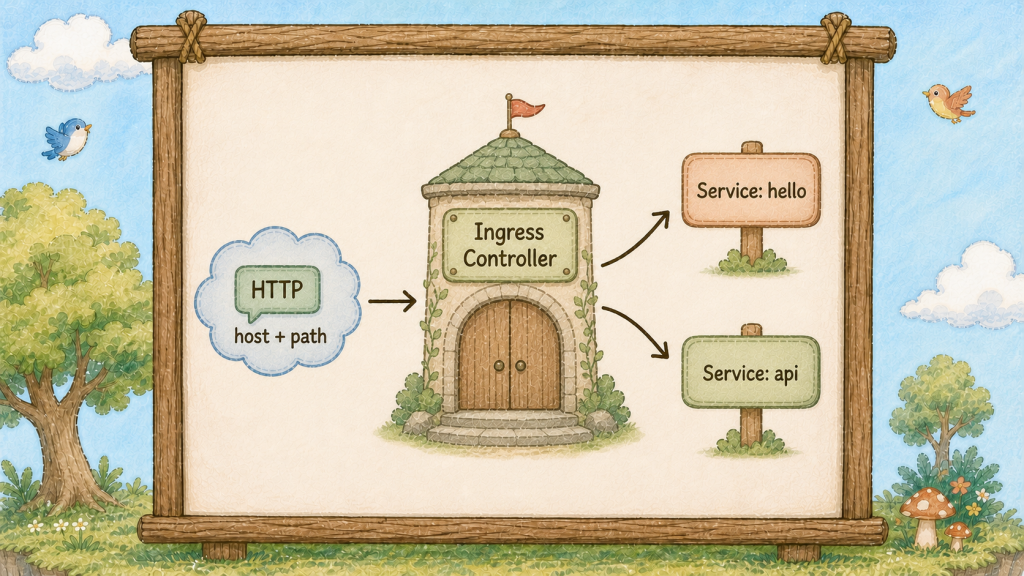
島的大門旁立著一塊地圖看板(Ingress),看板上分岔出兩條路線,分別指向島內兩根不同的圖騰柱(Service)。
昨天那三種柱子(Service)有個共同的限制:它們只認得埠號,不認得網址。
從外面打進來的封包,柱子(Service)看到的是「有人敲 30080 這個門」。
它沒辦法知道對方想去 /hello 還是 /api,也不知道對方輸入的網域是 shop.com 還是 blog.com。
要分辨這些,得先把 HTTP 內容拆開來看,而柱子(Service)的層級太低,看不到那裡。
所以島的大門旁邊立了一塊地圖看板(Ingress),做的事情很單純:先讀你要去哪,再告訴你走哪條路。
看板(Ingress)自己不提供任何服務,它只是把「網址」翻譯成「哪一根柱子(Service)」。
真正讀取規則並轉送流量的是旁邊的 守門員(Ingress Controller)。
在常見的單一 Controller 配置裡,多個對外服務可以共用入口與位址,再靠網址分流;實際也可能有多個 Controller 或 443 HTTPS 入口。
這一下就解決了開頭那個痛點:五個服務,一個入口,零份額外帳單。
看板(Ingress)認得兩種規則,通常混著用:
path 規則:看路徑/hello 送到 hello 柱子(Service),/api 送到 api 柱子,適合同一個網域下拆功能。
host 規則:看網域shop.example.com 送到一根柱子(Service),blog.example.com 送到另一根,適合一座島上放好幾個不同的網站。

地圖看板(Ingress)後面站著一位讀看板的居民,手上的指示牌指向其中一根圖騰柱(Service),這位居民本身才是真的在幹活的人。
Ingress 這個資源本身不會動。
寫的那份 YAML 只是一張規則表,它需要有人真的去讀它、然後真的去轉發封包。
那個「有人」叫做 Ingress Controller,而它預設不存在,要自己另外裝。
這跟目前為止學的所有東西都不一樣。
部署管家(Deployment)、貓頭鷹(ReplicaSet)、柱子(Service)由叢集元件直接處理;Ingress 資源則需要額外的 Controller。
寫完 Ingress 卻發現完全沒反應,沒裝或沒對上 Ingress Controller 是常見原因之一;也要檢查 class、Service、DNS 與 port mapping。
Controller 有很多牌子,最常見的是 ingress-nginx(就是拿 Nginx 改的)。
裝好之後,Controller 自己也會以 Pod 與 Service 的形式運作;Ingress 資源則由它讀取並執行。
還有一個界線要劃清楚:標準 Ingress API 主要描述 HTTP/HTTPS 路由。
資料庫、Redis 或自訂 TCP 流量要看 Controller 是否提供額外的 TCP/UDP 能力;gRPC 通常可透過 HTTP/2 支援,那些還是得走昨天的柱子(Service)。
看板(Ingress)主要描述網站的 HTTP/HTTPS 入口;其他協定要依 Controller 能力與 Service 設計處理。
HTTPS 憑證也是掛在看板(Ingress)上的(spec.tls 欄位)。
所有服務共用一個入口的另一個好處,就是憑證只要管一份。
最後一句話交代 ingressClassName:島上可以同時裝好幾牌 Controller,這個欄位就是在說「這張規則表歸誰管」。
裝 ingress-nginx 就填 nginx。
前十五天我們有一根 ClusterIP 的 hello 柱子(Service)。今天要在大門立看板(Ingress),讓你的瀏覽器能直接打進來。
先講一件事:Kind 的島預設沒有把 80 埠接到你的筆電上,所以我們得重建叢集,另外也不會遺失設定,這正是宣告式設定的優勢,你的東西全在 YAML 檔案裡,也是寫檔案的價值。
建立 kind-config.yaml:
kind: Cluster
apiVersion: kind.x-k8s.io/v1alpha4
nodes:
  - role: control-plane
    kubeadmConfigPatches:
      - |
        kind: InitConfiguration
        nodeRegistration:
          kubeletExtraArgs:
            node-labels: "ingress-ready=true"
    extraPortMappings:
      - containerPort: 80
        hostPort: 80
        protocol: TCP
extraPortMappings 把樹的 80 埠接到你電腦的 80 埠;ingress-ready=true 是貼在樹上的貼紙(Label),等一下 Controller 會拿放大鏡(Selector)找它。
砍掉重蓋:
kind delete cluster --name hello
kind create cluster --name hello --config kind-config.yaml
kubectl get nodes
一分鐘後新島就緒。把你的服務搬回來:
kubectl apply -f hello-deployment.yaml
kubectl apply -f hello-service.yaml
kubectl get pods,svc
三顆泡泡(Pod)加一根柱子(Service),兩行指令復原。
現在裝 Controller:
kubectl apply -f https://raw.githubusercontent.com/kubernetes/ingress-nginx/controller-v1.12.1/deploy/static/provider/kind/deploy.yaml
等它起來(這行會卡住直到準備好,最多九十秒):
kubectl wait --namespace ingress-nginx \
  --for=condition=ready pod \
  --selector=app.kubernetes.io/component=controller \
  --timeout=90s
看看那位居民:
kubectl get pods -n ingress-nginx
Controller 自己就是一顆泡泡(Pod),住在 ingress-nginx 這道圍籬(Namespace)裡。
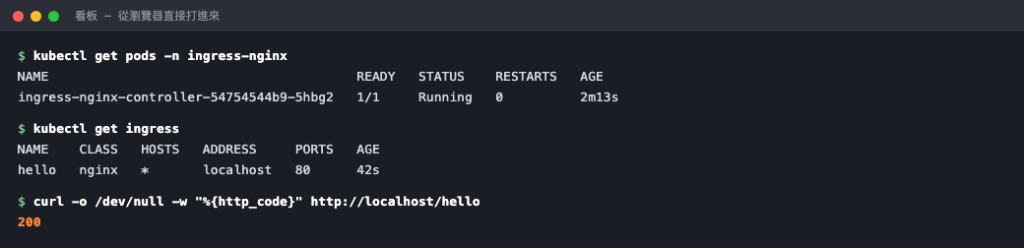
看板(Ingress)要由島上的守門員(Ingress Controller)讀取後才會產生效果。
立看板(Ingress)。建立 hello-ingress.yaml:
apiVersion: networking.k8s.io/v1
kind: Ingress
metadata:
  name: hello
  annotations:
    # 若後端服務本身沒有處理 /hello 前綴,才需使用 rewrite-target 轉發
    nginx.ingress.kubernetes.io/rewrite-target: /$2
spec:
  ingressClassName: nginx
  rules:
    - http:
        paths:
          - path: /hello(/|$)(.*)
            pathType: ImplementationSpecific
            backend:
              service:
                name: hello
                port:
                  number: 80
那個 rewrite-target 是在說「把 /hello 這段砍掉再往後送」── 因為你的 Nginx 根本沒有 /hello 這個頁面,它只有 /。不加這行你會拿到 404。
kubectl apply -f hello-ingress.yaml
kubectl get ingress
打開瀏覽器輸入 http://localhost/hello:
Nginx 的 Welcome 頁出現了。 沒有 port-forward、沒有奇怪的埠號、沒有雲端帳單。
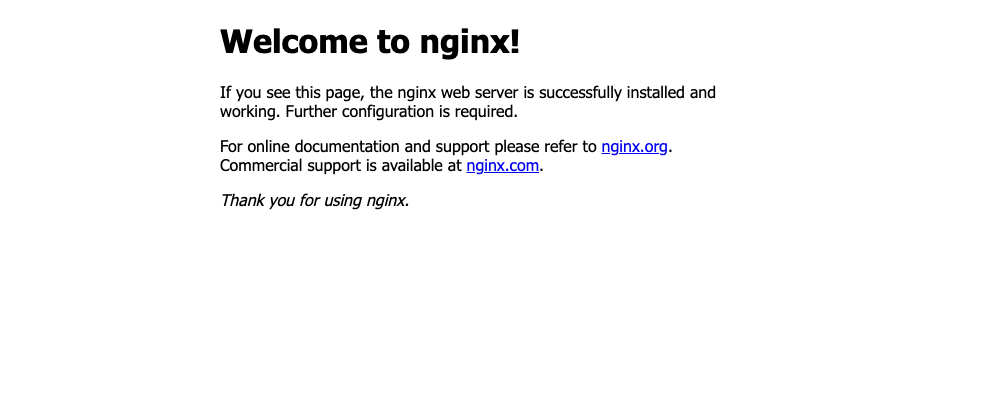
網址列就是 localhost/hello,走的是 80 埠。
試試 host 規則。把 spec.rules 那段改成:
  rules:
    - host: hello.local
      http:
        paths:
          - path: /
            pathType: Prefix
            backend:
              service:
                name: hello
                port:
                  number: 80
kubectl apply -f hello-ingress.yaml
curl -s -H "Host: hello.local" http://localhost | head -5
curl -s http://localhost | head -3
第一行通了,第二行回 404 ── 看板(Ingress)現在只認 hello.local 這個網域,其他一律不理。
那個 -H "Host: hello.local" 是在騙看板(Ingress)說「我是從這個網域來的」。
實際上線時這一段由 DNS 負責,你把網域指到看板的 IP 就好,規則寫法完全一樣。想在本機用真的網址測,把 hello.local 加進你的 /etc/hosts 指到 127.0.0.1,瀏覽器就能直接開。
看板(Ingress)只是規則表,得有人讀它才會動。



 iThome鐵人賽
 看影片追技術