

為了減少初始打包大小(main.js),我們引進了一個輕量且即時載入(Eagerly loaded)的主畫面(Home Screen)登陸頁面,同時將繁重的多模態 AI 與 Web Audio 語音合成邏輯延遲載入(Lazily loaded)至儀表板路由(Dashboard route)。今天的重點是在撰寫程式碼之前,使用 AI 技能與 Stitch MCP Server 來設計這個極簡的登陸視圖及其頁首導覽。
我使用了 /grill-with-docs 技能對我進行深入盤問(Grill),以設計出符合 DESIGN.md 規範的新主畫面。
/grill-with-docs I need to design a new home screen based on the theme tokens and contract in @DESIGN.md. The new page has a button that navigates to the dashboard when clicked. The header component needs to have home icon on the left edge the navigates back to the home page when clicked. The icon is an inline SVG so that no icon library will be downloaded by accident.
在完成深入盤問環節後,我們達成了共識,Gemini 制定了以下計畫:
/to-spec 技能為新主畫面建立 PRD。CONTEXT.md 以新增主畫面(Home Screen)、主頁導覽動作(Home Navigation Action)和 TTS 工作室工作區(TTS Studio Workspace)的標準定義。DESIGN.md 將更新兩個章節:
.surface-card、.btn-primary、排版與條件約束)。此外,我們同意將元件類別命名為 HomeComponent。HomeIconComponent。它是一個輕量的內聯 SVG,以避免下載任何外部圖示庫。HeaderComponent 以匯入 RouterLink 與 HomeIconComponent,並處理其自身與主畫面之間的導覽。HomeComponent,包含獨立的 CSS、HTML 範本檔案、TypeScript 類別以及測試規格(Spec)檔案。/home 即時載入 HomeComponent、/dashboard 延遲載入 DashboardComponent,並將 '/' 重新導向至 home 路徑。npm run build、npm run lint 和 npm run test:once,以確保沒有破壞性變更、100% 正確性以及良好的程式碼品質。這份技術計畫看起來很棒,但我希望 Gemini 能根據 Stitch UI 中的主畫面來實作 HomeComponent 的 CSS 與 HTML 範本。
這段對話討論了如何將 Stitch UI 整合至 Angular 元件設計工作流程中。
I want Stitch to design the home screen so that HomeComponent implement the styles and HTML according to it. please advise. The Stitch project ID is <Stitch Project ID>, new screens must be created for desktop and mobile viewports, and they must follow the contract in DESIGN.md.
Gemini 更新了計畫以產生 PRD,並更新 CONTEXT.md 與 DESIGN.md。接著,Gemini 將呼叫 Stitch MCP Server 的工具來設計主畫面,並等待我進行檢查。
* Generate PRD
* Update `CONTEXT.md` and `DESIGN.md`
* Call Stitch tool generate_screen_from_text for the Desktop Viewport (DESKTOP) based on the Obsidian & Indigo contract in DESIGN md.
  * Call Stitch tool generate_screen_from_text for the Mobile Viewport (MOBILE) ensuring mobile-responsive touch targets and layout padding.
  * Inspect the generated HTML/CSS output from Stitch to extract structural markup and styling classes.

... resume the  other steps ...
Stitch 並不是世界上最容易使用的文字轉 UI(Text-to-UI)工具,我將分 4 個階段處理主畫面功能:
to-spec 技能產生 PRD 並更新 Markdown 檔案(CONTEXT.md 與 DESIGN.md)implement 技能開發 HomeIconComponent 與 HomeComponent,並修改 HeaderComponent 及應用程式路由/to-spec please create the PRD for the new home screen based on the conversation and the latest plan. Then, update CONTEXT.md and DESIGN.md
主畫面的 PRD 建立在 .scratch/home-screen/spec.md 中。
CONTEXT.md 提及了主畫面、儀表板和主頁導覽的職責。
### Navigation & Application Views

**Home Screen (Landing View)**:
The minimalist entry view of the application that introduces the capabilities of the AI studio and provides direct navigation to the multimodal analysis and speech generation workspace.
_Avoid_: Splash page, login screen, index html, home widget

**TTS Studio Workspace (Dashboard)**:
The primary interactive workspace view providing real-time image analysis, prompt customization, and gapless streaming audio synthesis.
_Avoid_: Home page, main panel, tool screen

**Home Navigation Action**:
The accessible icon button rendered on the left edge of the application header that enables users to navigate directly back to the Home Screen from any view.
_Avoid_: Back button, logo button, root link
第 12 節已附加至 DESIGN.md,且 App Header 節提到了主頁導覽動作。
### 1. App Header (`HeaderComponent`)

- **Container**: Relative wrapper with centered text block (`relative flex items-center justify-center text-center mb-6 sm:mb-8 min-h-[4rem]`).
- **Home Navigation Action (`.header-home-btn`)**:
  - Left-anchored link (`absolute left-0 top-1/2 -translate-y-1/2 p-2 rounded-lg text-slate-400 hover:text-slate-100 hover:bg-slate-800/60 focus:outline-none focus:ring-2 focus:ring-indigo-500 transition-all`) housing `<app-home-icon />`.
  - Accessible label: `aria-label="Go to Home Screen"`.
  - Target: `routerLink="/home"`.

### 12. Home Screen (`HomeComponent`)

- **Outer Wrapper (`.home-container`)**: Centered layout inside standard `.app-main` (`w-full flex-1 flex flex-col items-center justify-center py-8 sm:py-16`).
- **Hero Card (`.home-card` / `.surface-card`)**:
  - **Desktop Viewport (1280px+)**: Floating surface card (`bg-slate-800/50 border border-slate-700 rounded-2xl max-w-2xl w-full p-8 sm:p-12 text-center flex flex-col items-center gap-6 shadow-2xl backdrop-blur-sm`).
  - **Mobile Viewport (<768px)**: Full-width responsive card (`p-6 w-full flex flex-col items-center gap-5`).
- **Category Pill (`.home-badge`)**: `"Firebase AI Logic & Vertex AI"` (`text-xs uppercase font-bold tracking-widest text-indigo-400 bg-indigo-950/60 border border-indigo-800/60 px-3 py-1 rounded-full`).
- **Headline (`.home-title`)**: `"Multimodal Vision & Real-Time Speech Studio"` (`text-2xl sm:text-3xl lg:text-4xl font-bold tracking-tight text-slate-100`).
- **Description (`.home-description`)**: `"Analyze images with Gemini multimodal intelligence, discover grounded obscure facts, and generate real-time streaming audio with customizable voice personas."` (`text-sm sm:text-base text-slate-400 max-w-lg leading-relaxed`).
- **Primary CTA Button (`.btn-launch`)**:
  - Button element with `routerLink="/dashboard"`.
  - Styling: `@apply btn-primary px-8 py-3.5 text-base font-semibold shadow-lg shadow-indigo-500/20 flex items-center justify-center gap-2;`.
  - Label: `"Launch Studio"`.
- **Strict Constraints**:
  - Strictly NO isolated `min-h-screen` or independent background overrides; must seamlessly inherit `.app-shell` and `.app-container`.
  - Strictly NO marketing carousels, unstyled external links, or secondary sidebar menus.
stitch-mcp: design the home screen in Stitch (Project ID: <Stitch Project ID>) in both desktop and mobile viewports.
桌面端畫面初次嘗試時看起來很棒。然而,行動端畫面卻出人意料地在清單項目中新增了徽章膠囊(Badge pills),並使用了已退役的 Gemini 1.5 Flash / Pro 模型。這令人感到沮喪,因此我在 Stitch UI 中手動刪除了該行動端畫面。
我提示 Gemini 修訂 DESIGN.md 以指定最新的 Gemini 3.8 Flash 模型,並禁止在清單項目上使用徽章。
修訂後:
- **Architecture & Capabilities Metadata Grid (`.home-features-grid`)**:
  - Clean key-value list with **zero status pills or badge chips**:
    - **Model Pipeline**: `Gemini 3.8 Flash`
    - **Audio Synthesis**: `Gemini-TTS Streaming`
    - **Grounding**: `Google Search Tool`
  - Layout: 1-column stack on mobile (`grid-cols-1 gap-2.5`), 3-column row on desktop (`sm:grid-cols-3 sm:gap-4`).
- **Strict Constraints**:
  - Strictly NO status pills, badges, or chip tags on list items (`Multimodal`, `Real-Time`, `Verified` tags are forbidden).
  - Strictly NO obsolete model names (must use modern `Gemini 3.8 Flash`).
我提示 Gemini 列出畫面識別碼(Screen IDs),以便要求它更新桌面主畫面的模型名稱並設計一個新的行動主畫面。
stitch-mcp: please list the screen ids of active home screen
接下來,我們更新了桌面主畫面中的模型名稱,並設計了新的行動主畫面。
stitch-mcp: please edit the model name of screen id: <Stitch Screen ID> from Gemini 1.5 Flash / Pro to Gemini 3.8. Please design a new mobile home screen. Both screens must follow the contract in section 12 of DESIGN.md. No need to recommend HTML and CSS to save tokens.
Stitch 產生了新畫面,我在 Stitch 畫布中進行了一些快速的手動調整,使其外觀完全符合預期。
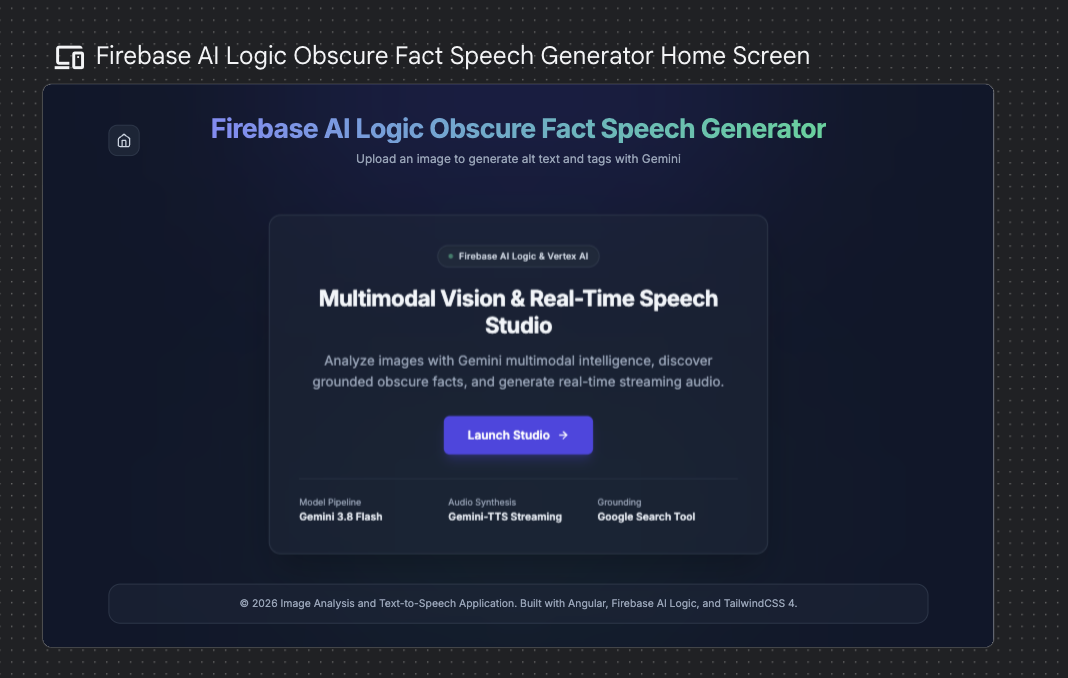
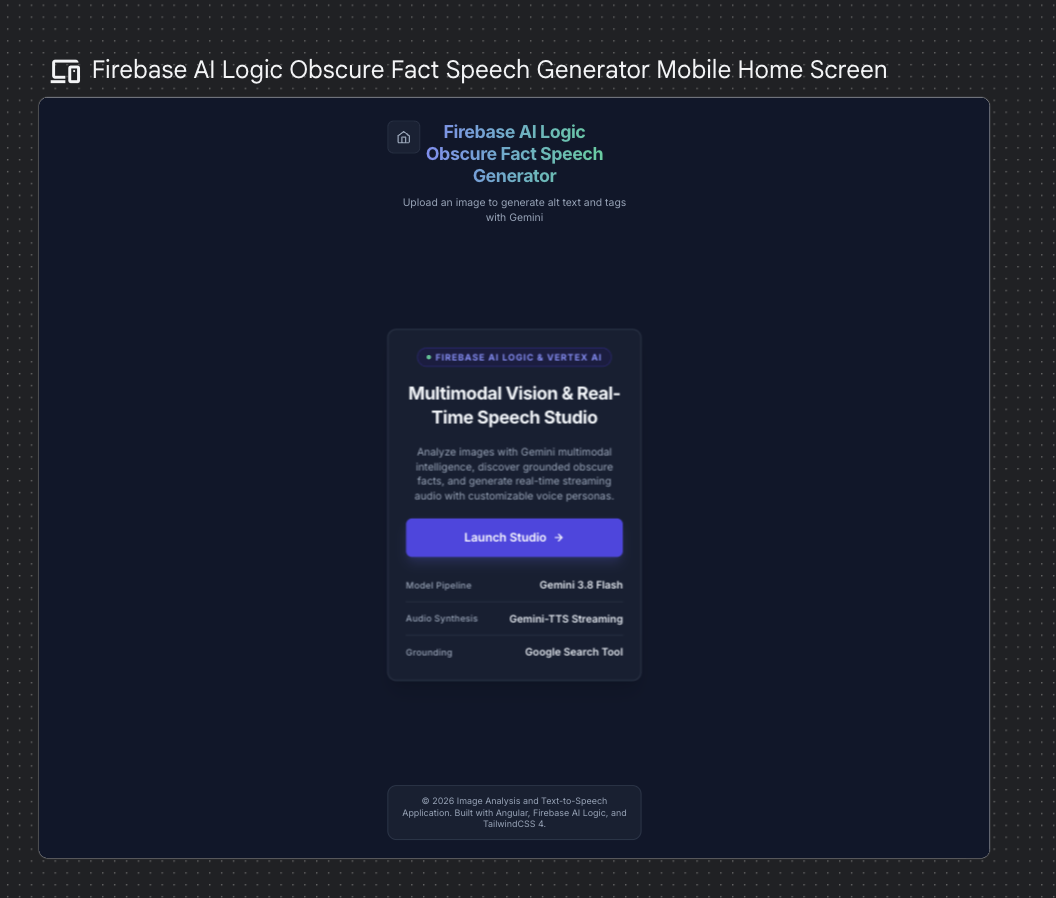
這兩個畫面皆具備完整的響應能力,並顯示現代的 Gemini 3.8 Flash 模型與 Google Search Tool 定錨(Grounding),完全沒有任何雜亂的徽章。
完成了第 1 與第 2 階段,Day 29 到此結束!明天在第 3 與第 4 階段中,我們將實作 Angular 元件、串接路由,並衡量打包大小與效能影響。


 iThome鐵人賽
 看影片追技術