
Agent 裡有一部分是確定性的邏輯:Pydantic 資料契約驗證模型輸出的格式,Router 依 State 的內容決定下一個節點。這兩者同樣的輸入一定得到同樣的輸出,不帶模型的隨機性。在前面我們介紹過的〈用 LangGraph 狀態圖管理 Agent 執行流程〉與〈教學文章/用 Pydantic 驗證意圖並控制 LangGraph 路由〉中,已把狀態(State)從模型抽離出來,讓「語意理解歸 AI、流程控制歸程式」。
這篇就從這一層開始測試:用 pytest 搭配 Fake Model 固定模型輸出,在本地執行,不必呼叫真實模型。我們延續前面章節提到的電商客服 Agent 情境,系統支援查詢訂單、商品推薦與退貨申請。當 Agent 接收到「訂單 ORD-1001 配送到哪了?」或「我要退貨」等自然語言訊息時,在 LangGraph 派發到業務節點前,必須先通過四道確定性防線:
ORD-1234 格式,且 State 禁止寫入未定義欄位)。needs_clarification 判斷為 true 時,同樣停止進入業務流程。接下來使用 pytest 搭配 Fake Model,依序驗證兩道關鍵防禦:首先在 langgraph-intent-eval-local 驗證意圖分流與 Pydantic 邊界檢查;確認 Router 路由無誤後,再進入 langgraph-return-eval-local 驗證退貨 Graph 的工具呼叫次數與最終狀態更新。
Agent 的處理鏈分為 AI 理解、Pydantic 驗證與狀態圖路由三個階段:
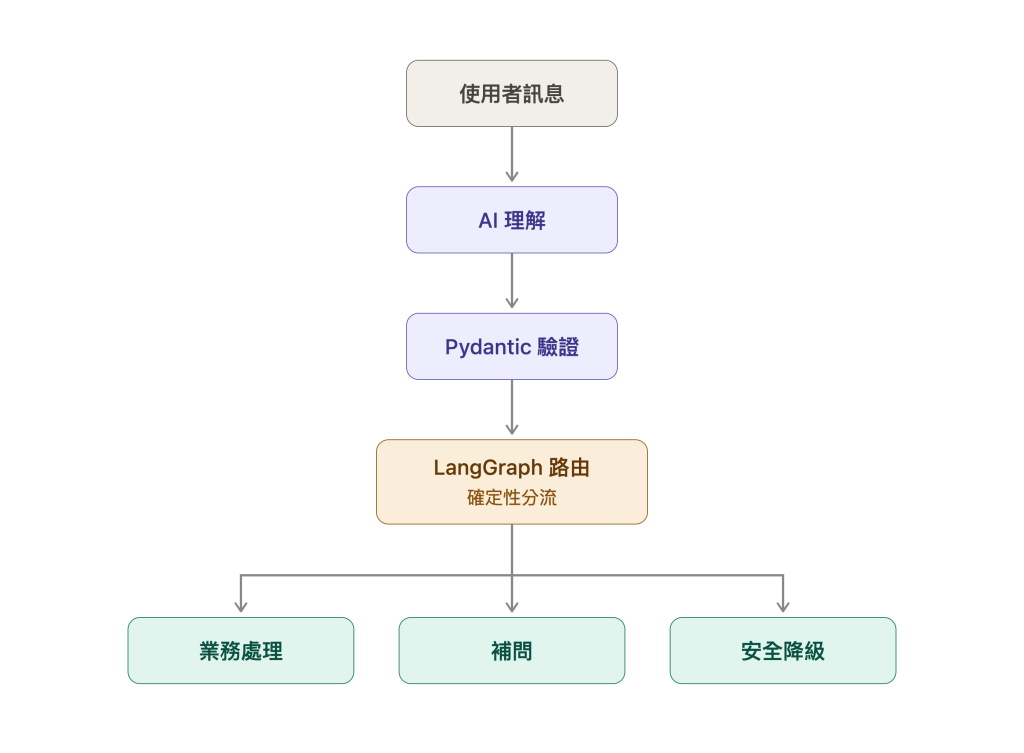
模型將判斷結果封裝為結構化的 IntentDecision 寫入 State,Router 接著根據裡面的意圖與參數決定流程走向。
其中進入「補問」節點有兩種不同來源:
needs_clarification 設為 True。order_id,Router 也必須強制攔截。因為 Router 的分流完全依據這份結構化契約,測試時只要用 FakeStructuredModel 模擬出不同欄位的 IntentDecision,就能直接斷言 Graph 是否進入正確的節點。
為了排除模型的不確定性,我們建立一個極簡的 FakeStructuredModel:不管傳入什麼訊息,它都直接回傳我們預設的假結果:
class FakeStructuredModel:
    def __init__(self, response: Any) -> None:
        self.response = response

    def invoke(self, message: Any) -> Any:
        return self.response
測試 Router 的邏輯很直接:傳入預設的假模型結果 $\rightarrow$ 執行 Graph $\rightarrow$ 驗證 Router 是否導向正確的節點(handled_by)。
例如給定一個合法的訂單查詢結果,驗證 Router 是否將流程導向 query_order:
def test_routes_order_status_with_valid_order_id() -> None:
    model = FakeStructuredModel(
        IntentDecision(
            intent=Intent.ORDER_STATUS,
            order_id="ORD-1001",
            needs_clarification=False,
        )
    )
    graph = build_graph(model)
    result = graph.invoke(State(message="ORD-1001 配送到哪了?"))

    assert result["handled_by"] == "query_order"
    assert result["decision"].order_id == "ORD-1001"
其餘的測試定義在 tests/test_intent_routing.py 中,寫法與上方完全相同,各測試函式分別驗證對應的路由行為:
test_routes_refund_with_valid_order_id:驗證合法退款進入 prepare_refund。test_routes_product_advice:驗證商品諮詢進入 recommend_product。test_model_requested_clarification_routes_to_clarification:驗證語意不明(needs_clarification=True)時導向 ask_for_details。test_missing_order_id_routes_to_clarification:驗證缺少單號時強制攔截至 ask_for_details。test_routes_unsupported_intent:驗證不支援的意圖進入 unsupported。test_invalid_intent_schema_routes_to_fallback:驗證格式損毀或未知意圖時觸發 classification_fallback 安全降級。在 Terminal 執行測試命令:
$ uv run pytest tests/test_intent_routing.py
.......                                                                  [100%]
7 passed in 0.25s
7 個情境在 0.25 秒內驗證完成,且完全不消耗任何 API Token。
在進入業務流程前,先驗證模型輸出的參數,確保意圖合法且訂單編號符合格式。因此我們在 tests/test_models.py 撰寫測試,驗證 Pydantic 的資料邊界防護。
首先測試訂單編號的正規化。模型即使回傳包含空白的小寫 ord-1001,normalize_order_id() 也會在格式驗證前移除空白並轉成大寫:
def test_normalizes_order_id() -> None:
    decision = IntentDecision(
        intent=Intent.ORDER_STATUS,
        order_id="  ord-1001  ",
        needs_clarification=False,
    )

    assert decision.order_id == "ORD-1001"
訂單編號正規化後仍必須符合 ORD-1234 格式。如果模型回傳 ORDER-1001,Pydantic 無法將它修正成合法編號,測試應該收到 ValidationError:
def test_rejects_invalid_order_id_format() -> None:
    with pytest.raises(ValidationError):
        IntentDecision(
            intent=Intent.ORDER_STATUS,
            order_id="ORDER-1001",
            needs_clarification=False,
        )
intent 只能是列舉所定義的訂單查詢、退款、商品推薦或不支援。如果模型回傳系統沒有定義的 cancel_subscription,測試應該收到 ValidationError:
def test_rejects_unknown_intent() -> None:
    with pytest.raises(ValidationError):
        IntentDecision.model_validate(
            {
                "intent": "cancel_subscription",
                "order_id": None,
                "needs_clarification": False,
            }
        )
State 也設定 extra="forbid"。如果應用程式寫入 schema 沒有定義的狀態,測試應該收到 ValidationError:
def test_state_rejects_extra_fields() -> None:
    with pytest.raises(ValidationError):
        State.model_validate(
            {
                "message": "ORD-1001 配送到哪了?",
                "unexpected": "value",
            }
        )
$ uv run pytest tests/test_models.py
....                                                                     [100%]
4 passed in 0.14s
前面的 Router 測試確認 REFUND 會被派發到退貨 Node。接下來繼續驗證進入退貨流程後的行為:Agent 是否只呼叫一次 create_return、Provider 是否正確建立退貨,以及使用者是否收到已確認的處理結果。
先從正常流程開始。這個 Agent 假設一張訂單只能整筆退貨,因此只需要訂單編號,不需要指定個別商品。load_case("success") 準備訂單 A123,Provider 建立退貨後回傳案件編號 RET-901。FactsReplyWriter 再根據這個已確認結果產生回覆。
退貨 Graph 使用 ReturnState 保存整個流程的資料。這裡只保留與本次測試直接相關的欄位:
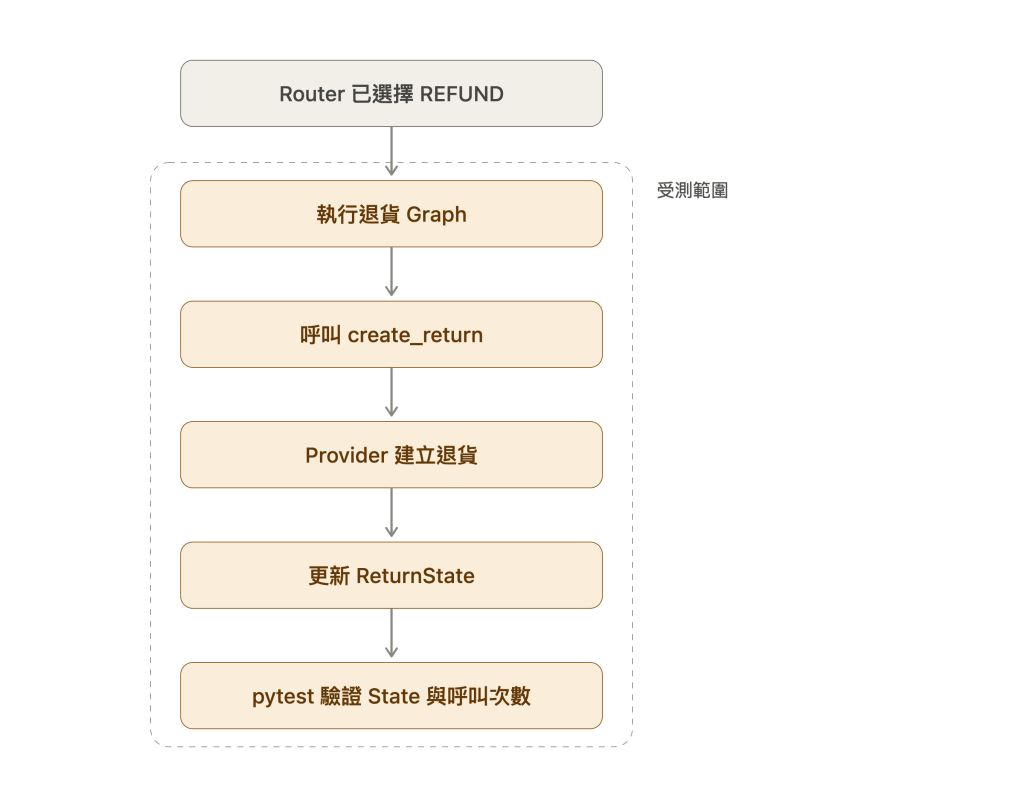
前面的測試已經確認 Router 會不會選擇 REFUND;這裡從退貨 Graph 開始執行,驗證 Provider 的處理結果是否正確寫回 ReturnState,以及 Agent 與 Provider 的呼叫次數是否符合預期。
class ReturnState(TypedDict):
    requested_order_id: str       # 使用者要整筆退貨的訂單編號
    result: ReturnResult | None    # Tool Adapter 回傳的退貨結果
    status: WorkflowStatus         # Agent 最後如何結束這次流程
    final_reply: str | None        # Agent 最後回覆給使用者的文字
requested_order_id:這次要整筆退貨的訂單編號。result:Tool Adapter 回傳的退貨結果,其中 outcome 可能是 created、rejected 或 unresolved。status:Agent 根據 Tool 結果決定的流程狀態,可能是 completed、rejected 或 needs_human。final_reply:Agent 最後回覆給使用者的文字。實際的 ReturnState 還包含對話訊息、fallback 與事件紀錄,但不影響這裡要驗證的成功條件,因此先省略。graph.invoke() 執行完成後會回傳最終的 ReturnState。run_case() 再從這個 State 取出 status、result["outcome"] 與 final_reply,加上 Agent、Adapter 的呼叫軌跡,整理成測試使用的 output。
output["status"] 可以驗證 Agent 的最終流程狀態,output["outcome"] 則可以驗證 State 裡的 Tool 執行結果;它們不是 Provider 的原始 response。正常案例先挑出最重要的成功條件:
def test_success_creates_return_once() -> None:
    # Arrange:準備 Provider 正常建立退貨的案例
    case = load_case("success")

    # Act:執行完整退貨 Graph,取得最終 State 整理出的 output
    output = run_case(
        case.input,
        reply_writer=FactsReplyWriter(),
    )

    # Assert:流程完成,只建立一次退貨,並回覆案件編號
    assert output["status"] == "completed"
    assert output["agent_create_return_calls"] == 1
    assert output["provider_create_calls"] == 1
    assert "RET-901" in output["final_reply"]
這個案例先確立基準:Graph 最後進入 completed,Agent 只呼叫一次 create_return,Provider 也只收到一次建立請求,而且使用者會收到已確認的案件編號。測試只檢查回覆包含 RET-901,不限制完整句型,避免修改文案或標點就造成測試失敗。Provider 狀態查詢與更詳細的 Tool 軌跡留到後面的異常案例再驗證。
Provider 可能因為超過退貨期限而回傳 rejected。這是明確的業務結果,重試不會改變答案,Adapter 必須立即停止:
def test_business_rejection_does_not_retry_the_write() -> None:
    output = run_case(
        load_case("rejected").input,
        reply_writer=FactsReplyWriter(),
    )

    assert output["status"] == "rejected"
    assert output["agent_create_return_calls"] == 1
    assert output["provider_create_calls"] == 1
    assert output["provider_status_lookup_calls"] == 0
測試不只確認最終狀態是 rejected,還要驗證 Provider 寫入次數維持在 1。
unavailable_then_success 模擬 Provider 第一次回覆服務不可用,並且明確尚未建立退貨。Adapter 可以發起第二次 Provider 請求,但必須沿用同一把冪等鍵:
def test_provider_unavailable_retries_with_same_idempotency_key() -> None:
    output = run_case(
        load_case("unavailable_then_success").input,
        reply_writer=FactsReplyWriter(),
    )

    assert output["status"] == "completed"
    assert output["outcome"] == "created"
    assert output["agent_create_return_calls"] == 1
    assert output["provider_create_calls"] == 2
    assert output["provider_status_lookup_calls"] == 0
    assert output["same_provider_idempotency_key"] is True
這裡的 Provider 呼叫次數是 2,Agent Tool call 仍然只有 1。重試是 Adapter 內部的復原機制,不是 Agent 再次決定退貨。
Provider 已經寫入、但 response 在回程中遺失時,Adapter 不能使用相同方式直接重試寫入。timeout_after_create 案例會確認 Adapter 改用原冪等鍵查詢請求狀態:Agent Tool call 為 1、Provider 寫入為 1、狀態查詢為 1。
固定資料集還有兩種無法確認結果的情境:
unresolved。這兩種情境都必須轉交人工。Agent 不能宣稱退貨成功,也不能把 Provider 的內部錯誤碼當成使用者回覆。
交易軌跡正確,不代表使用者回覆一定正確。reply_contract() 會檢查:
created 回覆必須包含已確認的退貨案件編號。rejected 回覆必須說明無法退貨,不能宣稱已建立。unresolved 回覆必須說明轉交人工,不能猜測成功或失敗。FactsReplyWriter 根據已確認事實產生固定回覆。UnusableReplyWriter 則模擬模型回覆失敗,確認 Graph 會改用固定 fallback。這些測試不呼叫真實模型;真實模型能否根據 Tool 結果產生清楚回覆,才屬於 Offline Eval。
進入 sample 後執行:
$ uv run pytest
................................                                         [100%]
32 passed in 0.46s
release_gate.py 要求最終結果、Tool 軌跡與回覆契約全部通過。這些可以由程式確定的條件只要失敗一筆,就不允許發布。
pytest 搭配 Fake Model 驗證的是模型輸出之後的程式行為:
IntentDecision 的 intent、order_id 與 needs_clarification 導向正確節點,缺少訂單編號時一律進入補問。intent 與 State 的多餘欄位。create_return;業務拒絕不重試,Provider 明確未寫入時才用同一把冪等鍵重試,結果無法確認時轉交人工。這些測試的輸入是預先寫好的 IntentDecision,所以無法得知真實模型看到「幫我處理一下 ORD-1001」這種可能是查詢也可能是退貨的訊息時,是否真的回傳 needs_clarification=True,也無法得知修改 Prompt 或更換模型後,「ORD-1001 配送到哪了?」是否仍被分類成 order_status。這類結果要讓真實模型逐筆處理固定案例才看得到。
下一篇會把這些對話整理成 Langfuse Dataset,讓真實模型逐筆處理,並用 Trace 與 Experiments 比較修改前後的分類結果。pytest 的確定性檢查在每次修改後照常執行,Langfuse 評估則用來檢查模型的判斷。



 iThome鐵人賽
 看影片追技術