
前幾天一直在專注於 XBOT 骨架與 FK 開發與時間軸,但當我按下播放鍵讓 3D 火柴人跳起連續招式時,心裡卻浮現出一個極大的問號:
「奇怪,明明關節角度都很準,為什麼虛擬舞者跳起來這麼像個機器人,看起來這麼呆板?」
今天我們暫時放下程式開發,先從觀察人類舞者開始並提出關鍵的解決方案!
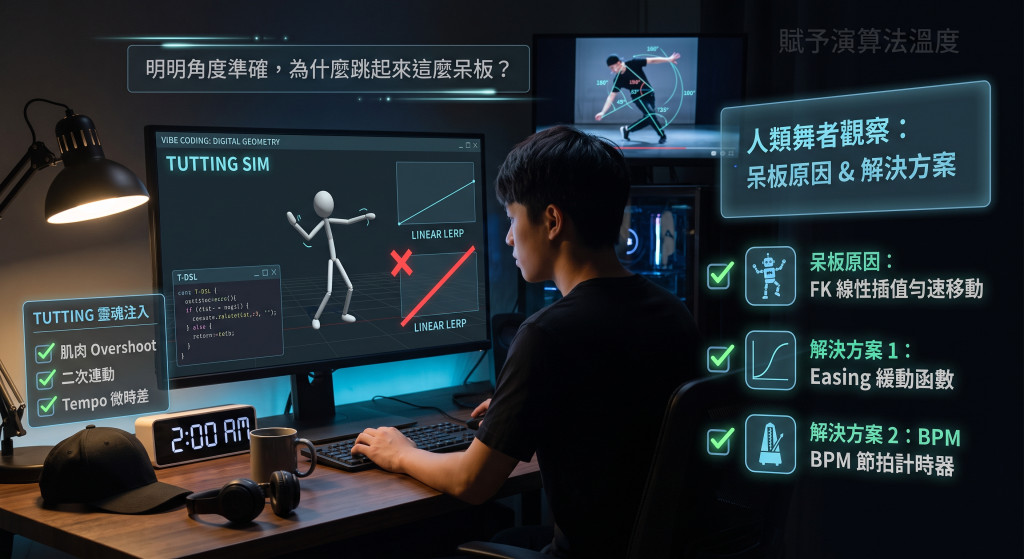
當我們仔細觀察真人 Tutting 舞者在卡點與過渡時的肌肉運作參考影片,會發現人體動作絕不是機械式的。這種勻速移動在視覺上會呈現出強烈的機械感與呆板感,完全失去了街舞的韌性與節奏律動。
為了讓數位舞者擺脫呆板,我們必須在時間軸渲染引擎中引入以下兩大機制:
緩動函數(Easing Functions) 是用來控制參數隨時間變化速率的數學算式,核心作用在於精準掌握動畫或動態過渡中的「加速度變化」。
現實世界中的物體運動(如車子啟動、球體落地的反彈)極少以恆定速度進行,通常伴隨著加速與減速的慣性過程。透過緩動函數,能夠打破機械式「勻速直線運動」的生硬感,讓 UI 介面、遊戲以及動畫呈現出更貼近真實物理慣性、且符合視覺舒適度的動態品質。
在 Tutting 模擬器中,舞蹈動作極為講究頓點與力道爆發。因此,根據舞者的肢體慣性引入合適的緩動函數——例如呈現滑順質感的 easeInOutCubic,或是帶有微幅回彈與卡點震撼力的 easeOutBack——能大幅提升動態的視覺真實感,精準還原真人舞者的精神與肌肉爆發力。
圖片來源:https://encrypted-tbn0.gstatic.com/images?q=tbn:ANd9GcSdHJbjk2vZcEsg_MByhwFb_xuQQFpBqVJhHg04l2GIlDBU8CcfBlImm84&s=10
為了貼近舞者直覺的音樂語言,系統將動作過渡時間從傳統的「絕對秒數」轉換為基於 每分鐘節拍數(Beats Per Minute, BPM) 的音樂時間軸。在此機制下,每組 Pose 到 Pose 之間的插值時間,皆能動態換算為標準的音樂拍數(如半拍 1/2 beat 或四分之一拍 1/4 beat )。
所有關節的 Easing 曲線與過渡時長皆能與 BPM 節拍完美重合,確保每一次手盒折疊與幾何變幻,都能實現 100% 精準打擊音樂重拍的極致卡點。
完美的幾何角度給予了 Tutting 骨架,但緩動函數與 BPM 的節奏鎖定,才是賦予數位舞者肉體與靈魂的關鍵!
明天我們將與AI一同實作,完成緩動函數與 BPM 的節奏功能吧!!!!
# Easing 函式動畫圖鑑 — 生成 Prompt

請幫我製作一個獨立的 HTML 檔案,視覺化展示以下 32 種 easing(緩動)函式,並加入動畫效果。

## Easing 函式清單(JavaScript 程式碼)

``javascript
const EASINGS = {
  linear:        t => t,
  smoothStep:    t => t*t*(3 - 2*t),
  easeInSine:    t => 1 - Math.cos((t*Math.PI)/2),
  easeOutSine:   t => Math.sin((t*Math.PI)/2),
  easeInOutSine: t => -(Math.cos(Math.PI*t) - 1)/2,
  easeInQuad:    t => t*t,
  easeOutQuad:   t => 1 - (1-t)*(1-t),
  easeInOutQuad: t => t < 0.5 ? 2*t*t : 1 - Math.pow(-2*t+2, 2)/2,
  easeInCubic:    t => t*t*t,
  easeOutCubic:   t => 1 - Math.pow(1-t, 3),
  easeInOutCubic: t => t < 0.5 ? 4*t*t*t : 1 - Math.pow(-2*t+2, 3)/2,
  easeInQuart:    t => t*t*t*t,
  easeOutQuart:   t => 1 - Math.pow(1-t, 4),
  easeInOutQuart: t => t < 0.5 ? 8*t*t*t*t : 1 - Math.pow(-2*t+2, 4)/2,
  easeInQuint:    t => t*t*t*t*t,
  easeOutQuint:   t => 1 - Math.pow(1-t, 5),
  easeInOutQuint: t => t < 0.5 ? 16*t*t*t*t*t : 1 - Math.pow(-2*t+2, 5)/2,
  easeInExpo:    t => t === 0 ? 0 : Math.pow(2, 10*t - 10),
  easeOutExpo:   t => t === 1 ? 1 : 1 - Math.pow(2, -10*t),
  easeInOutExpo: t => t === 0 ? 0 : t === 1 ? 1 : t < 0.5 ? Math.pow(2, 20*t-10)/2 : (2 - Math.pow(2, -20*t+10))/2,
  easeInCirc:    t => 1 - Math.sqrt(1 - Math.pow(t, 2)),
  easeOutCirc:   t => Math.sqrt(1 - Math.pow(t-1, 2)),
  easeInOutCirc: t => t < 0.5 ? (1 - Math.sqrt(1 - Math.pow(2*t, 2)))/2 : (Math.sqrt(1 - Math.pow(-2*t+2, 2)) + 1)/2,
  easeInBack: t => { const c1=1.70158, c3=c1+1; return c3*t*t*t - c1*t*t; },
  easeOutBack: t => { const c1=1.70158, c3=c1+1; return 1 + c3*Math.pow(t-1,3) + c1*Math.pow(t-1,2); },
  easeInOutBack: t => {
    const c1=1.70158, c2=c1*1.525;
    return t < 0.5
      ? (Math.pow(2*t, 2) * ((c2+1)*2*t - c2)) / 2
      : (Math.pow(2*t-2, 2) * ((c2+1)*(t*2-2) + c2) + 2) / 2;
  },
  easeInElastic: t => {
    const c4 = (2*Math.PI)/3;
    return t === 0 ? 0 : t === 1 ? 1 : -Math.pow(2, 10*t-10) * Math.sin((t*10-10.75)*c4);
  },
  easeOutElastic: t => {
    const c4 = (2*Math.PI)/3;
    return t === 0 ? 0 : t === 1 ? 1 : Math.pow(2, -10*t) * Math.sin((t*10-0.75)*c4) + 1;
  },
  easeInOutElastic: t => {
    const c5 = (2*Math.PI)/4.5;
    return t === 0 ? 0 : t === 1 ? 1 : t < 0.5
      ? -(Math.pow(2, 20*t-10) * Math.sin((20*t-11.125)*c5))/2
      : (Math.pow(2, -20*t+10) * Math.sin((20*t-11.125)*c5))/2 + 1;
  },
  easeOutBounce,
  easeInBounce:    t => 1 - easeOutBounce(1 - t),
  easeInOutBounce: t => t < 0.5 ? (1 - easeOutBounce(1 - 2*t))/2 : (1 + easeOutBounce(2*t - 1))/2
};

const EASING_GROUPS = [
  { label:"基本", items:[["linear","Linear(線性)"],["smoothStep","SmoothStep(平滑)"]] },
  { label:"Sine",    items:[["easeInSine","In"],["easeOutSine","Out"],["easeInOutSine","InOut"]] },
  { label:"Quad",    items:[["easeInQuad","In"],["easeOutQuad","Out"],["easeInOutQuad","InOut"]] },
  { label:"Cubic",   items:[["easeInCubic","In"],["easeOutCubic","Out"],["easeInOutCubic","InOut"]] },
  { label:"Quart",   items:[["easeInQuart","In"],["easeOutQuart","Out"],["easeInOutQuart","InOut"]] },
  { label:"Quint",   items:[["easeInQuint","In"],["easeOutQuint","Out"],["easeInOutQuint","InOut"]] },
  { label:"Expo",    items:[["easeInExpo","In"],["easeOutExpo","Out"],["easeInOutExpo","InOut"]] },
  { label:"Circ",    items:[["easeInCirc","In"],["easeOutCirc","Out"],["easeInOutCirc","InOut"]] },
  { label:"Back(甩過頭)",    items:[["easeInBack","In"],["easeOutBack","Out"],["easeInOutBack","InOut"]] },
  { label:"Elastic(彈簧)",   items:[["easeInElastic","In"],["easeOutElastic","Out"],["easeInOutElastic","InOut"]] },
  { label:"Bounce(彈跳)",    items:[["easeInBounce","In"],["easeOutBounce","Out"],["easeInOutBounce","InOut"]] }
];
``

## 需求

1. 產生一個**單一、可獨立開啟**的 `.html` 檔案(不依賴外部框架)。
2. 依照 `EASING_GROUPS` 分組,每組標題顯示家族名稱(如 Sine、Quad、Back 等),底下用網格排列該組所有 easing 的卡片。
3. 每張卡片包含:
   - 一個小型 SVG 曲線圖,畫出該 easing 函式在 t=0~1 區間的輸出曲線(含格線、對角參考虛線)。
   - 曲線上有一個會動的圓點,即時對應該函式在目前時間下的輸出值。
   - 曲線下方一條水平「軌道」,其中一顆小球依照該 easing 函式移動,直觀呈現實際運動的加速/減速/回彈手感。
   - 函式名稱標籤(中英對照,例如「In (easeInSine)」)。
4. **動畫需求**:所有卡片的動畫同步循環播放(例如跑 1.4 秒、停頓 0.5 秒後重來),並提供「暫停/播放」按鈕。自動偵測系統的「減少動態效果」(`prefers-reduced-motion`)設定,若使用者開啟則預設暫停動畫。
5. 支援亮色/暗色模式自動切換(使用 CSS 變數 + `prefers-color-scheme`)。
6. 版面簡潔、卡片式設計,寬度自適應(`grid-template-columns: repeat(auto-fit, minmax(140px, 1fr))`)。



 iThome鐵人賽
 看影片追技術