
一、前言:
昨天我們完成 StoryFlowManager.cs 的核心對話與立繪切換後,今天我們終於要完成它的後半段——關鍵劇情選擇(Choice Panel)與玩家狀態管理器(PlayerStatsManager)!看我們如何讓玩家的選擇即時扣除資金、影響聲譽,並根據選擇分歧推進不同的劇情與關卡!
二、 數值管理核心:PlayerStatsManager.cs
為了讓劇情選擇能實質影響玩家金錢、聲譽數值,我們設計了 PlayerStatsManager 採用單例模式(Singleton),方便任何劇情腳本隨時呼叫並更新 UI。
using UnityEngine;

using TMPro;

public class PlayerStatsManager : MonoBehaviour {

    public static PlayerStatsManager Instance { get; private set;

}

    [Header("玩家數據")]

    public int money = 1000000;

    public int reputation = 15;


    [Header("UI 連結")]

    public TextMeshProUGUI moneyText;

    public TextMeshProUGUI reputationText;


    private void Awake()  {

        if (Instance == null) Instance = this;

        else Destroy(gameObject);

    }

    public void ChangeMoney(int amount)  {

        money += amount;

        UpdateStatusUI();

    }

    public void ChangeReputation(int amount)  {

        reputation += amount;

        UpdateStatusUI();

    }

    public void UpdateStatusUI()  {

        if (moneyText != null) moneyText.text = $"金錢: {money:N0}";

        if (reputationText != null) reputationText.text = $"聲譽: {reputation}";

    }

}
三、劇情控制器擴充:StoryFlowManager.cs 增修部分
我們在昨日【DAY 08】的基礎上,僅需增修選項控制與數值連動的核心邏輯:
using UnityEngine;

using System.Collections;

using UnityEngine.SceneManagement;


public class StoryFlowManager : MonoBehaviour {

    // ... [延續 DAY 08 的 UI、立繪與 DialogueSegment 宣告] ...

    [Header("狀態管理與關卡")]

    public PlayerStatsManager statsManager;

    public string nextSceneName = "OfficeScene 36";


    [Header("選擇面板 UI")]

    public GameObject choicePanel;

    public Button yesButton;

    public Button noButton;


    [Header("分歧劇情內容")]

    public DialogueSegment[] yesResultSegments;

    public DialogueSegment[] noResultSegments;


    void Start()  {

        // 取得數值單例並初始化 UI

        statsManager = PlayerStatsManager.Instance;

        if (statsManager != null) statsManager.UpdateStatusUI();


        // 設定選項按鈕監聽

        if (choicePanel != null) choicePanel.SetActive(false);

        if (yesButton != null && noButton != null) {

            yesButton.onClick.AddListener(() => OnChoiceMade(true));

            noButton.onClick.AddListener(() => OnChoiceMade(false));

        }


        StartCoroutine(StartStoryFlow());

    }


    IEnumerator StartStoryFlow() {

        // 1. 播完前置對話 -> 2. 開啟選項面板等待選擇

        yield return StartCoroutine(PlaySegments(preChoiceSegments, false));

        yield return StartCoroutine(WaitForChoice());

    }


    /// 顯示選項面板並暫停流程


    IEnumerator WaitForChoice()  {

        if (choicePanel != null) choicePanel.SetActive(true);

        isPaused = true;

        yield return new WaitUntil(() => !isPaused);

    }


    /// 玩家點擊 YES / NO 選擇後的觸發點

    public void OnChoiceMade(bool isYes)   {

        if (choicePanel != null) choicePanel.SetActive(false);


        if (isYes) {

            // 點擊 YES:扣除 500,000 資金,增加 10 聲譽,並播放同意贊助劇情

            if (statsManager != null) {

                statsManager.ChangeMoney(-500000);

                statsManager.ChangeReputation(10);

            }

            StartCoroutine(PlaySegments(yesResultSegments, true));

        }

        else  {

            // 點擊 NO:播放拒絕劇情

            StartCoroutine(PlaySegments(noResultSegments, true));

        }


        isPaused = false; // 釋放流程鎖

    }


    // ... [PlaySegments 支援 isFinalSequence 自動 SceneManager.LoadScene(nextSceneName)] ...

}
StoryFlowManager.cs 修改後,和原先相比多出了選項控制功能:

圖一、多出了Yes/No選項
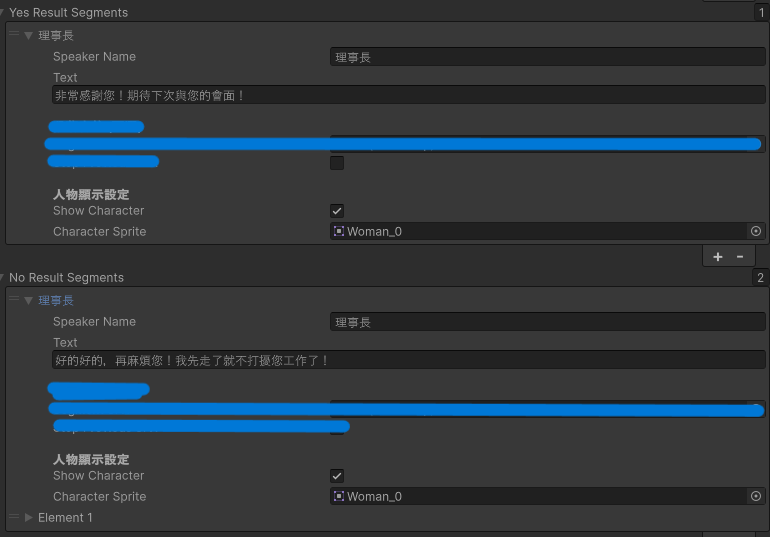
圖二、Yes/No選項個別的劇本與UI輸入
三、遊戲實機對比與結果測試
透過實際的遊戲畫面測試,我們可以看到 StoryFlowManager 與 PlayerStatsManager 完美連動的過程:
1. 抉擇時刻(選擇前)
右上角 UI 展示初始狀態:金錢: 1,000,000、聲譽: 15。
畫面中央跳出選項面板,提示玩家按下 YES 將扣除 $500,000 並獲得 +10 聲譽。

圖三、遭遇選擇事件示意圖
2-1. 決策生效(點擊 YES 後)
點擊 YES 後,PlayerStatsManager 即時將右上角 UI 更新為 金錢: 500,000 與 聲譽: 25!
系統關閉選擇面板,並自動切換播放 yesResultSegments(理事長回應:「非常感謝您!期待下次與您的會面!」)。
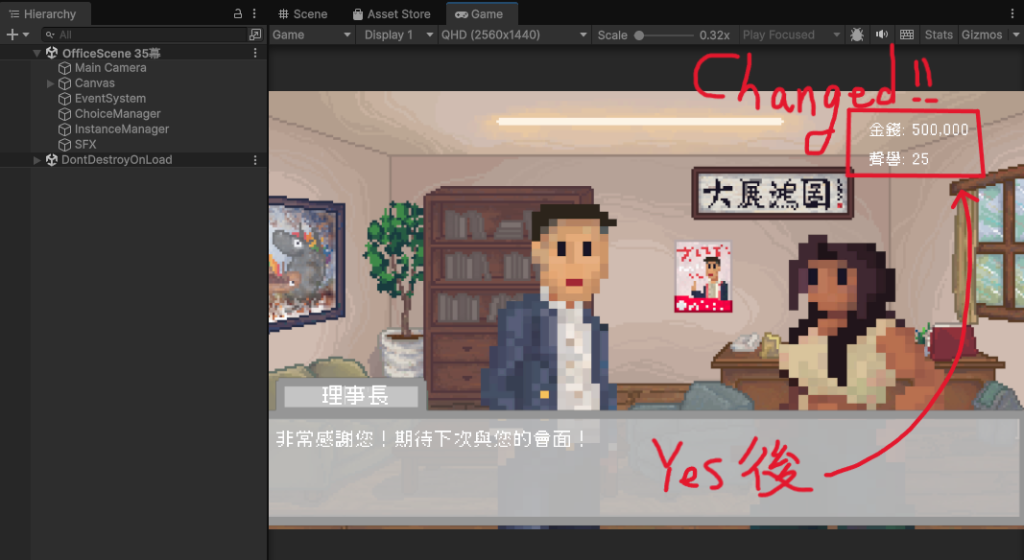
圖四、選擇YES的選項後影響到剩餘金錢與聲譽值
2-2. 決策生效(點擊 NO 後)
點擊 NO 後,PlayerStatsManager 即時將右上角 UI 更新為 金錢: 1,000,000 與 聲譽: 10!
系統關閉選擇面板,並自動切換播放 noResultSegments(旁白回應:「成年人的禮儀,兩邊都清楚這是委婉的推辭。理事長知道,以這樣的說法再糾纏也沒用,所以索性拍拍屁股走人。」)。

圖五、選擇NO的選項後影響到剩餘金錢與聲譽值
四、開發實戰經驗與架構優勢
1. overrideInitialStats 靈活偵錯: 在開發後半段(如第 35 幕)時,如果每次測試都要從第一幕開始玩會極度花費時間。透過 overrideInitialStats = true 並指定 initialMoney = 1000000,開發者可以直接在 Hierarchy 開啟第 35 幕獨立測試,極大地提升了除錯效率!
2. ToString("N0") 格式化美化: 在程式碼中我們使用了 ToString("N0"),這會自動為金錢數字加上千分位逗號(例如 $1,000,000),讓 UI 數值看起來更加專業且易讀!
3. 直覺的劇本事件映射: 直接將 Choice_Scenario_5 等方法明確標註幕數與加減數值,使原創劇本與 Unity C# 邏輯能夠 100% 準確對應,避免數值算錯的 Bug。
五、今日成果與小結
數值適配器實作:完成了 NewPlayerStatsManager 連結底層單例與當前場景 UI 的介面。
幕數決策綁定:實裝各劇情幕數(第 10~35 幕)的專屬加減扣分邏輯與格式化顯示。
範例影片:
今天一樣是劇情上面的變動,所以與前幾天屬同分支:
檢查修改狀態
git status
加入暫存區並提交 Commit
git add .
git commit -m "feat: 實作 PlayerStatsManager 數值管理與 StoryFlowManager 選擇分歧與選項面板"
推送到遠端開發分支
git push origin feature/story-flow



 iThome鐵人賽
 看影片追技術