
接續昨天的內容,今天來處理最複雜的渲染部分,以及最後把渲染部分接回工具函數!
還記得 base.py 中定義的 LLMResponse 資料類別嗎?
# src/meowgent/providers/base.py
...
class LLMResponse:
    status: Literal[
	    "response", "thinking", "thinking_done",
	    "tool_calling", "tool_executed", "tool_rejected"
    ]

	...
回傳時分成以上六種狀態,thinking、tool_calling、response 三種狀態(對應到下面三點)是代表正在做 ...,是「動態」的,渲染時,我想採取的效果如下:
(轉圈圈動畫)[子 agent id] 思考分析中...。(轉圈圈動畫)[子 agent id] 正在準備調用工具...。(轉圈圈動畫)[子 agent id] 正在彙整分析結果...。會有動態的「轉圈圈效果」,蠻酷的,等下會說要怎麼做到。
剩下的三種 thinking_done、tool_executed、tool_rejected 則是「靜態」的,就用之前 renderer.py 裡寫好的函數(要稍微改一下,加入子 agent id):
4. 思考結束時:[子 agent id] 已思考 x 秒。
5. 工具調用結束時:工具名 已被 [子 agent id] 調用。
6. 工具調用被拒絕時(在目前的邏輯,基本上是不會出現的,但為了未來的擴充性,這邊還是先做了):工具名 未被 [子 agent id] 調用。
而在最後,當子 agent 結束時,我還希望可以有 ✔ [子 agent id] 任務已完成 的畫面。這裡有兩種方案:一種是在 LLMResponse 加上 done 狀態,然後 agent.py 也要做回傳出此狀態的邏輯,有點麻煩。
第二種方案是在 subagent_once() 的 for ... chat(): 結束後回傳一個訊號(is_end = True),藉由判斷 is_end 就可以知道子 agent 是否結束,要不要輸出結束的畫面。
這邊,我選擇了方案二的形式。
看一下效果如下:
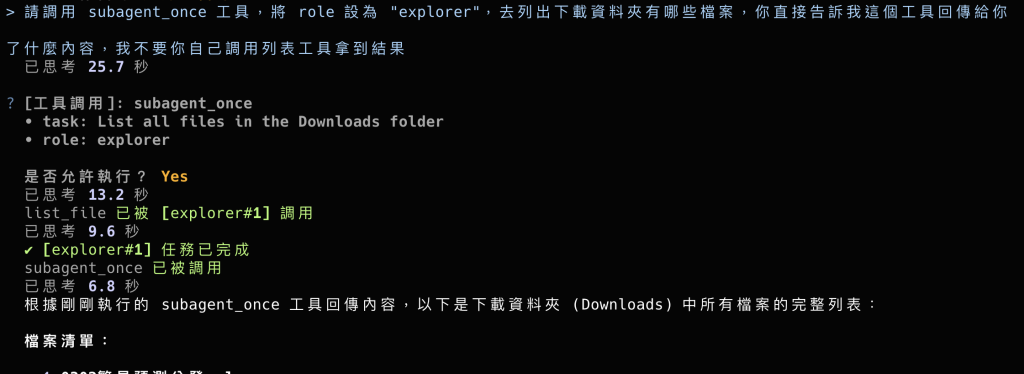
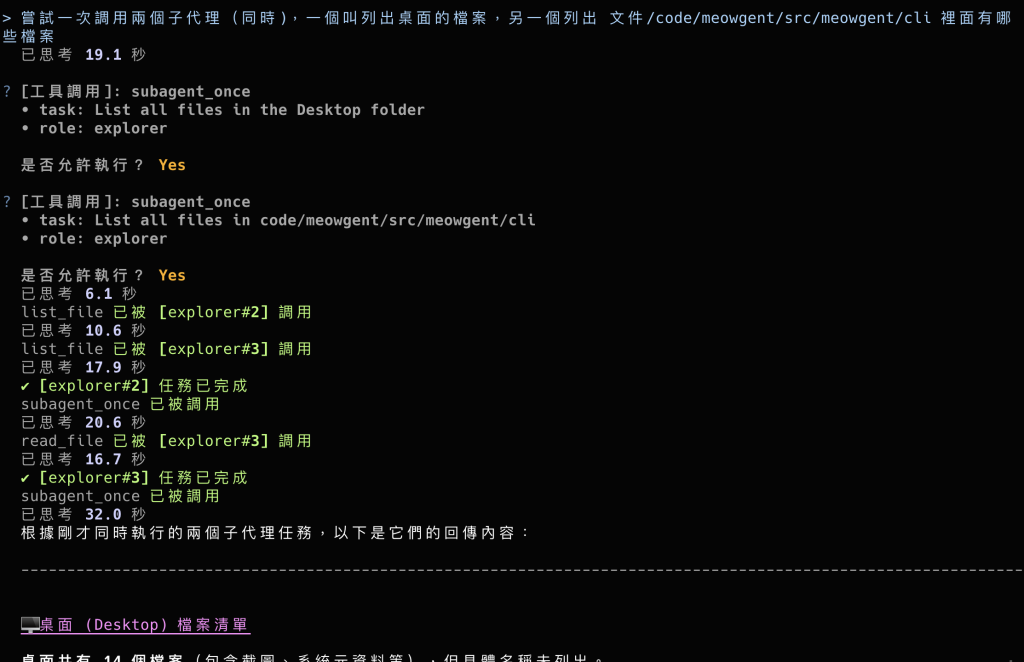
此圖是兩個子 agent 同時運行,看到它們兩個成功一起跑真的還蠻感動的!
已思考 x 秒的部分,我一開始忘記把 id 傳進去,所以圖中沒有像下面程式寫的一樣有註明是誰思考多久的部分。
子 agent 在 agent.py 上被調用,而它的渲染途徑我設計得與 main.py 中調用主 agent 類似,由 on_subagent_status()(放在 main.py 中)作為「回呼函式」來調用 renderer.py 中的渲染函數,
可以理解為每當 for ... chat(): 收到訊息時,調用 on_subagent_status() 做判斷,看要渲染什麼效果。
首先,先來依照剛才上面說的效果來新增三種動態的渲染,這裡,我把它們都整合在一個函數。
這個函數要能做到:根據 active_subagents 字典得到目前正在運行的每個子 agent 狀態。
active_subagents來自晚點要做的on_subagent_status(),裡面的資料樣式為Dict[str, str],前者為子 agent 名,後者為它處於的狀態。
而當沒有任何子 agent 時要回傳空字串(到 on_subagent_status() 裡相當於做了 live.update(""),也就是刪除動態內容)。
然後先把要輸出的文字定義好(status_text_map 中)。
# src/meowgent/cli/renderers.py
from ...
from rich.spinner import Spinner
from rich.markup import escape
...
class CLIRenderer(...):
	...

	def render_active_subagents(
	        self,
	        active_subagents: dict,
	    ) -> Group:
	        """ 將所有正在運作的子 agent 渲染轉圈圈動態 """
	        if not active_subagents:
	            return "" # 防護,當沒有子 agent 時回傳空字串

	        status_text_map = {
	            "thinking": "思考分析中...",
	            "tool_calling": "正在準備調用工具...",
	            "response": "正在彙整分析結果...",
	        }
接下來,我們來介紹一下 spinner,也就是要用來做載入動畫的東西,可以在終端中打 python3 -m rich.spinner 試試看,會顯示出各式各樣的轉圈動畫(其實就是用文字不斷更新做出來的):
![[截圖 2026-10-07 晚上9.48.24.png|420]]
而因為可能會同時有多個子 agent 需要做動態渲染,所以我們用 for 來遍歷 active_subagents,然後把 Spinner 物件包進 Padding 再放進 spinners 串列裡:
Spinner 物件要搭配動態渲染的方式做顯示,例如 Live(不能用 Rich 的 Console,因為為靜態),而一經渲染就會不停轉動,直到被刷新覆蓋。
# src/meowgent/cli/renderers.py
...
class CLIRenderer(...):
	...
	def render_active_subagents(...) -> ...:
		...

		spinners = []
		for agent_id, st in active_subagents.items():
			text = status_text_map.get(st)

			# 產生轉圈圈物件
			spinners.append(
				Padding(
					Spinner(
						"dots",
						text=f"[dim]{escape(f'[{agent_id}]')} {text}[/dim]"
					),
					(0, 0, 0, 2),
				)
			)
有注意到
{escape(f'[{agent_id}]')}這個地方蠻特別的嗎?
因為我們要用[]把子 agent 名字括起,但在 Rich 中[]還代表了「顏色」,所以我們要對其做「跳脫」,方法是用escape()包起字串。
由於裡面又有變數,所以又要再加一個f'',等等!單引號?沒錯,之前在 Day 20 時也有講過,是因為避免字串在該處被提早截斷。
最後,把 spinners 拆包,加上分隔線回傳 Group 物件:
# src/meowgent/cli/renderers.py
...
class CLIRenderer(...):
	...
	def render_active_subagents(...) -> ...:
		...

		return Group(*spinners, self.get_rule())
# src/meowgent/cli/renderers.py
...
class CLIRenderer(...):
	...
	def render_subagent_end(self, subagent_id: str) -> Padding:
        return Padding(
	        f"[green]✔ {escape(f'[{subagent_id}]')} 任務已完成[/green]",
	        (0, 0, 0, 2)
        )
渲染的邏輯被放在 main.py 中的 on_subagent_status() 裡,它要做到的事有:
thinking、tool_calling、response)且「發生改變」呼叫 render_active_subagents() 重新渲染畫面(用 Live)。thinking_done、tool_executed、tool_rejected)呼叫 render_thinking_summary() 或 render_tool_approval_result() 來渲染畫面(用 Rich 的 Console)。is_end 為 True 輸出此子 agent 的結束訊息。注意!每個子 agent 都會獨立調用一個
on_subagent_status()(因為它們是由模型分別調用subagent_once()得來的),而每當任意子 agent 符合條件一時,就會呼叫render_active_subagents()對「全部」的動態內容做刷新。
動態的部分,為什麼要只在「狀態發生改變時」做渲染呢?
這是因為在chat()中每輸出一個chunk就會有一次yield,也就會有一次狀態,如果不加上這個條件,會有很多不必要的渲染以及可能會造成 spinner 顯示有問題(每次被呼叫都會Spinner("dots", ...)重新建立一個全新的 Spinner 物件,如果一秒鐘重新建立幾十次,Spinner 的動畫幀計數器會一直被重置,導致終端機上的轉圈圈**看起來像當掉或在閃爍)。
建立函數時,順便建立好 _subagents_active_status 字典,以及「互斥鎖 - threading.Lock()」:
互斥鎖是為了防止不同子 agent 同時使用 on_subagent_status() 來覆寫全域資源(_subagents_active_status),要搭配 with 使用。
# src/meowgent/cli/main.py
...

_subagents_active_status = {}
_subagent_lock = threading.Lock() # 防止多個執行緒同時修改 _subagents_active_status

def on_subagent_status(
	subagent_id: str,
	stream_content: Optional[LLMResponse] = None,
	is_end: bool = False
):
    """
    子模型的回呼函式,
    針對 subagent_once() 傳入的狀態做輸出
    """

    with _subagent_lock:
...
之前有說過循環引用的內容,不過我在寫程式時常常都不會意識到出現了這問題,都等到報錯時才驚覺。
而我發現了一個做法,在 Python 3.7 以上,當我們引用只是為了做「型別註記」時(像上面的LLMResponse那樣),可以用以下方式:# src/meowgent/cli/main.py from __future__ import annotations from typing import TYPE_CHECKING if TYPE_CHECKING: from providers import LLMResponse from ... ...原理是它會告知直譯器「在模組載入時,不要立即對型別標記進行表達式求值 (Evaluation),而是直接將所有型別標記當作「純字串」儲存於
__annotations__字典中」(這是第一行的意思)。
而TYPE_CHECKING是一個特殊的常數。在執行期它的值固定為False;但在 IDE(Pylance、Pyright)與靜態檢查器(mypy)分析程式碼時,它的值被視為True,
因此包覆在if TYPE_CHECKING:內部的import在程式執行期完全不會被執行,從物理層面徹底杜絕循環匯入!簡單來說就是讓執行期根本拿不到那個模組(只有 IDE 檢查型別、或用型別檢查工具時才拿得到),而
annotations確保直譯器看到那個型別名稱時不會因為找不到它而崩潰。
先處理結束的部分,如果 is_end 為 True 就可以直接刪除該子 agent,然後再呼叫 render_active_subagents() 來做動態畫面更新:
前面有說過,如果真的都沒子 agent 也不會有問題,會回傳空字串,也就相當於做了
live.update()。
# src/meowgent/cli/main.py
...

def on_subagent_status(...):
	...
	with ...:

		if is_end:
            _subagents_active_status.pop(subagent_id, None) # 刪除

            cli.console.print(cli.render_subagent_end(subagent_id)) # 顯示完成訊息

            live.update(cli.render_active_subagents(_subagents_active_status))
            # 更新其他子 agent

            return
...
這邊先把 status(目前狀態)跟上次的狀態拿出來:
# src/meowgent/cli/main.py
...

def on_subagent_status(...):
	...
	with ...:
		...

		status = stream_content.status

        last_status = _subagents_active_status.get(subagent_id)
檢查為「動態狀態」以及「狀態有改變(不同)」,首先把 _subagents_active_status 裡的狀態更新,然後就可以交給 render_active_subagents() 生成出文字,這邊只需要 live.update() 做更新就行了:
# src/meowgent/cli/main.py
...

def on_subagent_status(...):
	...
	with ...:
		...

		if status in ("thinking", "tool_calling", "response"):

            if status != last_status: # 狀態改變才刷新

                _subagents_active_status[subagent_id] = status

                live.update(cli.render_active_subagents(
                    active_subagents=_subagents_active_status,
                ))
首先,先把 render_thinking_summary() 以及 render_tool_approval_result() 加上 subagent_name 的支援:
其中,也都有使用到稍早講過的
escape()。
# src/meowgent/cli/renderers.py
...
class CLIRenderer:
	...

    def render_thinking_summary(self, think_time: float, subagent_name: str = "") -> Padding: # 推理總結渲染

        subagent_name = f"{
	        escape(f'[{subagent_name}]')
        } " if subagent_name else ""

        return Padding(
	        f"[dim]{subagent_name}已思考 {think_time} 秒[/dim]",
	        (0, 0, 0, 2)
        )
    ...
# src/meowgent/cli/renderers.py
...
class CLIRenderer:
	...

    def render_tool_approval_result(
	    self,
	    tool_name: str,
	    approval: bool,
	    subagent_name: str = ""
    ) -> Padding:
	    # 工具調用結果渲染

        subagent_name = f" {escape(f'[{subagent_name}]')} " if subagent_name else ""

        text_chunk = f'[green]已被{subagent_name}調用[/green]' if approval else f"[red]未被{subagent_name}調用[/red]"

        return Padding(f"[dim]{tool_name}[/dim] {text_chunk}", (0, 0, 0, 2))
然後就是依照狀態用對應的函數產出文字,用 Rich 的 Console 做渲染:
# src/meowgent/cli/main.py
...

def on_subagent_status(...):
	...
	with ...:
		...

		elif status == "thinking_done":
            cli.console.print(cli.render_thinking_summary(
	            stream_content.think_time,
	            subagent_id
            ))

        elif status == "tool_executed":
            cli.console.print(cli.render_tool_approval_result(
	            stream_content.tool_name,
	            True,
	            subagent_id
            ))

        elif status == "tool_rejected":
            cli.console.print(cli.render_tool_approval_result(
	            stream_content.tool_name,
	            False,
	            subagent_id
            ))
這麼一來,渲染部分也就大功告成了!
馬上來完成最後的部分 - 接回工具函數 - subagent_once() 吧!
回呼函式,也就是剛做好的 on_subagent_status(),
先做一個函數來取得它,並存到 tool.py 的全域變數 _subagent_callback。
# src/meowgent/tool.py
...

_subagent_counter = ...
_subagent_callback = None

def set_subagent_callback(callback: Callable):
    """ 供外部(如 main.py)設定子 Agent 的狀態回呼函式 """
    global _subagent_callback
    _subagent_callback = callback

...
在 main.py 中把回呼函式傳入:
# src/meowgent/cli/main.py
...
from tool import set_subagent_callback
...
if __name__ == "__main__":
	cli = ...

    set_subagent_callback(on_subagent_status)

    ...
那為什麼要這麼麻煩,不直接在
tool.py匯入on_subagent_status()就好?
又是那個煩人的問題 - 循環引用,main.py匯入agent.py,而agent.py又匯入了tool.py,所以要是我們在tool.py中還匯入main.py的話,這條依賴鏈就直接形成循環依賴了。而還有另一個原因,在
on_subagent_status()中出現了cli以及live兩個物件,所以如果用匯入的方式進到tool.py的話,它們根本不自帶這兩個物件!
這邊,就是當 chat() yield 內容回來的時候,觸發 on_subagent_status()(已經被包成 _subagent_callback 了),然後當狀態為「回答」時要記下回答內容:
# src/meowgent/tool.py
...
@...
def subagent_once(...) -> ...:
	...

	for stream_content in sub_model.chat(...):

		_subagent_callback(subagent_id, stream_content)

        if stream_content.status == "response":
            final_report = stream_content.content or ""
最後一行
or ""是為了防止stream_content.content為None的情況進到下面收尾回傳的final_report.strip()部分導致報錯。
最後,要傳 is_end=True 給 on_subagent_status() 做收尾,然後回傳回答給主 agent:
# src/meowgent/tool.py
...
@...
def subagent_once(...) -> ...:
	...

	_subagent_callback(subagent_id, is_end=True)

    return final_report if final_report.strip() else "(子 Agent 執行完畢,無輸出內容)"
哇!完成啦,現在可以試試看本篇截圖中測試的那兩種情境(單個子 Agent 任務與多個子 Agent 同時執行),或者是自己想一些複雜的問題來觸發子 agent 功能試試。
明天,我們要開始來做上下文壓縮的部分,期待一下吧~
(今天還是一樣壓線才發文,庫存依然為 0,不過快要完賽了!加油啊~)
(發文的時候發現這篇有超過一萬字,應該是目前最多的一篇,太厲害了我!在 0 庫存的情況下硬是寫下了個史上最長,哈哈)



 iThome鐵人賽
 看影片追技術