
讀完能做到:幫 agent 接上 Google Search grounding,讀懂它回傳的
groundingMetadata並用它做逐句引用,也知道企業版的 Agent Search 為什麼你可能現在就用不了。
LLM 的訓練資料有截止日期,這件事大家都知道。但更麻煩的是另一件事:當模型被問到訓練資料裡沒有、或者本來就模稜兩可的問題時,它不會老實說「我不知道」,而是會用看起來很有把握的語氣編一個答案出來。這在聊天應用裡頂多讓人尷尬,但如果你的 agent 要回答「這支股票現在多少錢」「這場比賽誰贏了」這種時效性問題,編故事就是產品事故。
Grounding 就是解這個問題的機制:把 agent 的回答錨定在可查證的外部資料上。ADK 文件把它拆成兩條路——Google Search Grounding(走 Gemini API)與 Grounding with Search / Agent Search(走 Google Cloud)。這兩條路名字很像,用起來也很像,但底層認證方式完全不同,這是今天要特別提醒的坑。
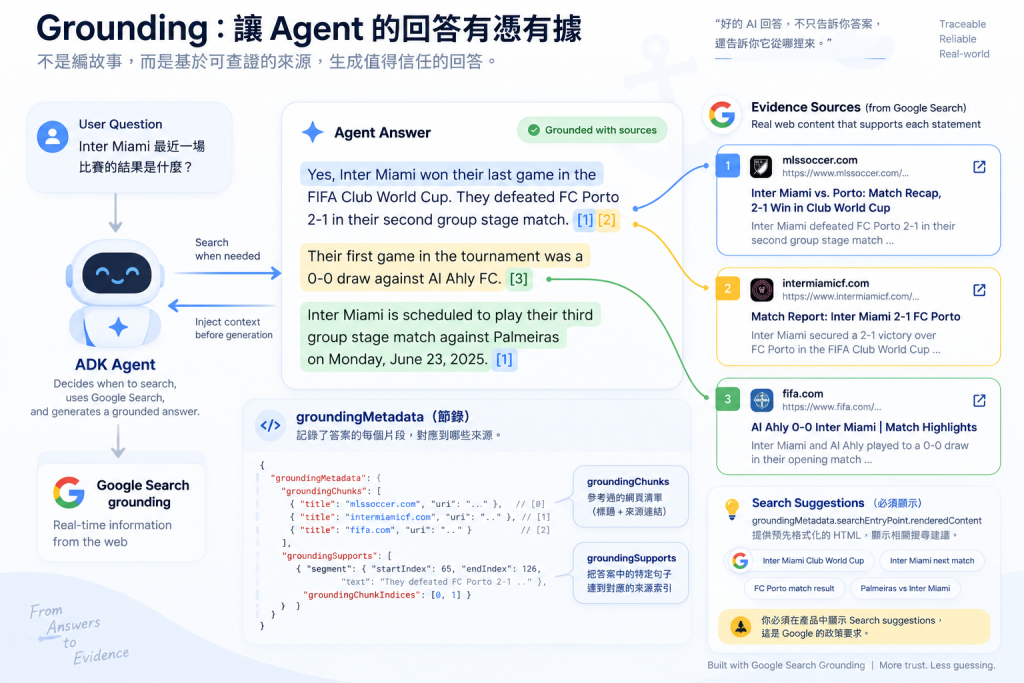
啟用方式簡單到有點反直覺——就是把 google_search 當一個普通工具加進 agent:
from google.adk.agents import Agent
from google.adk.tools import google_search

root_agent = Agent(
    name="google_search_agent",
    model="gemini-flash-latest",
    instruction="Answer questions using Google Search when needed. Always cite sources.",
    description="Professional search assistant with Google Search capabilities",
    tools=[google_search]
)
關鍵在於「when needed」這幾個字——agent 自己決定何時要搜尋,不是每次提問都觸發搜尋。底層 LLM 會判斷這個問題是不是需要訓練資料之外、或時效性的資訊,判斷需要才主動呼叫 google_search。這跟 Day 6 講的工具呼叫邏輯是同一套:模型看 instruction、看工具描述,自己決定要不要用。
光是這樣定義出 root_agent,它還不會自己跑起來。要真的看到它去搜尋、拿到 groundingMetadata,得接上 Runner:
from google.adk.runners import Runner
from google.adk.sessions import InMemorySessionService
from google.genai import types

APP_NAME = "google_search_agent"
USER_ID = "user1234"
SESSION_ID = "1234"

async def setup_session_and_runner():
    session_service = InMemorySessionService()
    session = await session_service.create_session(app_name=APP_NAME, user_id=USER_ID, session_id=SESSION_ID)
    runner = Runner(agent=root_agent, app_name=APP_NAME, session_service=session_service)
    return session, runner

async def call_agent_async(query):
    content = types.Content(role='user', parts=[types.Part(text=query)])
    session, runner = await setup_session_and_runner()
    events = runner.run_async(user_id=USER_ID, session_id=SESSION_ID, new_message=content)

    async for event in events:
        if event.is_final_response():
            final_response = event.content.parts[0].text
            print("Agent Response: ", final_response)

await call_agent_async("what's the latest ai news?")
(來源:integrations-google-search.md,逐字引用;未實跑驗證輸出,執行前請自行核對版本。)跑起來之後,event 上能拿到的 grounding_metadata 就是下一節要拆解的資料結構。
官方畫了一張Sequence Diagram,拆成七步:
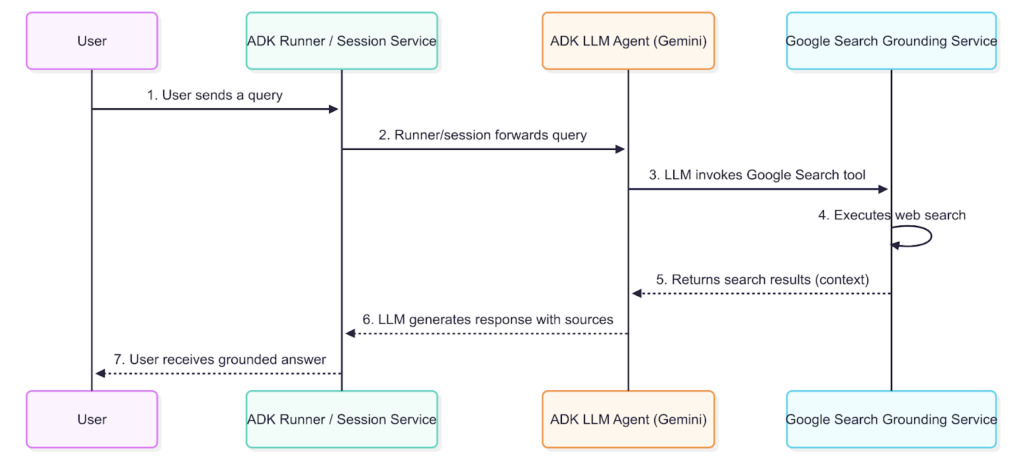
google_search
這裡最值得停下來想一下的是第五步。落地不是「先讓模型亂答一次,再拿搜尋結果去驗證」,而是先拿到搜尋結果,才讓模型基於這些結果生成回答——順序反過來,落地的意義就沒了。
groundingMetadata:能不能做出漂亮引用 UI 的關鍵Grounding 的回應不只是一段文字,還附帶一份詳細的 metadata,記錄它引用了哪些來源。官方用一個足球賽事問答做示範:
回答文字:
"Yes, Inter Miami won their last game in the FIFA Club World Cup. They defeated FC Porto 2-1 in their second group stage match. Their first game in the tournament was a 0-0 draw against Al Ahly FC. Inter Miami is scheduled to play their third group stage match against Palmeiras on Monday, June 23, 2025."
對應的 metadata(節錄):
"groundingMetadata": {
  "groundingChunks": [
    { "web": { "title": "mlssoccer.com", "uri": "..." } },
    { "web": { "title": "intermiamicf.com", "uri": "..." } }
  ],
  "groundingSupports": [
    {
      "groundingChunkIndices": [0, 1],
      "segment": {
        "startIndex": 65,
        "endIndex": 126,
        "text": "They defeated FC Porto 2-1 in their second group stage match."
      }
    }
  ],
  "searchEntryPoint": { ... }
}
拆解這份資料怎麼用:groundingChunks 是模型參考過的網頁清單,每筆有標題跟連往來源的 uri;groundingSupports 則把答案裡的特定句子(用 segment.startIndex/endIndex 標定文字範圍)連到 groundingChunkIndices 指到的來源。範例裡「They defeated FC Porto 2-1...」這句話,就是由索引 0 跟 1 的來源支持的。
這代表你可以逐句幫回應加上引用標記——groundingSupports 裡每一筆記錄,都在告訴你「答案第 65–126 字元這段話,來源是 groundingChunks[0] 和 [1]」。想做那種 Perplexity 風格、句子後面掛小數字連到來源的 UI,這份資料結構就是現成的原料,不用自己另外解析。
這一段很少人提,但官方文件明講:「you must display the Search suggestions in production and in your applications... in accordance with the policy」。groundingMetadata 裡的 searchEntryPoint 物件,包含預先格式化好的 HTML(renderedContent),用來顯示搜尋查詢建議——通常渲染成一排可點擊的「chip」,讓使用者能探索相關主題。這份 HTML 帶有 Google 標誌與相關查詢的 chip,直接整合進前端就會顯示成官方預期的樣子。
如果你的產品只顯示了答案文字、沒有渲染這個建議列,等於漏掉了官方明講的顯示義務——這種細節在教學文章裡很少被提到。
功能上跟 Google Search Grounding 很像——一樣有資料流圖、一樣有 grounding metadata 可以解讀,文件甚至還多了 Optional Citation Display 跟 Implementation Considerations 兩節處理引用顯示細節。
但這裡有一個容易誤用、而且踩到會卡住整個開發流程的坑,官方用粗體特別強調:
Agent Search requires Google Cloud Platform (Agent Platform) authentication. Google AI Studio is not supported for this tool.
回想 Day 2、Day 3 講過的:新手最常見的起手式是走 Google AI Studio 的 API key,因為設定最簡單、不用碰 GCP 專案。但如果你用的是這條最簡單的認證路線,Agent Search 現在就是走不通的——不是程式碼寫錯,是認證方式從一開始就不對,得整套換成 Google Cloud(Agent Platform)認證。這種「程式碼看起來沒問題,錯誤訊息卻很難對應回真正原因」的情況,正是最容易讓人卡好幾個小時的那種坑。
實際的工具類別是 VertexAiSearchTool,建構時必須帶資料庫 ID:
from google.adk.tools import VertexAiSearchTool

vertex_search_tool = VertexAiSearchTool(data_store_id=DATASTORE_PATH)
DATASTORE_PATH(來源 grounding-grounding-with-search.md 裡命名為 DATASTORE_ID,兩份來源變數名不一致,功能相同)不是隨便一個字串,格式是:
projects/<PROJECT_ID>/locations/<REGION>/collections/default_collection/dataStores/<DATASTORE_ID>
跟 google_search 一樣,光定義出 tool 跟 agent 還不會跑,一樣得接上 Runner 才能真的呼叫(寫法與前面 google_search 的 Runner 範例相同,agent= 換成這裡的 agent 即可,官方範例見 integrations-agent-search.md 的完整版本)。
企業場景最常遇到的需求是「不同使用者只能搜到自己有權限看的文件」——官方給的解法是子類化 VertexAiSearchTool、覆寫 _build_vertex_ai_search_config,依 readonly_context.state 動態組出過濾條件:
class MyVertexAISearchTool(VertexAiSearchTool):
    def _build_vertex_ai_search_config(self, readonly_context):
        config = super()._build_vertex_ai_search_config(readonly_context)
        if "user_id" in readonly_context.state:
            config.filter = f'user_id: ANY("{readonly_context.state["user_id"]}")'
        return config
這不是「叫模型只回答使用者有權限的內容」那種軟性提示,是在請求送進去之前就把過濾條件鎖死——跟 Day 6 提過的內建工具限制一樣,都是「該用程式碼確定性處理的事,不要指望 prompt」這條原則的具體案例,後面 Day 28 講企業安全網時還會再遇到。
Google Search 與 Agent Search 都屬於 Day 6 講過的「內建工具不能與其他工具共存於同一個 agent」限制——這個限制只適用 ADK (python) v1.15.0 以下,v1.16.0 起已經內建 bypass_multi_tools_limit 繞道。如果你發現「明明照著文件加了 google_search,卻報錯說不能跟其他工具一起用」,先檢查手上的 ADK 版本,這很可能不是新問題,是版本落差。
官方文件沒有把「怎麼用自己的資料庫做 grounding」放在 grounding 這一頁,這對第一次找文件的人來說有點反直覺——想做「用自己的知識庫回答問題」的話,要去別的地方拼湊:
vertex_ai_rag_retrieval)——一樣受單一工具限制、用前要準備好 RAG corpusVertexAiRagMemoryService)——屬於 Memory 而不是 Grounding 的範疇如果你在做企業內部知識庫問答的專案,記得別只盯著 grounding 這一頁找答案。
今天講的是「讓答案有憑有據」,用的是外部搜尋。但另一個同樣重要、卻常被新手忽略的問題是:對話一長,context 塞滿了怎麼辦?明天進入第二篇的中段——Sessions 管理,從「一段對話怎麼被記住」開始,一路講到 ADK 2.0 之後 session schema 遷移的眉角。
Google ADK 官方網站
GitHub - Agent Development Kit (ADK) 2.0
GitHub 開源實作:https://github.com/SeanLinH/adk_tutor
下一章 Day 09 - Sessions 管理:對話狀態、Rewind



 iThome鐵人賽
 看影片追技術