

努力學習 DRA 的人都是戰士。昨天 Day4 我們介紹了 DRA 的一些基礎能做到的事,Day5 就來稍微玩一下他的進階功能吧,我們沿用昨天的環境,並把昨天建立的測試用 namespace 都刪掉。由於今天介紹的是進階功能,所以我們要重整一下環境。
kubectl delete ns gpu-test1 gpu-test2 gpu-test3 --ignore-not-found
首先先打開 Partitionable Devices 的功能:
cd ~/dra-example-driver

helm upgrade dra-example-driver deployments/helm/dra-example-driver \
  --namespace dra-example-driver \
  --reset-values \
  --set kubeletPlugin.gpuPartitions=2
同一個 pool,這次有兩份 ResourceSlice。其中 counters: 8 是指有 8 張卡,devices: 24 是指有 24 個可以申請的形狀。代表一張卡有 3 種可以申請的形狀:
kubectl get resourceslice -o json | python3 -c "
import sys, json
for s in json.load(sys.stdin)['items']:
    sp = s['spec']
    print(s['metadata']['name'][:14], 'counters:', len(sp.get('sharedCounters',[])), 'devices:', len(sp.get('devices',[])))"
00000-gpu.exam counters: 8 devices: 0
00001-gpu.exam counters: 0 devices: 24
順帶一提,slice 會變成兩份不是巧合,是 API 規定的:一份 ResourceSlice 裡 devices 和 sharedCounters 只能擇一。所以一旦用上額度池,就至少會拆成兩份——一份放額度、一份放裝置。這也正好兌現昨天提過的那句「一個 pool 可以分散在多個 ResourceSlice 中」。
上面說一張卡有 3 種可以申請的形狀,以 gpu-0 來說,架上掛著 gpu-0-partition-0(40Gi/50)、gpu-0-partition-1(40Gi/50)、gpu-0-full(80Gi/100)三個選項,但這是同一張卡的三種賣法,不是三張卡。那組數字是「申請它會從這張卡的額度扣掉多少」,而 gpu-0 的總額度剛好就是 80Gi/100。所以拿走 full 就沒有分割,拿走一塊分割 full 也租不出去了。
kubectl get resourceslice -o json | python3 -c "
import sys, json
for s in json.load(sys.stdin)['items']:
    for d in s['spec'].get('devices',[])[:3]:
        print(d['name'], '| 吃', d['consumesCounters'][0]['counters'])"
gpu-0-partition-0 | 吃 {'compute': {'value': '50'}, 'memory': {'value': '40Gi'}}
gpu-0-partition-1 | 吃 {'compute': {'value': '50'}, 'memory': {'value': '40Gi'}}
gpu-0-full | 吃 {'compute': {'value': '100'}, 'memory': {'value': '80Gi'}}
昨天的 claim 都只寫了「我要一張卡」,沒有說要哪一張。CEL selector 就是「挑」的那一層。
它寫在 request 的 selectors 底下,對每一個候選裝置跑一次,回傳 true 才算通過。DeviceClass 自己也帶著一條 CEL(device.driver == 'gpu.example.com'),所以實際上是兩層條件相乘:管理員先圈出一類,使用者再往下縮。
CEL 表達式裡能讀到的東西只有四種:
| 變數 | 是什麼 |
|---|---|
device.driver |
這個裝置由哪一支 driver 發布 |
device.attributes[網域] |
屬性 |
device.capacity[網域] |
容量 |
device.allowMultipleAllocations |
能不能被多份 claim 拿走 |
而中括號裡的 key 是 driver 自己定義的。以 dra-example-driver 來說,開了 partition 之後每個裝置身上會有這些:
| 屬性 | capacity.memory | |
|---|---|---|
gpu-N-partition-* |
index、partition、partitionable |
40Gi |
gpu-N-full |
index、full、partitionable |
80Gi |
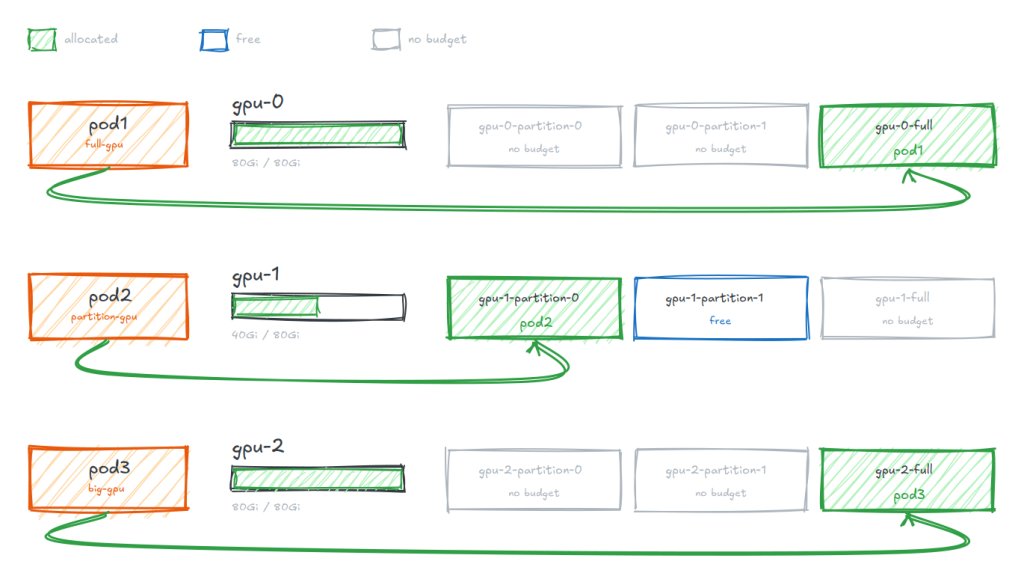
三個 Pod、三種寫法,看它們各自選到什麼:
| Pod | 條件 | 白話 |
|---|---|---|
pod1 |
has(...full) |
我要整卡 |
pod2 |
has(...partition) |
我要分割 |
pod3 |
memory >= 80Gi |
我要大的 |
pod1 和 pod3 講的其實是同一件事,但走的是完全不同的路:一個問屬性、一個問容量。
---
apiVersion: v1
kind: Namespace
metadata:
  name: gpu-test4

---
apiVersion: resource.k8s.io/v1
kind: ResourceClaimTemplate
metadata:
  namespace: gpu-test4
  name: full-gpu
spec:
  spec:
    devices:
      requests:
      - name: gpu
        exactly:
          deviceClassName: gpu.example.com
          selectors:
          - cel:
              expression: 'has(device.attributes["gpu.example.com"].full)'

---
apiVersion: v1
kind: Pod
metadata:
  namespace: gpu-test4
  name: pod1
  labels:
    app: pod
spec:
  containers:
  - name: ctr
    image: ubuntu:22.04
    command: ["bash", "-c"]
    args: ["export; trap 'exit 0' TERM; sleep 9999 & wait"]
    resources:
      claims:
      - name: gpu
  resourceClaims:
  - name: gpu
    resourceClaimTemplateName: full-gpu

---
apiVersion: resource.k8s.io/v1
kind: ResourceClaimTemplate
metadata:
  namespace: gpu-test4
  name: partition-gpu
spec:
  spec:
    devices:
      requests:
      - name: gpu
        exactly:
          deviceClassName: gpu.example.com
          selectors:
          - cel:
              expression: 'has(device.attributes["gpu.example.com"].partition)'

---
apiVersion: v1
kind: Pod
metadata:
  namespace: gpu-test4
  name: pod2
  labels:
    app: pod
spec:
  containers:
  - name: ctr
    image: ubuntu:22.04
    command: ["bash", "-c"]
    args: ["export; trap 'exit 0' TERM; sleep 9999 & wait"]
    resources:
      claims:
      - name: gpu
  resourceClaims:
  - name: gpu
    resourceClaimTemplateName: partition-gpu

---
apiVersion: resource.k8s.io/v1
kind: ResourceClaimTemplate
metadata:
  namespace: gpu-test4
  name: big-gpu
spec:
  spec:
    devices:
      requests:
      - name: gpu
        exactly:
          deviceClassName: gpu.example.com
          selectors:
          - cel:
              expression: 'device.capacity["gpu.example.com"].memory.compareTo(quantity("80Gi")) >= 0'

---
apiVersion: v1
kind: Pod
metadata:
  namespace: gpu-test4
  name: pod3
  labels:
    app: pod
spec:
  containers:
  - name: ctr
    image: ubuntu:22.04
    command: ["bash", "-c"]
    args: ["export; trap 'exit 0' TERM; sleep 9999 & wait"]
    resources:
      claims:
      - name: gpu
  resourceClaims:
  - name: gpu
    resourceClaimTemplateName: big-gpu
kubectl -n gpu-test4 get resourceclaim \
  -o custom-columns='CLAIM:.metadata.name,DEVICE:.status.allocation.devices.results[*].device'
for p in pod1 pod2 pod3; do printf "%-6s " $p; kubectl -n gpu-test4 logs $p | grep -o 'GPU_DEVICE_[^=]*="[^"]*"' | head -1; done
CLAIM            DEVICE
pod1-gpu-z2s2r   gpu-0-full
pod2-gpu-8vpp8   gpu-1-partition-0
pod3-gpu-b6gzg   gpu-2-full

pod1   GPU_DEVICE_0_FULL="gpu-0-full"
pod2   GPU_DEVICE_1_PARTITION_0="gpu-1-partition-0"
pod3   GPU_DEVICE_2_FULL="gpu-2-full"
三個 Pod 落在三張不同的實體卡上,而且每一步都是被前一步逼出來的:
gpu-0-full,gpu-0 的額度扣到 0,兩塊分割當場消失gpu-1 拿分割,因為 gpu-0 的分割已經沒額度了gpu-1 給不起(被 pod2 用掉 40Gi,只剩 40Gi),所以跳到 gpu-2
實驗四已經順手用到它了:同一張實體卡,同時發布「整卡」和「好幾塊分割」兩種裝置,而且排程器知道它們互斥。
這件事靠兩個欄位表達,一個在帳戶那邊、一個在裝置那邊。
sharedCounters 宣告一張卡總共有多少家當,放在第一份 ResourceSlice 裡:
sharedCounters:
- name: gpu-7-counters
  counters:
    memory:  { value: 80Gi }
    compute: { value: "100" }
consumesCounters 掛在每個裝置上,說自己要從哪個帳戶扣多少:
- name: gpu-7-full
  consumesCounters:
  - counterSet: gpu-7-counters        # ← 從這個帳戶扣
    counters:
      memory:  { value: 80Gi }        # ← 扣光
      compute: { value: "100" }

- name: gpu-7-partition-0
  consumesCounters:
  - counterSet: gpu-7-counters        # ← 同一個帳戶
    counters:
      memory:  { value: 40Gi }
      compute: { value: "50" }
互斥不是誰寫的規則,是減法的結果。 排程器不需要知道 full 和 partition 是同一塊硬體,它只要會算扣完還剩多少。
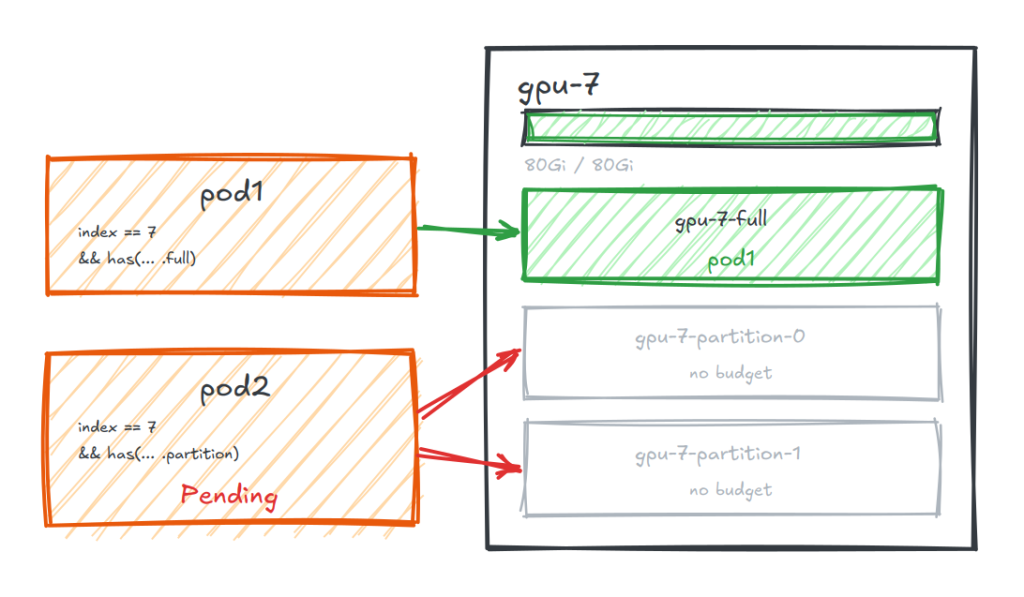
實驗四的互斥是「隱形」的——你只看到三個 Pod 落在三張卡上,得回頭推才知道為什麼。這次把它逼到檯面上:兩個 Pod 都用 CEL 釘死 index == 7,不准跑去別張卡,但要的形狀不同。
# pod1
device.attributes["gpu.example.com"].index == 7 &&
has(device.attributes["gpu.example.com"].full)

# pod2
device.attributes["gpu.example.com"].index == 7 &&
has(device.attributes["gpu.example.com"].partition)
一張卡的額度只有一份,所以這兩個人不可能同時滿足。
---
apiVersion: v1
kind: Namespace
metadata:
  name: gpu-test5

---
apiVersion: resource.k8s.io/v1
kind: ResourceClaimTemplate
metadata:
  namespace: gpu-test5
  name: gpu7-full
spec:
  spec:
    devices:
      requests:
      - name: gpu
        exactly:
          deviceClassName: gpu.example.com
          selectors:
          - cel:
              expression: >-
                device.attributes["gpu.example.com"].index == 7 &&
                has(device.attributes["gpu.example.com"].full)

---
apiVersion: v1
kind: Pod
metadata:
  namespace: gpu-test5
  name: pod1
  labels:
    app: pod
spec:
  containers:
  - name: ctr
    image: ubuntu:22.04
    command: ["bash", "-c"]
    args: ["export; trap 'exit 0' TERM; sleep 9999 & wait"]
    resources:
      claims:
      - name: gpu
  resourceClaims:
  - name: gpu
    resourceClaimTemplateName: gpu7-full

---
apiVersion: resource.k8s.io/v1
kind: ResourceClaimTemplate
metadata:
  namespace: gpu-test5
  name: gpu7-partition
spec:
  spec:
    devices:
      requests:
      - name: gpu
        exactly:
          deviceClassName: gpu.example.com
          selectors:
          - cel:
              expression: >-
                device.attributes["gpu.example.com"].index == 7 &&
                has(device.attributes["gpu.example.com"].partition)

---
apiVersion: v1
kind: Pod
metadata:
  namespace: gpu-test5
  name: pod2
  labels:
    app: pod
spec:
  containers:
  - name: ctr
    image: ubuntu:22.04
    command: ["bash", "-c"]
    args: ["export; trap 'exit 0' TERM; sleep 9999 & wait"]
    resources:
      claims:
      - name: gpu
  resourceClaims:
  - name: gpu
    resourceClaimTemplateName: gpu7-partition
kubectl -n gpu-test5 get pods
kubectl -n gpu-test5 get resourceclaim \
  -o custom-columns='CLAIM:.metadata.name,DEVICE:.status.allocation.devices.results[*].device'
NAME   READY   STATUS    RESTARTS   AGE
pod1   1/1     Running   0          62s
pod2   0/1     Pending   0          62s

CLAIM            DEVICE
pod1-gpu-ststw   gpu-7-full
pod2-gpu-b2qxs   <none>
pod2 排不上去,但原因不是「叢集沒有卡了」——其他卡都還有空位,而是它指定的那張卡的額度被扣光了。
而且注意 claim 還是被建出來了,只是 status.allocation 是空的。這跟 Device Plugin 的差別在這裡:那邊 Pod 卡住只會說資源不足,DRA 卡住是卡在一個你查得到的物件上。
kubectl -n gpu-test5 delete pod pod1
NAME   READY   STATUS    RESTARTS   AGE
pod2   1/1     Running   0          104s

CLAIM            DEVICE
pod2-gpu-b2qxs   gpu-7-partition-0
pod2 自己起來了,拿到 gpu-7-partition-0。因為 pod1 一走,它的 claim 跟著消失,gpu-7-counters 的餘額回來,排程器下一輪就把 pod2 放進去了。
實驗五把一張卡切成互斥的幾種形狀。這一節再往下一層:同一個分割,能不能兩個人分著用?
答案是不行的,因為預設一個裝置只能被配給一份 ResourceClaim。要打開得多帶一個開關:
helm upgrade dra-example-driver deployments/helm/dra-example-driver \
  --namespace dra-example-driver \
  --reset-values \
  --set kubeletPlugin.gpuPartitions=2 \
  --set gpuAllowMultipleAllocations=true
開關改了裝置上的兩個欄位:
# 開之前
- name: gpu-6-partition-0
  allowMultipleAllocations: false
  capacity:
    memory: { value: 40Gi }

# 開之後
- name: gpu-6-partition-0
  allowMultipleAllocations: true          # 可以配給多份 claim
  capacity:
    memory:
      value: 40Gi
      requestPolicy:                       # 怎麼分的規則
        default: 40Gi
        validRange: { min: 1Gi, max: 40Gi, step: 1Gi }
requestPolicy 是「你可以跟我要多少」:最少 1Gi、最多 40Gi、以 1Gi 為單位。
而 claim 這邊多寫一段 capacity.requests,說自己要多少:
capacity:
  requests:
    memory: 20Gi
    compute: "25"
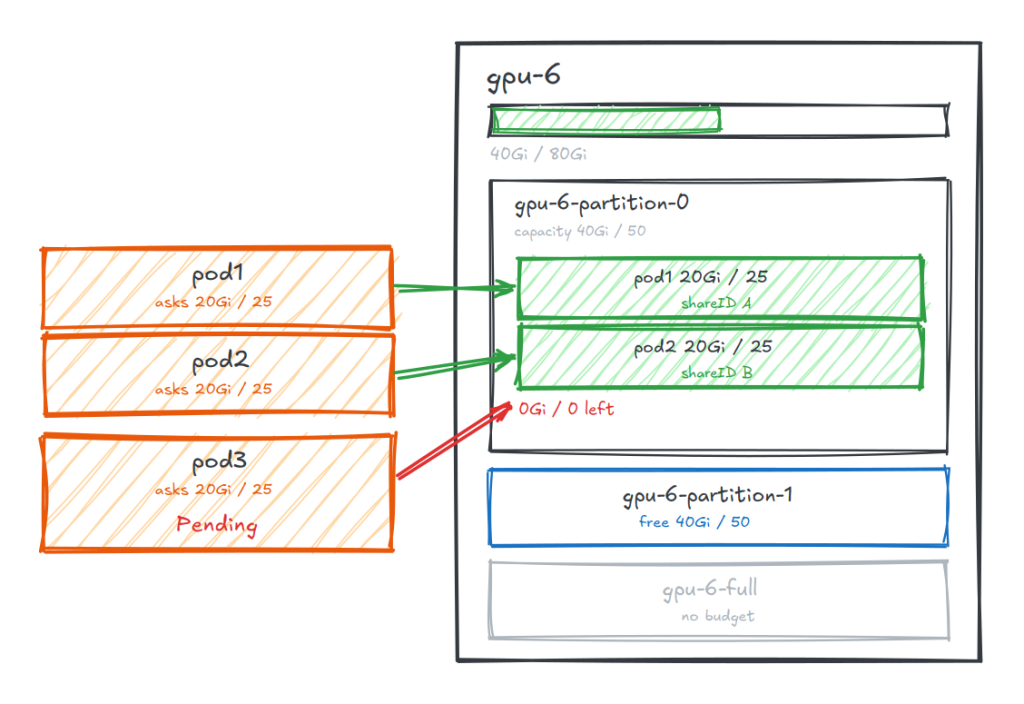
三個 Pod 用同一份 template,全部釘死在 gpu-6-partition-0 上,每個人要 20Gi / 25。
那塊分割總共只有 40Gi / 50——前兩個塞得下,第三個不行。
---
apiVersion: v1
kind: Namespace
metadata:
  name: gpu-test6

# ---------- pod1 / pod2:各要一半 ----------
---
apiVersion: resource.k8s.io/v1
kind: ResourceClaimTemplate
metadata:
  namespace: gpu-test6
  name: half-partition
spec:
  spec:
    devices:
      requests:
      - name: gpu
        exactly:
          deviceClassName: gpu.example.com
          selectors:
          - cel:
              expression: >-
                device.attributes["gpu.example.com"].index == 6 &&
                has(device.attributes["gpu.example.com"].partition) &&
                device.attributes["gpu.example.com"].partition == 0
          capacity:
            requests:
              memory: 20Gi
              compute: "25"

---
apiVersion: v1
kind: Pod
metadata:
  namespace: gpu-test6
  name: pod1
spec:
  containers:
  - name: ctr
    image: ubuntu:22.04
    command: ["bash", "-c"]
    args: ["export; trap 'exit 0' TERM; sleep 9999 & wait"]
    resources:
      claims:
      - name: gpu
  resourceClaims:
  - name: gpu
    resourceClaimTemplateName: half-partition

---
apiVersion: v1
kind: Pod
metadata:
  namespace: gpu-test6
  name: pod2
spec:
  containers:
  - name: ctr
    image: ubuntu:22.04
    command: ["bash", "-c"]
    args: ["export; trap 'exit 0' TERM; sleep 9999 & wait"]
    resources:
      claims:
      - name: gpu
  resourceClaims:
  - name: gpu
    resourceClaimTemplateName: half-partition

# ---------- pod3:第三個人,要不到 ----------
---
apiVersion: v1
kind: Pod
metadata:
  namespace: gpu-test6
  name: pod3
spec:
  containers:
  - name: ctr
    image: ubuntu:22.04
    command: ["bash", "-c"]
    args: ["export; trap 'exit 0' TERM; sleep 9999 & wait"]
    resources:
      claims:
      - name: gpu
  resourceClaims:
  - name: gpu
    resourceClaimTemplateName: half-partition
開關沒開的時候:
pod1   1/1     Running
pod2   0/1     Pending
pod3   0/1     Pending

pod1-gpu-mqcjw → gpu-6-partition-0 consumed: None   share: -
pod2-gpu-hkjhw → 未分配
pod3-gpu-wx27w → 未分配
pod1 寫了 20Gi,但 consumed 是 None,代表裝置不接受「只拿一部分」這種要法,就是整個給你。後面兩個沒得拿。
開了之後:
pod1   1/1     Running
pod2   1/1     Running
pod3   0/1     Pending

pod1-gpu-cfrgt → gpu-6-partition-0 consumed: {'memory': '20Gi', 'compute': '25'} share: 0f954979
pod2-gpu-vm5dj → gpu-6-partition-0 consumed: {'memory': '20Gi', 'compute': '25'} share: e2415c42
pod3-gpu-8lkgb → 未分配
gpu-6-partition-0 出現兩次,shareID 不同。裝置從「一個不可分割的東西」變成「一個有餘額的東西」:
gpu-6-partition-0   總額 40Gi / 50
├─ pod1  拿 20Gi / 25   share 0f954979   ← 餘 20Gi
└─ pod2  拿 20Gi / 25   share e2415c42   ← 餘 0
   pod3  要 20Gi        → 扣不動,Pending
shareID 是這件事的副產品。同一個裝置被配了兩次之後,光靠裝置名已經分不出誰是誰,所以每一份配一個 ID。
另外值得注意的是,pod3 卡住不是因為 gpu-6 沒卡了——gpu-6-partition-1 還空著。它卡住是因為 CEL 把它釘死在 partition == 0 上。
兩個功能名字都像「切」,但切的東西不一樣:
| Partitionable | Consumable Capacity | |
|---|---|---|
| 切什麼 | 一張卡 → 幾種形狀 | 一個裝置 → 幾份額度 |
| 減什麼 | sharedCounters |
裝置自己的 capacity |
| 語意 | 形狀之間互斥 | 同一個裝置分著用 |
| 拿到什麼 | 不同的裝置名 | 同一個裝置名 + 不同 shareID |
而且兩層可以疊起來,也就是現在這個環境:8 張卡 → 16 個分割 → 每個分割再分給 2 個人。
今天我們繼續深度探討 DRA,跑了三個 DRA 進階功能的小實驗。
而 DRA 的功能還遠不只這些。原本想一起放進來講但怕篇幅太大的還有 extendedResourceName(KEP-5004),它讓你原本 Device Plugin 的寫法 resources.limits: nvidia.com/gpu: 1 可以無痛直接接到 DRA 服務。又或者 DeviceTaintRule ,它把壞掉的卡標記起來,從已經在跑的 Pod 上面驅逐。
Kubernetes Documentation — Dynamic Resource Allocation
Kubernetes Documentation — DRA API Objects
Kubernetes Documentation — DRA Feature
kubernetes-sigs/dra-example-driver — partitionable-devices
kubernetes-sigs/dra-example-driver — gpu-allow-multiple-allocations-partitionable


 iThome鐵人賽
 看影片追技術