
主張:
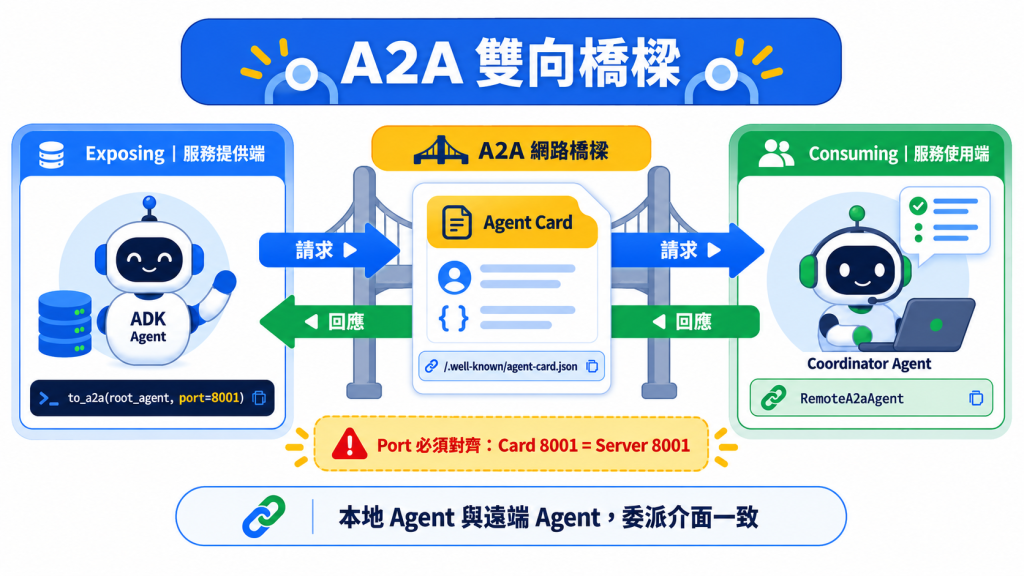
to_a2a()一行程式碼就能把一支 agent 變成網路服務,但真正決定能不能上生產的,是 agent card 怎麼發佈、跟 port 有沒有對齊。
讀完能做到:把一支 ADK agent 暴露成 A2A 服務,再從另一支 agent 用RemoteA2aAgent連上去,並解讀自動產生的 agent card。
昨天講完「什麼時候該用 A2A」,今天動手做兩件事:先把一支 agent 暴露出去,再從另一支 agent 消費它。官方的兩份 quickstart 用的是同一個故事情境——會滾骰子跟會檢查質數的兩個 agent,只是分別放在不同的 sample 資料夾裡(等一下抓下範例就會看到)。
adk-python 是整個 ADK Python 框架的原始碼 repo,clone 下來動輒上千個檔案——今天用得到的東西全部集中在其中一個資料夾,先抓下來,之後不用管其他部分:
pip install google-adk[a2a]
git clone https://github.com/google/adk-python.git
cd adk-python
下面所有指令都假設你人在 adk-python/ 這個目錄底下——sample 是用 contributing.samples.a2a... 這種模組路徑執行的,離開這個目錄會直接看到 ModuleNotFoundError: No module named 'contributing'。
今天真正要看的路徑是 contributing/samples/a2a/,裡面是官方維護的五組獨立 A2A 範例:
$ ls contributing/samples/a2a/
a2a_auth  a2a_basic  a2a_human_in_loop  a2a_root  a2a_state_forwarding
a2a_root:把一個遠端 A2A agent 直接當成 root agent 用——今天 Exposing 節走的路,示範 to_a2a() + uvicorn。a2a_basic:本地 sub-agent 跟遠端 A2A sub-agent 混合委派——今天 Consuming 節走的路,示範 RemoteA2aAgent + adk api_server --a2a。a2a_auth:遠端 agent 要求 OAuth 認證,本地 agent 引導使用者完成授權流程再把憑證交回去。a2a_human_in_loop:遠端 agent 用 long-running tool 卡住,等真人核准大額報帳才繼續。a2a_state_forwarding:A2A 預設是 stateless,這個 sample 示範怎麼把本地 session state 透過 request metadata 手動轉發給遠端 agent。今天只會用到 a2a_root 跟 a2a_basic,兩者剛好共用同一組故事——會滾骰子的 roll_agent 跟會檢查質數的 prime_agent——只是暴露/消費的寫法不同,下面分開講。其餘三組今天用不到,但知道它們在做什麼,之後要延伸到認證、人機協作、跨程序狀態同步可以直接抄。
暴露一支 ADK agent 讓它變成 A2A 相容,官方提供兩種方式:
to_a2a(root_agent) 函式:把既有 agent 直接轉換成可以用 uvicorn 服務的物件,自動幫你產生 agent card。適合想快速把一支既有 agent 上線、又想對 uvicorn 的部署方式有較多掌控的情境。agent.json)並用 adk api_server --a2a 服務:好處是能跟 adk web 一起用,方便除錯測試;而且可以指定一個包含多支 agent 的父資料夾,任何有 agent.json 的都會自動透過同一個 server 對外提供 A2A。缺點是 agent card 要自己寫。今天聚焦在 to_a2a(),因為它是最快讓 agent 上線的路,而且自動產生 agent card 這件事本身就值得看仔細——它是怎麼從你的 agent 程式碼反推出一份合格的能力宣告文件的。
假設你已經有一支正常運作的 agent(下面這段是示意,<...> 的地方換成你自己的 tools 跟 instruction,不能直接執行):
root_agent = Agent(
    model='gemini-flash-latest',
    name='hello_world_agent',
    <...your agent code...>
)
用 to_a2a() 包一下就能拿到一個可以被 uvicorn 服務的 A2A 應用:
from google.adk.a2a.utils.agent_to_a2a import to_a2a

a2a_app = to_a2a(root_agent, port=8001)
to_a2a() 會自動從你的 agent 程式碼萃取 skills、capabilities、metadata,在記憶體裡生成一份 agent card,agent 服務起來的時候就一起被公開在標準的 well-known 端點上。如果自動產生的不夠精準,可以透過 agent_card 參數傳入自己寫的 AgentCard 物件或指向一份 JSON 檔案的路徑。
to_a2a() 表面上只是一行呼叫,實際上一次幫你設定好四件事——弄懂這四個名詞,之後 agent 連不上、或 agent card 內容跟預期不同的時候,才知道要去哪裡查:
A2aAgentExecutor:A2A 協定跟你的 ADK agent 之間的橋樑。如果你沒提供自訂的 Runner,它會自動建一個由記憶體內建 services(artifact、session、memory、credential)支撐的預設 Runner。InMemoryTaskStore 追蹤 A2A 任務,InMemoryPushNotificationConfigStore 處理推播通知。DefaultRequestHandler,把進來的 A2A HTTP 請求導向 A2aAgentExecutor 與狀態儲存區。AgentCardBuilder 自動從 agent 設定建一份,再掛上所有必要的 A2A API 路由。to_a2a() 有幾個參數值得留意:host(預設 localhost)、protocol(預設 http)跟 port 三個一起決定廣播出去的 agent card 裡的網址,to_a2a() 本身不會綁定 port——一定要跟你實際用 uvicorn --host --port 服務的位置對齊,不然廣播出去的 agent card 會指向一個打不通的地方,這是實務上最容易忽略、也最難 debug 的一個坑,因為服務看起來啟動成功,錯誤只會在別人試圖連過來時才浮現。
先啟動被暴露的遠端 agent:
uvicorn contributing.samples.a2a.a2a_root.remote_a2a.hello_world.agent:a2a_app --host localhost --port 8001
啟動時你會先看到四段 [EXPERIMENTAL] 的 UserWarning(to_a2a、A2aAgentExecutor、A2aAgentExecutorConfig、AgentCardBuilder 各一段)——這是正常的,A2A 支援目前就是 Experimental 狀態。看到這一行代表服務真的起來了:
INFO: Uvicorn running on http://localhost:8001 (Press CTRL+C to quit)
⚠️ 為什麼是 8001,不是 8000? 因為本地測試時,消費端的 adk web 預設用 8000,暴露端的 A2A server 必須用不同的 port,官方範例選了 8001。
啟動之後,直接打開自動產生的 agent card 端點確認:
http://localhost:8001/.well-known/agent-card.json
你會看到一份完整描述這支 agent 能力的 JSON——description、skills(裡面甚至包含每個工具的完整 docstring,像 roll_die、check_prime)、defaultInputModes / defaultOutputModes,還有描述傳輸方式的 supportedInterfaces 陣列(裡面放 url、protocolBinding、protocolVersion)。這份自動產生的內容再次呼應 Day 6 講的「docstring 就是介面定義」——這次不只是給 LLM 看,連跨服務發現能力的機制都靠它。逐字節錄一份實際輸出:
{
    "name": "hello_world_agent",
    "description": "hello world agent that can roll a dice of 8 sides and check prime numbers.",
    "supportedInterfaces": [
        {
            "url": "http://localhost:8001",
            "protocolBinding": "JSONRPC",
            "protocolVersion": "1.0"
        }
    ],
    "version": "0.0.1",
    "capabilities": {
        "streaming": false,
        "pushNotifications": false
    },
    "defaultInputModes": ["text/plain"],
    "defaultOutputModes": ["text/plain"],
    "skills": [
        {
            "id": "hello_world_agent",
            "name": "model",
            "description": "hello world agent that can roll a dice of 8 sides and check prime numbers.",
            "tags": ["llm"]
        },
        {
            "id": "hello_world_agent-roll_die",
            "name": "roll_die",
            "description": "Roll a die and return the rolled result.\n\nArgs:\n  sides: The integer number of sides the die has.\n  tool_context: the tool context\nReturns:\n  An integer of the result of rolling the die.",
            "tags": ["llm", "tools"]
        },
        {
            "id": "hello_world_agent-check_prime",
            "name": "check_prime",
            "description": "Check if a given list of numbers are prime.\n\nArgs:\n  nums: The list of numbers to check.\n\nReturns:\n  A str indicating which number is prime.",
            "tags": ["llm", "tools"]
        }
    ]
}
主 agent 用 RemoteA2aAgent 當成消費遠端服務的代理。下面兩段都摘自 a2a_basic/agent.py——這個檔案已經在你剛剛 clone 的 repo 裡,等一下直接用 adk web 跑,不需要自己重建:
from google.adk.agents.remote_a2a_agent import AGENT_CARD_WELL_KNOWN_PATH
from google.adk.agents.remote_a2a_agent import RemoteA2aAgent

prime_agent = RemoteA2aAgent(
    name="prime_agent",
    description="Agent that handles checking if numbers are prime.",
    agent_card=(
        f"http://localhost:8001/a2a/check_prime_agent{AGENT_CARD_WELL_KNOWN_PATH}"
    ),
)
RemoteA2aAgent 必須提供 name 跟 agent_card(可以是 AgentCard 物件、一個網址、或本地檔案路徑),description 是選填,不填預設空字串。這裡的網址帶了 /a2a/check_prime_agent 前綴——那是 adk api_server --a2a 的掛載慣例,它會把每個含 agent.json 的資料夾掛在 /a2a/<資料夾名>/ 底下。如果對方是像前面 Exposing 節那樣用 to_a2a() + uvicorn 直接暴露的,card 就在根路徑(http://<host>:<port>/.well-known/agent-card.json),沒有這段前綴——兩種路徑不能混用,貼錯網址會拿到 404。
定義好之後,直接把它當成一般的 sub-agent 用。同一個檔案裡,這段之前還定義了 roll_agent——一支綁了 roll_die 工具的本地 Agent,專門負責滾骰子,跟遠端的 prime_agent 相對——以及 example_tool,一組給 few-shot 範例用的 ExampleTool。root_agent 的建構式寫法前幾天都已經提到,唯一新鮮的是 sub_agents 那一行:
from google.adk.agents.llm_agent import Agent

root_agent = Agent(
    name="root_agent",
    instruction="""
      You are a helpful assistant that can roll dice and check if numbers are prime.
      You delegate rolling dice tasks to the roll_agent and prime checking tasks to the prime_agent.
      Follow these steps:
      1. If the user asks to roll a die, delegate to the roll_agent.
      2. If the user asks to check primes, delegate to the prime_agent.
      3. If the user asks to roll a die and then check if the result is prime, call roll_agent first, then pass the result to prime_agent.
      Always clarify the results before proceeding.
    """,
    global_instruction=(
        "You are DicePrimeBot, ready to roll dice and check prime numbers."
    ),
    sub_agents=[roll_agent, prime_agent],
    tools=[example_tool],
    # generate_content_config 略:跟 A2A 無關,只是關掉骰子相關的安全過濾
)
這裡最值得注意的地方是:root_agent 的 sub_agents 清單裡,roll_agent(本地 sub-agent)跟 prime_agent(遠端 A2A agent)寫法完全一樣——這正是 Day 19 提過「ADK 把網路層抽象掉」的具體證明。從 coordinator 的 instruction 角度看,委派給本地 agent 跟委派給一個透過網路呼叫的遠端 agent,沒有任何語法差異。
A2A 協定要求每個 agent 都要有一張 agent card 描述自己能做什麼。如果消費的是別人已經寫好的遠端 agent,要先確認對方有沒有提供 agent.json——adk api_server --a2a 只會把資料夾裡剛好叫做 agent.json 的 agent 對外暴露成 A2A:
{
  "capabilities": {},
  "defaultInputModes": ["text/plain"],
  "defaultOutputModes": ["application/json"],
  "description": "An agent specialized in checking whether numbers are prime. It can efficiently determine the primality of individual numbers or lists of numbers.",
  "name": "check_prime_agent",
  "skills": [
    {
      "id": "prime_checking",
      "name": "Prime Number Checking",
      "description": "Check if numbers in a list are prime using efficient mathematical algorithms",
      "tags": ["mathematical", "computation", "prime", "numbers"]
    }
  ],
  "url": "http://localhost:8001/a2a/check_prime_agent",
  "version": "1.0.0"
}
如果是自己要暴露的 agent,前面提過的 to_a2a(root_agent) 會自動幫你產生等價的 card,不需要手寫。
注意這裡換了一組 sample——前面 Exposing 節跑的是 a2a_root,這裡改用 a2a_basic(手寫 agent.json 那一條路)。啟動遠端的質數檢查服務:
adk api_server --a2a --port 8001 contributing/samples/a2a/a2a_basic/remote_a2a
再啟動消費端的 dev UI:
adk web contributing/samples/a2a/
打開 http://localhost:8000,左上角的下拉選單會列出 contributing/samples/a2a/ 底下的所有 app,選 a2a_basic——不是 a2a_basic.remote_a2a.check_prime_agent,那是被暴露的那一支,不是消費端的入口。今天這兩個 sample 都會實際呼叫 Gemini 模型,記得先設好 Day 2 那組模型憑證,沒設的話對話一送出就是 403。
這份清單會隨 adk-python 主線持續變動,數字本身不用背,跑之前用 curl http://localhost:8000/list-apps 現查一次最準。
三種對話都能測到不同的委派路徑:
User: Roll a 6-sided die
Bot: I rolled a 4 for you.
(純本地 sub-agent,roll_agent 處理)
User: Is 7 a prime number?
Bot: Yes, 7 is a prime number.
(純遠端 A2A agent,prime_agent 透過網路處理)
User: Roll a 10-sided die and check if it's prime
Bot: I rolled an 8 for you.
Bot: 8 is not a prime number.
(本地跟遠端接力:先本地滾骰子,再把結果傳給遠端 agent 檢查)
第三種對話最能看出 A2A 抽象層的價值——使用者的一句話背後,實際上發生了一次本地函式呼叫加一次跨網路的 A2A 請求,但從對話體驗跟 root agent 的 instruction 寫法來看,完全感覺不出這個差異。
如果 to_a2a() 跟 RemoteA2aAgent 的預設行為不夠用,兩邊都提供更細的客製化掛勾:
A2aAgentExecutorConfig)
Event / Part 之間的雙向轉換before_agent、after_event、after_agent 三個攔截點A2aRemoteAgentConfig)
before_request、after_request
這些客製化點主要是給需要精細控制訊息格式或加中介邏輯(例如統一的日誌、認證頭)的生產場景用,一般開發階段用預設值就夠。
to_a2a() 的 host / protocol / port 要跟實際 uvicorn 服務的位置對齊:對不上時服務照樣啟動成功,只有等對方連過來才會發現。to_a2a() 跟 adk api_server --a2a 的 agent card 掛載路徑不一樣:前者在根路徑,後者在 /a2a/<資料夾名>/ 底下,兩者網址不能互換。adk web contributing/samples/a2a/ 的下拉選單裡 app 數量會跟著 repo 變:今天要選的是 a2a_basic,不是被暴露的那支 a2a_basic.remote_a2a.check_prime_agent;本文實測(2026-09-16)是 10 個,跑之前用 curl http://localhost:8000/list-apps 現查最準。到這裡,「戰術編排」這一篇正式收尾——從 graph、dynamic workflow、模板積木、多 agent 模式,一路到跨程序的 A2A,你已經有了一整套組裝複雜 agent 系統的工具箱。明天進入「特種作戰」篇,第一站是 Live and Voice Agents——當 agent 要處理的不再是一句一句的文字對話,而是即時的語音串流時,ADK 的架構會長出一整套新的機制。
Google ADK 官方網站
GitHub - Agent Development Kit (ADK) 2.0
GitHub 開源實作:https://github.com/SeanLinH/adk_tutor



 iThome鐵人賽
 看影片追技術