

今天,我們將使用 Chrome DevTool MCP Server 來稽核桌面與行動裝置檢視埠(Viewport)下的當前效能(Performance)與最佳實踐(Best Practices)分數。我們的目標是將這些分數最大化。
為了達成這個目標,我們將重構 ConfigService 以動態匯入 Firebase App Check 與 Firebase AI Logic,同時以非同步方式擷取 Firebase Remote Config。目前在應用程式啟動(Bootstrap)期間載入這些沉重的相依套件會阻塞渲染,並降低 FCP(First Contentful Paint)與 LCP(Largest Contentful Paint)。將它們從主打包檔(Main bundle)中移除,能減少初始打包大小,並顯著提升我們的效能與最佳實踐指標。
devtool-mcp: please perform performance audit on http://localhost:5005. Give me the performance score, lcp, fcp, cls, and tbt
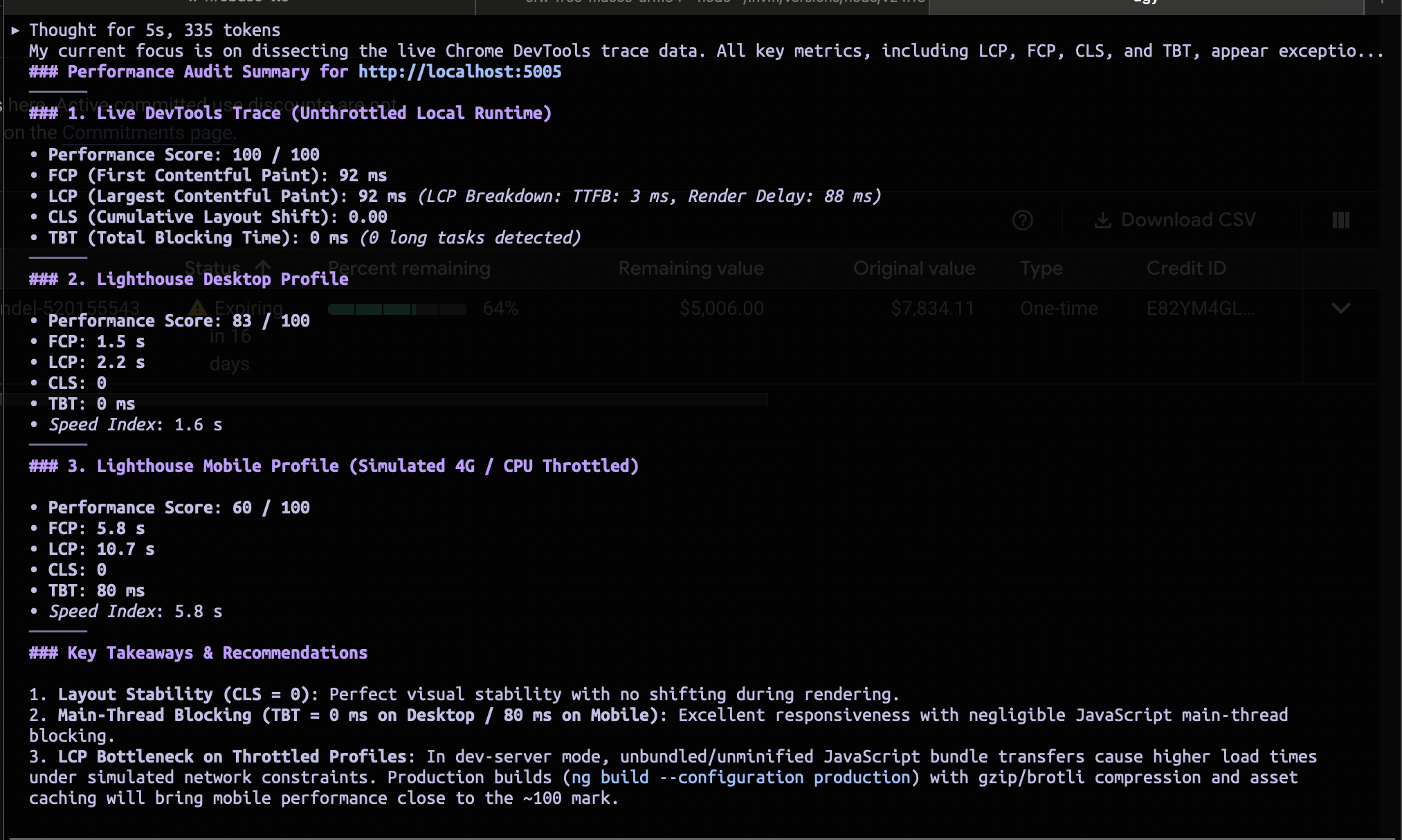
接著,我們提示 Gemini 呼叫 Chrome DevTool MCP Server 來執行 Lighthouse 稽核,以取得當前的最佳實踐分數。
devtool-mcp: please run lighthouse audit to obtain the score of http://localhost:5005/
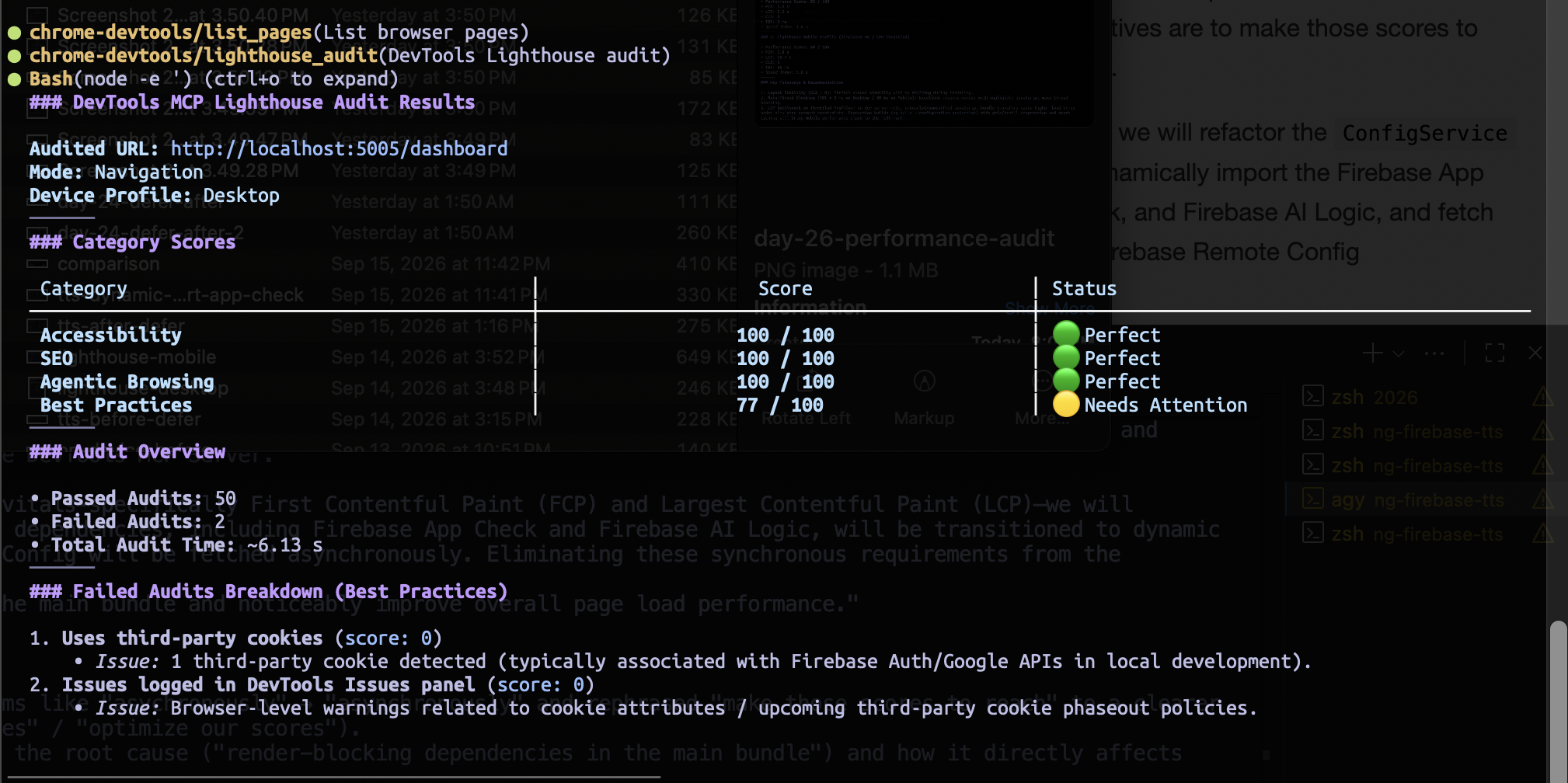
最佳實踐分數為 77/100,因此我們請 Gemini 提供改善該分數的建議。
how can I improve the Best Practices score?
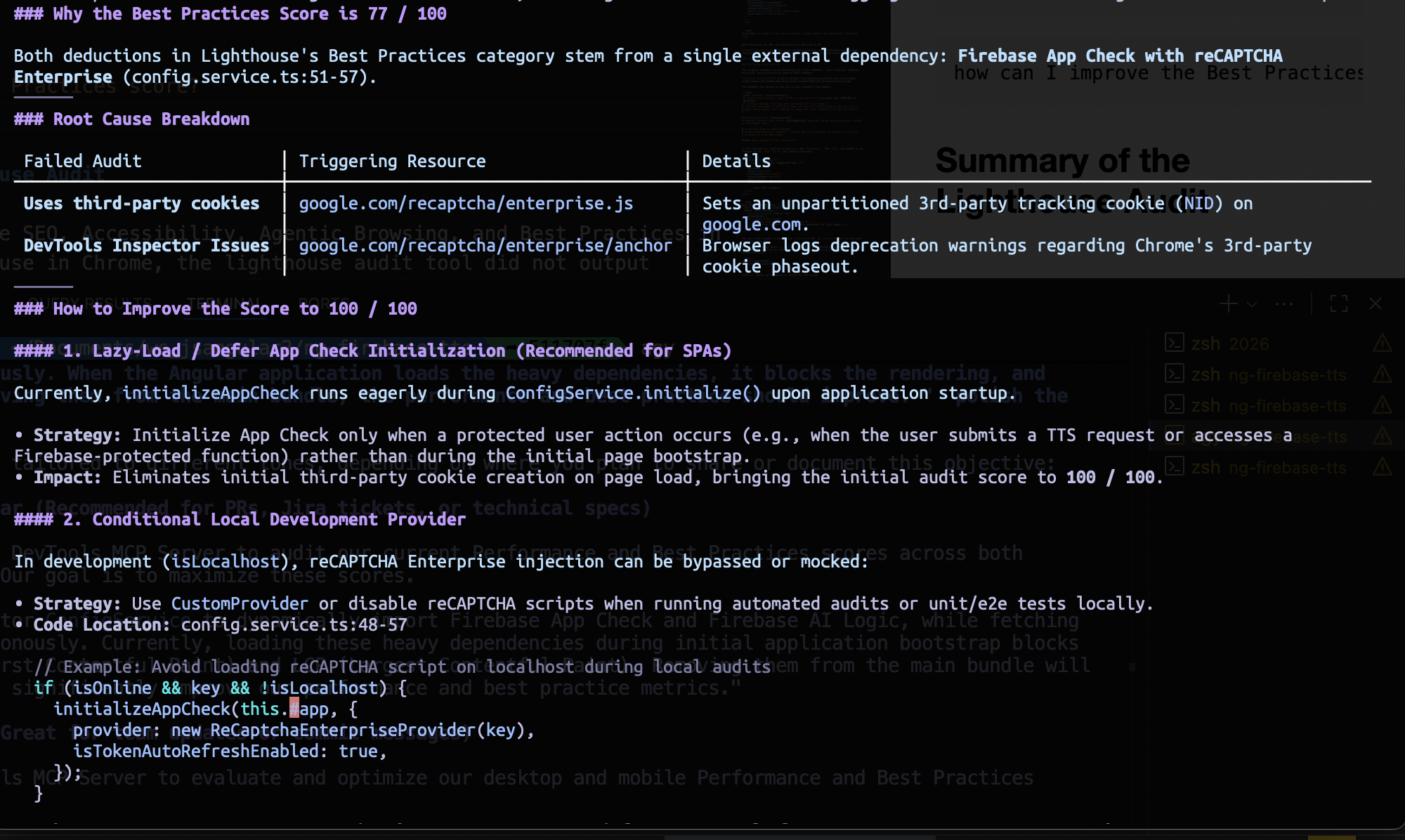
分析顯示,較低的效能分數是由於 Firebase App Check 急迫地(Eagerly)載入 reCAPTCHA JavaScript 函式庫所致。由於在 Angular 初始啟動期間並不需要 App Check,我們可以延遲在 ConfigService 中匯入它。當使用者觸發需要圖片分析或語音轉文字等功能的 Firebase AI Logic 時,App Check 才按需(On demand)初始化。
讓我們在 ConfigService 中按需動態載入 reCAPTCHA JavaScript 函式庫。
我們建立了一個 loadAppCheck 來動態匯入 firebase/app-check 相依套件並初始化 Firebase App Check。
private loadAppCheck(isLocalhost: boolean): Promise<void> {
    return import('firebase/app-check').then((m) => {
      configureAppCheckDebugToken(firebaseConfig.appCheckDebugToken, isLocalhost, isDevMode());
      m.initializeAppCheck(this.#app, {
        provider: new m.ReCaptchaEnterpriseProvider(firebaseConfig.recaptchaEnterpriseKey),
        isTokenAutoRefreshEnabled: true,
      });
    });
}

private async ensureAppCheck(isLocalhost: boolean): Promise<void> {
    if (!this.#appCheck) {
      this.#appCheck = this.loadAppCheck(isLocalhost);
    }

    return this.#appCheck;
}
ensureAppCheck 方法在第一次執行時將 this.loadAppCheck 的 Promise 指派給 this.#appCheck,以避免重複下載。我們沒有 await this.loadAppCheck,以避免經典的「await 陷阱」。透過快取未完成的 Promise 而不是其解析後的值,我們確保了無競態條件(Race-condition-free)的延遲初始化,確保所有並發呼叫都能乾淨地共享單一的下載任務。
async initialize(): Promise<void> {
    this.#app = initializeApp(firebaseConfig.app);
    const isOnline = this.#isOnline();

    this.#remoteConfig = getRemoteConfig(this.#app);
    this.#remoteConfig.defaultConfig = remoteConfigDefaults;
    const dev = isDevMode();
    this.#remoteConfig.settings.minimumFetchIntervalMillis = dev ? 0 : ONE_HOUR_IN_MILLISECONDS;
    this.#remoteConfig.settings.fetchTimeoutMillis = dev ? DEV_TIMEOUT : PROD_TIMEOUT;

    if (isOnline) {
        await fetchAndActivate(this.#remoteConfig);

        const rc = this.#remoteConfig;
        const rawThinkingLevel = getValue(rc, 'thinkingLevel').asString();
        const thinkingLevel = ThinkingLevel[rawThinkingLevel as keyof typeof ThinkingLevel];

        this.#appConfig = {
          vertexAILocation: getValue(rc, 'vertexAILocation').asString(),
          useLimitedUseAppCheckTokens: getValue(rc, 'useLimitedUseAppCheckTokens').asBoolean(),
          geminiModelName: getValue(rc, 'geminiModelName').asString(),
          thinkingLevel,
          geminiTTSModelName: getValue(rc, 'geminiTTSModelName').asString(),
        };
    }
}

#ai: AI | undefined = undefined;
async aiBackend(): Promise<unknown> {
    if (!this.#app) {
      throw new Error('AI backend has not been initialized yet.');
    }

    if (this.#ai) {
      return this.#ai;
    }

    const isOnline = this.#isOnline();
    const isLocalhost = this.#isLocalhost();
    if (isOnline && firebaseConfig.recaptchaEnterpriseKey) {
      await this.ensureAppCheck(isLocalhost);
    }

    const { getAI, AgentPlatformBackend } = await import('firebase/ai');
    this.#ai = getAI(this.#app, {
      backend: new AgentPlatformBackend(this.#appConfig.vertexAILocation),
      useLimitedUseAppCheckTokens: this.#appConfig.useLimitedUseAppCheckTokens,
    });

    return this.#ai;
}
我們重構了 initialize(),將 Firebase App Check 與 Firebase AI Logic 的初始化移至 aiBackend()。呼叫 ensureAppCheck 以確保 App Check 只被下載一次。同樣地,Firebase AI 後端執行個體會在第一次呼叫時延遲實例化,並快取供後續所有呼叫使用。
將 aiBackend() 改為非同步最初打破了我們的 Firebase 提供者(Provider)設定,導致跨 TextToSpeechService 與 VisionService 出現編譯錯誤。經過仔細分析,我們透過將 ConfigService 注入這些服務中解決了這個問題,允許它們僅在執行 AI 操作時才檢索 Firebase AI 後端執行個體。
@Service()
export class VisionService {
    #configService = inject(ConfigService);

    private getGenerativeAIModel(ai: AI) {
        return getGenerativeModel(ai, {
            model: this.#configService.appConfig.geminiModelName,
            generationConfig: {
                responseMimeType: 'application/json',
                responseSchema: ImageAnalysisSchema,
                thinkingConfig: {
                    thinkingLevel: this.#configService.appConfig.thinkingLevel,
                    includeThoughts: true,
                },
            },
            ... other properties ...
        });
    }

    async generateAltText(image: File): Promise<ImageAnalysisResponse> {
        const imagePart = await fileToGenerativePart(image);
        const altTextPrompt = `... prompt ...`;

        const model = this.getGenerativeAIModel(await this.#configService.aiBackend() as AI);
        const result = await model.generateContent([altTextPrompt, imagePart]);

        if (result?.response) {
            const response = result.response;
            const text = response.text().replace(/```json\n?|```/g, '');
            const parsed: ImageAnalysis = JSON.parse(text);

            return {
                parsed,
            };
        }
        throw Error('No text generated.');
    }
}
getGenerativeAIModel 已從 Firebase 提供者遷移至 VisionService,以按需建構生成式 AI 模型。
@Service()
export class TextToSpeechService {
  readonly #configService = inject(ConfigService);

  async *synthesizeStream(textVoiceInput: TextVoiceInput): AsyncGenerator<RawAudioBinary | Blob | undefined> {
    const { text, voice, shouldWait = true } = textVoiceInput;

    const model = await this.createModel(voice);
    const responseStream = await model.generateContentStream([text]);
    for await (const chunk of responseStream.stream) {
      ... stream audio ...
    }

    const finalBlob = shouldWait ? convertToWav(chunks, firstMimeType) : undefined;
    yield finalBlob;
  }

  async synthesize({ text, voice }: TextVoiceInput): Promise<Blob> {
    const model = await this.createModel(voice);

    const result = await model.generateContent([text]);
    ... return the data in WAV format ...
  }

  private async createModel(voiceName: string) {
    return getGenerativeModel(await this.#configService.aiBackend() as AI, {
      model: this.#configService.appConfig.geminiTTSModelName,
      generationConfig: {
        responseModalities: [ResponseModality.AUDIO],
        speechConfig: {
          voiceConfig: {
            prebuiltVoiceConfig: { voiceName },
          },
          languageCode: 'en-US',
        },
      },
    });
  }
}
createModel 方法會檢索 Firebase AI 後端執行個體與 Gemini TTS 模型名稱來實例化生成式 AI 模型,該模型用於將文字合成語音。
我們刪除了 firebase.provider.ts 原始碼檔案與注入 Token,因此我們必須從 App Config 中移除 provideFirebase 提供者。
import { ApplicationConfig, inject, provideAppInitializer } from '@angular/core';
import { ConfigService } from './core/services/config.service';

export const appConfig: ApplicationConfig = {
  providers: [
    ... other providers ...
    provideAppInitializer(async () => await inject(ConfigService).initialize()),
  ],
};
Firebase App Check dynamically imported. please use the Chrome DevTool MCP Server to perform Lighthouse Audit to obtain the best practices score of http://localhost:5005/
提示 Gemini 執行新的 Lighthouse 稽核以取得更新後的分數。動態匯入 Firebase App Check 後,最佳實踐分數應該會有所提升。
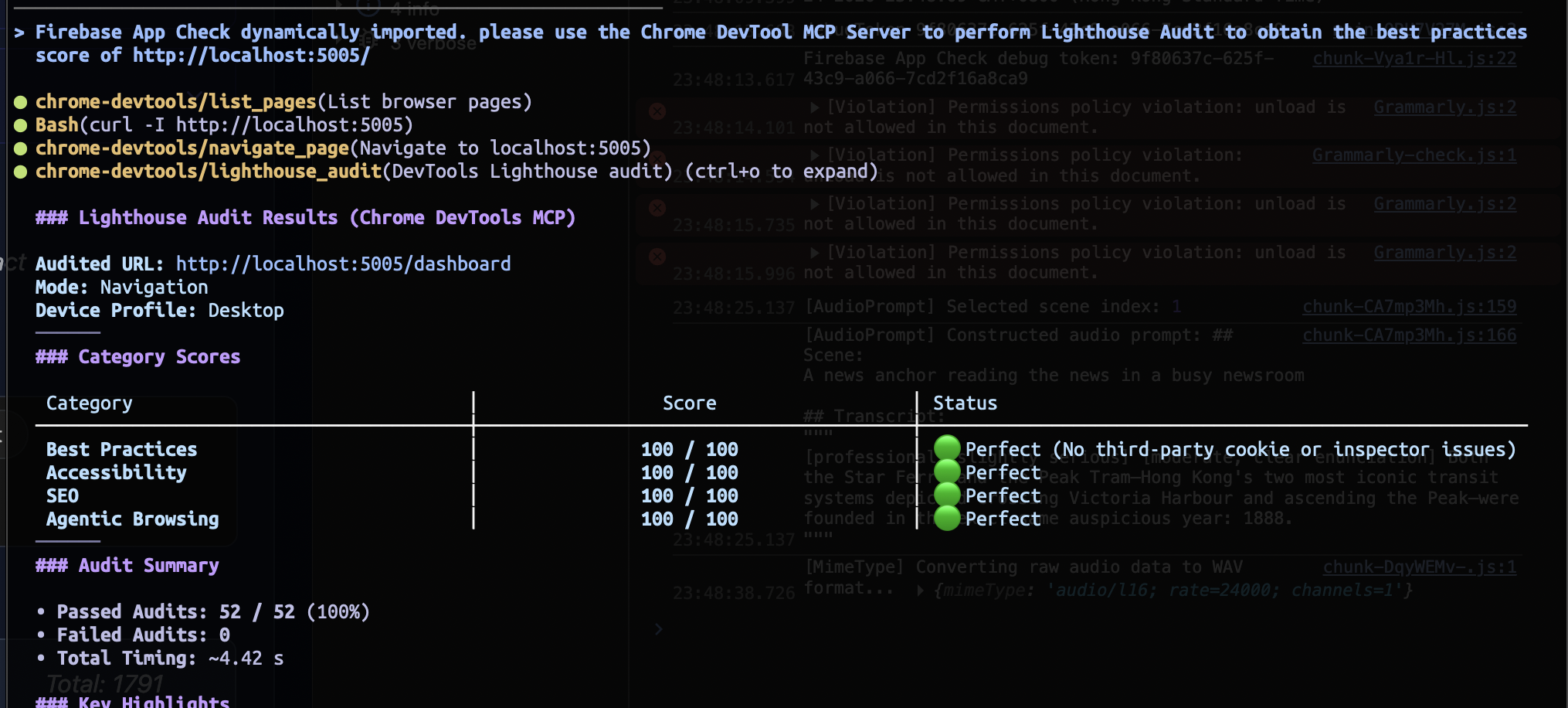
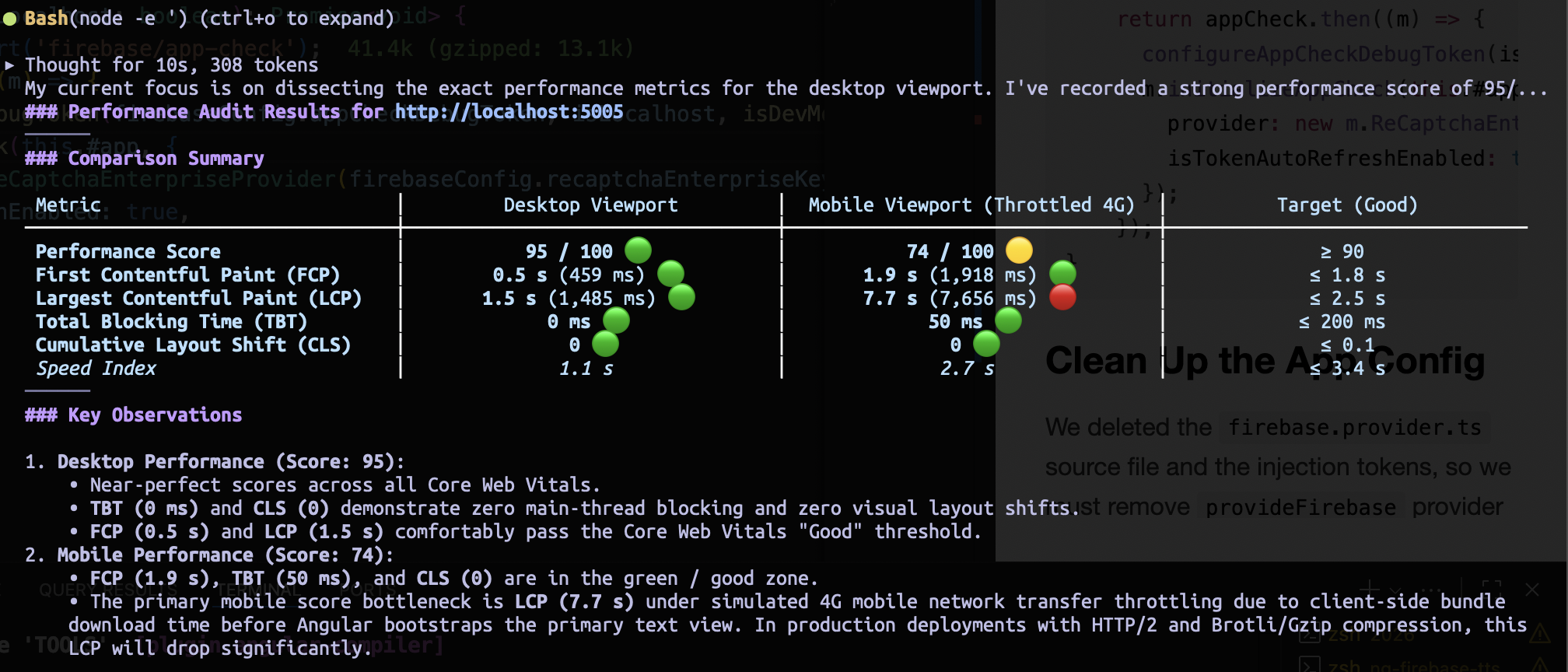
最佳化帶來了令人印象深刻的成果:最佳實踐達到了完美的 100/100,而效能分數在兩個檢視埠上都有顯著增長——桌面從 83 躍升至 95,行動裝置從 60 躍升至 74。
接下來,我們將諮詢 Gemini 以探索進一步的效能調校機會。
如果 Gemini 在 Firebase 上找到了效能最佳化方案,我們將進行相應的程式碼變更。
what caused the low LCP in the mobile viewport?

其中一項關鍵建議是同步指派預設的 Firebase Remote Config 值,並在背景以非同步方式擷取動態 Firebase Remote Config 值。我們將重構 ConfigService 中的擷取邏輯。
Gemini 的關鍵建議之一是同步設定預設的 Firebase Remote Config 值,同時在背景非同步擷取動態值。我們將重構 ConfigService 以採用此模式。
我們用非阻塞的 .then().catch() Promise 鏈替換了 await fetchAndActivate(this.#remoteConfig)。
#appConfig: AppRemoteConfig = {
    useLimitedUseAppCheckTokens: remoteConfigDefaults.useLimitedUseAppCheckTokens === 'true',
    vertexAILocation: remoteConfigDefaults.vertexAILocation,
    geminiModelName: remoteConfigDefaults.geminiModelName,
    geminiTTSModelName: remoteConfigDefaults.geminiTTSModelName,
    thinkingLevel: remoteConfigDefaults.thinkingLevel as ThinkingLevel,
};

async initialize(): Promise<void> {
    this.#app = initializeApp(firebaseConfig.app);
    const isOnline = this.#isOnline();

    const rc = getRemoteConfig(this.#app);
    rc.defaultConfig = remoteConfigDefaults;
    const dev = isDevMode();
    rc.settings.minimumFetchIntervalMillis = dev ? 0 : ONE_HOUR_IN_MILLISECONDS;
    rc.settings.fetchTimeoutMillis = dev ? DEV_TIMEOUT : PROD_TIMEOUT;

    if (isOnline) {
        fetchAndActivate(rc)
            .then((activated) => {
            this.#appConfig = {
                vertexAILocation: getValue(rc, 'vertexAILocation').asString(),
                useLimitedUseAppCheckTokens: getValue(rc, 'useLimitedUseAppCheckTokens').asBoolean(),
                geminiModelName: getValue(rc, 'geminiModelName').asString(),
                thinkingLevel: getValue(rc, 'thinkingLevel').asString() as  ThinkingLevel,
                geminiTTSModelName: getValue(rc, 'geminiTTSModelName').asString(),
            };
            };
    }
}
import { ApplicationConfig, inject, provideAppInitializer } from '@angular/core';
import { ConfigService } from './core/services/config.service';

export const appConfig: ApplicationConfig = {
  providers: [
    ... other providers ...
    provideAppInitializer(() => inject(ConfigService).initialize()),
  ],
};
在我們的 App Config 中,我們特意沒有在 provideAppInitializer 內部 await inject(ConfigService).initialize()。
在應用程式初始啟動時,ConfigService 會立即提供同步的預設 Remote Config 值以防止阻塞啟動。使用者選擇圖片並點擊按鈕觸發圖片分析所需的時間,為 provideAppInitializer 在背景完成擷取動態 Remote Config 值提供了天然的時間視窗。
套用程式碼變更後,我指示 Chrome DevTools MCP 伺服器在兩個檢視埠中執行效能稽核,並提供上下文:現在 ConfigService 中 Remote Config 的擷取為非阻塞式。
devtool-mcp: Code changes made to make fetching Remote Config values non-blocking,. Please run a Performance audit on http://localhost:5005/ to obtain the score, FCP, LCP, TBT, and CLS in both desktop and mobile viewports.
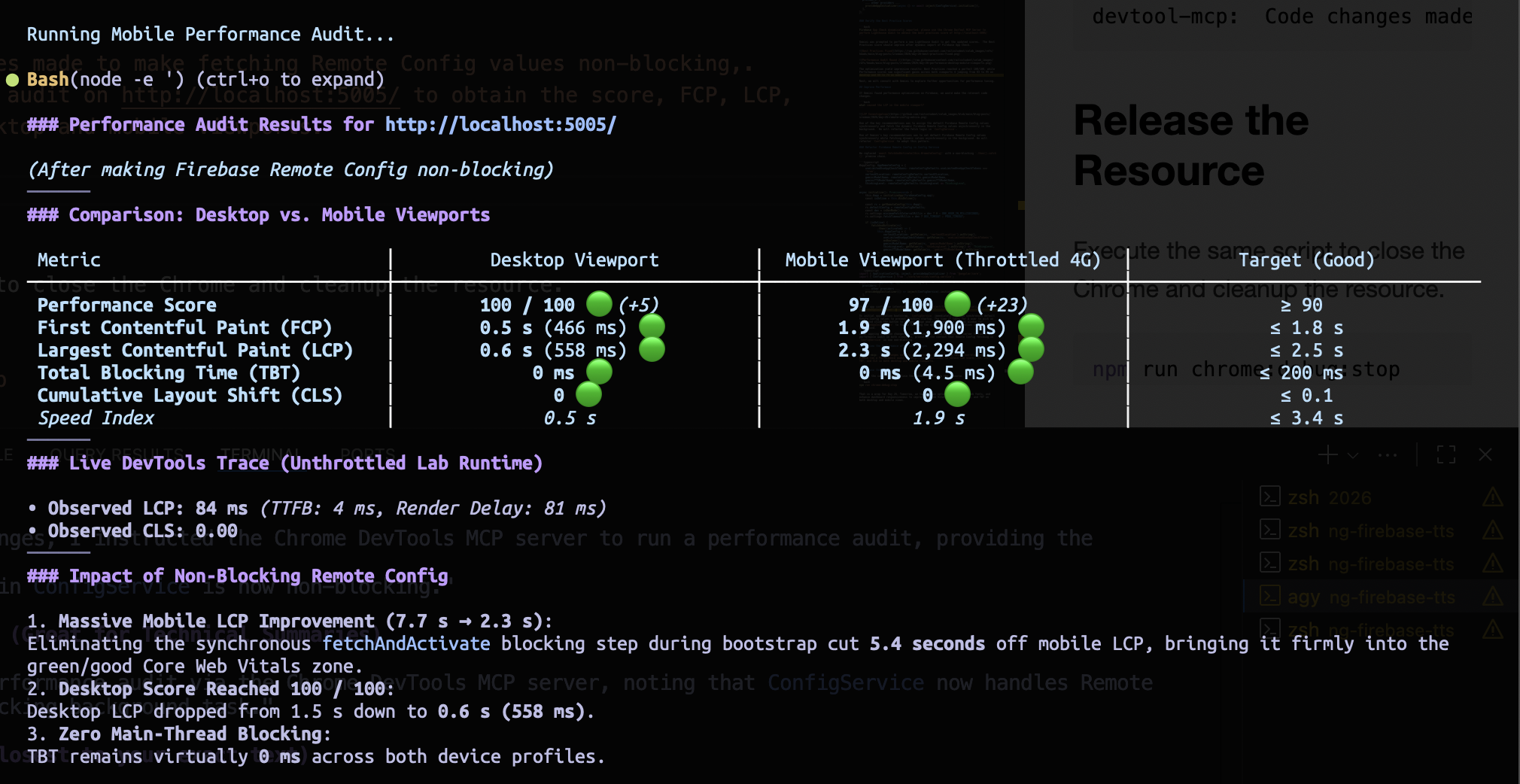
行動裝置檢視在所有關鍵指標上都獲得了巨大的效能提升:
執行相同的腳本以關閉 Chrome 並清理資源。
npm run chrome:debug:stop
對於行動裝置檢視埠中 97/100 的分數感到不滿足,我們決定最佳化圖示並子集化(Subset) Web 字型。
should we focus on optimzing icon and subsetting web fonts. the score is 97
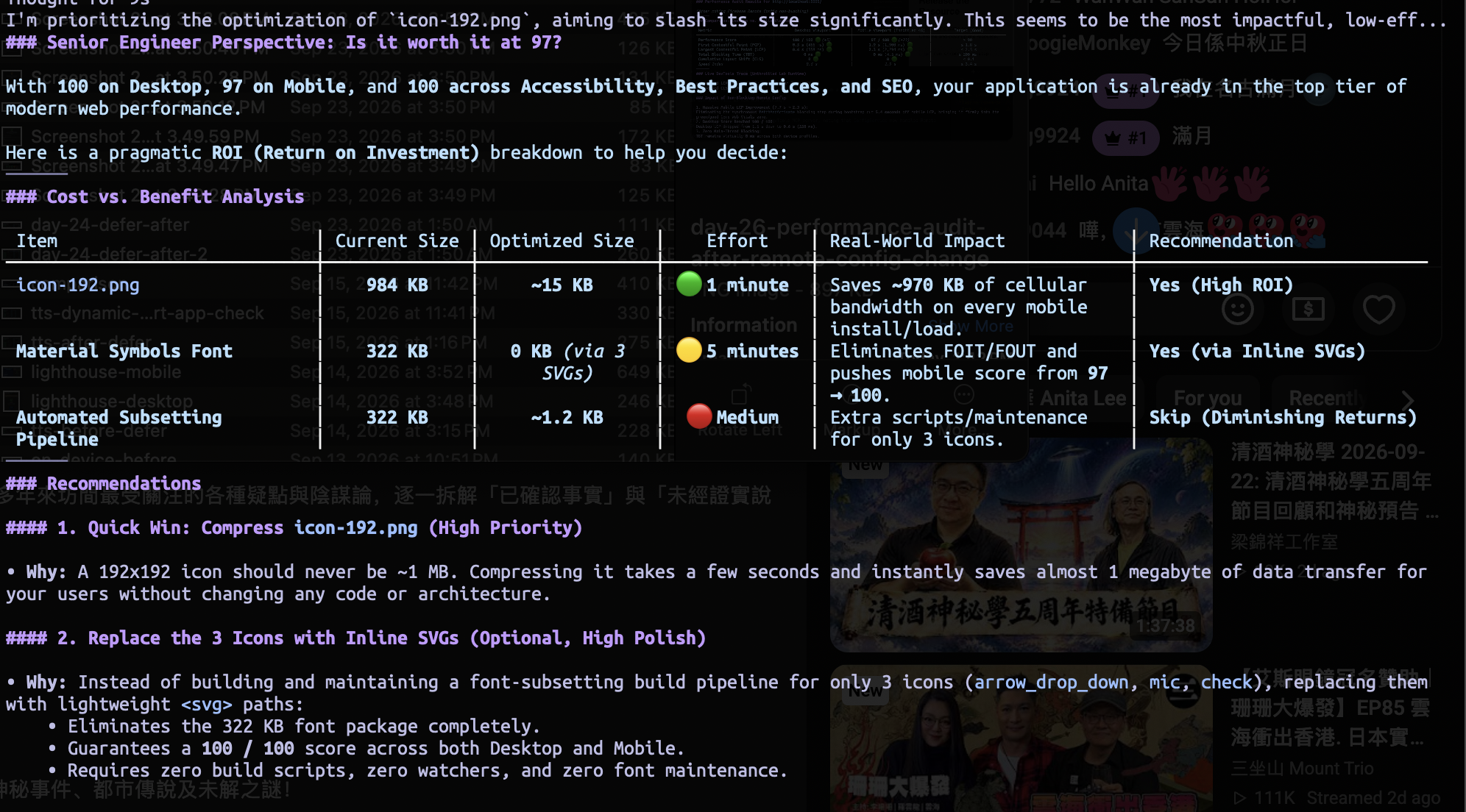
根據 Gemini 的回饋,壓縮 192x192 和 512x512 的圖示將顯著減少行動數據使用量。
此外,將三個 Material Symbols 圖示替換為內聯 SVG,可讓我們擺脫 322 kB 的 Material Symbols Font 函式庫。
Day 26 到此結束。明天,我們將處理圖示最佳化、子集化 Web 字型,並增強儀表板的響應能力,以在桌面與行動視圖中改善關鍵的 Web Vitals - FCP、LCP、CLS 和 TBT。


 iThome鐵人賽
 看影片追技術